User Profile

Masih17
Copper Contributor
Joined Feb 12, 2022


User Widgets
Recent Discussions
Using Azure VM Extensions on the Azure Lab Services Template
Hello, If I create a Windows template that has VM extensions such as backup or domain join, will the functionality of the extensions work in my Azure Lab Services environment? If that is not possible, what is the reason for that?Solved949Views0likes1CommentAdding external storage to the Azure Lab Services Template
Hello, I have a domain joined Lab environment and I'm looking for the best way to provide external storage to our lab machines. In our lab, we use Windows machines but in the future, we'll use Linux as well. I'd like the drive to be mounted to the lab's VM, at startup so that the students don't have to do any further configurations. In other words, is it possible to mount the drive to the template? If yes, how? Microsoft suggests many ways to use an external drive https://docs.microsoft.com/en-us/azure/lab-services/how-to-attach-external-storage. If I want only the owner of the file to have read/write access to the files, which of the methods mentioned in the suggestions should I pick? Thank you!Solved805Views0likes1CommentRegular Azure commands
Hello, I'm familiar with Az.LabServices Powershell Module. But I want to know why regular Azure commands (Get-AzVm, Get-AzVirtualNetwork, etc) don't return any information about the Lab Services resources? Is there any way to get information about the virtual machines, network, etc, only with regular Azure commands? Thank you!Solved682Views0likes1CommentLab Creator and Lab Contributors can't see the Labs
Hi, I have assigned the Roles above to our new team member but for some reason, he can not see the labs created by other users. I have tried various scopes such as subscription, Lab account, and the resource but had no result. From what I understand of the Role description, he should be able to see the Virtual machines, Start, Stop, Reset them, and more. Or is it so, that the Contributor and the Creator can only see the labs that they have created and not those by others? Regards, MasihSolved839Views0likes1CommentRecovering student's Lab machine
Hi All, Our organization is using Azure Lab Services and, we are seeking advice on a problem we are facing. The problem happens when students mistakenly modify the connection of their Lab machine. Understandably, changing the IP setting makes the RDP string obsolete. After that, the VM takes like 45 minutes to start (sometimes it fails and stops immediately) and, if it starts, the remote desktop is not possible. Of course, we can reset the bad VM but, that is not convenient because they will lose all their work. My questions are: Is there absolutely no other way to access a machine that its initial IP address has changed? Is there any way to backup students' lab computers? Regards, MasihSolved1.9KViews1like5CommentsRe: Nest Virtualization - HyperV Networking issue
Hi, You are allowed to use only one interface on the LAN. So, if you create an External switch (default setting) on the template, I assume the lab service, will terminate the Ethernet. You should use the Internal switch. I'm not an expert on this but we are using Hyper-V in our labs with the Internal V-Switch and things work fine. But we also don't configure the networking in advance. We only provide the Hyper-V manager on the template and let students install the Hyper-V and configure the V-Switch. Regards, Masih933Views0likes0CommentsRe: Recovering student's Lab machine
planetmaher thank you for your reply. The reset works fine. But my entire effort is to avoid using it because all the work on that machine will be lost. (details mentioned above) The two ways that you recommend for checking the private IP works only if the private IP hasn't been changed. If the private IP changes, because of the reason I explained earlier, the labs front end and PowerShell both still show the initial IP, not the new one.1.6KViews0likes1CommentRe: Recovering student's Lab machine
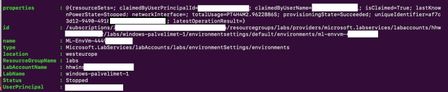
Hi Elizabeth, Our lab exercises involve IP, DNS, and DHCP configuration. We use nested virtualization with Hyper-V. However, sometimes, students don't release which machine they are working on and run the configurations on their Azure lab machine and that breaks things. Your solution suggested we "reset the private IP back to what ALS expects". That partially works. Sometimes students don't know the new Private IP that they have assigned, which makes the Remote Desktop connection using the Private IP impossible. I'm using https://docs.microsoft.com/en-us/azure/lab-services/reference-powershell-module module to see the lab information. I'm wondering if any of the parameters below could be used to access the virtual machine? Another question is, why Lab Services' virtual machines don't show with regular Get-AzVm command? There is also no network information, why is that? I assume these are by design and for security reasons, but could someone please confirm if there is no way around this? Regards, Masih1.7KViews0likes3Comments
Recent Blog Articles
No content to show