User Profile

Vegeta4205
Copper Contributor
Joined Feb 03, 2022


User Widgets
Recent Discussions
I want to print the logs myself from the MSIX Installer installation screen.
Double-click and run the MSIX appinstaller to update or install new packages. I want to write my own strings that appear in the description. I want to leave this as a developer note to show users of my application. Is this possible?432Views0likes0CommentsIs MSIX useful when I'm not using the Microsoft Store?
I have experience deploying a .NET Framework Windows Forms App using ClickOnce. In 2021, I used MSIX to package a .NET 5 WPF Application. However, it didn't support automatic updates like ClickOnce, so I had to inconveniently use Microsoft App Center for updates. Since it was an app for internal testing, I packaged MSIX through a test certificate. Therefore, when distributing, I also had to distribute the test certificate used in packaging, and my colleagues had to manually install the certificate. I think this part is inevitable. Then, does MSIX currently support easy packaging and updates like ClickOnce? This time as well, I'm planning to distribute a test app used within the company, so I will not be using the Microsoft Store. In this case, how can I easily distribute and update it?624Views0likes0Comments.NET MSIX config file location
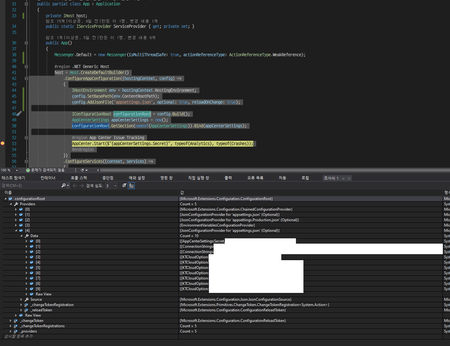
I'm using MSIX packaging in .NET 5 WPF. I'm also using a generic host, so I build the config file via IConfigurationBuilder. Where are my config files copied to on MSIX? The build action of my appsettings.json file is 'content' and always copy. ---- When debugging in .NET project debug mode, the path to HostBuilderContext.HostingEnvironment.ContentRootPath will be in the debug folder in the normal project subpath. But when I debug in MSIX project debug mode, the path to HostBuilderContext.HostingEnvironment.ContentRootPath is C:\Windows\SysWoW64 . Why does MSIX have different paths?1.5KViews0likes1Comment
Recent Blog Articles
No content to show