User Profile

Muiren
Copper Contributor
Joined Mar 16, 2018


User Widgets
Recent Discussions
Re: Driver Conflict Disabling Core Isolation Switch
Line 6 is one of the largest brand families of Yamaha Music with the Helix and HX Stomp multi-effects and IR modelling platform owned by 10s of thousands of professional artists worldwide. If you were trying to be helpful it would have taken only seconds to find that out instead of a comment stating the obvious. If it was a common experience then there would already be large numbers of other musicians on the Line 7 forum reporting the same issue. The Windows 11 Cumulative Update only dropped a few days ago and my post is the first one here and at the Line 6 support forum.6KViews0likes1CommentDriver Conflict Disabling Core Isolation Switch
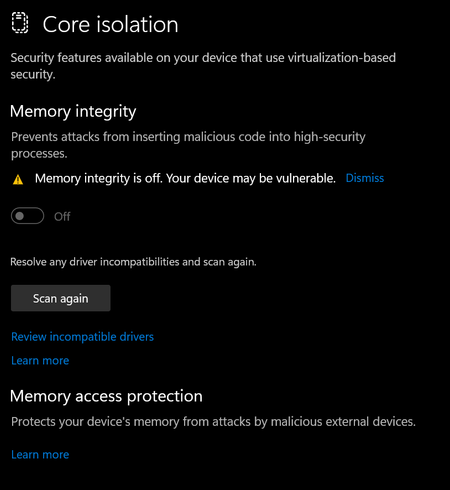
Line 6 Helix/HX Stomp Driver Conflict Following 2022-08 Cumulative Update for Windows 11 The latest Windows 11 Pro 64-bit OS update caused a hole in security due to Line 6 driver incompatibility on my hardware DAW, a DELL XPS 8940, 11th Gen Intel, i9-11900K processor (8-Core, 16M Cache, 3.5GHz to 5.3GHz), with 64GB RAM, running Windows 11 Pro 64-bit. The OS Memory Integrity switch cannot be toggled on due to conflicts with these Line 6 drivers. (Screen caps attached) I6Helix_AvsFilter.sys I6HXStomp_AvsFilter.sys (for some reason has 2 instances) I6PodHd2_AvsFilter.sys I also have a Surface Book 2 with the same problem. I previously used it as a DAW and uninstalled all Line 6 software but it did not successful remove all Line 6 drivers, specifically the I6HXStomp_AvsFilter.sys file. I have parsed through Microsoft documents for deleting unruly drivers but the system still thinks the driver is installed.6.3KViews2likes4CommentsHow to resolve USB Conflict Between SD Card and Line 6 HX Stomp?
I have a Surface Book 2 that doesn't want to play nice with a Line 6 HX Stomp. The HXS has the latest firmware updates, and I have the latest Line 6 drivers for the pedal loaded. From Windows Task Manager, I can see the HX Edit application attempt to load and connect to the pedal, then the process just dies. The only way to connect via USB is to eject my SDXC drive. I was hoping to find a workaround, hear something more productive than "Get a Mac!" https://line6.com/hx-stomp/ Surface Model: 1832 i5 Processor: Intel i5-8350U @ 1.70GHz 1.90 GHz Mem Installed: RAM 8.00 GB OS: Windows 10 Pro 64-bit Touch Driver: 242.0.1.5 Wi-Fi Driver: 15.68.17021.121 App Version: 61.60.139.03.1KViews0likes3CommentsRe: Failure to Start, Error Msg [wdfilter.sys]
The rename of the file sounds like good advice. I remember now doing something similar in the past. Thanks. My problem now is being locked out of my system. Someone suggested resetting my password because my laptop isn't authenticating my access. Password worked for accessing Outlook and my MS Account, but I assumed the knew something I didn't. Turns out the laptop has no way to see my new password because for some reason it is locked in [airplane mode] when I bootup in [Windows Safe Mode with Networking]. So I can't get into my system at all now because it can't authenticate my password and I don't have media necessary to reload from scratch. It came preloaded with Win Pro 7, I updated to 8.1, then took advantage of the free upgrade to Win 10 Pro 64-bit. I never have had media and can't find my USB or anywhere near I can walk to to get another one. I have to struggle through a meeting now without material because this happened before my regular backup. I will check back for suggestions on a couple of hours. Drithliú in San Francisco3.2KViews0likes0CommentsRe: Failure to Start, Error Msg [wdfilter.sys]
Forgot to include this . . . Edition: Windows 10 Professional Version: 1709 OS Build: 10.0.17074.1002 Serial#: 6X9W832 Processor: Intel(R) Core(TM) i3-5005U CPU @ 2.00GHz Graphics Card: Intel(R) HD Graphics 5500 System OS Type: 64-Bit X64 RAM: 8 GB3.4KViews0likes5CommentsFailure to Start, Error Msg [wdfilter.sys]
Windows Insider First opportunity to update on the road. Attempted to roll back to previous build but don't remember my password, have been using PIN#. Though password of my MS account is same as network device (laptop), an assumption that has proved true before but may have just been my using the same password for both. I have an endless green screen reboot, can't login, and can't get back to previous version. I would prefer not resetting my machine if possible.3.5KViews0likes6Comments
Recent Blog Articles
No content to show