User Profile

BDuffey
Copper Contributor
Joined Jan 13, 2022


User Widgets
Recent Discussions
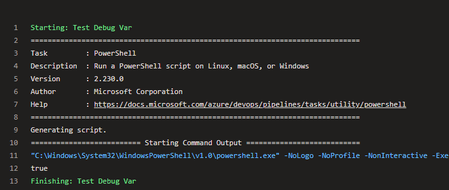
ADO YAML question re: 'enabled' and variable
- powershell: | write-host $(CxDebug) displayName: Test Debug Var enabled: true The above code works. I'd like to leverage a pipeline variable on the last line. When I add a variable and set it to 'true' - I get a YAML error prior to running the pipeline. - powershell: | write-host $(CxDebug) displayName: Test Debug Var enabled: $(CxDebug)362Views0likes1CommentRunning python/flask app on IIS using ASP.Net Core Module handler
Looking for insight into running/flask app using a modern/maintained method. wfastcgi is essentially deprecated (version 3.0.0 was released 7 years ago). HttpPlatform handler was replaced by the http://asp.net/ core module even before that (2016). I’ve made some progress using the http://asp.net/ Core Module handler - but when I try to launch the app I get an error: Application ‘/LM/W3SVC/1/ROOT’ with physical root 'C:\inetpub\wwwroot' failed to start process with commandline ‘“C:\Python312\python.exe” C:\inetpub\wwwroot\app.py’ with multiple retries. Failed to bind to port ‘11905’. First 30KB characters of captured stdout and stderr logs from multiple retries: Nothing in the python log. Any feedback appreciated.371Views0likes0CommentsAzure Devops YAML pipeline - multiple projects in single solution
Build server is trying to handle a solution that has 8 different projects. The build server has a YAML step that looks like this: # MSBuild step using Visual Studio - task: VSBuild@1 displayName: Build Solution $(Solution) inputs: clean: true solution: $(Solution) msbuildArgs: '/p:DeployOnBuild=True /p:DeployDefaultTarget=WebPublish /p:WebPublishMethod=FileSystem /p:DeleteExistingFiles=True /p:SkipInvalidConfigurations=true /p:publishUrl=$(Build.BinariesDirectory) /p:SelfContained=True' platform: $(BuildPlatform) configuration: $(BuildConfiguration) I need the output on the build agent to be \b \project1 \project2 \project3 \etc. What I get is a single folder with a single project. My guess is the build is clobbering all the previous ones. mailto:DotNetCoreCLI@2 has a flag 'modifyOutputPath' which will Add project's folder name to publish path. Default: true. Trying to find something similiar for @VSBuild@1.3.8KViews0likes1CommentUnable to rename a git repo due to TFVC workspaces
I'm trying to rename an Azure DevOps Server 2022 project. Apparently there was a legacy project that also had this name. When I try to rename the project, I get: The Team Project name XXX was previously used and there are still TFVC workspaces referring to this name. Before you can use this name, the owner of each workspace should execute the Get command to update their workspaces. See renaming a team project for more details (https://go.microsoft.com/fwlink/p?LinkId=528893). Found 1 workspace(s) using this name: SQL Source Control (5smrtsma.yja);b54e38c7-5ada-4853-9f62-95ef90e26485 When I try to delete this workspace: .\tf vc workspace /delete 'SQL Source Control (5smrtsma.yja);b54e38c7-5ada-4853-9f62-95ef90e26485' /collection:https://azuredevops.foo.com I get this error: TF14061: The workspace SQL Source Control (5smrtsma.yja);USERXYZ does not exist. I'm copying/pasting the project name/owner from the ADO error. I'm not sure how else to delete this workspace?992Views0likes0Comments
Recent Blog Articles
No content to show