User Profile

patfla123
Copper Contributor
Joined Oct 15, 2021


User Widgets
Recent Discussions
Re: I've been having daily system freezes ever since Win11 first dropped.
Thanks - I'll give that a try (clean install with a Win 11 ISO). Although not today since I'm working and the machine in question is not my work machine. That said, the machine in question has frozen already twice this morning and I'm been putting up with this for something like a yr-and-a-hlf - which are incentives to, basically, just nuke everything. I have nearly all my personal files on a 😧 drive. I assume that when this install says it will delete everything that's everything on the boot drive, C:, and not D:?2.2KViews1like1CommentRe: I've been having daily system freezes ever since Win11 first dropped.
Actually, the freezes first appeared in Aug. of 2021. I only switched to Beta 2-3 months ago. I switched to Beta after putting up with the freezes for a very long time and as part of addressing the problem - after, for example, it became clear that Nvidia driver updates weren't going to fix the problem. I want to do whatever's necessary to fix the problem and if that involves a reinstall of Windows, that's fine.2.2KViews1like4CommentsRe: I've been having daily system freezes ever since Win11 first dropped.
Hi Andrezej1 - thanks for your response. Still working without an error code> largely yes. However, it freezes sometimes 2 or 3 times/day. Mostly I immediately power cycle since that's the fastest way to recover. Occasionally I leave it in that frozen state which after say 5-8 minutes will produce the new 'green screen' that's the equivalent of the old blue screen. Bugcheck. I've accumulated only 5 or so minidumps (because I mostly power cycle). All bugcheck error code = 0x133 meaning Watchdog. Meaning, basically, the system was hung and it bugchecked itself. So what's the underlying problem? Don't know. Have been regularly updating my Nvidia video driver (via GeForce Experience) but that hasn't helped at all. I was on the Dev channel but 2-3 months ago switched to Beta hoping that would eventually lead me entirely out of Insider. I had, maybe, reasons for being in Insider a long time ago (it's complicated) but at this point mostly I want to get out. The experience has been a bad one. At some point, I'll just reinstall Windows altogether. It seems to me possible that even that won't solve the problem and I'll have to junk this machine and buy another and I'll feel (whether rightly or wrongly) that Insider was an important part of the problem and will, hopefully, never try Insider again. We're doing MS' testing for them and for free - and with bad interruptions to my own work. Is this the version number (compilation) you're looking for? C:\Windows\System32>ver Microsoft Windows [Version 10.0.22623.1095] C:\Windows\System32>2.3KViews1like9CommentsI've been having daily system freezes ever since Win11 first dropped.
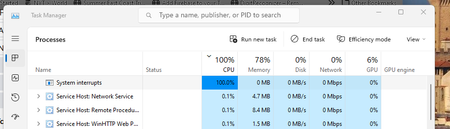
Which I calculate to have been 2021-08. Recopying how I'd written this up in a non-Insider forum earlier today - before I learned of the existence of this forum. ***** Ever since, roughly, August of last 2021 the new computer we bought in Jan 2021 has been having daily hard freezes. I put the machine into Windows Insider a couple of months before and I believe Win 11 began to drop at about the same time. It looked at first like a video driver (Nvidia for this system) problem at first however I've continued to update the Nvidia driver which hasn't fixed the problem and I'm thinking now that it's something in Windows. The other day I snapshotted the following when it started to get a strange hang which I think might be related. 100% on system interrupts - which lasted several minutes? ***** It's quickest to power cycle my machine when it freezes, however, I do have minidumps turned on and uploaded the most recent to my OneDrive: https://1drv.ms/u/s!AgV4YJlI4GeGgZlqnGc-SWoMB3-_yQ?e=ncQpvy2.4KViews1like11Comments22478.10[00|12]
Hmm. Insider Preview took me [first] to 22478.1000 today. Upon rebooting I could login but it crashed shortly thereafter in what appeared to be a greenscreen doom-loop. "Windows Insider Preview edition encountered an error ..." Previously to get out of these I've had to do a Windows reset from the Recovery Console. This time, after 3 or 4 attempts Windows stabilized (whatever that means) and I was able to complete the login and start working. No audio. Dug around. I have, admittedly old, Logitech Z340 speakers. (may have to replace them - but I'm not eager to do so). They don't even appear in Device Manage so maybe they're no longer supported. Then 1012 appeared. Applied that. I'm not sure I've ever seen a second update appear this quickly on the heels of a first and it doesn't inspire confidence as regards stability. Still no audio though. Depending on just how much of a problem that is, I'd prefer to wait a couple of days before going out and getting new speakers (But will they be compatible with 11? Who knows.) After lots of problems with Insider, I'd gladly exit but, even with some research, it's not entirely clear to me how I would time my exit from Insider and be sure that I have a genuinely stable version of Windows. And if that's not clear, then MSFT continues to have me by the short hairs as an increasingly unwilling Windows tester.580Views0likes0Comments
Recent Blog Articles
No content to show