User Profile

ediwang
Brass Contributor
Joined Sep 09, 2021


User Widgets
Recent Discussions
Re: Please store user passwords in a secured location
hez2010 I totally agree with you. I've just tired a utility here https://www.nirsoft.net/utils/web_browser_password.html It just show all my clear passwords on screen, without admin privileges, without UAC, without windows ask me for authentication with PIN, face, fingerprint... without anything....2.6KViews0likes0CommentsRe: Azure Static Web App-CLI script to create plus add location: eastus2
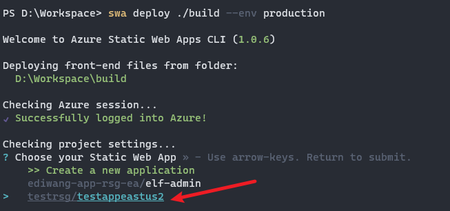
saratogacoach There are no options for specifying deployment location or region yet. Because https://learn.microsoft.com/en-us/azure/static-web-apps/faq#how-do-i-ensure-my-app-is-deployed-to-a-specific-azure-region- it will automatically distribute your app files to closest datacenter to your customers, only resource group is regional, in your case, I will show you how to deploy to a regional resource group. 1. Go to Azure portal first and create a new static web app in your desired location, in your case East US 2. Make sure you select "Other" in Deployment details - source. Wait for 5 minutes (important, otherwise you will not see this app in step 2). 2. Use SWA to deploy your code, it will list existing static web apps which were created from Azure portal in the previous step. Select the app you created in step 1. 3. This time your code will be deployed to East US 2 resource group.1.6KViews1like1Comment
Recent Blog Articles
No content to show