User Profile

EvilMerlin
Copper Contributor
Joined Jul 24, 2021


User Widgets
Recent Discussions
PUBG on build 22518 game crash to desktop.
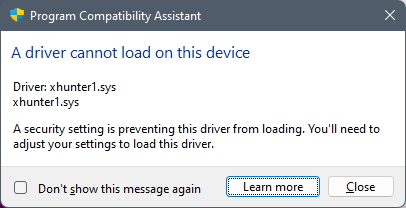
I did report it via Feedback. But has anyone else had an issue with build 22518 and PUBG? I've tried reinstalling etc. Double click to start the game and boom, crash to desktop. I do get two popups (I've seen this under previous builds too), and reading up, really not going to disable Core Isolation to let it run (it needs to stay off) as this is just an anti-cheat tool with a rather poor reputation. Based on previous experience you can still play the game with this error in the past.2.5KViews0likes2CommentsRe: Can't Update Windows 11 to any Dev channel releases
Nope. No help really from Microsoft yet on it. I've tried installing from the older ISO available on Windows Updates, but the system blue screens. I've tried installing from an ISO locally and mounting it as a drive. Fails with blue screen. I've literally removed every device from my computer with the exception of the drives, ram, GPU and CPU. Fails. I've never had this problem before. My last computer was 30+ builds of Windows 10, with 9 builds of Windows 11 on top of it. No issues. Now, nothing but issues.4.1KViews0likes1CommentCan't Update Windows 11 to any Dev channel releases
I recently rebuilt my computer with a new mobo, CPU, RAM, M.2 drives. More or less a whole new PC with the exception of the GPU and sound card. I installed Windows 11 from the base ISO, activated it using my Windows 11 license bound to my Live account. Install went fine, all drivers, firmware and such fully up to date and running fine. I put this system back into the Windows Insider Dev Channel like I always have. No upgrades to later builds work. I have tried downloading via Windows Update (to 22509), nope. System reboots, blue screens and reverts. "Installation Failure: Windows failed to install the following update with error 0xC1900101: Windows 11 Insider Preview 10.0.22509.1011 (rs_prerelease)." I have stripped the system down totally. The only devices installed is RAM, the four M.2 drives, my 3090 GPU, and a keyboard and mouse. Nothing upgrades. I've gone as far as downloading the last ISO from the Dev channel (22499), both booting from USB and attempting to mound the ISO and installing from that fail with the same error listed above. I thought it may have been an issue with using a "virtual key" bound to my Live.com account, so I re-registered with a Windows 10 key, but I still get the same error. There is very little in Panther other than this: 2021-12-07 22:52:04, Error SP Failure while getting the known folder path for CSIDL_PRINTHOOD (S-1-5-21-274051381-1130579977-2232271799-1001): Win32Exception: The system cannot find the file specified. [0x00000002] class UnBCL::String *__cdecl Mig::CFacadeUser::GetKnownFolderLocation(class UnBCL::String *,int *,class UnBCL::String **) 2021-12-07 22:52:04, Error ITaskFolder::DeleteTask failed. hr = 0x80070002 2021-12-07 22:53:14, Error SP Failure while getting the known folder path for CSIDL_PRINTHOOD (S-1-5-21-274051381-1130579977-2232271799-1001): Win32Exception: The system cannot find the file specified. [0x00000002] class UnBCL::String *__cdecl Mig::CFacadeUser::GetKnownFolderLocation(class UnBCL::String *,int *,class UnBCL::String **) 2021-12-07 22:53:14, Error SP pSPRemoveUpgradeRegTree: failed to delete reg tree HKLM\SYSTEM\Setup\Upgrade[gle=0x00000005] 2021-12-07 22:53:22, Error [0x080831] MIG CSIAgent: Invalid xml format: FormatException: "script" attribute is mandatory. class Mig::CMXEMerge *__cdecl Mig::CMXEMigrationXml::LoadMerge(class UnBCL::XmlNode *,int,class Mig::CMXEMigrationXml *,class Mig::CMXEXmlComponent *) 2021-12-07 22:53:40, Error [0x080831] MIG CSIAgent: Invalid xml format: FormatException: Component with display name: Plugin/{C939EC0F-2F56-4CE8-AF56-2336596A5FA7} already loaded __cdecl Mig::CMXEMigrationXml::CMXEMigrationXml(class Mig::CPlatform *,class UnBCL::String *,class UnBCL::XmlDocument *,class UnBCL::String *,class UnBCL::String *) 2021-12-07 22:54:45, Error SP Failure while getting the known folder path for CSIDL_PRINTHOOD (S-1-5-21-274051381-1130579977-2232271799-1001): Win32Exception: The system cannot find the file specified. [0x00000002] class UnBCL::String *__cdecl Mig::CFacadeUser::GetKnownFolderLocation(class UnBCL::String *,int *,class UnBCL::String **)[gle=0x000036b7] 2021-12-07 22:55:15, Error SP CSetupPlatform::ResurrectAutomation: Failed to resurrect automation: 0x80070002[gle=0x00000002] 2021-12-07 22:57:37, Error SP Failure while getting the known folder path for CSIDL_PRINTHOOD (S-1-5-21-274051381-1130579977-2232271799-1001): Win32Exception: The system cannot find the file specified. [0x00000002] class UnBCL::String *__cdecl Mig::CFacadeUser::GetKnownFolderLocation(class UnBCL::String *,int *,class UnBCL::String **)[gle=0x000036b7]4.4KViews0likes6Comments
Recent Blog Articles
No content to show