automation
460 TopicsThe Unified SecOps Transition — Why It Is a Security Architecture Decision, Not Just a Portal Change
Microsoft will retire the standalone Azure Sentinel portal on March 31, 2027. Most of the conversation around this transition focuses on cost optimization and portal consolidation. That framing undersells what is actually happening. The unified Defender portal is not a new interface for the same capabilities. It is the platform foundation for a fundamentally different SOC operating model — one built on a 2-tier data architecture, graph-based investigation, and AI agents that can hunt, enrich, and respond at machine speed. Partners who understand this will help customers build security programs that match how attackers actually operate. Partners who treat it as a portal migration will be offering the same services they offered five years ago. This document covers four things: What the unified platform delivers — the security capabilities that do not exist in standalone Sentinel and why they matter against today’s threats. What the transition really involves - is not data migration, but it is a data architecture project that changes how telemetry flows, where it lives, and who queries it. Where the partner opportunity lives — a structured progression from professional services (transactional, transition execution, and advisory) to ongoing managed security services. Why does the unified platform win competitively — factual capability advantages that give partners a defensible position against third-party SIEM alternatives. The Bigger Picture: Preparing for the Agentic SOC Before getting into transition mechanics, partners need to understand where the industry is headed — because the platform decisions made during this transition will determine whether a customer’s SOC is ready for what comes next. The security industry is moving from human-driven, alert-centric workflows to an operating model built on three pillars: Intellectual Property — the detection logic, hunting hypotheses, response playbooks, and domain expertise that differentiate one security team from another. Human Orchestration — the judgment, context, and decision-making that humans bring to complex incidents. Humans set strategy, validate findings, and make containment decisions. They do not manually triage every alert. AI Agents - built agents that execute repeatable work: enriching incidents, hunting across months of telemetry, validating security posture, drafting response actions, and flagging anomalies for human review. The SOC of 2027 will not be scaled by hiring more analysts. It will be scaled by deploying agents that encode institutional knowledge into automated workflows — orchestrated by humans who focus on the decisions that require judgment. This transformation requires a platform that provides three things: Deep telemetry — agents need months of queryable data to analyze behavioral patterns, build baselines, and detect slow-moving threats. The Sentinel Data Lake provides this at a cost point that makes long-retention feasible. Relationship context — agents need to understand how entities connect. Which accounts share credentials? What is the blast radius of a compromised service principle? What is the attack path from a phished user to domain admin? Sentinel Graph provides this. Extensibility — partners and customers need to build and deploy their own agents without waiting for Microsoft to ship them. The MCP framework and Copilot agent architecture provide this. None of these exist in standalone Azure Sentinel. All three ship with the unified platform. The urgency goes beyond the March 2027 deadline. Organizations are deploying AI agents, copilots, and autonomous workflows across their businesses — and every one of those creates a new attack surface. Prompt injection, data poisoning, agent hijacking, cross-plugin exploitation — these are not theoretical risks. They are in the wild today. Defending against AI-powered attacks requires a security platform that is itself AI Agent-ready. The unified Defender portal is that platform. What the Unified Platform Actually Delivers The original framing — “single pane of glass for SIEM and XDR” — is accurate but insufficient. Here is what the unified platform delivers that standalone Sentinel does not. Cross-Domain Incident Correlation The Defender correlation engine does not just group alerts by time proximity. It builds multi-stage incident graphs that link identity compromise to lateral movement to data exfiltration across SIEM and XDR telemetry — automatically. Consider a token theft chain: an infostealer harvests browser session cookies (endpoint telemetry), the attacker replays the token from a foreign IP (Entra ID sign-in logs), creates a mailbox forwarding rule (Exchange audit logs), and begins exfiltrating data (DLP alerts). In standalone Sentinel, these are four separate alerts in four different tables. In the unified platform, they are one correlated incident with a visual attack timeline. 2-Tier Data Architecture The Sentinel Data Lake introduces a second storage tier that changes the economics and capabilities of security telemetry: Analytics Tier Data Lake Purpose Real-time detection rules, SOAR, alerting Hunting, forensics, behavioral analysis, AI agent queries Latency Sub-5-minute query and alerting Minutes to hours acceptable Cost ~$4.30/GB PAYG ingestion (~$2.96 at 100 GB/day commitment) ~$0.05/GB ingestion + $0.10/GB data processing (at least 20x cheaper) Retention 90 days default (expensive to extend) Up to 12 years at low cost Best for High-signal, low-volume sources High-volume, investigation-critical sources The architecture decision is not “which tier is cheaper.” It is “which tier gives me the right detection capability for each data source.” Analytics tier candidates: Entra ID sign-in logs, Azure activity, audit logs, EDR alerts, PAM events, Defender for Identity alerts, email threat detections. These need sub-5-minute alerting. Data Lake candidates: Raw firewall session logs, full DNS query streams, proxy request logs, Sysmon process events, NSG flow logs. These drive hunting and forensic analysis over weeks or months. Dual-ingest sources: Some sources need both tiers. Entra ID sign-in logs are the canonical example — analytics tier for real-time password spray detection, Data Lake for graph-based blast radius analysis across months of authentication history. Implementation is straightforward: a single Data Collection Rule (DCR) transformation handles the split. One collection point, two routing destinations. The right framing: “Right data in the right tier = better detections AND lower cost.” Cost savings are a side effect of good security architecture, not the goal. Sentinel Graph Sentinel Graph enables SOC teams and AI agents to answer questions that flat log queries cannot: What is the blast radius of this compromised account? Which service principals share credentials with the breached identity? What is the attack path from this phished user to domain admin? Which entities are connected to this suspicious IP across all telemetry sources? Graph-based investigation turns isolated alerts into context-rich intelligence. It is the difference between knowing “this account was compromised” and understanding “this account has access to 47 service principals, 3 of which have written access to production Key Vault.” Security Copilot Integration Security Copilot embedded in the unified portal helps analysts summarize incidents, generate hunting queries, explain attacker behavior, and draft response actions. For complex multi-stage incidents, it reduces the time from “I see an alert” to “I understand the full scope” from hours to minutes. With free SCUs available with Microsoft 365 E5, teams can apply AI to the highest-effort investigation work without adding incremental cost. MCP and the Agent Framework The Model Context Protocol (MCP) and Copilot agent architecture let partners and customers build purpose-built security agents. A concrete example: an MCP-enabled agent can automatically enrich a phishing incident by querying email metadata, checking the sender against threat intelligence, pulling the user’s recent sign-in patterns, correlating with Sentinel Graph for lateral risk, and drafting a containment recommendation — in under 60 seconds. This is where partner intellectual property becomes competitive advantage. The agent framework is the mechanism for encoding proprietary detection logic, response playbooks, and domain expertise into automated workflows that run at machine speed. Security Store Security Store allows partners to evolve from one‑time transition projects into repeatable, scalable offerings—supporting professional services, managed services, and agent‑based IP that align with the customer’s unified SecOps operating model. As part of the transition, the Microsoft Security Store becomes the extension layer for the unified SecOps platform—allowing partners to deliver differentiated agents, SaaS, and security services natively within Defender and Sentinel, instead of building and integrating in isolation The 4 Investigation Surfaces: A Customer Maturity Ladder The Sentinel Data Lake exposes four distinct investigation surfaces, each representing a step toward the Agentic SOC — and a partner service opportunity: Surface Capability Maturity Level Partner Opportunity KQL Query Ad-hoc hunting, forensic investigation Basic — “we can query” Hunting query libraries; KQL training Graph Analytics Blast radius, attack paths, entity relationships Intermediate — “we understand relationships” Graph investigation training; attack path workshops Notebooks (PySpark) Statistical analysis, behavioral baselines, ML models Advanced — “we predict behaviors” Custom notebook development; anomaly scoring Agent/MCP Access Autonomous hunting, triage, response at machine speed Agentic SOC — “we automate” Custom agent development; MCP integration The customer who starts with “help us hunt better” ends up at “build us agents that hunt autonomously.” That is the progression from professional services to managed services. What the Transition Actually Involves It is not a data migration — customers’ underlying log data and analytics remain in their existing Log Analytics workspaces. That is important for partners to communicate clearly. But partners should not set the expectation that nothing changes except the URL. Microsoft’s official transition guide documents significant operational changes — including automation rules and playbooks, analytics rule, RBAC restructuring to the new unified model (URBAC), API schema changes that break ServiceNow and Jira integrations, analytics rule transitions where the Fusion engine is replaced by the Defender XDR correlation engine, and data policy shifts for regulated industries. Most customers cannot navigate this complexity without professional help. Important: Transitioning to the Defender portal has no extra cost - estimate the billing with the new Sentinel Cost Estimator Optimizing the unified platform means making deliberate changes: Adding dual-ingest for critical sources that need both real-time detection and long-horizon hunting. Moving high-volume telemetry to the Data Lake — enabling hunting at scale that was previously cost-prohibitive. Retiring redundant data copies where Defender XDR already provides the investigation capability. Updating RBAC, automation, and integrations for the unified portal’s consolidated schema and permission structure. Training analysts on new investigation workflows, Sentinel Graph navigation, and Copilot-assisted triage. Threat Coverage: The Detection Gap Most Organizations Do Not Know They Have This transition is an opportunity to quantify detection maturity — and most organizations will not like what they find. Based on real-world breach analysis — infostealers, business email compromise, human-operated ransomware, cloud identity abuse, vulnerability exploitation, nation-state espionage, and other prevalent threat categories — organizations running standalone Sentinel with default configurations typically have significant detection gaps. Those gaps cluster in three areas: Cross-domain correlation gaps — attacks that span identity, endpoint, email, and cloud workloads. These require the Defender correlation engine because no single log source tells the complete story. Long-retention hunting gaps — threats like command-and-control beaconing and slow data exfiltration that unfold over weeks or months. Analytics-tier retention at 90 days is too expensive to extend and too short for historical pattern analysis. Graph-based analysis gaps — lateral movement, blast radius assessment, and attack path analysis that require understanding entity relationships rather than flat log queries. The unified platform with proper log source coverage across Microsoft-native sources can materially close these gaps — but only if the transition includes a detection coverage assessment, not just a portal cutover. Partners should use MITRE ATT&CK as the common framework for measuring detection maturity. Map existing detections to ATT&CK tactics and techniques before and after transition — a measurable, defensible improvement that justifies advisory fees and ongoing managed services. Partner Opportunity: Professional Services to Managed Services The USX transition creates a structured progression for all partner types — from professional services that build trust and surface findings, to managed security services that deliver ongoing value. The key insight most partners miss: do not jump from “transition assessment” to “managed services pitch.” Customers are not ready for that conversation until they have experienced the value of professional services. The bridge engagement — whether transactional, transition execution, or advisory — builds trust, demonstrates the expertise, and surfaces the findings that make the managed services conversation a logical next step. Professional Services (transactional + transition execution + advisory) → Managed Security Services (MSSP) The USX transition is the ideal professional services entry point because it combines a mandatory deadline (March 2027) with genuine technical complexity (analytics rule, automation behavioral changes, RBAC restructuring, API schema shifts) that most customers cannot navigate alone. Every engagement produces findings — detection gaps, automation fragility, staffing shortfalls — that are the most credible possible evidence for managed services. Professional Services Transactional Partners Offer Customer Value Key Deliverables Transition Readiness Assessment Risk-mitigated transition with clear scope Sentinel deployment inventory; Defender portal compatibility check; transition roadmap with timeline; MITRE ATT&CK detection coverage baseline Transition Execution and Enablement Accelerated time-to-value, minimal disruption Workspace onboarding; RBAC and automation updates; Dual-portal testing and validation; SOC team training on unified workflows Security Posture and Detection Optimization Better detections and lower cost Data ingestion and tiering strategy; Dual-ingest implementation for critical sources; Detection coverage gap analysis; Automation and Copilot/MCP recommendations Advisory Partners Offer Customer Value Key Deliverables Executive and Strategy Advisory Leadership alignment on why this transition matters Unified SecOps vision and business case; Zero Trust and SOC modernization alignment; Stakeholder alignment across security, IT, and leadership Architecture and Design Advisory Future-ready architecture optimized for the Agentic SOC Target-state 2-tier data architecture; Dual-ingest routing decisions mapped to MITRE tactics; RBAC, retention, and access model design Detection Coverage and Gap Analysis Measurable detection maturity improvement Current-state MITRE ATT&CK coverage mapping; Gap analysis against 24 threat patterns; Detection improvement roadmap with priority recommendations SOC Operating Model Advisory Smooth analyst adoption with clear ownership Redesigned SOC workflows for unified portal; Incident triage and investigation playbooks; RACI for detection engineering, hunting, and platform ops Agentic SOC Readiness Preparation for AI-driven security operations MCP and agent architecture assessment; Custom agent development roadmap; IP + Human Orchestration + Agent operating model design Cost, Licensing and Value Advisory Transparent cost impact with strong business case Current vs. future cost analysis; Data tiering optimization recommendations; TCO and ROI modeling for leadership The conversion to managed services is evidence-based. Every professional services engagement produces findings — detection gaps, automation fragility, staffing shortfalls. Those findings are the most credible possible case for ongoing managed services. Managed Security Services The unified platform changes the managed security conversation. Partners are no longer selling “we watch your alerts 24/7.” They are selling an operating model where proprietary AI agents handle the repeatable work — enrichment, hunting, posture validation, response drafting — and human experts focus on the decisions that require judgment. This is where the competitive moat forms. The formula: IP + Human Orchestration + AI Agents = differentiated managed security. The unified platform enables this through: Multi-tenancy — the built-in multitenant portal eliminates the need for third-party management layers. Sentinel Data Lake — agents can query months of customer telemetry for behavioral analysis without cost constraints. Sentinel Graph — agents can traverse entity relationships to assess blast radius and map attack paths. MCP extensibility — partners can build agents that integrate with proprietary tools and customer-specific systems. Partners who build proprietary agents encoding their detection logic into the MCP framework will differentiate from partners who rely on out-of-box capabilities. The Securing AI Opportunity Organizations are deploying AI agents, copilots, and autonomous workflows across their businesses at an accelerating pace. Every AI deployment creates a new attack surface — prompt injection, data poisoning, agent hijacking, cross-plugin exploitation, unauthorized data access through agentic workflows. These are not theoretical risks. They are in the wild today. Partners who can help customers secure their AI deployments while also using AI to strengthen their SOC will command premium positioning. This requires a security platform that is itself AI Agent-ready — one that can deploy defensive agents at the same pace organizations deploy business AI. The unified Defender portal is that platform. Partners who position USX as “preparing your SOC for AI-driven security operations” will differentiate from partners who position it as “moving to a new portal.” Cost and Operational Benefits Better security architecture also costs less. This is not a contradiction — it is the natural result of putting the right data in the right tier. Benefit How It Works Eliminate low-value ingestion Identify and remove log sources that are never used for detections, investigations, or hunting. Immediately lowers analytics-tier costs without impacting security outcomes. Right-size analytics rules Disable unused rules, consolidate overlapping detections, and remove automation that does not reduce SOC effort. Pay only for processing that delivers measurable security value. Avoid SIEM/XDR duplication Many threats can be investigated directly in Defender XDR without duplicating telemetry into Sentinel. Stop re-ingesting data that Defender already provides. Tier data by detection need Store high-volume, hunt-oriented telemetry in the Data Lake at at least 20x lower cost. Promote only high-signal sources to the analytics tier. Full data fidelity preserved in both tiers. Reduce operational overhead Unified SIEM+XDR workflows in a single portal reduce tool switching, accelerate investigations, simplify analyst onboarding, and enable SOC teams to scale without proportional headcount increases. Improve detection quality The Defender correlation engine produces higher-fidelity incidents with fewer false positives. SOC teams spend less time triaging noise and more time on real threats. Competitive Positioning Partners need defensible talking points when customers evaluate third-party SIEM alternatives. The following advantages are factual, sourced from Microsoft’s transition documentation and platform capabilities — not marketing claims. No extra cost for transitioning — even for non-E5 customers. Third-party SIEM migrations involve licensing, data migration, detection rewrite, and integration rebuild costs. Native cross-domain correlation across Sentinel + Defender products into multi-stage incident graphs. Third-party SIEMs receive Microsoft logs as flat events — they lack the internal signal context, entity resolution, and product-specific intelligence that powers cross-domain correlation. Custom detections across SIEM + XDR — query both Sentinel and Defender XDR tables without ingesting Defender data into Sentinel. Eliminates redundant ingestion cost. Alert tuning extends to Sentinel — previously Defender-only capability, now applicable to Sentinel analytics rules. Net-new noise reduction. Unified entity pages — consolidated user, device, and IP address pages with data from both Sentinel and Defender XDR, plus global search across SIEM and XDR. Third-party SIEMs provide entity views from ingested data only. Built-in multi-tenancy for MSSPs — multitenant portal manages incidents, alerts, and hunting across tenants without third-party management layers. Try out the new GDAP capabilities in Defender portal. Industry validation: Microsoft’s SIEM+XDR platform has been recognized as a Leader by both Forrester (Security Analytics Platforms, 2025) and Gartner (SIEM Magic Quadrant, 2025). Summary: What Partners Should Take Away Topic Key Message Framing USX is a security architecture transformation, not a portal transition. Lead with detection capability, not cost savings. Platform foundation Sentinel Data Lake + Sentinel Graph + MCP/Agent Framework = the platform for the Agentic SOC. 4 investigation surfaces KQL → Graph → Notebooks → Agent/MCP. A maturity ladder from “we can query” to “we automate at machine speed.” Architecture 2-tier data model (analytics + Data Lake) with dual-ingest for critical sources. Cost savings are a side effect of good architecture. Transition complexity Analytics rules and automation rules. API schema changes. RBAC restructuring. Most customers need professional help. Partner engagement model Professional Services (transactional + transition execution + advisory) → Managed Services (MSSP). Competitive positioning No extra cost. Native correlation. Cross-domain detections. Built-in multi-tenancy. Capabilities third-party SIEMs cannot replicate. Partner differentiation IP + Human Orchestration + AI Agents. Partners who build proprietary agents on MCP have competitive advantage. Timeline March 31, 2027. Start now — phased transition with one telemetry domain first, then scale.
Automate Prior Authorization with AI Agents - Now Available as a Foundry Template
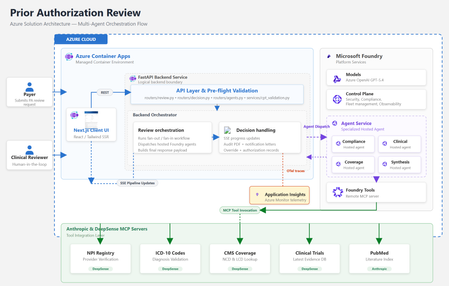
By Amit Mukherjee · Principal Solutions Engineer, Microsoft Health & Life Sciences Lindsey Craft-Goins · Technology Leader - Cloud & AI Platforms, Health & Life Sciences Joel Borellis · Director Solutions Engineering - Cloud & AI Platforms, Health & Life Sciences Prior authorization (PA) is one of the most expensive bottlenecks in U.S. healthcare. Physicians complete an average of 39 PA requests per week, spending roughly 13 hours of physician-and-staff time on PA-related work (AMA 2024 Prior Authorization Physician Survey). Turnaround averages 5–14 business days, and PA alone accounts for an estimated $35 billion in annual administrative spending (Sahni et al., Health Affairs Scholar, 2024). The regulatory clock is now ticking. CMS-0057-F mandates electronic PA with 72-hour urgent response starting in 2026. Forty-nine states plus DC already have PA laws on the books, and at least half of all U.S. state legislatures introduced new PA reform bills this year, including laws specifically targeting AI use in PA decisions (KFF Health News, April 2026). Today we’re making the Prior Authorization Multi-Agent Solution Accelerator available as a Microsoft Foundry template. Health plan payers can deploy a working, four-agent PA review pipeline to Azure using the Azure Developer CLI (“azd”) with a single command in supported environments, then customize it to their policies, workflows, and EHR environment. Try it now: Find the template in the Foundry template gallery, or clone directly from github.com/microsoft/Prior-Authorization-Multi-Agent-Solution-Accelerator What the template delivers The accelerator deploys four specialist Foundry hosted agents (Compliance, Clinical Reviewer, Coverage, and Synthesis), each independently containerized and managed by Foundry. In internal testing with synthetic demo cases, the pipeline reduced review workflow, from beginning to completion in under 5 minutes per case. Agent Role Key capability Compliance Documentation check 10-item checklist with blocking/non-blocking flags Clinical Reviewer Clinical evidence ICD-10 validation, PubMed + ClinicalTrials.gov search Coverage Policy matching CMS NCD/LCD lookup, per-criterion MET/NOT_MET mapping Synthesis Decision rubric 3-gate APPROVE/PEND with weighted confidence scoring Compliance and Clinical run in parallel. Coverage runs after clinical findings are ready. Synthesis evaluates all three outputs through a three-gate rubric. The result is a structured recommendation with per-criterion confidence scores and a full audit trail, not a black-box answer. Solution architecture The accelerator runs entirely on Azure. The frontend and backend deploy as Azure Container Apps. The four specialist agents are hosted by Microsoft Foundry. Real-time healthcare data flows through third-party MCP servers. Figure 1: Azure solution architecture How the pipeline works The four agents execute in a structured parallel-then-sequential pipeline. Compliance and Clinical run simultaneously in Phase 1. Coverage runs after clinical findings are ready. The Synthesis agent applies a three-gate decision rubric over all prior outputs. Figure 2: Agentic architecture, hosted agent pipeline Compliance and Clinical run in parallel via asyncio.gather, since neither depends on the other. Coverage runs sequentially after Clinical because it needs the structured clinical profile for criterion mapping. Synthesis evaluates all three outputs through a three-gate rubric (Provider, Codes, Medical Necessity) with weighted confidence scoring: 40% coverage criteria + 30% clinical extraction + 20% compliance + 10% policy match. The total pipeline time is bound by the slowest parallel agent plus the sequential agents, not the sum. In internal testing with synthetic demo cases, this architecture indicated materially reduced processing time compared to sequential manual workflows. Under the hood For the architect in the room, here are four design decisions worth knowing about: Foundry hosted agents: Each agent is independently containerized, versioned, and managed by Foundry’s runtime. The FastAPI backend is a pure HTTP dispatcher. All reasoning happens inside the agent containers, and there are no code changes between local (Docker Compose) and production (Foundry); the environment variable is the only switch. Structured output: Every agent uses MAF’s response_format enforcement to produce typed Pydantic schemas at the token level. No JSON parsing, no malformed fences, no free-form text. The orchestrator receives typed Python objects; the frontend receives a stable API contract. Keyless security: DefaultAzureCredential throughout, so no API keys are stored anywhere. Managed Identity handles production; azd tokens handle local development. Role assignments are provisioned automatically by Bicep at deploy time. Observability: All agents emit OpenTelemetry traces to Azure Application Insights. The Foundry portal shows per-agent spans correlated by case ID. End-to-end latency, per-agent contribution, and error rates are visible from day one with no additional configuration. For the full architecture documentation, agent specifications, Pydantic schemas, and extension guides, see the GitHub repository. Why this matters now Human-in-the-loop by design The system runs in LENIENT mode by default: it produces only APPROVE or PEND and is not designed to produce automated DENY outcomes in its default configuration. Every recommendation requires a clinician to Accept or Override with documented rationale before the decision is finalized. Override records flow to the audit PDF, notification letters, and downstream systems. This directly addresses the emerging wave of state legislation governing AI use in PA decisions. Domain experts own the rules Agent behavior is defined in markdown skill files, not Python code. When CMS updates a coverage determination or a plan changes its commercial policy, a clinician or compliance officer edits a text file and redeploys. No engineering PR required. Real-time healthcare data via MCP Agents connect to five MCP servers for real-time data: ICD-10 codes, NPI Registry, CMS Coverage policies, PubMed, and ClinicalTrials.gov. This incorporates real‑time clinical reference data sources to inform agent recommendations. Third-party MCP servers are included for demonstration with synthetic data only. Their inclusion does not constitute an endorsement by Microsoft. See the GitHub repository for production migration guidance. Audit-ready from day one Every case generates an 8-section audit justification PDF with per-criterion evidence, data source attribution, timestamps, and confidence breakdowns. Clinician overrides are recorded in Section 9. Notification letters (approval and pend) are generated automatically. These artifacts are designed to support CMS-0057-F documentation requirements. Deploy in under 15 minutes From the Foundry template gallery or from the command line: git clone https://github.com/microsoft/Prior-Authorization-Multi-Agent-Solution-Accelerator cd Prior-Authorization-Multi-Agent-Solution-Accelerator azd up That single command provisions Foundry, Azure Container Registry, Container Apps, builds all Docker images, registers the four agents, and runs health checks. The demo is live with a synthetic sample case as soon as deployment completes. What’s included What you customize 4 Foundry hosted agents Payer-specific coverage policies FastAPI orchestrator + Next.js frontend EHR/FHIR integration for clinical notes 5 MCP healthcare data connections Self-hosted MCP servers for production PHI Audit PDF + notification letter generation Authentication (Microsoft Entra ID) Full Bicep infrastructure-as-code Persistent storage (Cosmos DB / PostgreSQL) OpenTelemetry + App Insights observability Additional agents (Pharmacy, Financial) Built on Microsoft Foundry + Foundry hosted agents · Microsoft Agent Framework (MAF) · Azure OpenAI gpt-5.4 · Azure Container Apps · Azure Developer CLI + Bicep · OpenTelemetry + Azure Application Insights · DefaultAzureCredential (keyless, no secrets) Full architecture documentation, agent specifications, and extension guides are in the GitHub repository. Get started Foundry template gallery: Search “AI-Powered Prior Authorization for Healthcare” in the Foundry template section GitHub: github.com/microsoft/Prior-Authorization-Multi-Agent-Solution-Accelerator Disclaimers Not a medical device. This solution accelerator is not a medical device, is not FDA-cleared, and is not intended for autonomous clinical decision-making. All AI recommendations require qualified clinical review before any authorization decision is finalized. Not production-ready software. This is an open-source reference architecture (MIT License), not a supported Microsoft product. Customers are solely responsible for testing, validation, regulatory compliance, security hardening, and production deployment. Performance figures are illustrative. Metrics cited (including processing time reductions) are based on internal testing with synthetic demo data. Actual results will vary based on case complexity, infrastructure, and configuration. Third-party services included for demonstration only; not endorsed by Microsoft. Customers should evaluate providers against their compliance and data residency requirements. The demo uses synthetic data only. Customers deploying real patient data are responsible for HIPAA compliance and establishing appropriate Business Associate Agreements. This accelerator is intended to help customers align documentation workflows with CMS‑0057‑F requirements but has not been independently validated or certified for regulatory compliance.632Views0likes0CommentsWhat’s new in Microsoft Defender XDR at Secure 2025
Protecting your organization against cybersecurity threats is more challenging than ever before. As part of our 2025 Microsoft Secure cybersecurity conference announcements, we’re sharing new product features that spotlight our AI-first, end-to-end security innovations designed to help - including autonomous AI agents in the Security Operations Center (SOC), as well as automatic detection and response capabilities. We also share information on how you can expand your protection by bringing data security and collaboration tools closer to the SOC. Read on to learn more about how these capabilities can help your organization stay ahead of today’s advanced threat actors. Expanding AI-Driven Capabilities for Smarter SOC Operations Introducing Microsoft Security Copilot’s Security Alert Triage Agent (previously named Phishing Triage Agent) Today, we are excited to introduce Security Copilot agents, a major step in bringing AI-driven automation to Microsoft Security solutions. As part of this, we’re unveiling our newest innovation in Microsoft Defender: the Security Alert Triage Agent. Acting as a force multiplier for SOC analysts, it streamlines the triage of user-submitted phishing incidents by autonomously identifying and resolving false positives, typically cleaning out over 95% of submissions. This allows teams to focus on the remaining incidents – those that pose the most critical threats. Phishing submissions are among the highest-volume alerts that security teams handle daily, and our data shows that at least 9 in 10 reported emails turn out to be harmless bulk mail or spam. As a result, security teams must sift through hundreds of these incidents weekly, often spending up to 30 minutes per case determining whether it represents a real threat. This manual triage effort not only adds operational strain but also delays the response to actual phishing attacks, potentially impacting protection levels. The Security Alert Triage Agent transforms this process by leveraging advanced LLM-driven analysis to conduct sophisticated assessments –such as examining the semantic content of emails– to autonomously determine whether an incident is a genuine phishing attempt or a false alarm. By intelligently cutting through the noise, the agent alleviates the burden on SOC teams, allowing them to focus on high-priority threats. Figure 1. A phishing incident triaged by the Security Copilot Security Alert Triage Agent To help analysts gain trust in its decision-making, the agent provides natural language explanations for its classifications, along with a visual representation of its reasoning process. This transparency enables security teams to understand why an incident was classified in a certain way, making it easier to validate verdicts. Analysts can also provide feedback in plain language, allowing the agent to learn from these interactions, refine its accuracy, and adapt to the organization’s unique threat landscape. Over time, this continuous feedback loop fine-tunes the agent’s behavior, aligning it more closely with organizational nuances and reducing the need for manual verification. The Security Copilot Security Alert Triage Agent is designed to transform SOC operations with autonomous, AI-driven capabilities. As phishing threats grow increasingly sophisticated and SOC analysts face mounting demands, this agent alleviates the burden of repetitive tasks, allowing teams to shift their focus to proactive security measures that strengthen the organization’s overall defense. Note: The Phishing Triage Agent has since been expanded and is now called the Security Alert Triage Agent. Learn more at aka.ms/SATA Security Copilot Enriched Incident Summaries and Suggested Prompts Security Copilot Incident Summaries in Microsoft Defender now feature key enrichments, including related threat intelligence and asset risk –enhancements driven by customer feedback. Additionally, we are introducing suggested prompts following incident summaries, giving analysts quick access to common follow-up questions for deeper context on devices, users, threat intelligence, and more. This marks a step towards a more interactive experience, moving beyond predefined inputs to a more dynamic, conversational workflow. Read more about Microsoft Security Copilot agent announcements here. New protection across Microsoft Defender XDR workloads To strengthen core protection across Microsoft Defender XDR workloads, we're introducing new capabilities while building upon existing integrations for enhanced protection. This ensures a more comprehensive and seamless defense against evolving threats. Introducing collaboration security for Microsoft Teams Email remains a prevalent entry point for attackers. But the fast adoption of collaboration tools like Microsoft Teams has opened new attack surfaces for cybercriminals. Our advancements within Defender for Office 365 allow organizations to continue to protect users in Microsoft Teams against phishing and other emerging cyberthreats with inline protection against malicious URLs, safe attachments, brand impersonation protection, and more. And to ensure seamless investigation and response at the incident level, everything is centralized across our SOC workflows in the unified security operations platform. Read the announcement here. Introducing Microsoft Purview Data Security Investigations for the SOC Understanding the extent of the data that has been impacted to better prioritize incidents has been a challenge for security teams. As data remains the main target for attackers it’s critical to dismantle silos between security and data security teams to enhance response times. At Microsoft, we’ve made significant investments in bringing SOC and data security teams closer together by integrating Microsoft Defender XDR and Microsoft Purview. We are continuing to build upon the rich set of capabilities and today, we are excited to announce that Microsoft Purview Data Security Investigations (DSI) can be initiated from the incident graph in Defender XDR. Ensuring robust data security within the SOC has always been important, as it helps protect sensitive information from breaches and unauthorized access. Data Security Investigations significantly accelerates the process of analyzing incident related data such as emails, files, and messages. With AI-powered deep content analysis, DSI reveals the key security and sensitive data risks. This integration allows analysts to further analyze the data involved in the incident, learn which data is at risk of compromise, and take action to respond and mitigate the incident faster, to keep the organization’s data protected. Read the announcement here. Figure 2. An incident that shows the ability to launch a data security investigation. OAuth app insights are now available in Exposure Management In recent years, we’ve witnessed a substantial surge in attackers exploiting OAuth applications to gain access to critical data in business applications like Microsoft Teams, SharePoint, and Outlook. To address this threat, Microsoft Defender for Cloud Apps is now integrating OAuth apps and their connections into Microsoft Security Exposure Management, enhancing both attack path and attack surface map experiences. Additionally, we are introducing a unified application inventory to consolidate all app interactions into a single location. This will address the following use cases: Visualize and remediate attack paths that attackers could potentially exploit using high-privilege OAuth apps to access M365 SaaS applications or sensitive Azure resources. Investigate OAuth applications and their connections to the broader ecosystem in Attack Surface Map and Advanced Hunting. Explore OAuth application characteristics and actionable insights to reduce risk from our new unified application inventory. Figure 3. An attack path infused with OAuth app insights Read the latest announcement here AI & TI are critical for effective detection & response To effectively combat emerging threats, AI has become critical in enabling faster detection and response. By combining this with the latest threat analytics, security teams can quickly pinpoint emerging risks and respond in real-time, providing organizations with proactive protection against sophisticated attacks. Disrupt more attacks with automatic attack disruption In this era of multi-stage, multi-domain attacks, the SOC need solutions that enable both speed and scale when responding to threats. That’s where automatic attack disruption comes in—a self-defense capability that dynamically pivots to anticipate and block an attacker’s next move using multi-domain signals, the latest TI, and AI models. We’ve made significant advancements in attack disruption, such as threat intelligence-based disruption announced at Ignite, expansion to OAuth apps, and more. Today, we are thrilled to share our next innovation in attack disruption—the ability to disrupt more attacks through a self-learning architecture that enables much earlier and much broader disruption. At its core, this technology monitors a vast array of signals, ranging from raw telemetry data to alerts and incidents across Extended Detection and Response (XDR) and Security Information and Event Management (SIEM) systems. This extensive range of data sources provides an unparalleled view of your security environment, helping to ensure potential threats do not go unnoticed. What sets this innovation apart is its ability learn from historical events and previously seen attack types to identify and disrupt new attacks. By recognizing similar patterns across data and stitching them together into a contextual sequence, it processes information through machine learning models and enables disruption to stop the attack much earlier in the attack sequence, stopping significantly more attacks in volume and variety. Comprehensive Threat Analytics are now available across all Threat Intelligence reports Organizations can now leverage the full suite of Threat Analytics features (related incidents, impacted assets, endpoints exposure, recommended actions) on all Microsoft Threat Intelligence reports. Previously only available for a limited set of threats, these features are now available for all threats Microsoft has published in Microsoft Defender Threat Intelligence (MDTI), offering comprehensive insights and actionable intelligence to help you ensure your security measures are robust and responsive. Some of these key features include: IOCs with historical hunting: Access IOCs after expiration to investigate past threats and aid in remediation and proactive hunting. MITRE TTPs: Build detections based on threat techniques, going beyond IOCs to block and alert on specific tactics. Targeted Industries: Filter threats by industry, aligning security efforts with sector-specific challenges. We’re proud of our new AI-first innovations that strengthen security protections for our customers and help us further our pledge to customers and our community to prioritize cyber safety above all else. Learn more about the innovations designed to help your organization protect data, defend against cyber threats, and stay compliant. Join Microsoft leaders online at Microsoft Secure on April 9. We hope you’ll also join us in San Francisco from April 27th-May 1 st 2025 at the RSA Conference 2025 to learn more. At the conference, we’ll share live, hands-on demos and theatre sessions all week at the Microsoft booth at Moscone Center. Secure your spot today.11KViews2likes1CommentWhy UK Enterprise Cybersecurity Is Failing in 2026 (And What Leaders Must Change)
Enterprise cybersecurity in large organisations has always been an asymmetric game. But with the rise of AI‑enabled cyber attacks, that imbalance has widened dramatically - particularly for UK and EMEA enterprises operating complex cloud, SaaS, and identity‑driven environments. Microsoft Threat Intelligence and Microsoft Defender Security Research have publicly reported a clear shift in how attackers operate: AI is now embedded across the entire attack lifecycle. Threat actors use AI to accelerate reconnaissance, generate highly targeted phishing at scale, automate infrastructure, and adapt tactics in real time - dramatically reducing the time required to move from initial access to business impact. In recent months, Microsoft has documented AI‑enabled phishing campaigns abusing legitimate authentication mechanisms, including OAuth and device‑code flows, to compromise enterprise accounts at scale. These attacks rely on automation, dynamic code generation, and highly personalised lures - not on exploiting traditional vulnerabilities or stealing passwords. The Reality Gap: Adaptive Attackers vs. Static Enterprise Defences Meanwhile, many UK enterprises still rely on legacy cybersecurity controls designed for a very different threat model - one rooted in a far more predictable world. This creates a dangerous "Resilience Gap." Here is why your current stack is failing- and the C-Suite strategy required to fix it. 1. The Failure of Traditional Antivirus in the AI Era Traditional antivirus (AV) relies on static signatures and hashes. It assumes malicious code remains identical across different targets. AI has rendered this assumption obsolete. Modern malware now uses automated mutation to generate unique code variants at execution time, and adapts behaviour based on its environment. Microsoft Threat Intelligence has observed threat actors using AI‑assisted tooling to rapidly rewrite payload components, ensuring that every deployment looks subtly different. In this model, there is no reliable signature to detect. By the time a pattern exists, the attacker has already moved on. Signature‑based detection is not just slow - it is structurally misaligned with AI‑driven attacks. The Risk: If your security relies on "recognising" a threat, you are already breached. By the time a signature exists, the attacker has evolved. The C-Suite Pivot: Shift investment from artifact detection to EDR/XDR (Extended Detection and Response). We must prioritise behavioural analytics and machine learning models that identify intent rather than file names. 2. Why Perimeter Firewalls Fail in a Cloud-First World Many UK enterprise still rely on firewalls enforcing static allow/deny rules based on IP addresses and ports. This model worked when applications were predictable and networks clearly segmented. Today, enterprise traffic is encrypted, cloud‑hosted, API‑driven, and deeply integrated with SaaS and identity services. AI‑assisted phishing campaigns abusing OAuth and device‑code flows demonstrate this clearly. From a network perspective, everything looks legitimate: HTTPS traffic to trusted identity providers. No suspicious port. No malicious domain. Yet the attacker successfully compromises identity. The Risk: Traditional firewalls are "blind" to identity-based breaches in cloud environments. The C-Suite Pivot: Move to Identity-First Security. Treat Identity as the new Control Plane, integrating signals like user risk, device health, and geolocation into every access decision. 3. The Critical Weakness of Single-Factor Authentication Despite clear NCSC guidance, single-factor passwords remain a common vulnerability in legacy applications and VPNs. AI-driven credential abuse has changed the economics of these attacks. Threat actors now deploy adaptive phishing campaigns that evolve in real-time. Microsoft has observed attackers using AI to hyper-target high-value UK identities- specifically CEOs, Finance Directors, and Procurement leads. The Risk: Static passwords are now the primary weak link in UK supply chain security. The C-Suite Pivot: Mandate Phishing‑resistant MFA (Passkeys or hardware security keys). Implement Conditional Access policies that evaluate risk dynamically at the moment of access, not just at login. Legacy Security vs. AI‑Era Reality 4. The Inherent Risk of VPN-Centric Security VPNs were built on a flawed assumption: that anyone "inside" the network is trustworthy. In 2026, this logic is a liability. AI-assisted attackers now use automation to map internal networks and identify escalation paths the moment they gain VPN access. Furthermore, Microsoft has tracked nation-state actors using AI to create synthetic employee identities- complete with fake resumes and deepfake communication. In these scenarios, VPN access isn't "hacked"; it is legally granted to a fraudster. The Risk: A compromised VPN gives an attacker the "keys to the kingdom." The C-Suite Pivot: Transition to Zero Trust Architecture (ZTA). Access must be explicit, scoped to the specific application, and continuously re‑evaluated using behavioural signals. 5. Data: The High-Velocity Target Sensitive data sitting unencrypted in legacy databases or backups is a ticking time bomb. In the AI era, data discovery is no longer a slow, manual process for a hacker. Attackers now use AI to instantly analyse your directory structures, classify your files, and prioritise high-value data for theft. Unencrypted data significantly increases your "blast radius," turning a containable incident into a catastrophic board-level crisis. The Risk: Beyond the technical breach, unencrypted data leads to massive UK GDPR fines and irreparable brand damage. The C-Suite Pivot: Adopt Data-Centric Security. Implement encryption by default, classify data while adding sensitivity labels and start board-level discussions regarding post‑quantum cryptography (PQC) to future-proof your most sensitive assets. 6. The Failure of Static IDS Traditional Intrusion Detection Systems (IDS) rely on known indicators of compromise - assuming attackers reuse the same tools and techniques. AI‑driven attacks deliberately avoid that assumption. Threat actors are now using Large Language Models (LLMs) to weaponize newly disclosed vulnerabilities within hours. While your team waits for a "known pattern" to be updated in your system, the attacker is already using a custom, AI-generated exploit. The Risk: Your team is defending against yesterday's news while the attacker is moving at machine speed. The C-Suite Pivot: Invest in Adaptive Threat Detection. Move toward Graph‑based XDR platforms that correlate signals across email, endpoint, and cloud to automate investigation and response before the damage spreads. From Static Security to Continuous Security Closing Thought: Security Is a Journey, Not a Destination For UK enterprises, the shift toward adaptive cybersecurity is no longer optional - it is increasingly driven by regulatory expectation, board oversight, and accountability for operational resilience. Recent UK cyber resilience reforms and evolving regulatory frameworks signal a clear direction of travel: cybersecurity is now a board‑level responsibility, not a back‑office technical concern. Directors and executive leaders are expected to demonstrate effective governance, risk ownership, and preparedness for cyber disruption - particularly as AI reshapes the threat landscape. AI is not a future cybersecurity problem. It is a current force multiplier for attackers, exposing the limits of legacy enterprise security architectures faster than many organisations are willing to admit. The uncomfortable truth for boards in 2026 is that no enterprise is 100% secure. Intrusions are inevitable. Credentials will be compromised. Controls will be tested. The difference between a resilient enterprise and a vulnerable one is not the absence of incidents, but how risk is managed when they occur. In mature organisations, this means assuming breach and designing for containment: Access controls that limit blast radius Least privilege and conditional access restricting attackers to the smallest possible scope if an identity is compromised Data‑centric security using automated classification and encryption, ensuring that even when access is misused, sensitive data cannot be freely exfiltrated As a Senior Enterprise Cybersecurity Architect, I see this moment as a unique opportunity. AI adoption does not have to repeat the mistakes of earlier technology waves, where innovation moved fast and security followed years later. We now have a rare chance to embed security from day one - designing identity controls, data boundaries, automated monitoring, and governance before AI systems become business‑critical. When security is built in upfront, enterprises don’t just reduce risk - they gain the confidence to move faster and unlock AI’s value safely. Security is no longer a “department”. In the age of AI, it is a continuous business function - essential to preserving trust and maintaining operational continuity as attackers move at machine speed. References: Inside an AI‑enabled device code phishing campaign | Microsoft Security Blog AI as tradecraft: How threat actors operationalize AI | Microsoft Security Blog Detecting and analyzing prompt abuse in AI tools | Microsoft Security Blog Post-Quantum Cryptography | CSRC Microsoft Digital Defense Report 2025 | Microsoft https://www.ncsc.gov.uk/news/government-adopt-passkey-technology-digital-services
Full Automation Capabilities in Linux OS
Hello eveyone, We have configured Defender to detect viruses, and our goal is that if one of our assets downloads or encounters a virus, it is automatically hidden or removed. Based on the documentation regarding the automation levels in Automated Investigation and Remediation capabilities, we have set it to "Full - remediate threats automatically." While this works correctly on Windows devices, we have noticed that on Linux devices, the defender still detect the virus but it was not prevented. I was wondering if anyone has encountered this issue and, if so, how it was resolved? Additionally, as I am new to the Defender platform, I wanted to ask if could this issue potentially be resolved through specific Linux policies or functionalities? Best regards Mathiew101Views1like1CommentMicrosoft Sentinel MCP Entity Analyzer: Explainable risk analysis for URLs and identities
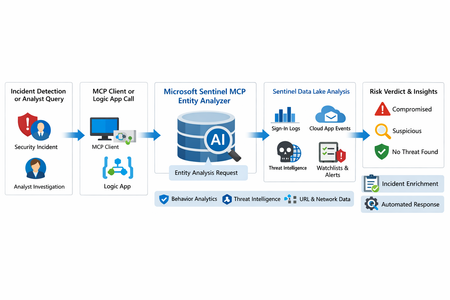
What makes this release important is not just that it adds another AI feature to Sentinel. It changes the implementation model for enrichment and triage. Instead of building and maintaining a chain of custom playbooks, KQL lookups, threat intel checks, and entity correlation logic, SOC teams can call a single analyzer that returns a reasoned verdict and supporting evidence. Microsoft positions the analyzer as available through Sentinel MCP server connections for agent platforms and through Logic Apps for SOAR workflows, which makes it useful both for interactive investigations and for automated response pipelines. Why this matters First, it formalizes Entity Analyzer as a production feature rather than a preview experiment. Second, it introduces a real cost model, which means organizations now need to govern usage instead of treating it as a free enrichment helper. Third, Microsoft’s documentation is now detailed enough to support repeatable implementation patterns, including prerequisites, limits, required tables, Logic Apps deployment, and cost behavior. From a SOC engineering perspective, Entity Analyzer is interesting because it focuses on explainability. Microsoft describes the feature as generating clear, explainable verdicts for URLs and user identities by analyzing multiple modalities, including threat intelligence, prevalence, and organizational context. That is a much stronger operational model than simple point-enrichment because it aims to return an assessment that analysts can act on, not just more raw evidence What Entity Analyzer actually does The Entity Analyzer tools are described as AI-powered tools that analyze data in the Microsoft Sentinel data lake and provide a verdict plus detailed insights on URLs, domains, and user entities. Microsoft explicitly says these tools help eliminate the need for manual data collection and complex integrations usually required for investigation and enrichment hat positioning is important. In practice, many SOC teams have built enrichment playbooks that fetch sign-in history, query TI feeds, inspect click data, read watchlists, and collect relevant alerts. Those workflows work, but they create maintenance overhead and produce inconsistent analyst experiences. Entity Analyzer centralizes that reasoning layer. For user entities, Microsoft’s preview architecture explains that the analyzer retrieves sign-in logs, security alerts, behavior analytics, cloud app events, identity information, and Microsoft Threat Intelligence, then correlates those signals and applies AI-based reasoning to produce a verdict. Microsoft lists verdict examples such as Compromised, Suspicious activity found, and No evidence of compromise, and also warns that AI-generated content may be incorrect and should be checked for accuracy. That warning matters. The right way to think about Entity Analyzer is not “automatic truth,” but “high-value, explainable triage acceleration.” It should reduce analyst effort and improve consistency, while still fitting into human review and response policy. Under the hood: the implementation model Technically, Entity Analyzer is delivered through the Microsoft Sentinel MCP data exploration tool collection. Microsoft documents that entity analysis is asynchronous: you start analysis, receive an identifier, and then poll for results. The docs note that analysis may take a few minutes and that the retrieval step may need to be run more than once if the internal timeout is not enough for long operations. That design has two immediate implications for implementers. First, this is not a lightweight synchronous enrichment call you should drop carelessly into every automation branch. Second, any production workflow should include retry logic, timeouts, and concurrency controls. If you ignore that, you will create fragile playbooks and unnecessary SCU burn. The supported access path for the data exploration collection requires Microsoft Sentinel data lake and one of the supported MCP-capable platforms. Microsoft also states that access to the tools is supported for identities with at least Security Administrator, Security Operator, or Security Reader. The data exploration collection is hosted at the Sentinel MCP endpoint, and the same documentation notes additional Entity Analyzer roles related to Security Copilot usage. The prerequisite many teams will miss The most important prerequisite is easy to overlook: Microsoft Sentinel data lake is required. This is more than a licensing footnote. It directly affects data quality, analyzer usefulness, and rollout success. If your organization has not onboarded the right tables into the data lake, Entity Analyzer will either fail or return reduced-confidence output. For user analysis, the following tables are required to ensure accuracy: AlertEvidence, SigninLogs, CloudAppEvents, and IdentityInfo. also notes that IdentityInfo depends on Defender for Identity, Defender for Cloud Apps, or Defender for Endpoint P2 licensing. The analyzer works best with AADNonInteractiveUserSignInLogs and BehaviorAnalytics as well. For URL analysis, the analyzer works best with EmailUrlInfo, UrlClickEvents, ThreatIntelIndicators, Watchlist, and DeviceNetworkEvents. If those tables are missing, the analyzer returns a disclaimer identifying the missing sources A practical architecture view An incident, hunting workflow, or analyst identifies a high-interest URL or user. A Sentinel MCP client or Logic App calls Entity Analyzer. Entity Analyzer queries relevant Sentinel data lake sources and correlates the findings. AI reasoning produces a verdict, evidence narrative, and recommendations. The result is returned to the analyst, incident record, or automation workflow for next-step action. This model is especially valuable because it collapses a multi-query, multi-tool investigation pattern into a single explainable decisioning step. Where it fits in real Sentinel operations Entity Analyzer is not a replacement for analytics rules, UEBA, or threat intelligence. It is a force multiplier for them. For identity triage, it fits naturally after incidents triggered by sign-in anomaly detections, UEBA signals, or Defender alerts because it already consumes sign-in logs, cloud app events, and behavior analytics as core evidence sources. For URL triage, it complements phishing and click-investigation workflows because it uses TI, URL activity, watchlists, and device/network context. Implementation path 1: MCP clients and security agents Microsoft states that Entity Analyzer integrates with agents through Sentinel MCP server connections to first-party and third-party AI runtime platforms. In practice, this makes it attractive for analyst copilots, engineering-side investigation agents, and guided triage experiences The benefit of this model is speed. A security engineer or analyst can invoke the analyzer directly from an MCP-capable client without building a custom orchestration layer. The tradeoff is governance: once you make the tool widely accessible, you need a clear policy for who can run it, when it should be used, and how results are validated before action is taken. Implementation path 2: Logic Apps and SOAR playbooks For SOC teams, Logic Apps is likely the most immediately useful deployment model. Microsoft documents an entity analyzer action inside the Microsoft Sentinel MCP tools connector and provides the required parameters for adding it to an existing logic app. These include: Workspace ID Look Back Days Properties payload for either URL or User The documented payloads are straightforward: { "entityType": "Url", "url": "[URL]" } And { "entityType": "User", "userId": "[Microsoft Entra object ID or User Principal Name]" } Also states that the connector supports Microsoft Entra ID, service principals, and managed identities, and that the Logic App identity requires Security Reader to operate. This makes playbook integration a strong pattern for incident enrichment. A high-severity incident can trigger a playbook, extract entities, invoke Entity Analyzer, and post the verdict back to the incident as a comment or decision artifact. The concurrency lesson most people will learn the hard way Unusually direct guidance on concurrency: to avoid timeouts and threshold issues, turn on Concurrency control in Logic Apps loops and start with a degree of parallelism of . The data exploration doc repeats the same guidance, stating that running multiple instances at once can increase latency and recommending starting with a maximum of five concurrent analyses. This is a strong indicator that the correct implementation pattern is selective analysis, not blanket analysis. Do not analyze every entity in every incident. Analyze the entities that matter most: external URLs in phishing or delivery chains accounts tied to high-confidence alerts entities associated with high-severity or high-impact incidents suspicious users with multiple correlated signals That keeps latency, quota pressure, and SCU consumption under control. KQL still matters Entity Analyzer does not eliminate KQL. It changes where KQL adds value. Before running the analyzer, KQL is still useful for scoping and selecting the right entities. After the analyzer returns, KQL is useful for validation, deeper hunting, and building custom evidence views around the analyzer’s verdict. For example, a simple sign-in baseline for a target user: let TargetUpn = "email address removed for privacy reasons"; SigninLogs | where TimeGenerated between (ago(7d) .. now()) | where UserPrincipalName == TargetUpn | summarize Total=count(), Failures=countif(ResultType != "0"), Successes=countif(ResultType == "0"), DistinctIPs=dcount(IPAddress), Apps=make_set(AppDisplayName, 20) by bin(TimeGenerated, 1d) | order by TimeGenerated desc And a lightweight URL prevalence check: let TargetUrl = "omicron-obl.com"; UrlClickEvents | where TimeGenerated between (ago(7d) .. now()) | search TargetUrl | take 50 Cost, billing, and governance GA is where technical excitement meets budget reality. Microsoft’s Sentinel billing documentation says there is no extra cost for the MCP server interface itself. However, for Entity Analyzer, customers are charged for the SCUs used for AI reasoning and also for the KQL queries executed against the Microsoft Sentinel data lake. Microsoft further states that existing Security Copilot entitlements apply The April 2026 “What’s new” entry also explicitly says that starting April 1, 2026, customers are charged for the SCUs required when using Entity Analyzer. That means every rollout should include a governance plan: define who can invoke the analyzer decide when playbooks are allowed to call it monitor SCU consumption limit unnecessary repeat runs preserve results in incident records so you do not rerun the same analysis within a short period Microsoft’s MCP billing documentation also defines service limits: 200 total runs per hour, 500 total runs per day, and around 15 concurrent runs every five minutes, with analysis results available for one hour. Those are not just product limits. They are design requirements. Limitations you should state clearly The analyze_user_entity supports a maximum time window of seven days and only works for users with a Microsoft Entra object ID. On-premises Active Directory-only users are not supported for user analysis. Microsoft also says Entity Analyzer results expire after one hour and that the tool collection currently supports English prompts only. Recommended rollout pattern If I were implementing this in a production SOC, I would phase it like this: Start with a narrow set of high-value use cases, such as suspicious user identities and phishing-related URLs. Confirm that the required tables are present in the data lake. Deploy a Logic App enrichment pattern for incident-triggered analysis. Add concurrency control and retry logic. Persist returned verdicts into incident comments or case notes. Then review SCU usage and analyst value before expanding coverage.568Views8likes0Comments
Observed Automation Discrepancies
Hi Team ... I want to know the logic behind the Defender XDR Automation Engine . How it works ? I have observed Defender XDR Automation Engine Behavior contrary to expectations of identical incident and automation handling in both environments, discrepancies were observed. Specifically, incidents with high-severity alerts were automatically closed by Defender XDR's automation engine before reaching their SOC for review, raising concerns among clients and colleagues. Automation rules are clearly logged in the activity log, whereas actions performed by Microsoft Defender XDR are less transparent . A high-severity alert related to a phishing incident was closed by Defender XDR's automation, resulting in the associated incident being closed and removed from SOC review. Wherein the automation was not triggered by our own rules, but by Microsoft's Defender XDR, and sought clarification on the underlying logic.196Views2likes4Comments
Issue connecting Azure Sentinel GitHub app to Sentinel Instance when IP allow list is enabled
Hi everyone, I’m running into an issue connecting the Azure Sentinel GitHub app to my Sentinel workspace in order to create our CI/CD pipelines for our detection rules, and I’m hoping someone can point me in the right direction. Symptoms: When configuring the GitHub connection in Sentinel, the repository dropdown does not populate. There are no explicit errors, but the connection clearly isn’t completing. If I disable my organization’s IP allow list, everything works as expected and the repos appear immediately. I’ve seen that some GitHub Apps automatically add the IP ranges they require to an organization’s allow list. However, from what I can tell, the Azure Sentinel GitHub app does not seem to have this capability, and requires manual allow listing instead. What I’ve tried / researched: Reviewed Microsoft documentation for Sentinel ↔ GitHub integrations Looked through Azure IP range and Service Tag documentation I’ve seen recommendations to allow list the IP ranges published at //api.github.com/meta, as many GitHub apps rely on these ranges I’ve already tried allow listing multiple ranges from the GitHub meta endpoint, but the issue persists My questions: Does anyone know which IP ranges are used by the Azure Sentinel GitHub app specifically? Is there an official or recommended approach for using this integration in environments with strict IP allow lists? Has anyone successfully configured this integration without fully disabling IP restrictions? Any insight, references, or firsthand experience would be greatly appreciated. Thanks in advance!155Views0likes1Comment
What caught you off guard when onboarding Sentinel to the Defender portal?
Following on from a previous discussion around what actually changes versus what doesn't in the Sentinel to Defender portal migration, I wanted to open a more specific conversation around the onboarding moment itself. One thing I have been writing about is how much happens automatically the moment you connect your workspace. The Defender XDR connector enables on its own, a bi-directional sync starts immediately, and if your Microsoft incident creation rules are still active across Defender for Endpoint, Identity, Office 365, Cloud Apps, and Entra ID Protection, you are going to see duplicate incidents before you have had a chance to do anything about it. That is one of the reasons I keep coming back to the inventory phase as the most underestimated part of this migration. Most of the painful post-migration experiences I hear about trace back to things that could have been caught in a pre-migration audit: analytics rules with incident title dependencies, automation conditions that assumed stable incident naming, RBAC gaps that only become visible when someone tries to access the data lake for the first time. A few things I would genuinely love to hear from practitioners who have been through this: - When you onboarded, what was the first thing that behaved unexpectedly that you had not anticipated from the documentation? - For those who have reviewed automation rules post-onboarding: did you find conditions relying on incident title matching that broke, and how did you remediate them? - For anyone managing access across multiple tenants: how are you currently handling the GDAP gap while Microsoft completes that capability? I am writing up a detailed pre-migration inventory framework covering all four areas and the community experience here is genuinely useful for making sure the practitioner angle covers the right ground. Happy to discuss anything above in more detail.Solved175Views2likes3CommentsRSAC 2026: What the Sentinel Playbook Generator actually means for SOC automation
RSAC 2026 brought a wave of Sentinel announcements, but the one I keep coming back to is the playbook generator. Not because it's the flashiest, but because it touches something that's been a real operational pain point for years: the gap between what SOC teams need to automate and what they can realistically build and maintain. I want to unpack what this actually changes from an operational perspective, because I think the implications go further than "you can now vibe-code a playbook." The problem it solves If you've built and maintained Logic Apps playbooks in Sentinel at any scale, you know the friction. You need a connector for every integration. If there isn't one, you're writing custom HTTP actions with authentication handling, pagination, error handling - all inside a visual designer that wasn't built for complex branching logic. Debugging is painful. Version control is an afterthought. And when something breaks at 2am, the person on call needs to understand both the Logic Apps runtime AND the security workflow to fix it. The result in most environments I've seen: teams build a handful of playbooks for the obvious use cases (isolate host, disable account, post to Teams) and then stop. The long tail of automation - the enrichment workflows, the cross-tool correlation, the conditional response chains - stays manual because building it is too expensive relative to the time saved. What's actually different now The playbook generator produces Python. Not Logic Apps JSON, not ARM templates - actual Python code with documentation and a visual flowchart. You describe the workflow in natural language, the system proposes a plan, asks clarifying questions, and then generates the code once you approve. The Integration Profile concept is where this gets interesting. Instead of relying on predefined connectors, you define a base URL, auth method, and credentials for any service - and the generator creates dynamic API calls against it. This means you can automate against ServiceNow, Jira, Slack, your internal CMDB, or any REST API without waiting for Microsoft or a partner to ship a connector. The embedded VS Code experience with plan mode and act mode is a deliberate design choice. Plan mode lets you iterate on the workflow before any code is generated. Act mode produces the implementation. You can then validate against real alerts and refine through conversation or direct code edits. This is a meaningful improvement over the "deploy and pray" cycle most of us have with Logic Apps. Where I see the real impact For environments running Sentinel at scale, the playbook generator could unlock the automation long tail I mentioned above. The workflows that were never worth the Logic Apps development effort might now be worth a 15-minute conversation with the generator. Think: enrichment chains that pull context from three different tools before deciding on a response path, or conditional escalation workflows that factor in asset criticality, time of day, and analyst availability. There's also an interesting angle for teams that operate across Microsoft and non-Microsoft tooling. If your SOC uses Sentinel for SIEM but has Palo Alto, CrowdStrike, or other vendors in the stack, the Integration Profile approach means you can build cross-vendor response playbooks without middleware. The questions I'd genuinely like to hear about A few things that aren't clear from the documentation and that I think matter for production use: Security Copilot dependency: The prerequisites require a Security Copilot workspace with EU or US capacity. Someone in the blog comments already flagged this as a potential blocker for organizations that have Sentinel but not Security Copilot. Is this a hard requirement going forward, or will there be a path for Sentinel-only customers? Code lifecycle management: The generated Python runs... where exactly? What's the execution runtime? How do you version control, test, and promote these playbooks across dev/staging/prod? Logic Apps had ARM templates and CI/CD patterns. What's the equivalent here? Integration Profile security: You're storing credentials for potentially every tool in your security stack inside these profiles. What's the credential storage model? Is this backed by Key Vault? How do you rotate credentials without breaking running playbooks? Debugging in production: When a generated playbook fails at 2am, what does the troubleshooting experience look like? Do you get structured logs, execution traces, retry telemetry? Or are you reading Python stack traces? Coexistence with Logic Apps: Most environments won't rip and replace overnight. What's the intended coexistence model between generated Python playbooks and existing Logic Apps automation rules? I'm genuinely optimistic about this direction. Moving from a low-code visual designer to an AI-assisted coding model with transparent, editable output feels like the right architectural bet for where SOC automation needs to go. But the operational details around lifecycle, security, and debugging will determine whether this becomes a production staple or stays a demo-only feature. Would be interested to hear from anyone who's been in the preview - what's the reality like compared to the pitch?Solved103Views0likes1Comment