investigation
323 Topics
Defender of XDR - Quarantine - Lack of filter/search options
Hi Microsoft, I love what you're doing with the Defender XDR portal, but could you please show some love to the Quarantine section soon? On a daily basis, I have to review emails caught in quarantine for false positives, and the lack of search and filtering options is appalling. As a company based in Denmark, 99% of legitimate emails come from .dk domains. Yet there is no way to search for or filter on something this simple. If I type .dk into the search box, I get 0 results, even though I can clearly see .dk sender addresses on the page. The filter options only allow me to enter full sender or recipient email addresses, which is of course almost useless in a quarantine-review context. Some examples of filters that would be extremely useful: Sender domain ends with .dk Sender domain contains .dk URL domain filtering Attachment name filtering Saved filter views More flexible search across message properties The Quarantine experience could be made dramatically better with relatively little effort. So please, pretty please, give the Quarantine portal some attention. It's often the part of Defender that security teams interact with every single day.43Views0likes1CommentMicrosoft Defender Incident – Handling incident severity change
There's no dedicated history/audit endpoint for field-level transitions (like "this incident went from Low → High at timestamp X") in the /security/incidents Graph API — the incident object only exposes the current severity plus a lastUpdateDateTime, not a change log. So this isn't something you're missing; it genuinely doesn't exist as a queryable history today. Also worth knowing before you build around it: Graph change notifications (webhooks) are not documented as supported for /security/incidents — subscription/webhook support is only documented for the legacy /security/alerts resource, and that resource is deprecated with removal expected around April 2026. So polling is currently the only supported pattern for incidents specifically, not a limitation of your approach — there's no webhook alternative to fall back to yet. Given that, the fix is in your polling strategy, not in finding a hidden feature: instead of filtering once at creation time and then ignoring the incident, poll using $filter=lastUpdateDateTime gt {last_poll_timestamp}. Since lastUpdateDateTime bumps on any property change — including a severity escalation — this catches incidents that started as Low/Informational and later got escalated, without re-fetching everything. A pattern that works well in practice: GET /security/incidents?$filter=lastUpdateDateTime gt {last_poll_time}&$orderby=lastUpdateDateTime asc Then in your own store, diff the incoming severity against what you last recorded for that id to detect the transition yourself — you're effectively reconstructing the history client-side since the API won't give it to you natively. Store (incidentId, severity, lastUpdateDateTime) on each poll and compare. One gotcha: this still won't tell you the exact moment the severity changed if multiple fields changed between polls — only that it changed sometime between your last two poll timestamps. If you need second-level precision on transition timing, you'd need to poll more frequently (your 5-minute interval is probably fine for SOC triage purposes, but not for precise SLA timestamping).21Views0likes0CommentsCampaign-Centric Hunting with Microsoft Defender XDR and Microsoft Sentinel
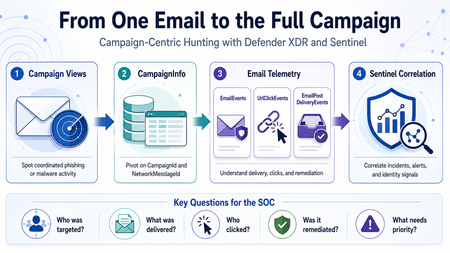
Phishing investigations usually start with one suspicious email. A user reports a message. An alert is generated. An analyst opens the email details, checks the sender, reviews the URL, and tries to understand whether the message is malicious. That is a normal starting point. However, in a real SOC investigation, one email is rarely the full story. Attackers usually operate in campaigns. They reuse sender infrastructure, similar subjects, URLs, payloads, templates, and delivery techniques. A single email may be only one part of a wider phishing or malware campaign targeting multiple users. This is why campaign-centric hunting is important. I wrote this article from the perspective of a SOC analyst who often needs to move quickly from a single suspicious email to the full campaign impact. The goal is simple: use Microsoft Defender XDR and Microsoft Sentinel together to understand who was targeted, what was delivered, who clicked, and what should be prioritized first. Why Campaign-Centric Hunting When investigating a phishing or malware email, analysts usually need to answer practical questions: How many users received messages from the same campaign? Were the messages blocked, junked, delivered, or remediated? Did any user click the URL? Did anyone click through a Safe Links warning? Were any priority or high-risk users affected? Was the email removed after delivery? Are there related Defender XDR or Sentinel incidents? If we only investigate one message, we may miss the bigger picture. Campaign-centric hunting helps the SOC move from this question: Is this email malicious? To this question: What is the full impact of this campaign? That shift is important because the response priority should be based on campaign impact, not only on a single alert. What Campaign Views Provides Campaign Views in Microsoft Defender for Office 365 help analysts investigate coordinated email attacks such as phishing and malware campaigns. From Campaign Views, analysts can review campaign-level information such as: Campaign name Campaign type Campaign subtype Targeted users Inboxed messages Clicked users Visited links Sender domains Sender IPs Payload URLs Delivery actions Campaign timeline Campaign flow This is useful during triage because it quickly shows whether an email is part of a wider attack. For example, one reported phishing message may look small at first. But if Campaign Views shows that the same campaign targeted 50 users, delivered messages to 15 inboxes, and had 2 users click the URL, the investigation becomes much more urgent. Where CampaignInfo Fits The CampaignInfo table gives analysts a KQL-based way to query campaign-related data. Some useful fields are: Field Purpose CampaignId Unique identifier for the campaign CampaignName Name of the campaign CampaignType Campaign category, such as Phish or Malware CampaignSubtype Additional context, such as brand being phished or malware family NetworkMessageId Unique identifier for the email message RecipientEmailAddress Recipient affected by the campaign Timestamp Time when the event was recorded For correlation, the most important field is usually: NetworkMessageId This field can help connect campaign data with other Defender XDR email tables, including: EmailEvents UrlClickEvents EmailPostDeliveryEvents EmailAttachmentInfo EmailUrlInfo This makes CampaignInfo a useful pivot table for campaign-level hunting. Important note: CampaignInfo is currently documented as Preview. Before using these queries in production analytics rules, validate the table availability, schema, and results in your own tenant. Practical Scenario An analyst receives a phishing alert in Microsoft Defender XDR. The alert is related to a user who received a suspicious email with a credential-harvesting URL. The analyst opens Campaign Views and sees that the message belongs to a wider phishing campaign. At that point, the investigation should not stop with the original user. The analyst should now ask: Who else received this campaign? How many messages were delivered? Which users clicked? Did any users click through the Safe Links warning? Were the messages removed after delivery? Are there related incidents in Microsoft Sentinel? The investigation flow could look like this: Start from Campaign Views in Microsoft Defender XDR. Identify the campaign details. Use CampaignInfo to list affected users and messages. Join with EmailEvents to validate delivery status. Join with UrlClickEvents to identify user interaction. Join with EmailPostDeliveryEvents to confirm remediation. Review related Microsoft XDR incidents in Microsoft Sentinel. Prioritize response based on campaign impact. Query 1: List Recent Campaigns The first query gives a simple overview of recent campaigns. CampaignInfo | where Timestamp > ago(14d) | summarize FirstSeen = min(Timestamp), LastSeen = max(Timestamp), AffectedUsers = dcount(RecipientEmailAddress), Messages = dcount(NetworkMessageId) by CampaignId, CampaignName, CampaignType, CampaignSubtype | order by LastSeen desc This helps analysts quickly identify campaigns that affected the organization during the selected period. Useful questions to ask from this output: Which campaigns are most recent? Which campaigns affected the most users? Are the campaigns phishing, malware, or spam? Is there a specific brand or malware family in the subtype? Are similar campaigns appearing repeatedly? Query 2: Understand Delivery Impact After identifying campaigns, the next step is to understand delivery impact. A campaign that was fully blocked is different from a campaign that reached user inboxes. let Campaigns = CampaignInfo | where Timestamp > ago(14d) | project CampaignId, CampaignName, CampaignType, CampaignSubtype, NetworkMessageId, RecipientEmailAddress; Campaigns | join kind=leftouter ( EmailEvents | where Timestamp > ago(14d) | project NetworkMessageId, RecipientEmailAddress, Subject, SenderFromAddress, SenderFromDomain, SenderIPv4, DeliveryAction, DeliveryLocation, ThreatTypes, DetectionMethods, Timestamp ) on NetworkMessageId, RecipientEmailAddress | summarize Messages = dcount(NetworkMessageId), AffectedUsers = dcount(RecipientEmailAddress), Subjects = make_set(Subject, 5), SenderDomains = make_set(SenderFromDomain, 10), SenderIPs = make_set(SenderIPv4, 10) by CampaignId, CampaignName, CampaignType, CampaignSubtype, DeliveryAction, DeliveryLocation | order by AffectedUsers desc, Messages desc This query helps separate campaigns that were blocked from campaigns that actually reached users. From a SOC perspective, delivered messages deserve closer attention, especially if they reached the inbox. Query 3: Identify Users Who Clicked Campaign URLs Delivery is important, but clicks usually increase the priority of the incident. This query joins campaign data with UrlClickEvents. let Campaigns = CampaignInfo | where Timestamp > ago(14d) | project CampaignId, CampaignName, CampaignType, CampaignSubtype, NetworkMessageId, RecipientEmailAddress; Campaigns | join kind=inner ( UrlClickEvents | where Timestamp > ago(14d) | project NetworkMessageId, AccountUpn, Url, ActionType, IsClickedThrough, ThreatTypes, DetectionMethods, IPAddress, Workload, ClickTime = Timestamp ) on NetworkMessageId | summarize FirstClick = min(ClickTime), LastClick = max(ClickTime), ClickEvents = count(), ClickedUsers = dcount(AccountUpn), ClickThroughUsers = dcountif(AccountUpn, IsClickedThrough == true), ClickedUrls = make_set(Url, 10), SourceIPs = make_set(IPAddress, 10) by CampaignId, CampaignName, CampaignType, CampaignSubtype | order by ClickThroughUsers desc, ClickedUsers desc, LastClick desc This query helps identify campaigns where users interacted with the payload. If a user clicked a phishing URL, the next step should usually include identity-focused investigation, such as reviewing sign-in activity, MFA status, session activity, and possible risky sign-ins. Query 4: Focus on Click-Through Events Safe Links may block access to a malicious site. In some cases, however, a user may continue through a warning page. Those cases should be reviewed carefully. let Campaigns = CampaignInfo | where Timestamp > ago(30d) | project CampaignId, CampaignName, CampaignType, CampaignSubtype, NetworkMessageId, RecipientEmailAddress; Campaigns | join kind=inner ( UrlClickEvents | where Timestamp > ago(30d) | where IsClickedThrough == true | project NetworkMessageId, AccountUpn, Url, ActionType, ThreatTypes, IPAddress, ClickTime = Timestamp ) on NetworkMessageId | project ClickTime, CampaignId, CampaignName, CampaignType, CampaignSubtype, AccountUpn, RecipientEmailAddress, Url, ActionType, ThreatTypes, IPAddress | order by ClickTime desc This is one of the most useful views during incident response. A click-through event does not automatically mean compromise, but it is a strong reason to investigate the user account further. Query 5: Confirm Post-Delivery Remediation A malicious message may be delivered first and removed later by ZAP, AIR, or manual remediation. This query joins CampaignInfo with EmailPostDeliveryEvents. let Campaigns = CampaignInfo | where Timestamp > ago(30d) | project CampaignId, CampaignName, CampaignType, CampaignSubtype, NetworkMessageId, RecipientEmailAddress; Campaigns | join kind=leftouter ( EmailPostDeliveryEvents | where Timestamp > ago(30d) | project NetworkMessageId, RecipientEmailAddress, RemediationTime = Timestamp, Action, ActionType, ActionTrigger, ActionResult, DeliveryLocation, SourceLocation ) on NetworkMessageId, RecipientEmailAddress | summarize RemediatedMessages = dcountif(NetworkMessageId, isnotempty(ActionType)), RemediationTypes = make_set(ActionType, 10), RemediationResults = make_set(ActionResult, 10), LastRemediation = max(RemediationTime) by CampaignId, CampaignName, CampaignType, CampaignSubtype | order by LastRemediation desc This helps answer a very important question: Were the delivered malicious messages actually removed? This is useful for both SOC triage and reporting because it shows not only detection, but also response. Query 6: Campaign Blast Radius Summary The following query combines campaign, delivery, click, and remediation data into one campaign-level view. let TimeRange = 30d; let Campaigns = CampaignInfo | where Timestamp > ago(TimeRange) | project CampaignId, CampaignName, CampaignType, CampaignSubtype, NetworkMessageId, RecipientEmailAddress; let Delivery = EmailEvents | where Timestamp > ago(TimeRange) | summarize DeliveryActions = make_set(DeliveryAction, 10), DeliveryLocations = make_set(DeliveryLocation, 10), DeliveredMessages = dcountif(NetworkMessageId, DeliveryAction =~ "Delivered"), JunkedMessages = dcountif(NetworkMessageId, DeliveryAction =~ "Junked"), BlockedMessages = dcountif(NetworkMessageId, DeliveryAction =~ "Blocked"), Subjects = make_set(Subject, 5), SenderDomains = make_set(SenderFromDomain, 10) by NetworkMessageId, RecipientEmailAddress; let Clicks = UrlClickEvents | where Timestamp > ago(TimeRange) | summarize ClickEvents = count(), ClickThroughEvents = countif(IsClickedThrough == true), FirstClick = min(Timestamp), LastClick = max(Timestamp), ClickedUrls = make_set(Url, 10) by NetworkMessageId; let Remediation = EmailPostDeliveryEvents | where Timestamp > ago(TimeRange) | summarize RemediationActions = make_set(ActionType, 10), LastRemediation = max(Timestamp) by NetworkMessageId, RecipientEmailAddress; Campaigns | join kind=leftouter Delivery on NetworkMessageId, RecipientEmailAddress | join kind=leftouter Clicks on NetworkMessageId | join kind=leftouter Remediation on NetworkMessageId, RecipientEmailAddress | summarize AffectedUsers = dcount(RecipientEmailAddress), Messages = dcount(NetworkMessageId), DeliveredMessages = sum(DeliveredMessages), JunkedMessages = sum(JunkedMessages), BlockedMessages = sum(BlockedMessages), TotalClickEvents = sum(ClickEvents), ClickThroughEvents = sum(ClickThroughEvents), Subjects = make_set(Subjects, 10), SenderDomains = make_set(SenderDomains, 10), ClickedUrls = make_set(ClickedUrls, 10), RemediationActions = make_set(RemediationActions, 10), LastClick = max(LastClick), LastRemediation = max(LastRemediation) by CampaignId, CampaignName, CampaignType, CampaignSubtype | extend SuggestedPriority = case( ClickThroughEvents > 0, "High", TotalClickEvents > 0, "Medium", DeliveredMessages > 0, "Medium", "Low" ) | order by SuggestedPriority asc, AffectedUsers desc, Messages desc This type of query can be useful during hunting sessions, incident review, and campaign reporting. The goal is not only to collect more data. The goal is to help the analyst decide what needs attention first. Correlating Campaign Activity with Microsoft Sentinel When Microsoft Defender XDR is connected to Microsoft Sentinel, incidents and alerts can be synchronized into the Sentinel incident queue. This allows the SOC to correlate campaign-related email activity with other security signals, such as: Suspicious sign-ins Identity alerts Endpoint alerts Cloud app activity OAuth consent activity Data exfiltration attempts Related Microsoft XDR incidents For example, if a user clicked a phishing URL, the SOC can then review whether the same user had suspicious sign-in activity shortly after the click. The following query is a simple starting point for reviewing Microsoft XDR incidents in Microsoft Sentinel. SecurityIncident | where TimeGenerated > ago(30d) | where ProviderName == "Microsoft XDR" | where Title has_any ("phish", "phishing", "email", "malware", "campaign") | summarize Incidents = count(), HighSeverity = countif(Severity == "High"), MediumSeverity = countif(Severity == "Medium"), Closed = countif(Status == "Closed"), Active = countif(Status == "Active") by bin(TimeGenerated, 1d) | order by TimeGenerated desc This query does not replace campaign hunting. It simply helps analysts understand how email-related activity is represented in the Sentinel incident queue. Suggested SOC Workflow A practical campaign-centric workflow could look like this: Step 1: Start from Campaign Views Review campaigns with delivered messages, clicked users, visited links, or high user impact. Step 2: Pivot to KQL Use CampaignInfo to list campaign-related messages and affected recipients. Step 3: Validate Delivery Join with EmailEvents to confirm whether messages were blocked, junked, delivered, or replaced. Step 4: Review User Interaction Join with UrlClickEvents to identify users who clicked URLs or clicked through Safe Links warnings. Step 5: Confirm Remediation Join with EmailPostDeliveryEvents to confirm whether delivered messages were removed after delivery. Step 6: Correlate in Sentinel Review related Microsoft XDR incidents and correlate with identity, endpoint, and cloud activity. Step 7: Decide Response Depending on the impact, the SOC may decide to: Escalate the incident Notify affected users Review user sign-ins Revoke user sessions Reset passwords Block sender domains or URLs Submit false negatives Create a watchlist for related indicators Tune analytics rules or response processes Suggested Priority Logic Not every campaign needs the same level of response. A simple triage model could be: Condition Suggested priority Campaign blocked before delivery Low Campaign delivered to junk Low to Medium Campaign delivered to inbox Medium Campaign delivered to multiple inboxes Medium to High User clicked URL High User clicked through warning High Priority account clicked High Click followed by suspicious sign-in Critical This model should be adapted to each organization’s risk profile and response process. Limitations and Things to Validate Before using this approach in production, validate the following: Defender for Office 365 Plan 2 availability Campaign Views permissions CampaignInfo table availability Defender XDR connector configuration Advanced hunting event streaming Field names in your environment Retention period Data latency Join behavior using NetworkMessageId Whether click events can be joined to email metadata in all cases One important limitation is that some URL click events may not join cleanly with email metadata. For example, clicks from Drafts or Sent Items may not have the same message metadata available for correlation. Also, because CampaignInfo is currently documented as Preview, I would avoid depending on it alone for critical production automation without testing and validation.121Views0likes0CommentsMicrosoft Sentinel data lake FAQ
Microsoft Sentinel data lake (generally available) is a purpose‑built, cloud‑native security data lake. It centralizes all security data in an open format, serving as the foundation for agentic defense, enhanced security insights, and graph-based enrichment. It offers cost‑effective ingestion, long‑term retention, and advanced analytics. In this blog we offer answers to many of the questions we’ve heard from our customers and partners. General questions What is the Microsoft Sentinel data lake? Microsoft has expanded its industry-leading SIEM solution, Microsoft Sentinel, to include a unified, security data lake, designed to help optimize costs, simplify data management, and accelerate the adoption of AI in security operations. This modern data lake serves as the foundation for the Microsoft Sentinel platform. It has a cloud-native architecture and is purpose-built for security—bringing together all security data for greater visibility, deeper security analysis, contextual awareness and agentic defense. It provides affordable, long-term retention, allowing organizations to maintain robust security while effectively managing budgetary requirements. What are the benefits of Sentinel data lake? Microsoft Sentinel data lake is purpose built for security offering flexible analytics, cost management, and deeper security insights. Sentinel data lake: Centralizes security data delta parquet and open format for easy access. This unified data foundation accelerates threat detection, investigation, and response across hybrid and multi-cloud environments. Enables data federation by allowing customers to access data in external sources like Microsoft Fabric, ADLS and Databricks from the data lake. Federated data appears alongside native Sentinel data, enabling correlated hunting, investigation, and custom graph analysis across a broader digital estate. Offers a disaggregated storage and compute pricing model, allowing customers to store massive volumes of security data at a fraction of the cost compared to traditional SIEM solutions. Allows multiple analytics engines like Kusto, Spark, and ML to run on a single data copy, simplifying management, reducing costs, and supporting deeper security analysis. Integrates with GitHub Copilot and VS Code empowering SOC teams to automate enrichment, anomaly detection, and forensic analysis. Supports AI agents via the MCP server, allowing tools like GitHub Copilot to query and automate security tasks. The MCP Server layer brings intelligence to the data, offering Semantic Search, Query Tools, and Custom Analysis capabilities that make it easier to extract insights and automate workflows. Provides streamlined onboarding, intuitive table management, and scalable multi-tenant support, making it ideal for MSSPs and large enterprises. The Sentinel data lake is designed for security workloads, ensuring that processes from ingestion to analytics meet evolving cybersecurity requirements. Is Microsoft Sentinel SIEM going away? No. Microsoft is expanding Sentinel into an AI powered end-to-end security platform that includes SIEM and new platform capabilities - Security data lake, graph-powered analytics and MCP Server. SIEM remains a core component and will be actively developed and supported. Getting started What are the prerequisites for Sentinel data lake? To get started: Connect your Sentinel workspace to Microsoft Defender prior to onboarding to Sentinel data lake. Once in the Defender experience see data lake onboarding documentation for next steps. Note: Sentinel is moving to the Microsoft Defender portal and the Sentinel Azure portal will be retired by March 31, 2027. I am a Sentinel-only customer, and not a Defender customer. Can I use the Sentinel data lake? Yes. You must connect Sentinel to the Defender experience before onboarding to the Sentinel data lake. Microsoft Sentinel is generally available in the Microsoft Defender portal, with or without Microsoft Defender XDR or an E5 license. If you have created a log analytics workspace, enabled it for Sentinel and have the right Microsoft Entra roles (e.g. Global Administrator + Subscription Owner, Security Administrator + Sentinel Contributor), you can enable Sentinel in the Defender portal. For more details on how to connect Sentinel to Defender review these sources: Microsoft Sentinel in the Microsoft Defender portal In what regions is Sentinel data lake available? For supported regions see: Geographical availability and data residency in Microsoft Sentinel | Azure Docs. Is there an expected release date for Microsoft Sentinel data lake in GCC, GCC-H, and DoD? While the exact date is not yet finalized, we plan to expand Sentinel data lake to the US Government environments. . How will URBAC and Entra RBAC work together to manage the data lake given there is no centralized model? Entra RBAC will provide broad access to the data lake (URBAC maps the right permissions to specific Entra role holders: GA/SA/SO/GR/SR). URBAC will become a centralized pane for configuring non-global delegated access to the data lake. For today, you will use this for the “default data lake” workspace. In the future, this will be enabled for non-default Sentinel workspaces as well – meaning all workspaces in the data lake can be managed here for data lake RBAC requirements. Azure RBAC on the Log Analytics (LA) workspace in the data lake is respected through URBAC as well today. If you already hold a built-in role like log analytics reader, you will be able to run interactive queries over the tables in that workspace. Or, if you hold log analytics contributor, you can read and manage table data. For more details see: Roles and permissions in the Microsoft Sentinel platform | Microsoft Learn Data ingestion and storage How do I ingest data into the Sentinel data lake? To ingest data into the Sentinel data lake, you can use existing Sentinel data connectors or custom connectors to bring data from Microsoft and third-party sources. Data can be ingested into the analytics tier or the data lake tier. Data ingested into the analytics tier is automatically mirrored to the lake (at no additional cost). Alternatively, data that is not needed in the analytics tier can be ingested directly into the data lake. Data retention is configured directly in table management, for both analytics retention and data lake storage. Note: Certain tables do not support data lake-only ingestion via either API or data connector UI. See here for more information: Custom log tables. What is Microsoft’s guidance on when to use analytics tier vs. the data lake tier? Sentinel data lake offers flexible, built-in data tiering (analytics and data lake tiers) to effectively meet diverse business use cases and achieve cost optimization goals. Analytics tier: Is ideal for high-performance, real-time, end-to-end detections, enrichments, investigation and interactive dashboards. Typically, high-fidelity data from EDRs, email gateways, identity, SaaS and cloud logs, threat intelligence (TI) should be ingested into the analytics tier. Data in the analytics tier is best monitored proactively with scheduled alerts and scheduled analytics to enable security detections Data in this tier is retained at no cost for up to 90 days by default, extendable to 2 years. A copy of the data in this tier is automatically available in the data lake tier at no extra cost, ensuring a unified copy of security data for both tiers. Data lake tier: Is designed for cost-effective, long-term storage. High-volume logs like NetFlow logs, TLS/SSL certificate logs, firewall logs and proxy logs are best suited for data lake tier. Customers can use these logs for historical analysis, compliance and auditing, incident response (IR), forensics over historical data, build tenant baselines, TI matching and then promote resulting insights into the analytics tier. Customers can run full Kusto queries, Spark Notebooks and scheduled jobs over a single copy of their data in the data lake. Customers can also search, enrich and promote data from the data lake tier to the analytics tier for full analytics. For more details see documentation. What does it mean that a copy of all new analytics tier data will be available in the data lake? When Sentinel data lake is enabled, a copy of all new data ingested into the analytics tier is automatically duplicated into the data lake tier. This means customers don’t need to manually configure or manage this process, every new log or telemetry added to the analytics tier becomes instantly available in the data lake. This allows security teams to run advanced analytics, historical investigations, and machine learning models on a single, unified copy of data in the lake, while still using the analytics tier for real-time SOC workflows. It’s a seamless way to support both operational and long-term use cases—without duplicating effort or cost. What is the guidance for customers using data federation capability in Sentinel data lake? Starting April 1, 2026, federate data from Microsoft Fabric, ADLS, and Azure Databricks into Sentinel data lake. Use data federation when data is exploratory, infrequently accessed, or must remain at source due to governance, compliance, sovereignty, or contractual requirements. Ingest data directly into Sentinel to unlock full SIEM capabilities, always-on detections, advanced automation, and AI‑driven defense at scale. This approach lets security teams start where their data already lives — preserving governance, then progressively ingest data into Sentinel for full security value. Is there any cost for retention in the analytics tier? Analytics ingestion includes 90 days of interactive retention, at no additional cost. Simply set analytics retention to 90 days or less. Analytics retention beyond 90 days will incur a retention cost. Data can be retained longer within the data lake by using the “total retention” setting. This allows you to extend retention within the data lake for up to 12 years. While data is retained within the analytics tier, there is no charge for the mirrored data within the lake. Retaining data in the lake beyond the analytics retention period incurs additional storage costs. See documentation for more details: Manage data tiers and retention in Microsoft Sentinel | Microsoft Learn What is the guidance for Microsoft Sentinel Basic and Auxiliary Logs customers? If you previously enabled Basic or Auxiliary Logs plan in Sentinel: You can view Basic Logs in the Defender portal but manage it from the Log Analytics workspace. To manage it in the Defender portal, you must change the plan from Basic to Analytics. Once the table is transitioned to the analytics tier, if desired, it can then be transitioned to the data lake. Existing Auxiliary Log tables will be available in the data lake tier for use once the Sentinel data lake is enabled. Billing for these tables will automatically switch to the Sentinel data lake meters. Microsoft Sentinel customers are recommended to start planning their data management strategy with the data lake. While Basic and Auxiliary Logs are still available, they are not being enhanced further. Sentinel data lake offers more capabilities at a lower price point. Please plan on onboarding your security data to the Sentinel data lake. Azure Monitor customers can continue to use Basic and Auxiliary Logs for observability scenarios. What happens to customers that already have Archive logs enabled? If a customer has already configured tables for Archive retention, existing retention settings will not change and will be automatically inherited by the Sentinel data lake. All data, including existing data in archive retention will be billed using the data lake storage meter, benefiting from 6x data compression. However, the data itself will not move. Existing data in archive will continue to be accessible through Sentinel search and restore experiences: o Data will not be backfilled into the data lake. o Data will be billed using the data lake storage meter. New data ingested after enabling the data lake: o Will be automatically mirrored to the data lake and accessible through data lake explorer. o Data will be billed using the data lake storage meter. Example: If a customer has 12 months of total retention enabled on a table, 2 months after enabling ingestion into the Sentinel data lake, the customer will still have access to 10 months of archived data (through Sentinel search and restore experiences), but access to only 2 months of data in the data lake (since the data lake was enabled). Key considerations for customers that currently have Archive logs enabled: The existing archive will remain, with new data ingested into the data lake going forward; previously stored archive data will not be backfilled into the lake. Archive logs will continue to be accessible via the Search and Restore tab under Sentinel. If analytics and data lake mode are enabled on table, which is the default setting for analytics tables when Sentinel data lake is enabled, all new data will be ingested into the Sentinel data lake. There will only be one storage meter (which is data lake storage) going forward. Archive will continue to be accessible via Search and Restore. If Sentinel data lake-only mode is enabled on table, new data will be ingested only into the data lake; any data that’s not already in the Sentinel data lake won’t be migrated/backfilled. Only data that was previously ingested under the archive plan will be accessible via Search and Restore. What is the guidance for customers using Azure Data Explorer (ADX) alongside Microsoft Sentinel? Some customers might have set up ADX cluster for their DIY lake setup. Customers can choose to continue using that setup and gradually migrate to Sentinel data lake for new data that they want to manage. The lake explorer will support federation with ADX to enable the customers to migrate gradually and simplify their deployment. What happens to the Defender XDR data after enabling Sentinel data lake? By default, Defender XDR tables are available for querying in advanced hunting, with 30 days of analytics tier retention included with the XDR license. To retain data beyond this period, an explicit change to the retention setting is required, either by extending the analytics tier retention or the total retention period. You can extend the retention period of supported Defender XDR tables beyond 30 days and ingest the data into the analytics tier. For more information see Manage XDR data in Microsoft Sentinel. You can also ingest XDR data directly into the data lake tier. See here for more information. A list of XDR advanced hunting tables supported by Sentinel are documented here: Connect Microsoft Defender XDR data to Microsoft Sentinel | Microsoft Learn. KQL queries and jobs Is KQL and Notebook supported over the Sentinel data lake? Yes, via the data lake KQL query experience along with a fully managed Notebook experience which enables spark-based big data analytics over a single copy of all your security data. Customers can run queries across any time range of data in their Sentinel data lake. In the future, this will be extended to enable SQL query over lake as well. Note: Triggering a KQL job directly via an API or Logic App is not yet supported but is on the roadmap. Why are there two different places to run KQL queries in Sentinel experience? Advanced hunting queries both XDR and analytics tables, with compute cost included. Data lake explorer only queries data in the lake and incurs a separate compute cost. Consolidating advanced hunting and KQL explorer user interfaces is on the roadmap. This will provide security analysts a unified query experience across both analytics and data lake tiers. Where is the output from KQL jobs stored? KQL jobs are written into existing or new custom tables in the analytics tier. Is it possible to run KQL queries on multiple data lake tables? Yes, you can run KQL interactive queries and jobs using operators like join or union. Can KQL queries (either interactive or via KQL jobs) join data across multiple workspaces? Security teams can run multi-workspace KQL queries for broader threat correlation Pricing and billing How does a customer pay for Sentinel data lake? Billing is automatically enabled at the time of onboarding based on Azure Subscription and Resource Group selections. Customers are then charged based on the volume of data ingested, retained, and analyzed (e.g. KQL Queries and Jobs). See Sentinel pricing page for more details. 2. What are the pricing components for Sentinel data lake? Sentinel data lake offers a flexible pricing model designed to optimize security coverage and costs. At a high level, pricing is based on the volume of data ingested/processed, the volume of data retained, and the volume of data processed. For specific meter definitions, see documentation. 3. How does the business model for Sentinel SIEM change with the introduction of the data lake? There is no change to existing Sentinel analytics tier ingestion business model. Sentinel data lake has separate meters for ingestion, storage and analytics. 4. What happens to the existing Sentinel SIEM and related Azure Monitor billing meters when a customer onboards to Sentinel data lake? When a customer onboards to the Sentinel data lake, nothing changes with analytic ingestion or retention. Customers using data archive and Auxiliary Logs will automatically transition to the new data lake meters. How does data lake storage affect cost efficiency for high volume data retention? Sentinel data lake offers cost-effective, long-term storage with uniform data compression of 6:1 across all data sources, applicable only to data lake storage. Example: For 600GB of data stored, you are only billed for 100GB compressed data. This approach allows organizations to retain greater volumes of security data over extended periods cost-effectively, thereby reducing security risks without compromising their overall security posture. here How “Data Processing” billed? To support the ingestion and standardization of diverse data sources, the Data Processing feature applies a $0.10 per GB (US East) charge for all data ingested into the data lake. This feature enables a broad array of transformations like redaction, splitting, filtering and normalization. The data processing charge is applied per GB of uncompressed data Note: For regional pricing, please refer to the “Data processing” meter within the Microsoft Sentinel Pricing official documentation. Does “Data processing” meter apply to analytics tier data mirrored in the data lake? No. Data processing charge will not be applied to mirrored data. Data mirrored from the analytic tier is not subject to either data ingestion or processing charges. How is retention billed for tables that use data lake-only ingestion & retention? Sentinel data lake decouples ingestion, storage, and analytics meters. Customers have the flexibility to pay based on how data is retained and used. For tables that use data lake‑only ingestion, there is no included free retention—unlike the analytics tier, which includes 90 days of analytics retention. Retention charges begin immediately once data is stored in the data lake. Data lake storage billing is based on compressed data size rather than raw ingested volume, which significantly reduces storage costs and delivers lower overall retention spend for customers. Does data federation incur charges? Data federation does not generate any ingestion or storage fees in Sentinel data lake. Customers are billed only when they run analytics or queries on federated data, with charges based on Sentinel data lake compute and analytics meters. This means customers pay solely for actual data usage, not mere connectivity. How do I understand Sentinel data lake costs? Sentinel data lake costs driven by three primary factors: how much data is ingested, how long that data is retained, and how the data is used. Customers can flexibly choose to ingest data into the analytics tier or data lake tier, and these architectural choices directly impact cost. For example, data can be ingested into the analytics tier—where commitment tiers help optimize costs for high data volumes—or ingested data directly into the Sentinel data lake for lower‑cost ingestion, storage, and on‑demand analysis. Customers are encouraged to work with their Microsoft account team to obtain an accurate cost estimate tailored to their environment. See Sentinel pricing page to understand Sentinel pricing. How do I manage Sentinel data lake costs? Built-in cost management experiences help customers with cost predictability, billing transparency, and operational efficiency. Reports provide customers with insights into usage trends over time, enabling them to identify cost drivers and optimize data retention and processing strategies. Set usage-based alerts on specific meters to monitor and control costs. For example, receive alerts when query or notebook usage passes set limits, helping avoid unexpected expenses and manage budgets. See our Sentinel cost management documentation to learn more. If I’m an Auxiliary Logs customer, how will onboarding to the Sentinel data lake affect my billing? Once a workspace is onboarded to Sentinel data lake, all Auxiliary Logs meters will be replaced by new data lake meters. Do we charge for data lake ingestion and storage for graph experiences? Microsoft Sentinel graph-based experiences are included as part of the existing Defender and Purview licenses. However, Sentinel graph requires Sentinel data lake and specific data sources to build the underlying graph. Enabling these data sources will incur ingestion and data lake storage costs. Note: For Sentinel SIEM customers, most required data sources are free for analytics ingestion. Non-entitled sources such as Microsoft Entra ID logs will incur ingestion and data lake storage costs. How is Entra asset data and ARG data billed? Data lake ingestion charges of $0.05 per GB (US EAST) will apply to Entra asset data and ARG data. Note: This was previously not billed during public preview and is billed since data lake GA. To learn more, see: https://learn.microsoft.com/azure/sentinel/datalake/enable-data-connectors When a customer activates Sentinel data lake, what happens to tables with archive logs enabled? To simplify billing, once the data lake is enabled, all archive data will be billed using the data lake storage meter. This provides consistent long-term retention billing and includes automatic 6x data compression. For most customers, this change results in lower long‑term retention costs. However, customers who previously had discounted archive retention pricing will not automatically receive the same discounts on the new data lake storage meters. In these cases, customers should engage their Microsoft account team to review pricing implications before enabling the Sentinel data lake. Thank you Thank you to our customers and partners for your continued trust and collaboration. Your feedback drives our innovation, and we’re excited to keep evolving Microsoft Sentinel to meet your security needs. If you have any questions, please don’t hesitate to reach out—we’re here to support you every step of the way. Learn more: Get started with Sentinel data lake today: https://aka.ms/Get_started/Sentinel_datalake Microsoft Sentinel AI-ready platform: https://aka.ms/Microsoft_Sentinel Sentinel data lake videos: https://aka.ms/Sentineldatalake_videos Latest innovations and updates on Sentinel: https://aka.ms/msftsentinelblog Sentinel pricing page: https://aka.ms/MicrosoftSentinel_Pricing6.4KViews1like9Comments
Pending Approval/Provisioning for Microsoft Defender XDR Lab/Trial Environment
Hello Microsoft Community Team, On June 26, 2026, our organization applied for a Microsoft 365 Developer Environment / Free Trial to support evaluation of the Microsoft Defender XDR Lab environment. To date, the environment has not been provisioned, and we have not received any status updates or confirmation. Impact: Current Status: We are currently utilizing our production environment to test project capabilities, which poses risks and limitations. Future Intent: Our organization plans to transition to a full, paid Business/Enterprise purchase immediately upon proving the platform’s benefits. Urgency: This delay is stalling our evaluation phase. We urgently need this environment onboarded and activated so we can proceed with deployment tests and subsequent procurement. Request: Please review the status of our registration and expedite the onboarding/provisioning of this developer environment. Thank you for your prompt assistance.27Views0likes0CommentsAnnouncing Public Preview: Security Copilot’s Email Summary in Microsoft Defender
Co-Authors: Cristina Da Gama Henriquez and Ajaj Shaikh AI is rapidly reshaping both sides of the security landscape, and email remains one of the most common and complex entry points for attacks. As adversaries use AI to scale more sophisticated phishing and email-based threats, defenders are under pressure not just to detect them, but to quickly understand what actually happened. Microsoft continues to apply generative and agentic AI across the email protection stack to help stop threats before they reach the inbox and catch what inevitably gets through in the SOC. Still, for security analysts, understanding an email threat requires piecing together context across the incident and its related artifacts. Much of that context exists within the Email entity experience, but it is spread across metadata, timelines, URLs, and attachments, making it time-consuming to connect the dots and act with confidence. Today, we are excited to announce the public preview of Security Copilot’s Email summary capability, designed to bring those insights together and make email threat investigations faster, clearer, and more actionable. With Security Copilot included in Microsoft 365 E5, organizations will be able to bring AI directly into their flow of work—extending these benefits across the SOC at no additional cost.* Bringing clarity into the investigation workflow Email summary brings AI-generated context directly into the Email entity page, transforming fragmented detection data into a clear, natural-language explanation of what happened and why. Analysts can access it from the Security Copilot right-side pane, the same place where Copilot activity across Microsoft Defender is surfaced. Instead of navigating across multiple views to reconstruct the story, analysts can generate a summary that connects the signals and highlights what matters most. And it all happens in seconds. Built on Security Copilot’s summarization capabilities, Email summary uses the same data analysts already rely on, like email metadata, timeline events, URLs, and attachments, and turns it into a cohesive narrative. It explains how a message was evaluated, what actions were taken, and where risk exists, without requiring manual correlation. A summary that follows how analysts think The experience is intentionally embedded in the Email entity page, where investigations already happen, so analysts don’t have to change how they work to benefit from it. The output is structured to match how analysts approach an investigation. It starts with a concise overview of the email, including what was detected, what actions were taken, and any key indicators. From there, it walks through the timeline of events, helping reconstruct how the email was delivered, interacted with, and remediated. It also breaks down URLs and attachments, calling out malicious signals and explaining associated risks in plain language. Importantly, this is a user-triggered experience. Analysts generate a summary when they need it, ensuring the capability is both intentional and efficient. From fragmented data to confident decisions Email summary is a foundational step toward making email threat investigations more explainable and efficient. Today, it brings together existing signals into a clear, actionable narrative. Over time, it will evolve to incorporate additional signal depth: detonation (sandboxing) results, submission responses, and more granular insights from the filtering stack, further strengthening the completeness and fidelity of each investigation. As threats continue to grow in speed and sophistication, the ability to quickly understand and act is just as critical as detection itself. Email summary helps close that gap, giving analysts the clarity they need to respond with confidence. *Eligible Microsoft 365 E5 customers will have 400 Security Compute Units (SCUs) per month for every 1,000 user licenses, up to 10,000 SCUs per month. This included capacity is expected to support typical scenarios. Customers will have an option to pay for scaling beyond the allocated amount at a future date with $6 per SCU on a pay-as-you-go basis, and will get a 30-day advanced notification when this option is available. Learn more.Tutorial: Get started with Azure WAF investigation Notebook
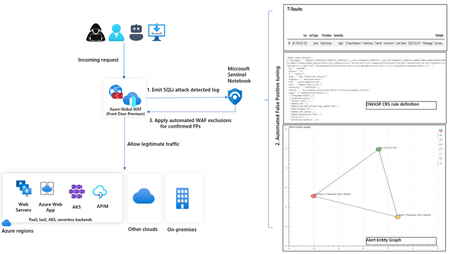
In this blog, we introduce you to the Azure WAF guided investigation Notebook using Microsoft Sentinel, which lets you investigate an Azure WAF triggered SQL injection attack event log. This Azure WAF Notebook queries incidents related to Azure WAF SQL injection events in your Microsoft Sentinel workspace. In addition to guiding you through the Azure WAF SQL injection incidents, the Notebook correlates the incidents with Threat Intelligence, maps them to the Sentinel entity graph, and gives you a complete picture of the attack landscape. Furthermore, it will guide you through an investigation experience to determine if the incident is a true positive, false positive or benign positive using Azure WAF raw logs. Upon confirmation of a false positive, the Azure WAF exclusions are applied automatically using Azure WAF APIs.11KViews2likes2Comments
Agent 365 connector: Monitor, hunt, and investigate AI agent activity in Microsoft Sentinel
As enterprises scale the use of AI agents, SOC teams need visibility into AI agent behavior. The Agent 365 connector, now in public preview, streams rich agent telemetry from Agent 365 into Microsoft Sentinel data lake. Agent activity, such as agent data exposure or access drift, is surfaced alongside other security data, giving SOC teams a unified view across digital environments. AI Agent actions are correlated with agent identity, endpoint, and cloud signals, enabling analysts to run end‑to‑end investigations using KQL, graph, and MCP-powered workflows. Why this matters for organizations By centralizing security and AI agent telemetry in Sentinel data lake, organizations establish a unified control plane for securing AI agents. This enables security teams to analyze agent activity in context with broader signals and investigate using familiar Sentinel tools. This unlocks the ability for SOCs to detect risky or anomalous agent behavior early, understand impact quickly, and respond with speed and confidence. As AI agents take on real operational responsibility, this level of visibility is critical to prevent blind spots, reduce risk, and ensure agents operate safely at enterprise scale. End‑to‑end visibility into AI agent behavior: A centralized view of AI agent behavior allows AI agents to be treated as first-class entities alongside users, identities, endpoints, and workloads. Advanced hunting with KQL: Hunt using KQL to proactively uncover unusual AI agent execution patterns, sensitive actions, or activity without clear human context. These hunts help surface potential risk early using the same workflows already used for other security data. Analyzing blast radius and impact with Sentinel graph: Security teams can correlate AI agent activity with identities, endpoints, and cloud resources to understand blast radius and potential impact during an investigation. By pivoting across related entities in Sentinel, analysts can assess how agent actions connect to the broader environment and support deeper, end‑to‑end investigations. Querying agent data through MCP: Use MCP to surface agent observability data through AI assistants, letting analysts pull agent telemetry into investigation workflows alongside other Sentinel data. Agent 365 connector key capabilities Install the Agent 365 connector with a single click using Sentinel Content Hub in the Defender portal. Once enabled, two capabilities come online automatically: Unified agent telemetry across Agent 365 agent experiences: Rich Agent 365 agent telemetry streams into Sentinel data lake, ready to analyze alongside identity, endpoint, and cloud signals using familiar SOC workflows. ASIM unified schema for AI agent observability: Agent 365 agent observability data is normalized into an ASIM-aligned schema so it is consistent, queryable, and ready for analytics and detections. With the connector in place, Sentinel data lake becomes the system of record and the control plane for Agent 365 agent security—turning agent behavior into first-class security signals across SecOps workflows like hunting, investigation, detection engineering, and response. Use cases Prevent sensitive data exposure from misconfigured agents When an AI agent is granted broader access than intended, a crafted prompt could override safeguards and expose confidential data. With agent telemetry, security teams can trace the full execution path—from prompt to tools to data access—to quickly identify the root cause and contain the exposure. Detect and control agent access drift over time As agents take on new tasks, their permissions can expand beyond the original scope, often without clear visibility. Agent telemetry enables continuous behavioral baselining, making it easier to spot abnormal access patterns early and prevent privilege misuse before it escalates. Uncover hidden lateral movement across agent workflows Agents often collaborate and delegate tasks across systems, creating complex chains of execution that are difficult to track. Agent telemetry provides visibility into these interactions, mapping delegation paths and helping teams understand and limit the potential blast radius. Defend against prompt injection and manipulation attacks Attackers can craft prompts to override agent instructions and manipulate behavior. By capturing prompts and reasoning flows, agent telemetry enables detection of these attacks and provides the context needed to investigate and remediate quickly. Accelerate SOC investigations with end-to-end visibility When an agent is involved in a security alert, understanding its actions can be challenging. Agent telemetry correlates prompts, identities, tools, and data access into a unified timeline, giving SOC teams the clarity needed to investigate faster and respond with confidence. Strengthen governance and compliance for AI agents Organizations need visibility into what agents exist and what data they can access. Agent telemetry provides a comprehensive audit trail of agent activity and access patterns, supporting compliance reporting and policy enforcement. Enable proactive threat hunting on agent behavior Security teams need to stay ahead of emerging risks as agent usage grows. Agent telemetry enables advanced hunting across agent activity, helping detect anomalies, uncover patterns, and identify threats before they impact the organization. Get started with Agent 365 connector Getting started is straightforward. In the Microsoft Defender portal, navigate to Microsoft Sentinel Open Content hub and search for Agent 365 Install the Agent 365 Connector (if not already installed) Open the connector page and select Connect to begin ingestion Once connected, AI agent telemetry starts flowing into Sentinel, ready for hunting, investigation, and response. Data ingestion and analytics are billed using existing Sentinel meters. Learn more Find the Agent 365 data connector | Microsoft Learn Discover and manage Sentinel out-of-the-box content | Microsoft Learn Connect data sources to Sentinel by using data connectors | Microsoft Learn Sample KQL queries for Sentinel data lake | Microsoft Learn Watch the Sentinel data lake video playlist | Microsoft Security Get started with Sentinel data lake | Microsoft Learn1.9KViews1like0CommentsMicrosoft Ignite 2025: Transforming Phishing Response with Agentic Innovation
Phishing attacks remain one of the most persistent and damaging threats to organizations worldwide. Security teams are under constant pressure to investigate a growing number of user reported phishing emails daily, ensuring accurate verdicts and timely responses. As threats grow in volume and sophistication, SOC teams are forced to spend valuable time triaging and investigating, often at the expense of strategic defense and proactive threat hunting. At Microsoft Ignite 2025 we are delivering innovation that showcases our continued commitment to infuse AI agents, and agentic workflows into the core of our email security solution and SOC operations to automate repetitive tasks, accelerate investigations, and provide transparent, actionable insights for every reported phishing email. In addition, we continue to invest in our ecosystem partnerships to empower customers with seamless integrations, as they adopt layered security solutions to comply with regulatory requirements, enhance detection, and ensure robust protection. Today I’m excited to announce: General Availability of the Security Alert Triage Agent (previously named Phishing Triage Agent) Agentic Email Grading System in Microsoft Defender Cisco and VIPRE Security Group join the Microsoft Defender ICES ecosystem Note: The Phishing Triage Agent has since been expanded and is now called the Security Alert Triage Agent. Learn more at aka.ms/SATA The Security Alert Triage Agent is now generally available In March 2025, we introduced the Security Alert Triage Agent, designed to autonomously handle user-submitted phishing reports at scale. The agent classifies incoming alerts, resolves false positives, and escalates only the malicious cases that require human expertise. Today, we’re announcing its general availability. We will also be extending the agent to triage alerts for identity and cloud alerts. The Security Alert Triage Agent automates repetitive tasks, accelerates investigations, and every decision is transparent, allowing security teams to focus on what matters most—investigating real threats and strengthening the overall security posture. Early results prove how it is transforming analyst work: Identified 6.5X more malicious alerts Improved verdict accuracy by 77% Agent supported analysts spent 53% more time investigating real threats Agentic email grading: Advanced analysis of phishing email submissions When customers report suspicious messages to Microsoft, they expect clarity, speed, and actionable insights to protect their environment. They expect a response they can trust, understand easily, and take additional investigation and response action for the organization. Previously, when customers reported messages to Microsoft, our response depended largely on manual human grader reviews, creating delays and inconsistent verdicts. Customers often waited several hours for a response, and sometimes it lacked clarity on how a verdict was reached. Today, we are excited to announce that we integrated an agentic grading system into the Microsoft Defender submission analysis and response workflow when customers report phishing messages to Microsoft. Image 2: Agentic Email Grading: Advanced analysis of phishing email submissions The agentic grading system brings a new level of speed and transparency to phishing analysis. It uses large language models (LLMs) orchestrated within an agentic workflow to analyze phishing emails, assess the full content of a submitted email, and communicate context and related metadata. This system combines advanced AI with existing machine learning models and human review for additional levels of accuracy and transparency for decision making. Every verdict comes with higher quality, clear verdicts, and context-rich explanations tailored to each phishing email submission. Additionally, it establishes a feedback mechanism that enhances continuous learning and self-healing, thereby strengthening and optimizing protection over time. By reducing reliance on manual reviews, users will experience lower wait times, faster responses and higher-quality results. It will enable security teams to respond promptly and act confidently against phishing threats. Over time we plan to expand beyond phishing verdicts to include spam, scam, bulk, and clean classifications, making the process more comprehensive. The system will continue to evolve through feedback and adapt to emerging attack patterns. How to view agentic submission responses in Microsoft Defender When you report a suspicious email—whether as an admin or an end user—you can now see how Microsoft Defender’s new agentic grading system evaluates your submission. To view agentic grading system responses, follow the steps below: Report the suspicious email Submit the email through the admin submission or user-reported submission process. Sign in to Microsoft Defender Go to https://security.microsoft.com. Navigate to Submissions From the left menu, select: Investigation & response > Actions & submissions > Submissions. Choose the correct tab Emails for admin submissions User reported for user submissions Open the submission details Click the email submission you want to review. A flyout panel will display Result details. Look for the Agentic AI note If the verdict was generated by Agentic AI, you’ll see: “AI-generated content may be incorrect. Check it for accuracy.” Image 3: AI generated explainable verdicts Expanding the Integrated Cloud Email Security (ICES) ecosystem In June, we introduced the Microsoft Defender ICES vendor ecosystem, a unified framework that enables seamless integration of Microsoft’s Defender’s email security solution with trusted third-party vendors. Today we are excited to announce two new partners: Cisco and VIPRE Security Group. The addition of these partners to our ecosystem reinforces our ongoing commitment to support customers in their choice to strategically layer their email security solutions. Organizations benefit from a unified quarantine experience, and a deep integration across the various SOC experiences including threat explorer, advanced hunting, and the email entity page, while providing clear insight into detection efficacy of each solution. As we continue to innovate, our commitment remains steadfast: empowering defenders with intelligent, transparent, and integrated security solutions that adapt to the evolving threat landscape. By infusing agentic AI into every layer of Microsoft Defender, expanding our ecosystem of trusted partners, and delivering faster, more actionable insights, we’re helping organizations build resilience and stay ahead of attackers. Our strategy is rooted in delivering real value making security simpler, more effective, and adapted to the needs of every customer. Learn More: Want to know what else is new in Microsoft Defender at Ignite 2025 check out the blog here. For info on how to complete admin phish submissions, please see For end user reported phish submissions, you need to have it configured for reporting messages to Microsoft. Set it up today. Join us at Microsoft Ignite Join us at Microsoft Ignite to see these advancements in action and discover how intelligent, agentic defense is becoming accessible to every organization. Don’t miss our featured sessions: AI vs AI: Protect email and collaboration tools with Microsoft Defender on Thursday, November 20 th . Learn More. Microsoft Defender: Building the agentic SOC with guest Allie Mellen on Wednesday, November 19 th . Learn more. Empowering the SOC: Security Copilot and the rise of Agentic Defense on Friday, November 21 st . Learn more.