azure kubernetes service
223 TopicsAnnouncing general availability for the Azure SRE Agent
Today, we’re excited to announce the General Availability (GA) of Azure SRE Agent— your AI‑powered operations teammate that helps organizations improve uptime, reduce incident impact, and cut operational toil by accelerating diagnosis and automating response workflows.11KViews1like1CommentAnnouncing a flexible, predictable billing model for Azure SRE Agent
Billing for Azure SRE Agent will start on September 1, 2025. Announced at Microsoft Build 2025, Azure SRE Agent is a pre-built AI agent for root cause analysis, uptime improvement, and operational cost reduction. Learn more about the billing model and example scenarios.4.1KViews1like1CommentThe Durable Task Scheduler Consumption SKU is now Generally Available
Today, we're excited to announce that the Durable Task Scheduler Consumption SKU has reached General Availability. Developers can now run durable workflows and agents on Azure with pay-per-use pricing, no storage to manage, no capacity to plan, and no idle costs. Just create a scheduler, connect your app, and start orchestrating. Whether you're coordinating AI agent workflows, processing event-driven pipelines, or running background jobs, the Consumption SKU is ready to go. GET STARTED WITH THE DURABLE TASK SCHEDULER CONSUMPTION SKU Since launching the Consumption SKU in public preview last November, we've seen incredible adoption and have incorporated feedback from developers around the world to ensure the GA release is truly production ready. “The Durable Task Scheduler has become a foundational piece of what we call ‘workflows’. It gives us the reliability guarantees we need for processing financial documents and sensitive workflows, while keeping the programming model straightforward. The combination of durable execution, external event correlation, deterministic idempotency, and the local emulator experience has made it a natural fit for our event-driven architecture. We have been delighted with the consumption SKUs cost model for our lower environments.”– Emily Lewis, CarMax What is the Durable Task Scheduler? If you're new to the Durable Task Scheduler, we recommend checking out our previous blog posts for a detailed background: Announcing Limited Early Access of the Durable Task Scheduler Announcing Workflow in Azure Container Apps with the Durable Task Scheduler Announcing Dedicated SKU GA & Consumption SKU Public Preview In brief, the Durable Task Scheduler is a fully managed orchestration backend for durable execution on Azure, meaning your workflows and agent sessions can reliably resume and run to completion, even through process failures, restarts, and scaling events. Whether you’re running workflows or orchestrating durable agents, it handles task scheduling, state persistence, fault tolerance, and built-in monitoring, freeing developers from the operational overhead of managing their own execution engines and storage backends. The Durable Task Scheduler works across Azure compute environments: Azure Functions: Using the Durable Functions extension across all Function App SKUs, including Flex Consumption. Azure Container Apps: Using the Durable Functions or Durable Task SDKs with built-in workflow support and auto-scaling. Any compute: Azure Kubernetes Service, Azure App Service, or any environment where you can run the Durable Task SDKs (.NET, Python, Java, JavaScript). Why choose the Consumption SKU? With the Consumption SKU you’re charged only for actions dispatched, with no minimum commitments or idle costs. There’s no capacity to size or throughput to reserve. Create a scheduler, connect your app, and you’re running. The Consumption SKU is a natural fit for workloads with unpredictable or bursty usage patterns: AI agent orchestration: Multi-step agent workflows that call LLMs, retrieve data, and take actions. Users trigger these on demand, so volume is spiky and pay-per-use avoids idle costs between bursts. Event-driven pipelines: Processing events from queues, webhooks, or streams with reliable orchestration and automatic checkpointing, where volumes spike and dip unpredictably. API-triggered workflows: User signups, form submissions, payment flows, and other request-driven processing where volume varies throughout the day. Distributed transactions: Retries and compensation logic across microservices with durable sagas that survive failures and restarts. What's included in the Consumption SKU at GA The Consumption SKU has been hardened based on feedback and real-world usage during the public preview. Here's what's included at GA: Performance Up to 500 actions per second: Sufficient throughput for a wide range of workloads, with the option to move to the Dedicated SKU for higher-scale scenarios. Up to 30 days of data retention: View and manage orchestration history, debug failures, and audit execution data for up to 30 days. Built-in monitoring dashboard Filter orchestrations by status, drill into execution history, view visual Gantt and sequence charts, and manage orchestrations (pause, resume, terminate, or raise events), all from the dashboard, secured with Role-Based Access Control (RBAC). Identity-based security The Consumption SKU uses Entra ID for authentication and RBAC for authorization. No SAS tokens or access keys to manage, just assign the appropriate role and connect. Get started with the Durable Task Scheduler today The Consumption SKU is available now Generally Available. Provision a scheduler in the Azure portal, connect your app, and start orchestrating. You only pay for what you use. Documentation Getting started Samples Pricing Consumption SKU docs We'd love to hear your feedback. Reach out to us by filing an issue on our GitHub repository174Views0likes0CommentsBuilding the agentic future together at JDConf 2026
JDConf 2026 is just weeks away, and I’m excited to welcome Java developers, architects, and engineering leaders from around the world for two days of learning and connection. Now in its sixth year, JDConf has become a place where the Java community compares notes on their real-world production experience: patterns, tooling, and hard-earned lessons you can take back to your team, while we keep moving the Java systems that run businesses and services forward in the AI era. This year’s program lines up with a shift many of us are seeing first-hand: delivery is getting more intelligent, more automated, and more tightly coupled to the systems and data we already own. Agentic approaches are moving from demos to backlog items, and that raises practical questions: what’s the right architecture, where do you draw trust boundaries, how do you keep secrets safe, and how do you ship without trading reliability for novelty? JDConf is for and by the people who build and manage the mission-critical apps powering organizations worldwide. Across three regional livestreams, you’ll hear from open source and enterprise practitioners who are making the same tradeoffs you are—velocity vs. safety, modernization vs. continuity, experimentation vs. operational excellence. Expect sessions that go beyond “what” and get into “how”: design choices, integration patterns, migration steps, and the guardrails that make AI features safe to run in production. You’ll find several practical themes for shipping Java in the AI era: connecting agents to enterprise systems with clear governance; frameworks and runtimes adapting to AI-native workloads; and how testing and delivery pipelines evolve as automation gets more capable. To make this more concrete, a sampling of sessions would include topics like Secrets of Agentic Memory Management (patterns for short- and long-term memory and safe retrieval), Modernizing a Java App with GitHub Copilot (end-to-end upgrade and migration with AI-powered technologies), and Docker Sandboxes for AI Agents (guardrails for running agent workflows without risking your filesystem or secrets). The goal is to help you adopt what’s new while hardening your long lived codebases. JDConf is built for community learning—free to attend, accessible worldwide, and designed for an interactive live experience in three time zones. You’ll not only get 23 practitioner-led sessions with production-ready guidance but also free on-demand access after the event to re-watch with your whole team. Pro tip: join live and get more value by discussing practical implications and ideas with your peers in the chat. This is where the “how” details and tradeoffs become clearer. JDConf 2026 Keynote Building the Agentic Future Together Rod Johnson, Embabel | Bruno Borges, Microsoft | Ayan Gupta, Microsoft The JDConf 2026 keynote features Rod Johnson, creator of the Spring Framework and founder of Embabel, joined by Bruno Borges and Ayan Gupta to explore where the Java ecosystem is headed in the agentic era. Expect a practitioner-level discussion on how frameworks like Spring continue to evolve, how MCP is changing the way agents interact with enterprise systems, and what Java developers should be paying attention to right now. Register. Attend. Earn. Register for JDConf 2026 to earn Microsoft Rewards points, which you can use for gift cards, sweepstakes entries, and more. Earn 1,000 points simply by signing up. When you register for any regional JDConf 2026 event with your Microsoft account, you'll automatically receive these points. Get 5,000 additional points for attending live (limited to the first 300 attendees per stream). On the day of your regional event, check in through the Reactor page or your email confirmation link to qualify. Disclaimer: Points are added to your Microsoft account within 60 days after the event. Must register with a Microsoft account email. Up to 10,000 developers eligible. Points will be applied upon registration and attendance and will not be counted multiple times for registering or attending at different events. Terms | Privacy JDConf 2026 Regional Live Streams Americas – April 8, 8:30 AM – 12:30 PM PDT (UTC -7) Bruno Borges hosts the Americas stream, discussing practical agentic Java topics like memory management, multi-agent system design, LLM integration, modernization with AI, and dependency security. Experts from Redis, IBM, Hammerspace, HeroDevs, AI Collective, Tekskills, and Microsoft share their insights. Register for Americas → Asia-Pacific – April 9, 10:00 AM – 2:00 PM SGT (UTC +8) Brian Benz and Ayan Gupta co-host the APAC stream, highlighting Java frameworks and practices for agentic delivery. Topics include Spring AI, multi-agent orchestration, spec-driven development, scalable DevOps, and legacy modernization, with speakers from Broadcom, Alibaba, CERN, MHP (A Porsche Company), and Microsoft. Register for Asia-Pacific → Europe, Middle East and Africa – April 9, 9:00 AM – 12:30 PM GMT (UTC +0) The EMEA stream, hosted by Sandra Ahlgrimm, will address the implementation of agentic Java in production environments. Topics include self-improving systems utilizing Spring AI, Docker sandboxes for agent workflow management, Retrieval-Augmented Generation (RAG) pipelines, modernization initiatives from a national tax authority, and AI-driven CI/CD enhancements. Presentations will feature experts from Broadcom, Docker, Elastic, Azul Systems, IBM, Team Rockstars IT, and Microsoft. Register for EMEA → Make It Interactive: Join Live Come prepared with an actual challenge you’re facing, whether you’re modernizing a legacy application, connecting agents to internal APIs, or refining CI/CD processes. Test your strategies by participating in live chats and Q&As with presenters and fellow professionals. If you’re attending with your team, schedule a debrief after the live stream to discuss how to quickly use key takeaways and insights in your pilots and projects. Learning Resources Java and AI for Beginners Video Series: Practical, episode-based walkthroughs on MCP, GenAI integration, and building AI-powered apps from scratch. Modernize Java Apps Guide: Step-by-step guide using GitHub Copilot agent mode for legacy Java project upgrades, automated fixes, and cloud-ready migrations. AI Agents for Java Webinar: Embedding AI Agent capabilities into Java applications using Microsoft Foundry, from project setup to production deployment. Java Practitioner’s Guide: Learning plan for deploying, managing, and optimizing Java applications on Azure using modern cloud-native approaches. Register Now JDConf 2026 is a free global event for Java teams. Join live to ask questions, connect, and gain practical patterns. All 23 sessions will be available on-demand. Register now to earn Microsoft Rewards points for attending. Register at JDConf.com158Views0likes0CommentsUnit Testing Helm Charts with Terratest: A Pattern Guide for Type-Safe Validation
Helm charts are the de facto standard for packaging Kubernetes applications. But here's a question worth asking: how do you know your chart actually produces the manifests you expect, across every environment, before it reaches a cluster? If you're like most teams, the answer is some combination of helm template eyeball checks, catching issues in staging, or hoping for the best. That's slow, error-prone, and doesn't scale. In this post, we'll walk through a better way: a render-and-assert approach to unit testing Helm charts using Terratest and Go. The result? Type-safe, automated tests that run locally in seconds with no cluster required. The Problem Let's start with why this matters. Helm charts are templates that produce YAML, and templates have logic: conditionals, loops, value overrides per environment. That logic can break silently: A values-prod.yaml override points to the wrong container registry A security context gets removed during a refactor and nobody notices An ingress host is correct in dev but wrong in production HPA scaling bounds are accidentally swapped between environments Label selectors drift out of alignment with pod templates, causing orphaned ReplicaSets These aren't hypothetical scenarios. They're real bugs that slip through helm lint and code review because those tools don't understand what your chart should produce. They only check whether the YAML is syntactically valid. These bugs surface at deploy time, or worse, in production. So how do we catch them earlier? The Approach: Render and Assert The idea is straightforward. Instead of deploying to a cluster to see if things work, we render the chart locally and validate the output programmatically. Here's the three-step model: Render: Terratest calls helm template with your base values.yaml + an environment-specific values-<env>.yaml override Unmarshal: The rendered YAML is deserialized into real Kubernetes API structs (appsV1.Deployment, coreV1.ConfigMap, networkingV1.Ingress, etc.) Assert: Testify assertions validate every field that matters, including names, labels, security context, probes, resource limits, ingress routing, and more No cluster. No mocks. No flaky integration tests. Just fast, deterministic validation of your chart's output. Here's what that looks like in practice: // Arrange options := &helm.Options{ ValuesFiles: s.valuesFiles, } output := helm.RenderTemplate(s.T(), options, s.chartPath, s.releaseName, s.templates) // Act var deployment appsV1.Deployment helm.UnmarshalK8SYaml(s.T(), output, &deployment) // Assert: security context is hardened secCtx := deployment.Spec.Template.Spec.Containers[0].SecurityContext require.Equal(s.T(), int64(1000), *secCtx.RunAsUser) require.True(s.T(), *secCtx.RunAsNonRoot) require.True(s.T(), *secCtx.ReadOnlyRootFilesystem) require.False(s.T(), *secCtx.AllowPrivilegeEscalation) Notice something important here: because you're working with real Go structs, the compiler catches schema errors. If you typo a field path like secCtx.RunAsUsr, the code won't compile. With YAML-based assertion tools, that same typo would fail silently at runtime. This type safety is a big deal when you're validating complex resources like Deployments. What to Test: 16 Patterns Across 6 Categories That covers the how. But what should you actually assert? Through applying this approach across multiple charts, we've identified 16 test patterns that consistently catch real bugs. They fall into six categories: Category What Gets Validated Identity & Labels Resource names, 5 standard Helm/K8s labels, selector alignment Configuration Environment-specific configmap data, env var injection Container Image registry per env, ports, resource requests/limits Security Non-root user, read-only FS, dropped capabilities, AppArmor, seccomp, SA token automount Reliability Startup/liveness/readiness probes, volume mounts Networking & Scaling Ingress hosts/TLS per env, service port wiring, HPA bounds per env You don't need all 16 on day one. Start with resource name and label validation, since those apply to every resource and catch the most common _helpers.tpl bugs. Then add security and environment-specific patterns as your coverage grows. Now, let's look at how to structure these tests to handle the trickiest part: multiple environments. Multi-Environment Testing One of the most common Helm chart bugs is environment drift, where values that are correct in dev are wrong in production. A single test suite that only validates one set of values will miss these entirely. The solution is to maintain separate test suites per environment: tests/unit/my-chart/ ├── dev/ ← Asserts against values.yaml + values-dev.yaml ├── test/ ← Asserts against values.yaml + values-test.yaml └── prod/ ← Asserts against values.yaml + values-prod.yaml Each environment's tests assert the merged result of values.yaml + values-<env>.yaml. So when your values-prod.yaml overrides the container registry to prod.azurecr.io, the prod tests verify exactly that, while the dev tests verify dev.azurecr.io. This structure catches a class of bugs that no other approach does: "it works in dev" issues where an environment-specific override has a typo, a missing field, or an outdated value. But environment-specific configuration isn't the only thing worth testing per commit. Let's talk about security. Security as Code Security controls in Kubernetes manifests are notoriously easy to weaken by accident. Someone refactors a deployment template, removes a securityContext block they think is unused, and suddenly your containers are running as root in production. No linter catches this. No code reviewer is going to diff every field of a rendered manifest. With this approach, you encode your security posture directly into your test suite. Every deployment test should validate: Container runs as non-root (UID 1000) Root filesystem is read-only All Linux capabilities are dropped Privilege escalation is blocked AppArmor profile is set to runtime/default Seccomp profile is set to RuntimeDefault Service account token automount is disabled If someone removes a security control during a refactor, the test fails immediately, not after a security review weeks later. Security becomes a CI gate, not a review checklist. With patterns and environments covered, the next question is: how do you wire this into your CI/CD pipeline? CI/CD Integration with Azure DevOps These tests integrate naturally into Azure DevOps pipelines. Since they're just Go tests that call helm template under the hood, all you need is a Helm CLI and a Go runtime on your build agent. A typical multi-stage pipeline looks like: stages: - stage: Build # Package the Helm chart - stage: Dev # Lint + test against values-dev.yaml - stage: Test # Lint + test against values-test.yaml - stage: Production # Lint + test against values-prod.yaml Each stage uses a shared template that installs Helm and Go, extracts the packaged chart, runs helm lint, and executes the Go tests with gotestsum. Environment gates ensure production tests pass before deployment proceeds. Here's the key part of a reusable test template: - script: | export PATH=$PATH:/usr/local/go/bin:$(go env GOPATH)/bin go install gotest.tools/gotestsum@latest cd $(Pipeline.Workspace)/helm.artifact/tests/unit gotestsum --format testname --junitfile $(Agent.TempDirectory)/test-results.xml \ -- ./${{ parameters.helmTestPath }}/... -count=1 -timeout 50m displayName: 'Test helm chart' env: HELM_RELEASE_NAME: ${{ parameters.helmReleaseName }} HELM_VALUES_FILE_OVERRIDE: ${{ parameters.helmValuesFileOverride }} - task: PublishTestResults@2 displayName: 'Publish test results' inputs: testResultsFormat: 'JUnit' testResultsFiles: '$(Agent.TempDirectory)/test-results.xml' condition: always() The PublishTestResults@2 task makes pass/fail results visible on the build's Tests tab, showing individual test names, durations, and failure details. The condition: always() ensures results are published even when tests fail, so you always have visibility. At this point you might be wondering: why Go and Terratest? Why not a simpler YAML-based tool? Why Terratest + Go Instead of helm-unittest? helm-unittest is a popular YAML-based alternative, and it's a fair question. Both tools are valid. Here's why we landed on Terratest: Terratest + Go helm-unittest (YAML) Type safety Renders into real K8s API structs; compiler catches schema errors String matching on raw YAML; typos in field paths fail silently Language features Loops, conditionals, shared setup, table-driven tests Limited to YAML assertion DSL Debugging Standard Go debugger, stack traces YAML diff output only Ecosystem alignment Same language as Terraform tests, one testing stack Separate tool, YAML-only The type safety argument is the strongest. When you unmarshal into appsV1.Deployment, the Go compiler guarantees your assertions reference real fields. With helm-unittest, a YAML path like spec.template.spec.containers[0].securityContest (note the typo) would silently pass because it matches nothing, rather than failing loudly. That said, if your team has no Go experience and needs the lowest adoption barrier, helm-unittest is a reasonable starting point. For teams already using Go or Terraform, Terratest is the stronger long-term choice. Getting Started Ready to try this? Here's a minimal project structure to get you going: your-repo/ ├── charts/ │ └── your-chart/ │ ├── Chart.yaml │ ├── values.yaml │ ├── values-dev.yaml │ ├── values-test.yaml │ ├── values-prod.yaml │ └── templates/ ├── tests/ │ └── unit/ │ ├── go.mod │ └── your-chart/ │ ├── dev/ │ ├── test/ │ └── prod/ └── Makefile Prerequisites: Go 1.22+, Helm 3.14+ You'll need three Go module dependencies: github.com/gruntwork-io/terratest v0.46.16 github.com/stretchr/testify v1.8.4 k8s.io/api v0.28.4 Initialize your test module, write your first test using the patterns above, and run: cd tests/unit HELM_RELEASE_NAME=your-chart \ HELM_VALUES_FILE_OVERRIDE=values-dev.yaml \ go test -v ./your-chart/dev/... -timeout 30m Start with a ConfigMap test. It's the simplest resource type and lets you validate the full render-unmarshal-assert flow before tackling Deployments. Once that passes, work your way through the pattern categories, adding security and environment-specific assertions as you go. Wrapping Up Unit testing Helm charts with Terratest gives you something that helm lint and manual review can't: Type-safe validation: The compiler catches schema errors, not production Environment-specific coverage: Each environment's values are tested independently Security as code: Security controls are verified on every commit, not in periodic reviews Fast feedback: Tests run in seconds with no cluster required CI/CD integration: JUnit results published natively to Azure DevOps The patterns we've covered here are the ones that have caught the most real bugs for us. Start small with resource names and labels, and expand from there. The investment is modest, and the first time a test catches a broken values-prod.yaml override before it reaches production, it'll pay for itself. We'd Love Your Feedback We'd love to hear how this approach works for your team: Which patterns were most useful for your charts? What resource types or patterns are missing? How did the adoption experience go? Drop a comment below. Happy to dig into any of these topics further!209Views0likes0CommentsBuilding an Enterprise Platform for Inference at Scale
Architecture Decisions With the optimization stack in place, the next layer of decisions is architectural — how you distribute compute across GPUs, nodes, and deployment environments to match your model size and traffic profile. GPU Parallelism Strategy on AKS Strategy How It Works When to Use Tradeoff Tensor Parallelism Splits weight matrices within each layer across GPUs (intra-layer sharding); all GPUs participate in every forward pass. Model exceeds single-GPU memory (e.g., 70B on A100 GPUs once weights, KV cache, runtime overhead are included) Inter-GPU communication overhead; requires fast interconnects (NVLink on ND-series) — costly to scale beyond a single node without them Pipeline Parallelism Distributes layers sequentially across nodes, with each stage processing part of the model Model exceeds single-node GPU memory — typically unquantized deployments beyond ~70–100B depending on node GPU count and memory Pipeline “bubbles” reduce utilization. Pipeline parallelism is unfriendly to small batches Data Parallelism Replicates full model across GPUs Scaling throughput / QPS on AKS node pools Memory-inefficient (full copy per replica); only strategy that scales throughput linearly Combined Tensor within node + Pipeline across nodes + Data for throughput scaling Production at scale on AKS — for any model requiring multi-node deployment, combine TP within each node and PP across nodes Complexity; standard for large deployments When a model can be quantized to fit a single GPU or a single node, the performance and cost benefits of avoiding cross-node communication are substantial. When quality permits, quantize before introducing distributed sharding, because fitting on a single GPU or single node often delivers the best latency and cost profile. If the model still doesn't fit after quantization, tensor parallelism across GPUs within a single node is the next step — keeping communication on fast intra-node interconnects like NVLink. Once the model fits, scale throughput through data parallelism. Pipeline parallelism across nodes is a last resort: it introduces cross-node communication overhead and pipeline bubbles that hurt latency at inference batch sizes. In practice, implementing combined parallelism requires coordinating placement of model shards across nodes, managing inter-GPU communication, and ensuring that scaling decisions don't break shard assignments. Anyscale on Azure handles this orchestration layer through Ray's distributed scheduling primitives — specifically placement groups, which allow tensor-parallel shards to be co-located within a node while data-parallel replicas scale independently across node pools. The result is that teams get the throughput benefits of combined parallelism without building and maintaining the scheduling logic themselves. Deployment Topology Parallelism strategy determines how you use GPUs inside a deployment. Topology determines where those deployments run. Cloud (AKS) offers flexibility and elastic scaling across Azure GPU SKUs (ND GB200-v6, ND H100 v5, NC A100 v4). Anyscale on Azure adds managed Ray clusters that run inside the customer’s AKS environment, with Azure billing integration, Microsoft Entra ID integration, and connectivity to Azure storage services. Edge enables ultra-low latency, avoids per-query cloud inference cost, and supports local data residency—critical in environments such as manufacturing, healthcare, and retail Hybrid is the pragmatic default for most enterprises. Sensitive data stays local with small quantized models; complex analysis routes to AKS. Azure Arc can extend governance across hybrid deployments. Across all three deployment patterns — cloud, edge, and hybrid — the operational challenge is consistent: managing distributed inference workloads without fragmenting your control plane. Anyscale on AKS addresses this directly. In pure cloud deployments, it provides managed Ray clusters inside your own Azure subscription, eliminating the need to operate Ray infrastructure yourself. In hybrid architectures, Ray clusters on AKS serve as the cloud leg, with Azure Arc extending Azure RBAC, Azure policy for governance, and centralized audit logging to Arc-enabled servers/Kubernetes clusters on the edge infrastructure. The result is a single operational model regardless of where inference is actually executing: scheduling, scaling, and observability are handled by Ray, the network boundary stays inside your Azure environment, and the governance layer stays consistent across locations. Teams that would otherwise maintain separate orchestration stacks for cloud and edge workloads can run both through a unified Ray deployment managed by Anyscale. The Enterprise Platform — Security, Compliance, and Governance on AKS The optimizations in this series — quantization, continuous batching, disaggregated inference, MIG partitioning — all assume a platform that meets enterprise requirements for security, compliance, and data governance. Without that foundation, none of the performance work matters. A fraud detection model that leaks customer data is not “cost-efficient.” An inference endpoint exposed to the public internet is not “low-latency.” The platform has to be solid before the optimizations can be useful. Self-hosting inference on AKS provides that foundation. Every inference request — input prompts, output tokens, KV cache, model weights, fine-tuning data — stays inside the customer’s own Azure subscription and virtual network. Data never traverses third-party infrastructure. This eliminates an entire class of data residency and sovereignty concerns that hosted API services cannot address by design. Network Isolation and Access Control AKS supports private clusters in which the Kubernetes API server is exposed through Azure Private Link rather than a public endpoint, limiting API-server access to approved private network paths. All traffic between the API server and GPU node pools stays internal. Network Security Groups (NSGs), Azure Firewall, and Kubernetes network policies enforced through Azure CNI powered by Cilium can restrict traffic between pods, namespaces, and external endpoints, enabling micro-segmentation between inference workloads. Microsoft Entra ID integration with Kubernetes RBAC handles enterprise identity management: SSO, group-based role assignments, and automatic permission updates when team membership changes. Managed identities eliminate credentials in application code. Azure Key Vault stores secrets, certificates, and API keys with hardware-backed encryption. The Anyscale on Azure integration inherits this entire stack. Workloads run inside the customer’s AKS cluster — with Entra ID authentication, Azure Blob storage connectivity via private endpoints, and unified Azure billing. There is no separate Anyscale-controlled infrastructure to audit or secure. The Metrics That Determine Profitability Metric What It Measures Why It Matters Tokens/second/GPU Raw hardware throughput Helps you understand how much work each GPU can do and supports capacity planning on AKS GPU node pools Tokens/GPU-hour Unit economics Tokens generated per Azure VM billing hour — the number your CFO cares about P95 / P99 latency Tail latency Shows the experience of slower requests, which matters more than averages in real production systems. GPU utilization % Paid vs. used Azure GPU capacity Low utilization means you are paying for expensive GPU capacity that is sitting idle or underused. Output-to-input token ratio Generation cost ratio Higher output ratios increase generation time and reduce how many requests each GPU can serve per hour. KV cache hit rate Context reuse efficiency Low hit rates mean more recomputation of prior context, which increases latency and cost. Product design directly affects inference economics. Defaulting to verbose responses when concise ones suffice consumes more GPU cycles per request, reducing how many requests each GPU can serve per hour. Conclusion Base model intelligence is increasingly commoditized. Inference efficiency compounds. Organizations that treat inference as a first-class engineering and financial discipline win. By deliberately managing the accuracy–latency–cost tradeoff and tracking tokens per GPU-hour like a core unit metric, they deploy AI cheaper, scale faster, and protect margins as usage grows. Links: Strategic partnership: Powering Distributed AI/ML at Scale with Azure and Anyscale | All things Azure Part 1: Inference at Enterprise Scale: Why LLM Inference Is a Capital Allocation Problem | Microsoft Community Hub Part 2: The LLM Inference Optimization Stack: A Prioritized Playbook for Enterprise Teams | Microsoft Community Hub Part 3: (this one)288Views0likes0Comments
Migrating to the next generation of Virtual Nodes on Azure Container Instances (ACI)
What is ACI/Virtual Nodes? Azure Container Instances (ACI) is a fully-managed serverless container platform which gives you the ability to run containers on-demand without provisioning infrastructure. Virtual Nodes on ACI allows you to run Kubernetes pods managed by an AKS cluster in a serverless way on ACI instead of traditional VM‑backed node pools. From a developer’s perspective, Virtual Nodes look just like regular Kubernetes nodes, but under the hood the pods are executed on ACI’s serverless infrastructure, enabling fast scale‑out without waiting for new VMs to be provisioned. This makes Virtual Nodes ideal for bursty, unpredictable, or short‑lived workloads where speed and cost efficiency matter more than long‑running capacity planning. Introducing the next generation of Virtual Nodes on ACI The newer Virtual Nodes v2 implementation modernises this capability by removing many of the limitations of the original AKS managed add‑on and delivering a more Kubernetes‑native, flexible, and scalable experience when bursting workloads from AKS to ACI. In this article I will demonstrate how you can migrate an existing AKS cluster using the Virtual Nodes managed add-on (legacy), to the new generation of Virtual Nodes on ACI, which is deployed and managed via Helm. More information about Virtual Nodes on Azure Container Instances can be found here, and the GitHub repo is available here. Advanced documentation for Virtual Nodes on ACI is also available here, and includes topics such as node customisation, release notes and a troubleshooting guide. Please note that all code samples within this guide are examples only, and are provided without warranty/support. Background Virtual Nodes on ACI is rebuilt from the ground-up, and includes several fixes and enhancements, for instance: Added support/features VNet peering, outbound traffic to the internet with network security groups Init containers Host aliases Arguments for exec in ACI Persistent Volumes and Persistent Volume Claims Container hooks Confidential containers (see supported regions list here) ACI standby pools Support for image pulling via Private Link and Managed Identity (MSI) Planned future enhancements Kubernetes network policies Support for IPv6 Windows containers Port Forwarding Note: The new generation of the add-on is managed via Helm rather than as an AKS managed add-on. Requirements & limitations Each Virtual Nodes on ACI deployment requires 3 vCPUs and 12 GiB memory on one of the AKS cluster’s VMs Each Virtual Nodes node supports up to 200 pods DaemonSets are not supported Virtual Nodes on ACI requires AKS clusters with Azure CNI networking (Kubenet is not supported, nor is overlay networking) Migrating to the next generation of Virtual Nodes on Azure Container Instances via Helm chart For this walkthrough, I'm using Bash via Windows Subsystem for Linux (WSL), along with the Azure CLI. Direct migration is not supported, and therefore the steps below show an example of removing Virtual Nodes managed add-on and its resources and then installing the Virtual Nodes on ACI Helm chart. In this walkthrough I will explain how to delete and re-create the Virtual Nodes subnet, however if you need to preserve the VNet and/or use a custom subnet name, refer to the Helm customisation steps here. Be sure to use a new subnet CIDR within the VNet address space, which doesn't overlap with other subnets nor the AKS CIDRS for nodes/pods and ClusterIP services. To minimise disruption, we'll first install the Virtual Nodes on ACI Helm chart, before then removing the legacy managed add-on and its resources. Prerequisites A recent version of the Azure CLI An Azure subscription with sufficient ACI quota for your selected region Helm Deployment steps Initialise environment variables location=northeurope rg=rg-virtualnode-demo vnetName=vnet-virtualnode-demo clusterName=aks-virtualnode-demo aksSubnetName=subnet-aks vnSubnetName=subnet-vn Create the new Virtual Nodes on ACI subnet with the specific name value of cg (a custom subnet can be used by following the steps here): vnSubnetId=$(az network vnet subnet create \ --resource-group $rg \ --vnet-name $vnetName \ --name cg \ --address-prefixes <your subnet CIDR> \ --delegations Microsoft.ContainerInstance/containerGroups --query id -o tsv) Assign the cluster's -kubelet identity Contributor access to the infrastructure resource group, and Network Contributor access to the ACI subnet: nodeRg=$(az aks show --resource-group $rg --name $clusterName --query nodeResourceGroup -o tsv) nodeRgId=$(az group show -n $nodeRg --query id -o tsv) agentPoolIdentityId=$(az aks show --resource-group $rg --name $clusterName --query "identityProfile.kubeletidentity.resourceId" -o tsv) agentPoolIdentityObjectId=$(az identity show --ids $agentPoolIdentityId --query principalId -o tsv) az role assignment create \ --assignee-object-id "$agentPoolIdentityObjectId" \ --assignee-principal-type ServicePrincipal \ --role "Contributor" \ --scope "$nodeRgId" az role assignment create \ --assignee-object-id "$agentPoolIdentityObjectId" \ --assignee-principal-type ServicePrincipal \ --role "Network Contributor" \ --scope "$vnSubnetId" Download the cluster's kubeconfig file: az aks get-credentials -n $clusterName -g $rg Clone the virtualnodesOnAzureContainerInstances GitHub repo: git clone https://github.com/microsoft/virtualnodesOnAzureContainerInstances.git Install the Virtual Nodes on ACI Helm chart: helm install <yourReleaseName> <GitRepoRoot>/Helm/virtualnode Confirm the Virtual Nodes node shows within the cluster and is in a Ready state (virtualnode-n): $ kubectl get node NAME STATUS ROLES AGE VERSION aks-nodepool1-35702456-vmss000000 Ready <none> 4h13m v1.33.6 aks-nodepool1-35702456-vmss000001 Ready <none> 4h13m v1.33.6 virtualnode-0 Ready <none> 162m v1.33.7 Scale-down any running Virtual Nodes workloads (example below): kubectl scale deploy <deploymentName> -n <namespace> --replicas=0 Drain and cordon the legacy Virtual Nodes node: kubectl drain virtual-node-aci-linux Disable the Virtual Nodes managed add-on (legacy): az aks disable-addons --resource-group $rg --name $clusterName --addons virtual-node Export a backup of the original subnet configuration: az network vnet subnet show --resource-group $rg --vnet-name $vnetName --name $vnSubnetName > subnetConfigOriginal.json Delete the original subnet (subnets cannot be renamed and therefore must be re-created): az network vnet subnet delete -g $rg -n $vnSubnetName --vnet-name $vnetName Delete the previous (legacy) Virtual Nodes node from the cluster: kubectl delete node virtual-node-aci-linux Test and confirm pod scheduling on Virtual Node: apiVersion: v1 kind: Pod metadata: annotations: name: demo-pod spec: containers: - command: - /bin/bash - -c - 'counter=1; while true; do echo "Hello, World! Counter: $counter"; counter=$((counter+1)); sleep 1; done' image: mcr.microsoft.com/azure-cli name: hello-world-counter resources: limits: cpu: 2250m memory: 2256Mi requests: cpu: 100m memory: 128Mi nodeSelector: virtualization: virtualnode2 tolerations: - effect: NoSchedule key: virtual-kubelet.io/provider operator: Exists If the pod successfully starts on the Virtual Node, you should see similar to the below: $ kubectl get pod -o wide demo-pod NAME READY STATUS RESTARTS AGE IP NODE NOMINATED NODE READINESS GATES demo-pod 1/1 Running 0 95s 10.241.0.4 vnode2-virtualnode-0 <none> <none> Modify the nodeSelector and tolerations properties of your Virtual Nodes workloads to match the requirements of Virtual Nodes on ACI (see details below) Modify your deployments to run on Virtual Nodes on ACI For Virtual Nodes managed add-on (legacy), the following nodeSelector and tolerations are used to run pods on Virtual Nodes: nodeSelector: kubernetes.io/role: agent kubernetes.io/os: linux type: virtual-kubelet tolerations: - key: virtual-kubelet.io/provider operator: Exists - key: azure.com/aci effect: NoSchedule For Virtual Nodes on ACI, the nodeSelector/tolerations are slightly different: nodeSelector: virtualization: virtualnode2 tolerations: - effect: NoSchedule key: virtual-kubelet.io/provider operator: Exists Troubleshooting Check the virtual-node-admission-controller and virtualnode-n pods are running within the vn2 namespace: $ kubectl get pod -n vn2 NAME READY STATUS RESTARTS AGE virtual-node-admission-controller-54cb7568f5-b7hnr 1/1 Running 1 (5h21m ago) 5h21m virtualnode-0 6/6 Running 6 (4h48m ago) 4h51m If these pods are in a Pending state, your node pool(s) may not have enough resources available to schedule them (use kubectl describe pod to validate). If the virtualnode-n pod is crashing, check the logs of the proxycri container to see whether there are any Managed Identity permissions issues (the cluster's -agentpool MSI needs to have Contributor access on the infrastructure resource group): kubectl logs -n vn2 virtualnode-0 -c proxycri Further troubleshooting guidance is available within the official documentation. Support If you have issues deploying or using Virtual Nodes on ACI, add a GitHub issue here555Views3likes0CommentsAfter Ingress NGINX: Migrating to Application Gateway for Containers
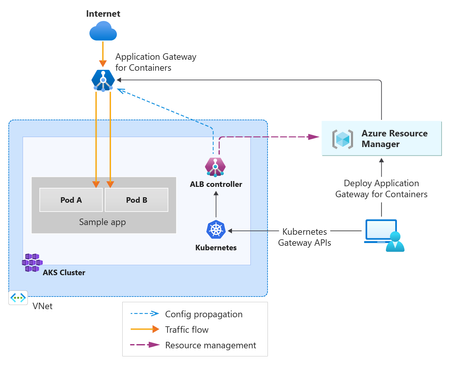
If you're running Ingress NGINX on AKS, you've probably seen the announcements by now. The community Ingress Nginx project is being retired, upstream maintenance ends in March 2026, and Microsoft's extended support for the Application Routing add-on runs out in November 2026. A requirement to migrate to another solution is inevitable. There are a few places you can go. This post focuses on Application Gateway for Containers: what it is, why it's worth the move, and how to actually do it. Microsoft has also released a migration utility that handles most of the translation work from your existing Ingress resources, so we'll cover that too. Ingress NGINX Retirement Ingress NGINX has been the default choice for Kubernetes HTTP routing for years. It's reliable, well-understood, and it appears in roughly half the "getting started with AKS" tutorials on the internet. So the retirement announcement caught a lot of teams off guard. In November 2025, the Kubernetes SIG Network and Security Response Committee announced that the community ingress-nginx project would enter best-effort maintenance until March 2026, after which there will be no further releases, bug fixes, or security patches. It had been running on a small group of volunteers for years, accumulated serious technical debt from its flexible annotation model, and the maintainers couldn't sustain it. For AKS, the timeline depends on how you're running it. If you self-installed via Helm, you're directly exposed to the March 2026 upstream deadline, after that, you're on your own for CVEs. If you're using the Application Routing add-on, Microsoft has committed to critical security patches until November 2026, but nothing beyond that. No new features, no general bug fixes. Application Gateway for Containers Application Gateway for Containers (AGC) is Azure's managed Layer 7 load balancer for AKS, and it's the successor to both the classic Application Gateway Ingress Controller and the Ingress API approach more broadly. It went GA in late 2024 and added WAF support in November 2025. The architecture splits across two planes. On the Azure side, you have the AGC resource itself, a managed load balancer that sits outside your cluster and handles the actual traffic. It has child resources for frontends (the public entry points, each with an auto-generated FQDN) and an association that links it to a dedicated delegated subnet in your VNet. Unlike the older App Gateway Ingress Controller, AGC is a standalone Azure resource, you don't deploy an App Gateway instance On the Kubernetes side, the ALB Controller runs as a small deployment in your cluster. It watches for Gateway API resources: Gateways, HTTPRoutes, and the various AGC policy types and translates them into configuration on the AGC resource. When you create or update an HTTPRoute, the controller picks it up and pushes the changes to the data plane. AGC supports both Gateway API and the Ingress API. This means you don't have to convert everything to Gateway API resources in one shot. Gateway API is where the richer functionality lives though, and so you may want to consider undertaking this migration. For deployment, you have two options: Bring Your Own (BYO) — you create the AGC resource, frontend, and subnet association in Azure yourself using the CLI, portal, Bicep, Terraform, or whatever tool you prefer. The ALB Controller then references the resource by ID. This gives you full control over the Azure-side lifecycle and fits well into existing IaC pipelines. Managed by ALB Controller — you define an ApplicationLoadBalancer custom resource in Kubernetes and the ALB Controller creates and manages the Azure resources for you. Simpler to get started, but the Azure resource lifecycle is tied to the Kubernetes resource — which some teams find uncomfortable for production workloads. One prerequisite worth flagging upfront: AGC requires Azure CNI or Azure CNI Overlay. Kubenet has been deprecated and will be fully retired in 2028, so If you're on Kubenet, you'll need to plan a CNI migration alongside this work. There is an in-place cluster migration process to allow you to do this without re-building your cluster. Why Choose AGC Over Other Alternatives? AGC's architecture is different from running an in-cluster ingress controller, and worth understanding before you start. The data plane runs outside your cluster entirely. With NGINX you're running pods that consume node resources, need upgrading, and can themselves become a reliability concern. With AGC, that's Azure's problem. You're not patching an ingress controller or sizing nodes around it. The ALB Controller does run a small number of pods in your cluster, but they're lightweight, watching Kubernetes resources and syncing configuration to the Azure data plane. They're not in the traffic path, and their resource footprint is minimal. Ingress and HTTPRoute resources still reference Kubernetes Services as usual. Application Gateway for Containers runs an Azure‑managed data plane outside the cluster and routes traffic directly to backend pod IPs using Kubernetes Endpoint/EndpointSlice data, rather than relying on in‑cluster ingress pods. This enables faster convergence as pods scale and allows health probing and traffic management to be handled at the gateway layer. WAF is built in, using the same Azure WAF policies you might already have. If you're currently running a separate Application Gateway in front of your cluster purely for WAF, AGC removes that extra hop and one fewer resource to keep current. Configuration changes push to the data plane near-instantly, without a reload cycle. NGINX reloads its config when routes change, which is mostly fine, but noticeable if you're in a high-churn environment with frequent deployments. Building on Gateway API from the start also means you're not doing this twice. It's where Kubernetes ingress is heading, and AGC fully supports it. By taking advantage of the Gateway API you are defining your configuration once in a proxy agnostic manner, and can easily switch the underlying proxy if you need to at a later date, avoiding vendor lock-in. Planning Your Migration Before you run any tooling or touch any manifests, spend some time understanding what you actually have. Start by inventorying your Ingress NGINX resources across all clusters and namespaces. You want to know how many Ingress objects you have, which annotations they're using, and whether there's anything non-standard such as custom snippets, lua configurations, or anything that leans heavily on NGINX-specific behaviour. The migration utility will flag most of this, but knowing upfront means fewer surprises. Next, confirm your cluster prerequisites. AGC requires Azure CNI or Azure CNI Overlay and workload identity. If you're on Kubenet, that migration needs to happen first. Finally, check that workload identity is enabled on your cluster. Decide on your deployment model before generating any output. BYO gives you full control over the AGC resource lifecycle and slots into existing IaC pipelines cleanly, but requires you to pre-create Azure resources. Managed is simpler to get started with but ties the Azure resource lifecycle to Kubernetes objects, which can feel uncomfortable for production workloads. Finally, decide whether you want to migrate from Ingress API to Gateway API as part of this work, or keep your existing Ingress resources and just swap the controller. AGC supports both. Doing both at once is more work upfront but gets you to the right place in a single migration. Keeping Ingress resources is lower risk in the short term, but you'll need to do the API migration later regardless. Introducing the AGC Migration Utility Microsoft released the AGC Migration Utility in January 2026 as an official CLI tool to handle the conversion of existing Ingress resources to Gateway API resources compatible with AGC. It doesn't modify anything on your cluster. It reads your existing configuration and generates YAML you can review and apply when you're ready. One thing to be aware of is that the migration utility only generates Gateway API resources, so if you use it, you're moving off the Ingress API at the same time as moving off NGINX. There's no flag to produce Ingress resources for AGC instead. If you want to land on AGC but keep Ingress resources for now, you'll need to set that up manually. There are two input modes. In files mode, you point it at a directory of YAML manifests and it converts them locally without needing cluster access. In cluster mode, it connects to your current kubeconfig context and reads Ingress resources directly from a live cluster. Both produce the same output. Alongside the converted YAML, the utility produces a migration report covering every annotation it encountered. Each annotation gets a status: completed, warning, not-supported, or error. The warning and not-supported statuses are where you'll need to do some manual work/ These represent annotations that either migrated with caveats, or have no AGC equivalent at all. The coverage of NGINX annotations is broad. URL rewrites, SSL redirects, session affinity, backend protocol, mTLS, WAF, canary routing by weight or header, permanent and temporary redirects, custom hostnames, most of the common patterns are covered. Before you run a full conversion, it's worth doing a --dry-run pass first to get a clear picture of what needs manual attention. Migrating Step by Step With prerequisites confirmed and your deployment model chosen, here's how the migration looks end to end. 1. Get the utility Pre-built binaries for Linux, macOS, and Windows are available on the GitHub releases page. Download the binary for your platform and make it executable. If you'd prefer to build from source, clone the repo and run ./build.sh from the root, which produces binaries in the bin folder. 2. Run a dry-run against your manifests Before generating any output, run in dry-run mode to see what the migration report looks like. This tells you which annotations are fully supported, which need manual attention, and which have no AGC equivalent. ./agc-migration files --provider nginx --ingress-class nginx --dry-run ./manifests/*.yaml If you'd rather read directly from your cluster, use cluster mode: ./agc-migration cluster --provider nginx --ingress-class nginx --dry-run 3. Review the migration report Work through the report before proceeding. Anything marked not-supported needs a plan. The next section covers the most common gaps, but the report itself includes specific recommendations for each issue it finds. 4. Set up AGC and install the ALB Controller Before applying any generated resources you need AGC running in Azure and the ALB Controller installed in your cluster. The setup process is well documented, so rather than reproduce it here, follow the official quickstart at aka.ms/agc. Make sure you note the resource ID of your AGC instance if you're using BYO deployment, as you'll need it in the next step. 5. Generate the converted resources Run the utility again with your chosen deployment flag to generate output: # BYO ./agc-migration files --provider nginx --ingress-class nginx \ --byo-resource-id $AGC_ID \ --output-dir ./output \ ./manifests/*.yaml # Managed ./agc-migration files --provider nginx --ingress-class nginx \ --managed-subnet-id $SUBNET_ID \ - -output-dir ./output \ ./manifests/*.yaml 6. Review and apply the generated resources Check the generated Gateway, HTTPRoute, and policy resources against your expected routing behaviour before applying anything. Apply to a non-production cluster first if you can. kubectl apply -f ./output/ 7. Validate and cut over Test your routes before updating DNS. Running both NGINX and AGC in parallel while you validate is a sensible approach; route test traffic to AGC while NGINX continues serving production, then update your DNS records to point to the AGC frontend FQDN once you're satisfied. 8. Decommission NGINX Once traffic has been running through AGC cleanly, uninstall the NGINX controller and remove the old Ingress resources. Two ingress controllers watching the same resources will cause confusion sooner or later. What the Migration Utility Doesn't Handle The utility covers a lot of ground, but there are some gaps you should be clear on. Annotations marked not-supported in the migration report have no direct AGC equivalent and won't appear in the generated output. The most common for NGINX users are custom snippets and lua-based configurations, which allow arbitrary NGINX config to be injected directly into the server block. There's no equivalent in AGC or Gateway API. If you're relying on these, you'll need to work out whether AGC's native routing capabilities can cover the same requirements through HTTPRoute filters, URL rewrites, or header manipulation. The utility doesn't migrate TLS certificates or update certificate references in the generated resources. Your existing Kubernetes Secrets containing certificates should carry over without changes, but verify that the Secret references in your generated Gateway and HTTPRoute resources are correct before cutting over. DNS cutover is outside the scope of the utility entirely. Once your AGC frontend is provisioned it gets an auto-generated FQDN, and you'll need to update your DNS records or CNAME entries accordingly. Any GitOps or CI/CD pipelines that reference your Ingress resources by name or apply them from a specific path will also need updating to reflect the new Gateway API resource types and output structure. Conclusion For many, the retirement of Ingress NGINX is unwanted complexity and extra work. If you have to migrate though, you can use it as an opportunity to land on a significantly better architecture: Gateway API as your routing layer, WAF and per-pod load balancing built in, and an ingress controller that's fully managed by Azure rather than running in your cluster. The migration utility can take care of a lot of the mechanical conversion work. Rather than manually rewriting Ingress resources into Gateway API equivalents and mapping NGINX annotations to their AGC counterparts, the utility does that translation for you and produces a migration report that tells you exactly what it couldn't handle. Running a dry-run against your manifests is a good first step to get a clear picture of your annotation coverage and what needs manual attention before you commit to a timeline. Full documentation for AGC is at aka.ms/agc and the migration utility repo is at github.com/Azure/Application-Gateway-for-Containers-Migration-Utility. Ingress NGINX retirement is coming up very soon, with the standalone implementation retiring very soon, at the end of March 2026. Using the App Routing add-on for AKS gives you a little bit of breathing room until November 2026, but it's still not long. Make sure you have a solution in place before this date to avoid running unsupported and potentially vulnerable software on your critical infrastructure.524Views1like1CommentThe LLM Inference Optimization Stack: A Prioritized Playbook for Enterprise Teams
The Solutions — An Optimization Stack for Enterprise Inference The optimizations below are ordered by implementation priority — starting with the highest-leverage. The Three-Layer Serving Stack Most enterprise LLM deployments operate across three layers, each responsible for a different part of the inference pipeline. Understanding which layer a bottleneck belongs to is often the fastest path to improving inference performance. Ray Serve provides the distributed model serving layer — handling request routing, autoscaling, batching, replica placement, and multi-model serving. Azure Kubernetes Service (AKS) orchestrates the infrastructure — GPU nodes, networking, and container lifecycle. Inference engines such as vLLM execute the model forward passes and implement token-generation optimizations such as continuous batching and KV-cache management. In simple terms: AKS manages infrastructure. Ray Serve manages inference workloads. vLLM generates tokens With that architecture in mind, we can examine the optimization stack. 1. GPU Utilization: Maximize What You Already Have Before optimizing models or inference engines, start here: are you fully utilizing the GPUs you’re already paying for? For most enterprise deployments, the answer is no. GPU utilization below 50% means you’re effectively paying double for every token generated. Autoscaling on inference-specific signals. Autoscaling should be driven by request queue depth, GPU utilization, and P95 latency — not generic CPU or memory metrics, which are poor proxies for LLM serving load. AKS supports GPU-enabled node pools with cluster autoscaler integration across NC-series (A100, H100) and ND-series VMs. Scale to zero during idle periods; scale up based on token-level demand, not container-level metrics. Inference-aware orchestration. AKS orchestrates infrastructure resources such as GPU nodes, pods, containers. Ray Serve operates one layer above as the inference orchestration framework, managing model replicas, request routing, autoscaling, streaming responses, and backpressure handling, while inference engines like vLLM perform continuous batching and KV-cache management. The distinction matters because LLM serving load doesn't express well in CPU or memory metrics; Ray Serve operates at the level of tokens and requests, not containers. AKS orchestrates infrastructure; Ray Serve orchestrates model serving. Anyscale Runtime reports faster performance and lower compute cost than self-managed Ray OSS on selected workloads, though gains depend on workload and configuration. Right-sizing Azure GPU selection. The default instinct when deploying GenAI in production is often to grab the biggest, fastest hardware available. For inference, that is often the wrong call. For structured output tasks, a well-optimized, quantized 7B model running on an NCads H100 v5 (H100 NVL 94GB) or an NC A100 v4 (A100 80GB) node can easily outperform a generalized 70B model on a full ND allocation—at a fraction of the cost. New deployments should target NCads H100 v5. The secret to cost-effective inference is matching your VM SKU to your workload's specific bottleneck. For compute-heavy prefill phases or massive multi-GPU parallelism, the ND H100 v5's ultra-fast interconnects are unmatched. However, autoregressive token generation (decode) is primarily bound by memory bandwidth. For single-GPU, decode-heavy workloads, the NCads series is the better fit: the H100 NVL 94GB has higher published HBM bandwidth (3.9 TB/s) than the H100 80GB (3.35 TB/s). ND H100 v5 remains the right choice when you need multi-GPU sharding, high aggregate throughput, or tightly coupled scale-out inference. You can extend utilization further with MIG partitioning to host multiple small models on a single NVL card, provided your application can tolerate the proportional drop in memory bandwidth per slice. 2. GPU Partitioning: MIG and Fractional GPU Allocation on AKS For smaller models or moderate-concurrency workloads, dedicating an entire GPU to a single model replica wastes resources. Two techniques address this on AKS. NVIDIA Multi-Instance GPU (MIG) partitions a single physical GPU into up to seven hardware-isolated instances, each with its own compute cores, memory, cache, and memory bandwidth. Each instance behaves as a standalone GPU with no code changes required. On AKS, MIG is supported on Standard_NC40ads_H100_v5, Standard_ND96isr_H100_v5, and A100 GPU VM sizes, configured at node pool creation using the --gpu-instance-profile parameter (e.g., MIG1g, MIG3g, MIG7g). Fractional GPU allocation in Ray Serve is a scheduling and placement mechanism, not hardware partitioning. By assigning fractional GPU resources (say, 0.5 GPU per replica) through Ray placement groups, multiple model replicas can share a single physical GPU. Ray Serve propagates the configured fraction to the serving worker (i.e. vLLM), but, unlike MIG, replicas still share the same underlying GPU memory and memory bandwidth. There’s no hard isolation. Because fractional allocation does not enforce hard VRAM limits, it requires careful memory management: conservative gpu_memory_utilization configuration, controlled concurrency and context length, and enough headroom for KV cache growth, CUDA overhead, and allocator fragmentation. It works best when model weights are relatively small, concurrency is predictable and moderate, and replica counts are stable. For stronger isolation and guaranteed memory partitioning, use NVIDIA MIG. Fractional allocation is best treated as a GPU packing optimization, not an isolation mechanism. 3. Quantization: The Fastest Path to Cost Reduction Quantization reduces the numerical precision of model weights, activations, and KV cache entries to shrink memory footprint and increase throughput. FP16 → INT8 roughly halves memory; 4-bit quantization cuts it by approximately 4×. Post-Training Quantization (PTQ) is the fastest path to production gains. As one example, Llama-3.3-70B-Instruct reduces weight memory from ~140 GB in BF16 to ~70 GB in FP8, which can make single-GPU deployment feasible on an 80GB GPU for low-concurrency or short-context workloads. Production feasibility still depends on KV cache size, engine overhead, and concurrency, so careful capacity planning is required. 4. Inference Engine Optimizations in vLLM Modern inference engines — particularly vLLM, which powers Anyscale’s Ray Serve on AKS — implement several optimizations that compound to deliver significant throughput improvements. Continuous batching replaces static batching, where the system waits for all requests in a batch to complete before accepting new ones. With continuous batching, new requests join at every decode iteration, keeping GPUs more fully utilized. Anyscale has demonstrated up to 23x throughput improvement using continuous batching versus static batching (measured on OPT-13B on A100 40GB with varying concurrency levels). In practice, this can push GPU utilization from 30–40% to 80%+ on AKS GPU node pools. PagedAttention manages KV cache allocation the way an operating system manages RAM — breaking it into small, non-contiguous pages to eliminate fragmentation. Naive KV cache allocation wastes significant reserved memory through internal and external fragmentation. PagedAttention eliminates this, enabling more concurrent requests per GPU. Enabled by default in vLLM. Prefix caching automatically stores the KV cache of completed requests in a global on-GPU cache. When new requests share common prefixes — system prompts, shared context in RAG — vLLM reuses cached state instead of recomputing it, reducing TTFT and compute load. Anyscale’s PrefixCacheAffinityRouter extends this by routing requests with similar prefixes to the same replica, maximizing cache hit rates across AKS pods. Chunked prefill breaks large prefill operations into smaller chunks and interleaves them with decode steps. Without it, a long incoming prompt can stall all ongoing decode operations. Chunked prefill keeps streaming responses smooth even when new long prompts arrive, and improves GPU utilization by mixing compute-bound prefill chunks with memory-bound decode. Enabled by default in vLLM V1. Speculative decoding addresses the sequential decode bottleneck directly. A smaller, faster “draft” model proposes multiple tokens ahead; the larger “target” model verifies them in parallel in a single forward pass. When the draft predicts correctly — which is frequent for routine language patterns — multiple tokens are generated in one step. Output quality is identical because every token is verified by the target model. Particularly effective for code completion, where token patterns are highly predictable. 5. Disaggregated Prefill and Decode Since prefill is compute-bound and decode is memory-bandwidth-bound, running both on the same GPU forces a compromise — the hardware is optimized for neither. Disaggregated inference separates these phases across different hardware resources. vLLM supports disaggregated prefill and decode and Ray Serve can orchestrate separate worker pools for each phase. In practice, this means Ray Serve routes each incoming request to a prefill worker first, then hands off the resulting KV cache to a dedicated decode worker — without the application layer needing to manage that handoff. This capability is evolving and should be validated against your Ray and vLLM versions before deploying to production. With MIG or separate node pools, prefill and decode resources can be isolated to better match each phase’s hardware requirements. Azure ND GB200 v6 VMs include four NVIDIA Blackwell GPUs per VM, while the broader GB200 NVL72 system enables rack-scale NVLink connectivity — providing the high-bandwidth GPU-to-GPU communication that disaggregated prefill/decode architectures depend on for KV-cache movement. 6. Multi-LoRA Adapters: Serve Many Use Cases from One Deployment Fine-tuned Low-Rank Adaptation (LoRA) adapters for different domains can share a single base model in GPU memory, with lightweight task-specific layers swapped at inference time. Legal, HR, finance, and engineering copilots are served from one AKS GPU deployment instead of four separate ones. This is a direct cost multiplier: instead of provisioning N separate model deployments for N departments, you provision one base model and swap adapters per request. Ray Serve and vLLM both support multi-LoRA serving on AKS. Open-Source Models for Enterprise Inference The open-source model ecosystem has matured to the point where self-hosted inference on open-weight models - running on AKS with Ray Serve and vLLM - is a viable and often preferable alternative to proprietary API access. The strategic advantages are significant: full control over data residency and privacy (workloads run inside your Azure subscription), no per-token API fees (cost shifts to Azure GPU infrastructure), the ability to fine-tune and distill for domain-specific accuracy, no vendor lock-in, and predictable cost structures that don’t scale with usage volume. Leading Open-Source Model Families Meta Llama (Llama 3.1, Llama 4) is the most widely adopted open-weight model family. Llama 3.1 offers dense models from 8B to 405B parameters; Llama 4 introduces MoE variants. Strong general-purpose performance with native vLLM integration. The 70B variant hits a reasonable quality-to-serving cost for most enterprise use cases. Available under Meta’s community license - Validate the specific model architecture and license you plan to use. Qwen (Alibaba) excels in multilingual and reasoning tasks. Qwen3-235B is a MoE model activating roughly 22B parameters per token — delivering frontier-class quality at a fraction of dense-model inference cost. Strong on code, math, and structured output. Apache 2.0 license on most variants. Mistral models are optimized for efficiency and inference speed. Mistral 7B remains one of the highest-performing models at its size class, making it well-suited for cost-sensitive, high-throughput deployments on smaller Azure GPU SKUs. Mixtral 8x22B provides MoE-based quality scaling. Mistral Large (123B) competes with frontier proprietary models. Licensing varies: most smaller models are Apache 2.0, while some larger releases use research or commercial licensing terms. Verify the license for the specific model prior to production deployment. DeepSeek (DeepSeek AI) introduced aggressive MoE architectures with cost-efficient training. DeepSeek-V3 (671B total, 37B active per token) delivers strong reasoning quality at significantly lower per-token inference cost than dense models of comparable capability. Strong on math, code, and multilingual tasks. DeepSeek models are developed by a Chinese AI research lab. Organizations in regulated industries should evaluate applicable data sovereignty, export control, and vendor risk policies before deploying DeepSeek weights in production. The examples below are illustrative starting points rather than fixed recommendations. Actual model and infrastructure choices should be validated against workload-specific latency, accuracy, and cost requirements. Model Selection Examples Workload Recommended Model Class Azure Infrastructure Rationale Internal copilots, high-throughput APIs 7B–13B (Llama 8B, Mistral 7B, Qwen 7B) NCads H100 v5 with MIG, or NC A100 v4 (existing deployments) 10–30x cheaper serving; recover accuracy via RAG and fine-tuning Customer-facing assistants 30B–70B (Llama 70B, Qwen 72B, Mistral Large) NC A100 v4 (80GB – existing deployments ) or ND H100 v5 Quality directly impacts revenue and trust Frontier quality at sub-frontier cost MoE (Qwen3-235B-A22B, DeepSeek-V3, and Mistral’s Mixtral-family models) ND H100 v5 or ND GB200-v6 Active parameters determine inference cost, not total model size Code completion and engineering copilots Code-specialized (DeepSeek-Coder, Qwen-Coder) NCads H100 v5 with MIG Domain models outperform larger general models at lower cost Multilingual Qwen, DeepSeek Matches workload size above Strongest non-English performance in open-weight ecosystem Edge / on-device Small edge-capable models (for example, 2B–8B-class models, often quantized) Azure IoT Edge / local hardware Fits within edge memory and power envelopes The rule of thumb: start with the smallest model that meets your quality threshold. Add RAG, caching, fine-tuning, and batching before scaling model size. Treat model choice as an ongoing decision —the open-source ecosystem evolves fast enough that what’s optimal today may not be in six months. Actual performance varies by workload, so these model and size recommendations should be validated through testing in your target environment. All leading open-weight models are natively supported by vLLM and Ray Serve / Anyscale on AKS, with out-of-the-box quantization, multi-GPU parallelism, and Multi-LoRA support. The optimizations above assume a platform that is already secure, governed, and production-hardened. Continuous batching on an exposed endpoint is not a production system. Part three covers the architecture decisions, security controls, and operational metrics that make enterprise inference deployable — and auditable. Continue to Part 3: Building an Enterprise Platform for Inference at Scale → Part 1: Inference at Enterprise Scale: Why LLM Inference Is a Capital Allocation Problem | Microsoft Community Hub Part 3: Building an Enterprise Platform for Inference at Scale | Microsoft Community Hub563Views0likes0Comments
Help wanted: Refresh articles in Azure Architecture Center (AAC)
I’m the Project Manager for architecture review boards (ARBs) in the Azure Architecture Center (AAC). We’re looking for subject matter experts to help us improve the freshness of the AAC, Cloud Adoption Framework (CAF), and Well-Architected Framework (WAF) repos. This opportunity is currently limited to Microsoft employees only. As an ARB member, your main focus is to review, update, and maintain content to meet quarterly freshness targets. Your involvement directly impacts the quality, relevance, and direction of Azure Patterns & Practices content across AAC, CAF, and WAF. The content in these repos reaches almost 900,000 unique readers per month, so your time investment has a big, global impact. The expected commitment is 4-6 hours per month, including attendance at weekly or bi-weekly sync meetings. Become an ARB member to gain: Increased visibility and credibility as a subject‑matter expert by contributing to Microsoft‑authored guidance used by customers and partners worldwide. Broader internal reach and networking without changing roles or teams. Attribution on Microsoft Learn articles that you own. Opportunity to take on expanded roles over time (for example, owning a set of articles, mentoring contributors, or helping shape ARB direction). We’re recruiting new members across several ARBs. Our highest needs are in the Web ARB, Containers ARB, and Data & Analytics ARB: The Web ARB focuses on modern web application architecture on Azure—App Service and PaaS web apps, APIs and API Management, ingress and networking (Application Gateway, Front Door, DNS), security and identity, and designing for reliability, scalability, and disaster recovery. The Containers ARB focuses on containerized and Kubernetes‑based architectures—AKS design and operations, networking and ingress, security and identity, scalability, and reliability for production container platforms. The Data & Analytics ARB focuses on data platform and analytics architectures—data ingestion and integration, analytics and reporting, streaming and real‑time scenarios, data security and governance, and designing scalable, reliable data solutions on Azure. We’re also looking for people to take ownership of other articles across AAC, CAF, and WAF. These articles span many areas, including application and solution architectures, containers and compute, networking and security, governance and observability, data and integration, and reliability and operational best practices. You don’t need to know everything—deep expertise in one or two areas and an interest in keeping Azure architecture guidance accurate and current is what matters most. Please reply to this post if you’re interested in becoming an ARB member, and I’ll follow up with next steps. If you prefer, you can email me at v-jodimartis@microsoft.com. Thanks! 🙂37Views0likes0Comments