azure arc
277 TopicsAzure IoT Operations 2603 is now available: Powering the next era of Physical AI
Industrial AI is entering a new phase. For years, AI innovation has largely lived in dashboards, analytics, and digital decision support. Today, that intelligence is moving into the real world, onto factory floors, oil fields, and production lines, where AI systems don’t just analyze data, but sense, reason, and act in physical environments. This shift is increasingly described as Physical AI: intelligence that operates reliably where safety, latency, and real‑world constraints matter most. With the Azure IoT Operations 2603 (v1.3.38) release, Microsoft is delivering one of its most significant updates to date, strengthening the platform foundation required to build, deploy, and operate Physical AI systems at industrial scale. Why Physical AI needs a new kind of platform Physical AI systems are fundamentally different from digital‑only AI. They require: Real‑time, low‑latency decision‑making at the edge Tight integration across devices, assets, and OT systems End‑to‑end observability, health, and lifecycle management Secure cloud‑to‑edge control planes with governance built in Industry leaders and researchers increasingly agree that success in Physical AI depends less on isolated models, and more on software platforms that orchestrate data, assets, actions, and AI workloads across the physical world. Azure IoT Operations was built for exactly this challenge. What’s new in Azure IoT Operations 2603 The 2603 release delivers major advancements across data pipelines, connectivity, reliability, and operational control, enabling customers to move faster from experimentation to production‑grade Physical AI. Cloud‑to‑edge management actions Cloud‑to‑edge management actions enable teams to securely execute control and configuration operations on on‑premises assets, such as invoking methods, writing values, or adjusting settings, using Azure Resource Manager and Event Grid–based MQTT messaging. This capability extends the Azure control plane beyond the cloud, allowing intent, policy, and actions to be delivered reliably to physical systems while remaining decoupled from protocol and device specifics. For Physical AI, this closes the loop between perception and action: insights and decisions derived from models can be translated into governed, auditable changes in the physical world, even when assets operate in distributed or intermittently connected environments. Built‑in RBAC, managed identity, and activity logs ensure every action is authorized, traceable, and compliant, preserving safety, accountability, and human oversight as intelligence increasingly moves from observation to autonomous execution at the edge. No‑code dataflow graphs Azure IoT Operations makes it easier to build real‑time data pipelines at the edge without writing custom code. No‑code data flow graphs let teams design visual processing pipelines using built‑in transforms, with improved reliability, validation, and observability. Visual Editor – Build multi-stage data processing systems in the Operations Experience canvas. Drag and connect sources, transforms, and destinations visually. Configure map rules, filter conditions, and window durations inline. Deploy directly from the browser or define in Bicep/YAML for GitOps. Composable Transforms, Any Order – Chain map, filter, branch, concatenate, and window transforms in any sequence. Branch splits messages down parallel paths based on conditions. Concatenate merges them back. Route messages to different MQTT topics based on content. No fixed pipeline shape. Expressions, Enrichment, and Aggregation – Unit conversions, math, string operations, regex, conditionals, and last-known-value lookups, all built into the expression language. Enrich messages with external data from a state store. Aggregate high-frequency sensor data over tumbling time windows to compute averages, min/max, and counts. Open and Extensible – Connect to MQTT, Kafka, and OpenTelemetry (OTel) endpoints with built-in security through Azure Key Vault and managed identities. Need logic beyond what no-code covers? Drop a custom Wasm module (even embed and run ONNX AI ML models) into the middle of any graph alongside built-in transforms. You're never locked into declarative configuration. Together, these capabilities allow teams to move from raw telemetry to actionable signals directly at the edge without custom code or fragile glue logic. Expanded, production‑ready connectivity The MQTT connector enables customers to onboard MQTT devices as assets and route data to downstream workloads using familiar MQTT topics, with the flexibility to support unified namespace (UNS) patterns when desired. By leveraging MQTT’s lightweight publish/subscribe model, teams can simplify connectivity and share data across consumers without tight coupling between producers and applications. This is especially important for Physical AI, where intelligent systems must continuously sense state changes in the physical world and react quickly based on a consistent, authoritative operational context rather than fragmented data pipelines. Alongside MQTT, Azure IoT Operations continues to deliver broad, industrial‑grade connectivity across OPC UA, ONVIF, Media, REST/HTTP, and other connectors, with improved asset discovery, payload transformation, and lifecycle stability, providing the dependable connectivity layer Physical AI systems rely on to understand and respond to real‑world conditions. Unified health and observability Physical AI systems must be trustworthy. Azure IoT Operations 2603 introduces unified health status reporting across brokers, dataflows, assets, connectors, and endpoints, using consistent states and surfaced through both Kubernetes and Azure Resource Manager. This enables operators to see—not guess—when systems are ready to act in the physical world. Optional OPC UA connector deployment Azure IoT Operations 2603 introduces optional OPC UA connector deployment, reinforcing a design goal to keep deployments as streamlined as possible for scenarios that don’t require OPC UA from day one. The OPC UA connector is a discrete, native component of Azure IoT Operations that can be included during initial instance creation or added later as needs evolve, allowing teams to avoid unnecessary footprint and complexity in MQTT‑only or non‑OPC deployments. This reflects the broader architectural principle behind Azure IoT Operations: a platform built for composability and decomposability, where capabilities are assembled based on scenario requirements rather than assumed defaults, supporting faster onboarding, lower resource consumption, and cleaner production rollouts without limiting future expansion. Broker reliability and platform hardening The 2603 release significantly improves broker reliability through graceful upgrades, idempotent replication, persistence correctness, and backpressure isolation—capabilities essential for always‑on Physical AI systems operating in production environments. Physical AI in action: What customers are achieving today Azure IoT Operations is already powering real‑world Physical AI across industries, helping customers move beyond pilots to repeatable, scalable execution. Procter & Gamble Consumer goods leader P&G continually looks for ways to drive manufacturing efficiency and improve overall equipment effectiveness—a KPI encompassing availability, performance, and quality that’s tracked in P&G facilities around the world. P&G deployed Azure IoT Operations, enabled by Azure Arc, to capture real-time data from equipment at the edge, analyze it in the cloud, and deploy predictive models that enhance manufacturing efficiency and reduce unplanned downtime. Using Azure IoT Operations and Azure Arc, P&G is extrapolating insights and correlating them across plants to improve efficiency, reduce loss, and continue to drive global manufacturing technology forward. More info. Husqvarna Husqvarna Group faced increasing pressure to modernize its fragmented global infrastructure, gain real-time operational insights, and improve efficiency across its supply chain to stay competitive in a rapidly evolving digital and manufacturing landscape. Husqvarna Group implemented a suite of Microsoft Azure solutions—including Azure Arc, Azure IoT Operations, and Azure OpenAI—to unify cloud and on-premises systems, enable real-time data insights, and drive innovation across global manufacturing operations. With Azure, Husqvarna Group achieved 98% faster data deployment and 50% lower infrastructure imaging costs, while improving productivity, reducing downtime, and enabling real-time insights across a growing network of smart, connected factories. More info. Chevron With its Facilities and Operations of the Future initiative, Chevron is reimagining the monitoring of its physical operations to support remote and autonomous operations through enhanced capabilities and real-time access to data. Chevron adopted Microsoft Azure IoT Operations, enabled by Azure Arc, to manage and analyze data locally at remote facilities at the edge, while still maintaining a centralized, cloud-based management plane. Real-time insights enhance worker safety while lowering operational costs, empowering staff to focus on complex, higher-value tasks rather than routine inspections. More info. A platform purpose‑built for Physical AI Across manufacturing, energy, and infrastructure, the message is clear: the next wave of AI value will be created where digital intelligence meets the physical world. Azure IoT Operations 2603 strengthens Microsoft’s commitment to that future—providing the secure, observable, cloud‑connected edge platform required to build Physical AI systems that are not only intelligent, but dependable. Get started To explore the full Azure IoT Operations 2603 release, review the public documentation and release notes, and start building Physical AI solutions that operate and scale confidently in the real world.124Views1like0CommentsAnnouncing Private Preview: Deploy Ansible Playbooks using Azure Policy via Machine Configuration
Azure Arc is on a mission to unify security, compliance, and management for Windows and Linux machines—anywhere. By extending Azure’s control plane beyond the cloud, Azure Arc enables organizations to unify governance, compliance, security and management of servers across on‑premises, edge, and multicloud environments using a consistent set of Azure tools and policies. Building on this mission, we’re excited to announce the private preview of deploying Ansible playbooks through Azure Policy using Machine Configuration, bringing Ansible‑driven automation into Azure Arc’s policy‑based governance model for Azure and Arc‑enabled Linux machines. This new capability enables you to orchestrate Ansible playbook execution directly from Azure Policy (via Machine Configuration) without requiring an Ansible control node, while benefiting from built‑in compliance reporting and remediation. Why this matters As organizations manage increasingly diverse server estates, they often rely on different tools for Windows and Linux, cloud, on-premises, or at the edge—creating fragmented security, compliance, and operational workflows. Many organizations rely on Ansible for OS configuration and application setup, but struggle with: Enforcing consistent configuration across distributed environments Detecting and correcting drift over time Integrating Ansible automation with centralized governance and compliance workflows With this private preview, Azure Policy becomes the single control plane for applying and monitoring Ansible‑based configuration, bringing Linux automation into the same governance model already used for Windows. Configuration is treated as policy—declarative, auditable, and continuously enforced—with compliance results surfaced in familiar Azure dashboards. What’s included in the private preview In this preview, you can: Use Azure Policy to trigger Ansible playbook execution on Azure and Azure Arc–enabled Linux machines Execute playbooks locally on each target machine, triggered by policy. Enable drift detection and automatic remediation by default View playbook execution status and compliance results directly in the Azure Policy compliance dashboard, alongside your other policies This provides a unified security, compliance and management experience across Windows and Linux machines—whether they’re running in Azure or connected through Azure Arc—while using your existing Ansible investments. Join the private preview If you’re interested in helping shape the future of Ansible‑based configuration management in Azure Arc, we’d love to partner with you. We’re especially interested in hearing your stories around usability, compliance reporting, and real‑world operational workflows. 👉 Sign up for the private preview and we'll reach out to you. We’ll continue investing in deeper Linux parity, broader scenarios, and tighter integration across Azure Arc’s security, governance and compliance experiences. We look forward to enhancing your unified Azure Arc experience for deploying, governing, and remediating configuration with Ansible—bringing consistent security, compliance, and management to Windows and Linux machines not only in Azure, but also across on‑premises and other public clouds.382Views1like0CommentsSimplify Azure Arc Server Onboarding with Ansible and the New Onboarding Role
If you’re already using Ansible to manage your infrastructure, there’s now a simpler—and more secure—way to bring machines under Azure Arc management. We’ve introduced a new Azure Arc onboarding role designed specifically for automated scenarios like Ansible playbooks. This role follows the principle of least privilege, giving your automation exactly what it needs to onboard servers—nothing more. A better way to onboard at scale Many customers want to standardize Azure Arc onboarding across hybrid and multicloud environments, but run into common challenges: Over‑privileged service principals Manual steps that don’t scale Inconsistent onboarding across environments By combining Ansible with the Azure Arc onboarding role, you can: Automate server onboarding end‑to‑end Reduce permissions risk with a purpose‑built role Scale confidently across thousands of machines Integrate Arc onboarding into existing Ansible workflows Built for automation, designed for security The new onboarding role removes the need to assign broader Azure roles just to connect servers to Azure Arc. Instead, your Ansible automation can authenticate using a tightly scoped identity that’s purpose‑built for Arc onboarding—making security teams happier without slowing down operations. Whether you’re modernizing existing datacenters or managing servers across multiple clouds, this new approach makes Azure Arc onboarding simpler, safer, and repeatable. Get started in minutes Our Microsoft Learn documentation provides guidance to help you get started quickly: Connect machines to Azure Arc at scale with Ansible Check out the Arc onboarding role, part of the Azure collection in Ansible Galaxy: Ansible Galaxy - azure.azcollection - Arc onboarding role Anything else you’d like to see with Azure Arc + Linux? Drop us a comment!145Views0likes0CommentsRun the latest Azure Arc agent with Automatic Agent Upgrade (Public Preview)
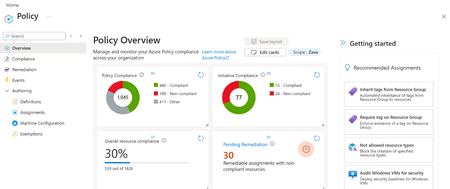
Customers managing large fleets of Azure Arc servers need a scalable way to ensure the Azure Arc agent stays up to date without manual intervention. Per server configuration does not scale, and gaps in upgrade coverage can lead to operational drift, missed features, and delayed security updates. To address this, we’re introducing two new options to help customers enable Automatic Agent Upgrade at scale: applied as a built-in Azure Policy and a new onboarding CLI flag. The built-in policy makes it easy to check whether Automatic Agent Upgrade is enabled across a given scope and automatically remediates servers that are not compliant. For servers being newly onboarded, customers can enable the feature at onboarding by adding the --enable-automatic-upgrade flag to the azcmagent connect command, ensuring the agent is configured correctly from the start. What is Automatic Agent Upgrade? Automatic Agent Upgrade is a feature, in public preview, that automatically keeps the Azure Connected Machine agent (Arc agent) up to date. Updates are managed by Microsoft, so once enabled, customers no longer need to manually manage agent upgrades. By always running the latest agent version, customers receive all the newest capabilities, security updates, and bug fixes as soon as they’re released. Learn more: What's new with Azure Connected Machine agent - Azure Arc | Microsoft Learn. Getting Started Apply automatic agent upgrade policy Navigate to the ‘Policy’ blade in the Azure Portal Navigate to the ‘Compliance’ section and click ‘Assign Policy’ Fill out the required sections Scope: Subscription and resource group (optional) that policy will apply to Policy definition: Configure Azure Arc-enabled Servers to enable automatic upgrades Navigate to the ‘Remediation’ tab and check the box next to ‘Create a remediation task’ Navigate to the ‘Review + create’ tab and press ‘Create’. The Policy has been successfully applied to the scope. For more information on this process, please visit this article Quickstart: Create policy assignment using Azure portal - Azure Policy | Microsoft Learn. Apply automatic agent upgrade CLI Flag Adding the following flag enables automatic agent upgrade during onboarding --enable-automatic-upgrade While this flag can be used on a single server, it can also be applied at scale using one of the existing Azure Arc at scale onboarding methods and adding the flag Connect hybrid machines to Azure at scale - Azure Arc | Microsoft Learn. Here is an at scale onboarding sample using a basic script. azcmagent connect --resource-group {rg} --location {location} --subscription-id {subid} --service-principal-id {service principal id} --service-principal-secret {service principal secret} --tenant-id {tenant id} --enable-automatic-upgrade To get started with this feature or learn more, please refer to this article Manage and maintain the Azure Connected Machine agent - Azure Arc | Microsoft Learn.428Views1like2Comments
Announcing Public Preview for Essential Machine Management
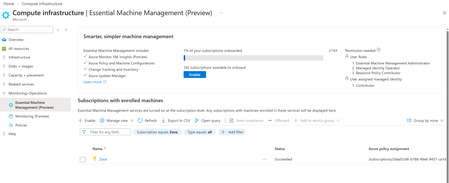
Managing servers and VMs across Azure, on premises, and multi-cloud environments often means turning on core capabilities—monitoring, updates, inventory, and configuration—through separate setup experiences. We’ve heard feedback that this makes it harder to get visibility into machine state and take actions. We’re excited to announce the public preview of Essential Machine Management experience within Compute Infrastructure Hub—a new entry point in Azure that streamlines onboarding for machines at scale and enables basic management capabilities. Start once at subscription scope, get a clear view of what’s turned on, and move from setup to operations faster across your Azure and cloud and hybrid estate. What is Essential Machine Management? Essential Machine Management is a centralized onboarding experience that helps customers enroll their machines into a set of selected cloud-native management services from Azure in a simple, scalable way, Instead of enabling monitoring, updates, inventory, and configuration independently per machine, Essential Machine Management allows you to enroll entire subscriptions at once, including both Azure Virtual Machines and Azure Arc–enabled servers. These services are pre-configured with best practices, enabling customers with out-of-the-box value right away. Once enrolled, current and future machines in the selected subscriptions are automatically onboarded to the enabled management services, helping ensure consistent visibility and operational coverage from day one. What management capabilities are enabled? Using Essential Machine Management, you can quickly onboard machines to multiple Azure management capabilities, including: Monitoring insights and recommended alerts for machine health and performance Azure Update Manager to help keep machines secure and compliant Change tracking and inventory for visibility and auditability Machine configuration for managing in-machine configuration, compliance and security Azure Security baseline policy is a set of tailored rules to assess your machine's security posture These services help keep your infrastructure secure and healthy. How much does it cost? Azure VMs: For Azure Virtual Machines only, capabilities enabled by Essential Machine Management are provided at no additional charge. Azure Arc-enabled servers: For Azure Arc-enabled servers with Windows Server Software Assurance, Windows Server PayGo, and Windows Server Extended Security Updates, capabilities enabled by Essential Machine Management are provided at no additional charge. For all other Arc-enabled servers, Essential Machine Management will be priced at $9 per server per month once billing is enabled. See more details here. Getting started If you manage Azure VMs or Arc-enabled servers and are looking to simplify how you onboard and manage machines at scale, Essential Machine Management feature is now available for you to try in public preview. Check out the preview in the Azure Portal under Compute infrastructure --> Monitoring + Operations --> Essential Machine Management (preview): Check out Essential Machine Management now and reach out to machineenrollmentsupport@microsoft.com for any feedback or support. Learn more about Essential Machine Management here.Automating Windows Server Licensing Benefits with Azure Arc Policy
Introduction: Managing Windows Server benefits licensing across hybrid environments can be challenging. Azure Arc combined with Azure Policy simplifies this by automatically enforcing licensing compliance. This blog explains how the provided policy works and how to deploy it. Why implement this policy? Automating Windows Server Licensing Benefits with Azure Arc Policy ensures that all eligible machines are seamlessly enabled for essential management services, including Azure Update Manager, Best Practice Assessment, Change Tracking, Inventory, and Windows Admin Center integration. For organizations managing hundreds or thousands of servers, manual enablement can be time-consuming and error prone. This policy continuously monitors your environment, automatically identifying newly added machines and highlighting those missing the required benefits, so you can maintain compliance and streamline operations at scale This learn document detail the benefits available when Windows Server is connected via Azure Arc, especially for machines with Software Assurance or subscription licenses: https://learn.microsoft.com/en-us/azure/azure-arc/servers/windows-server-management-overview?tabs=portal Note – Ensure that your organization has the proper Software Assurance Benefits to cover the machines that are being assigned. Please reference this link for billing information Windows Server Management enabled by Azure Arc - Azure Arc | Microsoft Learn "Customers need to explicitly attest for their Azure Arc-enabled servers or enroll in Windows Server pay-as-you-go to be exempt from billing for these services. Eligibility isn't inferred directly from the enablement to Azure Arc. Eligibility is not inferred from licensing status for the Azure Arc-enabled SQL Server instances that may be connected to an Azure Arc-enabled." Policy Purpose and Logic The policy ensures Arc-enabled Windows Servers are licensed correctly. It evaluates machines based on OS type, license status, and conditions for Software Assurance or Pay-As-You-Go. If compliance is missing, a remediation policy deploys the appropriate license profile. Key Conditions Applies to resources of type Microsoft.HybridCompute/machines with osType = windows. Checks if licenseProfile.licenseStatus equals Licensed. Uses existenceCondition to determine if the machine should have SA or PAYG licensing based on osSku and licenseChannel. Deployment Details The policy uses DeployIfNotExists effect. It deploys licenseProfiles under the Arc machine resource. Two scenarios are handled: Pay-As-You-Go: If licenseChannel contains 'PGS', productProfile.subscriptionStatus is set to Enabled. Software Assurance: If licenseChannel does not contain 'PGS', softwareAssuranceCustomer is set to true. The Policy The policy is located in GitHub (Link) and AzPolicyAdvertiser (Link). Download the policy files to be used in the following steps. Policy Description For 2025 server, if license type is Pay-as-you-go, then this will check the Pay-as-you-go box in license menu. If 2025 and not Pay-as-you-go license or not 2025 server then check Software Assurance box. This policy only checks Windows Server resources and will NOT check unlicensed servers How to Deploy the Policy After downloading the policy file, use Az PowerShell to create and assign the policy: #Create policy definition New-AzPolicyDefinition ` -Name "activate-azure-benefits-for-windows-arc-machines" ` -DisplayName "Activate Azure Benefits for Windows Arc Machines" ` -Policy 'azurepolicy.json' ` -ManagementGroupName "<MyManagementGroup>" ` -Mode Indexed #Assign policy definition $Policy = Get-AzPolicyDefinition -Name 'activate-azure-benefits-for-windows-arc-machines' -ManagementGroupName "<ScopeOfDefinitionCreation>" New-AzPolicyAssignment ` -Name "activate-arc-benefits" ` -DisplayName "Activate Azure Benefits for Windows Arc Machines" ` -PolicyDefinition $Policy ` -Scope "/providers/Microsoft.Management/managementGroups/<MyManagementGroup>" ` -Location 'eastus' ` -IdentityType 'SystemAssigned' # Optional use subscriptions instead of management groups. # or "/subscriptions/<SubscriptionId>" You can also copy and paste the contents of the policy into the portal or use a policy-as-code solution of your choice. Compliance The compliance blade of the Azure Policy will show the machines that do not abide by the policy definition. In this example many of the machines are not enabled for the Windows Server Benefits. The next step will be to use remediation tasks to enable these machines. On the Policy Remediation blade, you can initiate a remediation task to add the machines to enable the Azure Arc Benefits. Choose between the two radio button options for remediating all the selected locations, a single location, or select specific resources to remediate. When the Remediate button is pressed, a task is summitted and a notification will be displaced when the task is completed. The process may take some time and a status of In Progress will be displayed until the status changes to Complete. After this is completed go back and look at the Azure Arc Benefits – Windows Server Blade and you will see the machines activated. Note on Pay-as-you-go enablement When a Windows machine is deployed using Pay-as-you-go, as an example a new Windows Server 2025 machine, the status of the license after creation will be “Unlicensed” as shown below. The policy is not evaluating Unlicensed machines. The machine will need to have the Pay-as-you-go with Azure check box checked at least one time to “License” the machine. After the machine is Licensed the License details will show: Now if the machine would have the benefits removed in the future by unchecking the box, the machine will be audited with the policy. As an example, the Arc machine would show that the License type is Pay-as-you-go, Licensed, Disabled (for the Azure Benefits). Summary This policy automates Windows Server licensing for Arc-enabled machines. It ensures compliance by deploying license profiles for Software Assurance or Pay-As-You-Go scenarios. Deploying this policy reduces manual effort and enforces consistent licensing across your hybrid environment.Announcing Public Preview of Argo CD extension on AKS and Azure Arc enabled Kubernetes clusters
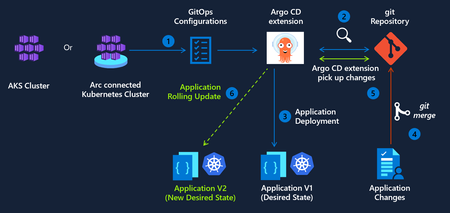
We are excited to announce public preview of the Argo CD extension for Azure Kubernetes Service (AKS) and Azure Arc-enabled Kubernetes clusters. As GitOps becomes the standard for deploying and operating applications at scale, enterprises need a way to implement GitOps while staying compliant with best practices for security and identity management. Argo CD extension delivers on this need across 3 pillars - Trusted Identity and Secure Access The Argo CD extension integrates with Microsoft Entra ID to provide a secure, enterprise-ready experience for: Secure authentication using Workload Identity federation to Azure Container Registry (ACR) and Azure DevOps. This removes the need for long-lived credentials or hard-coded secrets in Git Repos, moving your CD pipelines closer to a true zero-trust architecture. Single Sign-On (SSO) using existing Azure identities. Enterprise-Grade Hardening and Security This preview introduces several enhancements to improve your security posture: To minimize the attack surface, the extension’s images are built on Azure Linux, specifically engineered for reduced CVEs and improved baseline security. Opt-in to automatic patch releases to stay current on security fixes while maintaining full control over your change management processes. Parity with upstream Argo CD Argo CD extension is designed to remain fully aligned with the upstream Argo CD open‑source project, so teams can use Argo CD as they do today with support for Configuring Argo CD extension with High availability (HA) for production‑grade deployments of critical workloads. Using hub‑and‑spoke architecture for multi‑cluster GitOps scenarios. Application and ApplicationSet, enabling automated and scalable application delivery across large fleets of clusters. Getting Started We invite you to explore the Argo CD extension and provide feedback as we continue to evolve GitOps capabilities for Kubernetes. To get started today, you can enable the extension on your clusters using the Azure CLI. Argo CD extension management via the Azure Portal will be available in a few weeks.415Views0likes0Comments
Building Microsoft’s Sovereign AI on Azure Local with NVIDIA RTX PRO and Next Gen NVIDIA Rubin
This blog explores how Azure Local, in partnership with NVIDIA, enables governments and regulated industries to build and operate Sovereign AI within their own trusted boundaries. From enterprise AI acceleration available today with NVIDIA RTX PRO™ Blackwell GPUs to a forward‑looking preview of next‑generation NVIDIA Rubin support, Azure Local provides a consistent platform to run advanced AI workloads—connected or fully disconnected—without sacrificing control, compliance, or governance. Together with Foundry Local, AKS on Azure Local, and Azure Arc, customers can bring AI closer to sensitive data and evolve their Sovereign Private Cloud strategies over time with confidence.934Views3likes0CommentsAzure Arc Server Feb 2026 Forum Recap
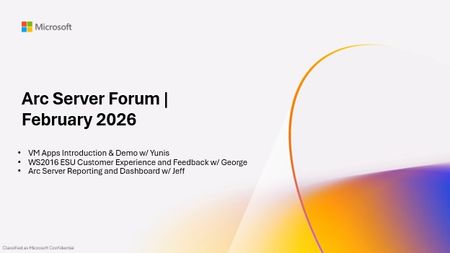
Please find the recording for the monthly Azure Arc Server Forum at YouTube! During the February 2026 Azure Arc Server Forum, we discussed: Arc Server Reporting & Dashboard (Jeff Pigot, Sr. Solution Engineer): Check out this awesome visual reporting bringing together different management services and experiences across Azure Arc-enabled servers on GitHub at Arc Software Assurance Benefits Dashboard. VM Applications (Yunis Hussein, Product Manager): Shared private preview experience and capabilities for 3P Application Deployment and Patching on Azure Arc-enabled servers. Please fill out this form to participate in Private Preview. Windows Server 2016 ESUs enabled by Azure Arc: Portal Experience Feedback (George Enninful): Please sign up on the feedback form. To sign up for the Azure Arc Server Forum and newsletter, please register with contact details at https://aka.ms/arcserverforumsignup/. For the latest agent release notes, check out What's new with Azure Connected Machine agent - Azure Arc | Microsoft Learn. Our March 2026 forum will be held on Thursday, March 26 at 9:30 AM PST / 12:30 PM EST. We look forward to you joining us, thank you!465Views0likes0CommentsAnnouncing the General Availability of the Azure Arc Gateway for Arc-enabled Kubernetes!
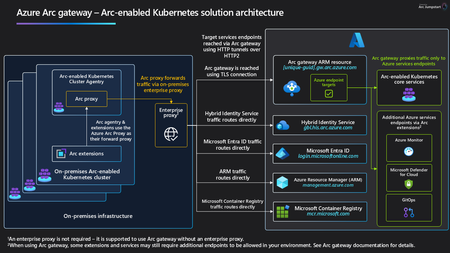
We’re excited to announce the General Availability of Arc gateway for Arc‑enabled Kubernetes. Arc gateway dramatically simplifies the network configuration required to use Azure Arc by consolidating outbound connectivity through a small, predictable set of endpoints. For customers operating behind enterprise proxies or firewalls, this means faster onboarding, fewer change requests, and a smoother path to value with Azure Arc. What’s new: To Arc‑enable a Kubernetes Cluster, customers previously had to allow 18 distinct endpoints. With Arc gateway GA, you can do the same with just 9, a 50% reduction that removes friction for security and networking teams. Why This Matters Organizations with strict outbound controls often spend days, or weeks, coordinating approvals for multiple URLs before they can onboard resources to Azure Arc. By consolidating traffic to a smaller set of destinations, Arc gateway: Accelerates onboarding for Arc‑enabled Kubernetes by cutting down the proxy/firewall approvals needed to get started. Simplifies operations with a consistent, repeatable pattern for routing Arc agent and extension traffic to Azure. How Arc gateway works Arc gateway introduces two components that work together to streamline connectivity: Arc gateway (Azure resource): A single, unique endpoint in your Azure tenant that receives incoming traffic from on‑premises Arc workloads and forwards it to the right Azure services. You configure your enterprise environment to allow this endpoint. Azure Arc Proxy (on every Arc‑enabled Kubernetes Cluster): A component of the Arc K8s agent that routes agent and extension traffic to Azure via the Arc gateway endpoint. It’s part of the core Arc agent; no separate install is required. At a high level, traffic flows: Arc-enabled Kubernetes agent → Arc Proxy → Enterprise Proxy → Arc gateway → Target Azure service. Scenario Coverage As part of this GA release, Arc-enabled Kubernetes Onboarding and other common Arc‑enabled Kubernetes scenarios are supported through Arc gateway, including: Arc-enabled Kubernetes Cluster Connect Arc-enabled Kubernetes Resource View Custom Location Azure Policy's Extension for Azure Arc For other scenarios, including Microsoft Defender for Containers, Azure Key Vault, Container Insights in Azure Monitor, etc., some customer‑specific data plane destinations (e.g., your Log Analytics workspaces, Storage Accounts, or Key Vault URLs) still need to be allow‑listed per your environment. Please consult the Arc gateway documentation for the current scenario‑by‑scenario coverage and any remaining per‑service URLs. Get started Create an Arc gateway resource using the Azure portal, Azure CLI, or PowerShell. Allow the Arc gateway endpoint (and the small set of core endpoints) in your enterprise proxy/firewall. Onboard or update clusters to use your Arc gateway resource. For step‑by‑step guidance, see the Arc gateway documentation on Microsoft Learn. FAQs Does Arc gateway require new software on my clusters? No additional installation - Arc Proxy is part of the standard Arc-enabled Kubernetes Agent. Will every Arc scenario route through the gateway today? Arc-enablement, and other scenarios are covered at GA; some customer‑specific data plane endpoints (for example, Log Analytics workspace FQDNs) may still need to be allowed. Check the docs for the latest coverage details. What is the status of Arc gateway for other infrastructure types? Arc gateway is already GA for Arc-enabled Servers, and Azure Local. Tell us what you think We’d love your feedback on Arc gateway GA for Kubernetes - what worked well, what could be improved, and which scenarios you want next. Use the Arc gateway feedback form to share your input with the product team.899Views3likes0Comments