.net
443 TopicsAZD for Beginners: A Practical Introduction to Azure Developer CLI
If you are learning how to get an application from your machine into Azure without stitching together every deployment step by hand, Azure Developer CLI, usually shortened to azd , is one of the most useful tools to understand early. It gives developers a workflow-focused command line for provisioning infrastructure, deploying application code, wiring environment settings, and working with templates that reflect real cloud architectures rather than toy examples. This matters because many beginners hit the same wall when they first approach Azure. They can build a web app locally, but once deployment enters the picture they have to think about resource groups, hosting plans, databases, secrets, monitoring, configuration, and repeatability all at once. azd reduces that operational overhead by giving you a consistent developer workflow. Instead of manually creating each resource and then trying to remember how everything fits together, you start with a template or an azd -compatible project and let the tool guide the path from local development to a running Azure environment. If you are new to the tool, the AZD for Beginners learning resources are a strong place to start. The repository is structured as a guided course rather than a loose collection of notes. It covers the foundations, AI-first deployment scenarios, configuration and authentication, infrastructure as code, troubleshooting, and production patterns. In other words, it does not just tell you which commands exist. It shows you how to think about shipping modern Azure applications with them. What Is Azure Developer CLI? The Azure Developer CLI documentation on Microsoft Learn, azd is an open-source tool designed to accelerate the path from a local development environment to Azure. That description is important because it explains what the tool is trying to optimise. azd is not mainly about managing one isolated Azure resource at a time. It is about helping developers work with complete applications. The simplest way to think about it is this. Azure CLI, az , is broad and resource-focused. It gives you precise control over Azure services. Azure Developer CLI, azd , is application-focused. It helps you take a solution made up of code, infrastructure definitions, and environment configuration and push that solution into Azure in a repeatable way. Those tools are not competitors. They solve different problems and often work well together. For a beginner, the value of azd comes from four practical benefits: It gives you a consistent workflow built around commands such as azd init , azd auth login , azd up , azd show , and azd down . It uses templates so you do not need to design every deployment structure from scratch on day one. It encourages infrastructure as code through files such as azure.yaml and the infra folder. It helps you move from a one-off deployment towards a repeatable development workflow that is easier to understand, change, and clean up. Why Should You Care About azd A lot of cloud frustration comes from context switching. You start by trying to deploy an app, but you quickly end up learning five or six Azure services, authentication flows, naming rules, environment variables, and deployment conventions all at once. That is not a good way to build confidence. azd helps by giving a workflow that feels closer to software delivery than raw infrastructure management. You still learn real Azure concepts, but you do so through an application lens. You initialise a project, authenticate, provision what is required, deploy the app, inspect the result, and tear it down when you are done. That sequence is easier to retain because it mirrors the way developers already think about shipping software. This is also why the AZD for Beginners resource is useful. It does not assume every reader is already comfortable with Azure. It starts with foundation topics and then expands into more advanced paths, including AI deployment scenarios that use the same core azd workflow. That progression makes it especially suitable for students, self-taught developers, workshop attendees, and engineers who know how to code but want a clearer path into Azure deployment. What You Learn from AZD for Beginners The AZD for Beginners course is structured as a learning journey rather than a single quickstart. That matters because azd is not just a command list. It is a deployment workflow with conventions, patterns, and trade-offs. The course helps readers build that mental model gradually. At a high level, the material covers: Foundational topics such as what azd is, how to install it, and how the basic deployment loop works. Template-based development, including how to start from an existing architecture rather than building everything yourself. Environment configuration and authentication practices, including the role of environment variables and secure access patterns. Infrastructure as code concepts using the standard azd project structure. Troubleshooting, validation, and pre-deployment thinking, which are often ignored in beginner content even though they matter in real projects. Modern AI and multi-service application scenarios, showing that azd is not limited to basic web applications. One of the strongest aspects of the course is that it does not stop at the first successful deployment. It also covers how to reason about configuration, resource planning, debugging, and production readiness. That gives learners a more realistic picture of what Azure development work actually looks like. The Core azd Workflow The official overview on Microsoft Learn and the get started guide both reinforce a simple but important idea: most beginners should first understand the standard workflow before worrying about advanced customisation. That workflow usually looks like this: Install azd . Authenticate with Azure. Initialise a project from a template or in an existing repository. Run azd up to provision and deploy. Inspect the deployed application. Remove the resources when finished. Here is a minimal example using an existing template: # Install azd on Windows winget install microsoft.azd # Check that the installation worked azd version # Sign in to your Azure account azd auth login # Start a project from a template azd init --template todo-nodejs-mongo # Provision Azure resources and deploy the app azd up # Show output values such as the deployed URL azd show # Clean up everything when you are done learning azd down --force --purge This sequence is important because it teaches beginners the full lifecycle, not only deployment. A lot of people remember azd up and forget the cleanup step. That leads to wasted resources and avoidable cost. The azd down --force --purge step is part of the discipline, not an optional extra. Installing azd and Verifying Your Setup The official install azd guide on Microsoft Learn provides platform-specific instructions. Because this repository targets developer learning, it is worth showing the common install paths clearly. # Windows winget install microsoft.azd # macOS brew tap azure/azd && brew install azd # Linux curl -fsSL https://aka.ms/install-azd.sh | bash After installation, verify the tool is available: azd version That sounds obvious, but it is worth doing immediately. Many beginner problems come from assuming the install completed correctly, only to discover a path issue or outdated version later. Verifying early saves time. The Microsoft Learn installation page also notes that azd installs supporting tools such as GitHub CLI and Bicep CLI within the tool's own scope. For a beginner, that is helpful because it removes some of the setup friction you might otherwise need to handle manually. What Happens When You Run azd up ? One of the most important questions is what azd up is actually doing. The short answer is that it combines provisioning and deployment into one workflow. The longer answer is where the learning value sits. When you run azd up , the tool looks at the project configuration, reads the infrastructure definition, determines which Azure resources need to exist, provisions them if necessary, and then deploys the application code to those resources. In many templates, it also works with environment settings and output values so that the project becomes reproducible rather than ad hoc. That matters because it teaches a more modern cloud habit. Instead of building infrastructure manually in the portal and then hoping you can remember how you did it, you define the deployment shape in source-controlled files. Even at beginner level, that is the right habit to learn. Understanding the Shape of an azd Project The Azure Developer CLI templates overview explains the standard project structure used by azd . If you understand this structure early, templates become much less mysterious. A typical azd project contains: azure.yaml to describe the project and map services to infrastructure targets. An infra folder containing Bicep or Terraform files for infrastructure as code. A src folder, or equivalent source folders, containing the application code that will be deployed. A local .azure folder to store environment-specific settings for the project. Here is a minimal example of what an azure.yaml file can look like in a simple app: name: beginner-web-app metadata: template: beginner-web-app services: web: project: ./src/web host: appservice This file is small, but it carries an important idea. azd needs a clear mapping between your application code and the Azure service that will host it. Once you see that, the tool becomes easier to reason about. You are not invoking magic. You are describing an application and its hosting model in a standard way. Start from a Template, Then Learn the Architecture Beginners often assume that using a template is somehow less serious than building something from scratch. In practice, it is usually the right place to begin. The official docs for templates and the Awesome AZD gallery both encourage developers to start from an existing architecture when it matches their goals. That is a sound learning strategy for two reasons. First, it lets you experience a working deployment quickly, which builds confidence. Second, it gives you a concrete project to inspect. You can look at azure.yaml , explore the infra folder, inspect the app source, and understand how the pieces connect. That teaches more than reading a command reference in isolation. The AZD for Beginners material also leans into this approach. It includes chapter guidance, templates, workshops, examples, and structured progression so that readers move from successful execution into understanding. That is much more useful than a single command demo. A practical beginner workflow looks like this: # Pick a known template azd init --template todo-nodejs-mongo # Review the files that were created or cloned # - azure.yaml # - infra/ # - src/ # Deploy it azd up # Open the deployed app details azd show Once that works, do not immediately jump to a different template. Spend time understanding what was deployed and why. Where AZD for Beginners Fits In The official docs are excellent for accurate command guidance and conceptual documentation. The AZD for Beginners repository adds something different: a curated learning path. It helps beginners answer questions such as these: Which chapter should I start with if I know Azure a little but not azd ? How do I move from a first deployment into understanding configuration and authentication? What changes when the application becomes an AI application rather than a simple web app? How do I troubleshoot failures instead of copying commands blindly? The repository also points learners towards workshops, examples, a command cheat sheet, FAQ material, and chapter-based exercises. That makes it particularly useful in teaching contexts. A lecturer or workshop facilitator can use it as a course backbone, while an individual learner can work through it as a self-study track. For developers interested in AI, the resource is especially timely because it shows how the same azd workflow can be used for AI-first solutions, including scenarios connected to Microsoft Foundry services and multi-agent architectures. The important beginner lesson is that the workflow stays recognisable even as the application becomes more advanced. Common Beginner Mistakes and How to Avoid Them A good introduction should not only explain the happy path. It should also point out the places where beginners usually get stuck. Skipping authentication checks. If azd auth login has not completed properly, later commands will fail in ways that are harder to interpret. Not verifying the installation. Run azd version immediately after install so you know the tool is available. Treating templates as black boxes. Always inspect azure.yaml and the infra folder so you understand what the project intends to provision. Forgetting cleanup. Learning environments cost money if you leave them running. Use azd down --force --purge when you are finished experimenting. Trying to customise too early. First get a known template working exactly as designed. Then change one thing at a time. If you do hit problems, the official troubleshooting documentation and the troubleshooting sections inside AZD for Beginners are the right next step. That is a much better habit than searching randomly for partial command snippets. How I Would Approach AZD as a New Learner If I were introducing azd to a student or a developer who is comfortable with code but new to Azure delivery, I would keep the learning path tight. Read the official What is Azure Developer CLI? overview so the purpose is clear. Install the tool using the Microsoft Learn install guide. Work through the opening sections of AZD for Beginners. Deploy one template with azd init and azd up . Inspect azure.yaml and the infrastructure files before making any changes. Run azd down --force --purge so the lifecycle becomes a habit. Only then move on to AI templates, configuration changes, or custom project conversion. That sequence keeps the cognitive load manageable. It gives you one successful deployment, one architecture to inspect, and one repeatable workflow to internalise before adding more complexity. Why azd Is Worth Learning Now azd matters because it reflects how modern Azure application delivery is actually done: repeatable infrastructure, source-controlled configuration, environment-aware workflows, and application-level thinking rather than isolated portal clicks. It is useful for straightforward web applications, but it becomes even more valuable as systems gain more services, more configuration, and more deployment complexity. That is also why the AZD for Beginners resource is worth recommending. It gives new learners a structured route into the tool instead of leaving them to piece together disconnected docs, samples, and videos on their own. Used alongside the official Microsoft Learn documentation, it gives you both accuracy and progression. Key Takeaways azd is an application-focused Azure deployment tool, not just another general-purpose CLI. The core beginner workflow is simple: install, authenticate, initialise, deploy, inspect, and clean up. Templates are not a shortcut to avoid learning. They are a practical way to learn architecture through working examples. AZD for Beginners is valuable because it turns the tool into a structured learning path. The official Microsoft Learn documentation for Azure Developer CLI should remain your grounding source for commands and platform guidance. Next Steps If you want to keep going, start with these resources: AZD for Beginners for the structured course, examples, and workshop materials. Azure Developer CLI documentation on Microsoft Learn for official command, workflow, and reference guidance. Install azd if you have not set up the tool yet. Deploy an azd template for the first full quickstart. Azure Developer CLI templates overview if you want to understand the project structure and template model. Awesome AZD if you want to browse starter architectures. If you are teaching others, this is also a good sequence for a workshop: start with the official overview, deploy one template, inspect the project structure, and then use AZD for Beginners as the path for deeper learning. That gives learners both an early win and a solid conceptual foundation.Agentic IIS Migration to Managed Instance on Azure App Service
Introduction Enterprises running ASP.NET Framework workloads on Windows Server with IIS face a familiar dilemma: modernize or stay put. The applications work, the infrastructure is stable, and nobody wants to be the person who breaks production during a cloud migration. But the cost of maintaining aging on-premises servers, patching Windows, and managing IIS keeps climbing. Azure App Service has long been the lift-and-shift destination for these workloads. But what about applications that depend on Windows registry keys, COM components, SMTP relay, MSMQ queues, local file system access, or custom fonts? These OS-level dependencies have historically been migration blockers — forcing teams into expensive re-architecture or keeping them anchored to VMs. Managed Instance on Azure App Service changes this equation entirely. And the IIS Migration MCP Server makes migration guided, intelligent, and safe — with AI agents that know what to ask, what to check, and what to generate at every step. What Is Managed Instance on Azure App Service? Managed Instance on App Service is Azure's answer to applications that need OS-level customization beyond what standard App Service provides. It runs on the PremiumV4 (PV4) SKU with IsCustomMode=true, giving your app access to: Capability What It Enables Registry Adapters Redirect Windows Registry reads to Azure Key Vault secrets — no code changes Storage Adapters Mount Azure Files, local SSD, or private VNET storage as drive letters (e.g., D:\, E:\) install.ps1 Startup Script Run PowerShell at instance startup to install Windows features (SMTP, MSMQ), register COM components, install MSI packages, deploy custom fonts Custom Mode Full access to the Windows instance for configuration beyond standard PaaS guardrails The key constraint: Managed Instance on App Service requires PV4 SKU with IsCustomMode=true. No other SKU combination supports it. Why Managed Instance Matters for Legacy Apps Consider a classic enterprise ASP.NET application that: Reads license keys from HKLM\SOFTWARE\MyApp in the Windows Registry Uses a COM component for PDF generation registered via regsvr32 Sends email through a local SMTP relay Writes reports to D:\Reports\ on a local drive Uses a custom corporate font for PDF rendering With standard App Service, you'd need to rewrite every one of these dependencies. With Managed Instance on App Service, you can: Map registry reads to Key Vault secrets via Registry Adapters Mount Azure Files as D:\ via Storage Adapters Enable SMTP Server via install.ps1 Register the COM DLL via install.ps1 (regsvr32) Install the custom font via install.ps1 Please note that when you are migrating your web applications to Managed Instance on Azure App Service in majority of the use cases "Zero application code changes may be required " but depending on your specific web app some code changes may be necessary. Microsoft Learn Resources Managed Instance on App Service Overview Azure App Service Documentation App Service Migration Assistant Tool Migrate to Azure App Service Azure App Service Plans Overview PremiumV4 Pricing Tier Azure Key Vault Azure Files AppCat (.NET) — Azure Migrate Application and Code Assessment Why Agentic Migration? The Case for AI-Guided IIS Migration The Problem with Traditional Migration Microsoft provides excellent PowerShell scripts for IIS migration — Get-SiteReadiness.ps1, Get-SitePackage.ps1, Generate-MigrationSettings.ps1, and Invoke-SiteMigration.ps1. They're free, well-tested, and reliable. So why wrap them in an AI-powered system? Because the scripts are powerful but not intelligent. They execute what you tell them to. They don't tell you what to do. Here's what a traditional migration looks like: Run readiness checks — get a wall of JSON with cryptic check IDs like ContentSizeCheck, ConfigErrorCheck, GACCheck Manually interpret 15+ readiness checks per site across dozens of sites Decide whether each site needs Managed Instance or standard App Service (how?) Figure out which dependencies need registry adapters vs. storage adapters vs. install.ps1 (the "Managed Instance provisioning split") Write the install.ps1 script by hand for each combination of OS features Author ARM templates for adapter configurations (Key Vault references, storage mount specs, RBAC assignments) Wire together PackageResults.json → MigrationSettings.json with correct Managed Instance fields (Tier=PremiumV4, IsCustomMode=true) Hope you didn't misconfigure anything before deploying to Azure Even experienced Azure engineers find this time-consuming, error-prone, and tedious — especially across a fleet of 20, 50, or 100+ IIS sites. What Agentic Migration Changes The IIS Migration MCP Server introduces an AI orchestration layer that transforms this manual grind into a guided conversation: Traditional Approach Agentic Approach Read raw JSON output from scripts AI summarizes readiness as tables with plain-English descriptions Memorize 15 check types and their severity AI enriches each check with title, description, recommendation, and documentation links Manually decide Managed Instance vs App Service recommend_target analyzes all signals and recommends with confidence + reasoning Write install.ps1 from scratch generate_install_script builds it from detected features Author ARM templates manually generate_adapter_arm_template generates full templates with RBAC guidance Wire JSON artifacts between phases by hand Agents pass readiness_results_path → package_results_path → migration_settings_path automatically Pray you set PV4 + IsCustomMode correctly Enforced automatically — every tool validates Managed Instance constraints Deploy and find out what broke confirm_migration presents a full cost/resource summary before touching Azure The core value proposition: the AI knows the Managed Instance provisioning split. It knows that registry access needs an ARM template with Key Vault-backed adapters, while SMTP needs an install.ps1 section enabling the Windows SMTP Server feature. You don't need to know this. The system detects it from your IIS configuration and AppCat analysis, then generates exactly the right artifacts. Human-in-the-Loop Safety Agentic doesn't mean autonomous. The system has explicit gates: Phase 1 → Phase 2: "Do you want to assess these sites, or skip to packaging?" Phase 3: "Here's my recommendation — Managed Instance for Site A (COM + Registry), standard for Site B. Agree?" Phase 4: "Review MigrationSettings.json before proceeding" Phase 5: "This will create billable Azure resources. Type 'yes' to confirm" The AI accelerates the workflow; the human retains control over every decision. Quick Start Clone and set up the MCP server git clone https://github.com//iis-migration-mcp.git cd iis-migration-mcp python -m venv .venv .venv\Scripts\activate pip install -r requirements.txt # Download Microsoft's migration scripts (NOT included in this repo) # From: https://appmigration.microsoft.com/api/download/psscripts/AppServiceMigrationScripts.zip # Unzip to C:\MigrationScripts (or your preferred path) # Start using in VS Code with Copilot # 1. Copy .vscode/mcp.json.example → .vscode/mcp.json # 2. Open folder in VS Code # 3. In Copilot Chat: "Configure scripts path to C:\MigrationScripts" # 4. Then: @iis-migrate "Discover my IIS sites" The server also works with any MCP-compatible client — Claude Desktop, Cursor, Copilot CLI, or custom integrations — via stdio transport. Architecture: How the MCP Server Works The system is built on the Model Context Protocol (MCP), an open protocol that lets AI assistants like GitHub Copilot, Claude, or Cursor call external tools through a standardized interface. ┌──────────────────────────────────────────────────────────────────┐ │ VS Code + Copilot Chat │ │ @iis-migrate orchestrator agent │ │ ├── iis-discover (Phase 1) │ │ ├── iis-assess (Phase 2) │ │ ├── iis-recommend (Phase 3) │ │ ├── iis-deploy-plan (Phase 4) │ │ └── iis-execute (Phase 5) │ └─────────────┬────────────────────────────────────────────────────┘ │ stdio JSON-RPC (MCP Transport) ▼ ┌──────────────────────────────────────────────────────────────────┐ │ FastMCP Server (server.py) │ │ 13 Python Tool Modules (tools/*.py) │ │ └── ps_runner.py (Python → PowerShell bridge) │ │ └── Downloaded PowerShell Scripts (user-configured) │ │ ├── Local IIS (discovery, packaging) │ │ └── Azure ARM API (deployment) │ └──────────────────────────────────────────────────────────────────┘ The server exposes 13 MCP tools organized across 5 phases, orchestrated by 6 Copilot agents (1 orchestrator + 5 specialist subagents). Important: The PowerShell migration scripts are not included in this repository. Users must download them from GitHub and configure the path using the configure_scripts_path tool. This ensures you always use the latest version of Microsoft's scripts, avoiding version mismatch issues. The 13 MCP Tools: Complete Reference Phase 0 — Setup configure_scripts_path Purpose: Point the server to Microsoft's downloaded migration PowerShell scripts. Before any migration work, you need to download the scripts from GitHub, unzip them, and tell the server where they are. "Configure scripts path to C:\MigrationScripts" Phase 1 — Discovery 1. discover_iis_sites Purpose: Scan the local IIS server and run readiness checks on every web site. This is the entry point for every migration. It calls Get-SiteReadiness.ps1 under the hood, which: Enumerates all IIS web sites, application pools, bindings, and virtual directories Runs 15 readiness checks per site (config errors, HTTPS bindings, non-HTTP protocols, TCP ports, location tags, app pool settings, app pool identity, virtual directories, content size, global modules, ISAPI filters, authentication, framework version, connection strings, and more) Detects source code artifacts (.sln, .csproj, .cs, .vb) near site physical paths Output: ReadinessResults.json with per-site status: Status Meaning READY No issues detected — clear for migration READY_WITH_WARNINGS Minor issues that won't block migration READY_WITH_ISSUES Non-fatal issues that need attention BLOCKED Fatal issues (e.g., content > 2GB) — cannot migrate as-is Requires: Administrator privileges, IIS installed. 2. choose_assessment_mode Purpose: Route each discovered site into the appropriate next step. After discovery, you decide the path for each site: assess_all: Run detailed assessment on all non-blocked sites package_and_migrate: Skip assessment, proceed directly to packaging (for sites you already know well) The tool classifies each site into one of five actions: assess_config_only — IIS/web.config analysis assess_config_and_source — Config + AppCat source code analysis (when source is detected) package — Skip to packaging blocked — Fatal errors, cannot proceed skip — User chose to exclude Phase 2 — Assessment 3. assess_site_readiness Purpose: Get a detailed, human-readable readiness assessment for a specific site. Takes the raw readiness data from Phase 1 and enriches each check with: Title: Plain-English name (e.g., "Global Assembly Cache (GAC) Dependencies") Description: What the check found and why it matters Recommendation: Specific guidance on how to resolve the issue Category: Grouping (Configuration, Security, Compatibility) Documentation Link: Microsoft Learn URL for further reading This enrichment comes from WebAppCheckResources.resx, an XML resource file that maps check IDs to detailed metadata. Without this tool, you'd see GACCheck: FAIL — with it, you see the full context. Output: Overall status, enriched failed/warning checks, framework version, pipeline mode, binding details. 4. assess_source_code Purpose: Analyze an Azure Migrate application and code assessment for .NET JSON report to identify Managed Instance-relevant source code dependencies. If your application has source code and you've run the assessment tool against it, this tool parses the results and maps findings to migration actions: Dependency Detected Migration Action Windows Registry access Registry Adapter (ARM template) Local file system I/O / hardcoded paths Storage Adapter (ARM template) SMTP usage install.ps1 (SMTP Server feature) COM Interop install.ps1 (regsvr32/RegAsm) Global Assembly Cache (GAC) install.ps1 (GAC install) Message Queuing (MSMQ) install.ps1 (MSMQ feature) Certificate access Key Vault integration The tool matches rules from the assessment output against known Managed Instance-relevant patterns. For a complete list of rules and categories, see Interpret the analysis results. Output: Issues categorized as mandatory/optional/potential, plus install_script_features and adapter_features lists that feed directly into Phase 3 tools. Phase 3 — Recommendation & Provisioning 5. suggest_migration_approach Purpose: Recommend the right migration tool/approach for the scenario. This is a routing tool that considers: Source code available? → Recommend the App Modernization MCP server for code-level changes No source code? → Recommend this IIS Migration MCP (lift-and-shift) OS customization needed? → Highlight Managed Instance on App Service as the target 6. recommend_target Purpose: Recommend the Azure deployment target for each site based on all assessment data. This is the intelligence center of the system. It analyzes config assessments and source code findings to recommend: Target When Recommended SKU MI_AppService Registry, COM, MSMQ, SMTP, local file I/O, GAC, or Windows Service dependencies detected PremiumV4 (PV4) AppService Standard web app, no OS-level dependencies PremiumV2 (PV2) ContainerApps Microservices architecture or container-first preference N/A Each recommendation comes with: Confidence: high or medium Reasoning: Full explanation of why this target was chosen Managed Instance reasons: Specific dependencies that require Managed Instance Blockers: Issues that prevent migration entirely install_script_features: What the install.ps1 needs to enable adapter_features: What the ARM template needs to configure Provisioning guidance: Step-by-step instructions for what to do next 7. generate_install_script Purpose: Generate an install.ps1 PowerShell script for OS-level feature enablement on Managed Instance. This handles the OS-level side of the Managed Instance provisioning split. It generates a startup script that includes sections for: Feature What the Script Does SMTP Install-WindowsFeature SMTP-Server, configure smart host relay MSMQ Install MSMQ, create application queues COM/MSI Run msiexec for MSI installers, regsvr32/RegAsm for COM registration Crystal Reports Install SAP Crystal Reports runtime MSI Custom Fonts Copy .ttf/.otf to C:\Windows\Fonts, register in registry The script can auto-detect needed features from config and source assessments, or you can specify them manually. 8. generate_adapter_arm_template Purpose: Generate an ARM template for Managed Instance registry and storage adapters. This handles the platform-level side of the Managed Instance provisioning split. It generates a deployable ARM template that configures: Registry Adapters (Key Vault-backed): Map Windows Registry paths (e.g., HKLM\SOFTWARE\MyApp\LicenseKey) to Key Vault secrets Your application reads the registry as before; Managed Instance redirects the read to Key Vault transparently Storage Adapters (three types): Type Description Credentials AzureFiles Mount Azure Files SMB share as a drive letter Storage account key in Key Vault Custom Mount storage over private endpoint via VNET Requires VNET integration LocalStorage Allocate local SSD on the Managed Instance as a drive letter None needed The template also includes: Managed Identity configuration RBAC role assignments guidance (Key Vault Secrets User, Storage File Data SMB Share Contributor, etc.) Deployment CLI commands ready to copy-paste Phase 4 — Deployment Planning & Packaging 9. plan_deployment Purpose: Plan the Azure App Service deployment — plans, SKUs, site assignments. Collects your Azure details (subscription, resource group, region) and creates a validated deployment plan: Assigns sites to App Service Plans Enforces PV4 + IsCustomMode=true for Managed Instance — won't let you accidentally use the wrong SKU Supports single_plan (all sites on one plan) or multi_plan (separate plans) Optionally queries Azure for existing Managed Instance plans you can reuse 10. package_site Purpose: Package IIS site content into ZIP files for deployment. Calls Get-SitePackage.ps1 to: Compress site binaries + web.config into deployment-ready ZIPs Optionally inject install.ps1 into the package (so it deploys alongside the app) Handle sites with non-fatal issues (configurable) Size limit: 2 GB per site (enforced by System.IO.Compression). 11. generate_migration_settings Purpose: Create the MigrationSettings.json deployment configuration. This is the final configuration artifact. It calls Generate-MigrationSettings.ps1 and then post-processes the output to inject Managed Instance-specific fields: Important: The Managed Instance on App Service Plan is not automatically created by the migration tools. You must pre-create the Managed Instance on App Service Plan (PV4 SKU with IsCustomMode=true) in the Azure portal or via CLI before generating migration settings. When running generate_migration_settings, provide the name of your existing Managed Instance plan so the settings file references it correctly. { "AppServicePlan": "mi-plan-eastus", "Tier": "PremiumV4", "IsCustomMode": true, "InstallScriptPath": "install.ps1", "Region": "eastus", "Sites": [ { "IISSiteName": "MyLegacyApp", "AzureSiteName": "mylegacyapp-azure", "SitePackagePath": "packagedsites/MyLegacyApp_Content.zip" } ] } Phase 5 — Execution 12. confirm_migration Purpose: Present a full migration summary and require explicit human confirmation. Before touching Azure, this tool displays: Total plans and sites to be created SKU and pricing tier per plan Whether Managed Instance is configured Cost warning for PV4 pricing Resource group, region, and subscription details Nothing proceeds until the user explicitly confirms. 13. migrate_sites Purpose: Deploy everything to Azure App Service. This creates billable resources. Calls Invoke-SiteMigration.ps1, which: Sets Azure subscription context Creates/validates resource groups Creates App Service Plans (PV4 with IsCustomMode for Managed Instance) Creates Web Apps Configures .NET version, 32-bit mode, pipeline mode from the original IIS settings Sets up virtual directories and applications Disables basic authentication (FTP + SCM) for security Deploys ZIP packages via Azure REST API Output: MigrationResults.json with per-site Azure URLs, Resource IDs, and deployment status. The 6 Copilot Agents The MCP tools are orchestrated by a team of specialized Copilot agents — each responsible for a specific phase of the migration lifecycle. @iis-migrate — The Orchestrator The root agent that guides the entire migration. It: Tracks progress across all 5 phases using a todo list Delegates work to specialist subagents Gates between phases — asks before transitioning Enforces the Managed Instance constraint (PV4 + IsCustomMode) at every decision point Never skips the Phase 5 confirmation gate Usage: Open Copilot Chat and type @iis-migrate I want to migrate my IIS applications to Azure iis-discover — Discovery Specialist Handles Phase 1. Runs discover_iis_sites, presents a summary table of all sites with their readiness status, and asks whether to assess or skip to packaging. Returns readiness_results_path and per-site routing plans. iis-assess — Assessment Specialist Handles Phase 2. Runs assess_site_readiness for every site, and assess_source_code when AppCat results are available. Merges findings, highlights Managed Instance-relevant issues, and produces the adapter/install features lists that drive Phase 3. iis-recommend — Recommendation Specialist Handles Phase 3. Runs recommend_target for each site, then conditionally generates install.ps1 and ARM adapter templates. Presents all recommendations with confidence levels and reasoning, and allows you to edit generated artifacts. iis-deploy-plan — Deployment Planning Specialist Handles Phase 4. Collects Azure details, runs plan_deployment, package_site, and generate_migration_settings. Validates Managed Instance configuration, allows review and editing of MigrationSettings.json. Does not execute migration. iis-execute — Execution Specialist Handles Phase 5 only. Runs confirm_migration to present the final summary, then only proceeds with migrate_sites after receiving explicit "yes" confirmation. Reports results with Azure URLs and deployment status. The Managed Instance Provisioning Split: A Critical Concept One of the most important ideas Managed Instance introduces is the provisioning split — the division of OS dependencies into two categories that are configured through different mechanisms: ┌──────────────────────────────────────────────────────────────┐ │ MANAGED INSTANCE PROVISIONING SPLIT │ ├─────────────────────────────┬────────────────────────────────┤ │ ARM Template │ install.ps1 │ │ (Platform-Level) │ (OS-Level) │ ├─────────────────────────────┼────────────────────────────────┤ │ Registry Adapters │ COM/MSI Registration │ │ → Key Vault secrets │ → regsvr32, RegAsm, msiexec │ │ │ │ │ Storage Mounts │ SMTP Server Feature │ │ → Azure Files │ → Install-WindowsFeature │ │ → Local SSD │ │ │ → VNET private storage │ MSMQ │ │ │ → Message queue setup │ │ │ │ │ │ Crystal Reports Runtime │ │ │ → SAP MSI installer │ │ │ │ │ │ Custom Fonts │ │ │ → Copy to C:\Windows\Fonts │ └─────────────────────────────┴────────────────────────────────┘ The MCP server handles this split automatically: assess_source_code detects which dependencies fall into which category recommend_target reports both adapter_features and install_script_features generate_adapter_arm_template builds the ARM template for platform features generate_install_script builds the PowerShell startup script for OS features You don't need to remember which goes where — the system decides and generates the right artifacts. End-to-End Walkthrough: From Discovery to Running on Managed Instance Here's what a complete migration conversation looks like: You: "@iis-migrate I want to migrate my IIS applications to Azure" Phase 1 — Discovery: Agent runs discover_iis_sites, presents a table: Site Status Framework Source Code? HRPortal READY_WITH_ISSUES v4.8 Yes (.sln found) PayrollAPI READY v4.8 No IntranetCMS BLOCKED (>2GB) v4.7.2 No Phase 2 — Assessment: Agent runs assess_site_readiness for HRPortal — finds GACCheck and RegistryCheck failures. Runs assess_source_code using AppCat report — confirms COM interop, registry access, and SMTP usage. Phase 3 — Recommendation: Agent runs recommend_target: HRPortal → MI_AppService (high confidence) — COM, registry, SMTP dependencies PayrollAPI → AppService (high confidence) — no OS dependencies Generates install.ps1 for HRPortal (SMTP + COM sections). Generates ARM template with registry adapter (Key Vault-backed) for HRPortal. Phase 4 — Deployment Planning: Agent collects subscription/RG/region, validates PV4 availability. Packages both sites. Generates MigrationSettings.json with two plans: mi-plan-hrportal (PremiumV4, IsCustomMode=true) — HRPortal std-plan-payrollapi (PremiumV2) — PayrollAPI Phase 5 — Execution: Agent shows full summary with cost projection. You type "yes". Sites deploy. You get Azure URLs within minutes. Prerequisites & Setup Requirement Purpose Windows Server with IIS Source server for discovery and packaging PowerShell 5.1 Runs migration scripts (ships with Windows) Python 3.10+ MCP server runtime Administrator privileges Required for IIS discovery, packaging, and migration Azure subscription Target for deployment (execution phase only) Azure PowerShell (Az module) Deploy to Azure (execution phase only) Migration Scripts ZIP Microsoft's PowerShell migration scripts AppCat CLI Source code analysis (optional) FastMCP (mcp[cli]>=1.0.0) MCP server framework Data Flow & Artifacts Every phase produces JSON artifacts that chain into the next phase: Phase 1: discover_iis_sites ──→ ReadinessResults.json │ Phase 2: assess_site_readiness ◄──────┘ assess_source_code ───→ Assessment JSONs │ Phase 3: recommend_target ◄───────────┘ generate_install_script ──→ install.ps1 generate_adapter_arm ─────→ mi-adapters-template.json │ Phase 4: package_site ────────────→ PackageResults.json + site ZIPs generate_migration_settings → MigrationSettings.json │ Phase 5: confirm_migration ◄──────────┘ migrate_sites ───────────→ MigrationResults.json │ ▼ Apps live on Azure *.azurewebsites.net Each artifact is inspectable, editable, and auditable — providing a complete record of what was assessed, recommended, and deployed. Error Handling The MCP server classifies errors into actionable categories: Error Cause Resolution ELEVATION_REQUIRED Not running as Administrator Restart VS Code / terminal as Admin IIS_NOT_FOUND IIS or WebAdministration module missing Install IIS role + WebAdministration AZURE_NOT_AUTHENTICATED Not logged into Azure PowerShell Run Connect-AzAccount SCRIPT_NOT_FOUND Migration scripts path not configured Run configure_scripts_path SCRIPT_TIMEOUT PowerShell script exceeded time limit Check IIS server responsiveness OUTPUT_NOT_FOUND Expected JSON output wasn't created Verify script execution succeeded Conclusion The IIS Migration MCP Server turns what used to be a multi-week, expert-driven project into a guided conversation. It combines Microsoft's battle-tested migration PowerShell scripts with AI orchestration that understands the nuances of Managed Instance on App Service — the provisioning split, the PV4 constraint, the adapter configurations, and the OS-level customizations. Whether you're migrating 1 site or 10, agentic migration reduces risk, eliminates guesswork, and produces auditable artifacts at every step. The human stays in control; the AI handles the complexity. Get started: Download the migration scripts, set up the MCP server, and ask @iis-migrate to discover your IIS sites. The agents will take it from there. This project is compatible with any MCP-enabled client: VS Code GitHub Copilot, Claude Desktop, Cursor, and more. The intelligence travels with the server, not the client.194Views0likes0CommentsGive your Foundry Agent Custom Tools with MCP Servers on Azure Functions
This blog post is for developers who have an MCP server deployed to Azure Functions and want to connect it to Microsoft Foundry agents. It walks through why you'd want to do this, the different authentication options available, and how to get your agent calling your MCP tools. Connect your MCP server on Azure Functions to Foundry Agent If you've been following along with this blog series, you know that Azure Functions is a great place to host remote MCP servers. You get scalable infrastructure, built-in auth, and serverless billing. All the good stuff. But hosting an MCP server is only half the picture. The real value comes when something actually uses those tools. Microsoft Foundry lets you build AI agents that can reason, plan, and take actions. By connecting your MCP server to an agent, you're giving it access to your custom tools, whether that's querying a database, calling an API, or running some business logic. The agent discovers your tools, decides when to call them, and uses the results to respond to the user. Why connect MCP servers to Foundry agents? You might already have an MCP server that works great with VS Code, VS, Cursor, or other MCP clients. Connecting that same server to a Foundry agent means you can reuse those tools in a completely different context, i.e. in an enterprise AI agent that your team or customers interact with. No need to rebuild anything. Your MCP server stays the same; you're just adding another consumer. Prerequisites Before proceeding, make sure you have the following: 1. An MCP server deployed to Azure Functions. If you don't have one yet, you can deploy one quickly by following one of the samples: Python TypeScript .NET 2. A Foundry project with a deployed model and a Foundry agent Authentication options Depending on where you are in development, you can pick what makes sense and upgrade later. Here's a summary: Method Description When to use Key-based (default) Agent authenticates by passing a shared function access key in the request header. This method is the default authentication for HTTP endpoints in Functions. Development, or when Entra auth isn't required. Microsoft Entra Agent authenticates using either its own identity (agent identity) or the shared identity of the Foundry project (project managed identity). Use agent identity for production scenarios, but limit shared identity to development. OAuth identity passthrough Agent prompts users to sign in and authorize access, using the provided token to authenticate. Production, when each user must authenticate individually. Unauthenticated Agent makes unauthenticated calls. Development only, or tools that access only public information. Connect your MCP server to your Foundry agent If your server uses key-based auth or is unauthenticated, it should be relatively straightforward to set up the connection from a Foundry agent. The Microsoft Entra and OAuth identity passthrough are options that require extra steps to set up. Check out detailed step-by-step instructions for each authentication method. At a high level, the process looks like this: Enable built-in MCP authentication : When you deploy a server to Azure Functions, key-based auth is the default. You'll need to disable that and enable built-in MCP auth instead. If you deployed one of the sample servers in the Prerequisite section, this step is already done for you. Get your MCP server endpoint URL: For MCP extension-based servers, it's https://<FUNCTION_APP_NAME>.azurewebsites.net/runtime/webhooks/mcp Get your credentials based on your chosen auth method: a managed identity configuration, OAuth credentials Add the MCP server as a tool in the Foundry portal by navigating to your agent, adding a new MCP tool, and providing the endpoint and credentials. Microsoft Entra connection required fields OAuth Identity required fields Once the server is configured as a tool, test it in the Agent Builder playground by sending a prompt that triggers one of your MCP tools. Closing thoughts What I find exciting about this is the composability. You build your MCP server once and it works everywhere: VS Code, VS, Cursor, ChatGPT, and now Foundry agents. The MCP protocol is becoming the universal interface for tool use in AI, and Azure Functions makes it easy to host these servers at scale and with security. Are you building agents with Foundry? Have you connected your MCP servers to other clients? I'd love to hear what tools you're exposing and how you're using them. Share with us your thoughts! What's next In the next blog post, we'll go deeper into other MCP topics and cover new MCP features and developments in Azure Functions. Stay tuned!289Views0likes0CommentsAzure Functions Ignite 2025 Update
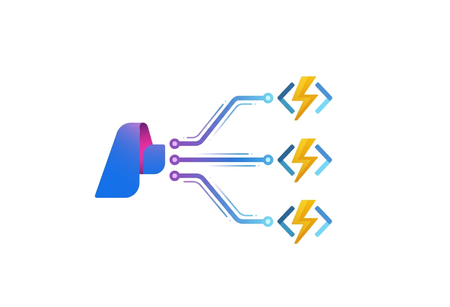
Azure Functions is redefining event-driven applications and high-scale APIs in 2025, accelerating innovation for developers building the next generation of intelligent, resilient, and scalable workloads. This year, our focus has been on empowering AI and agentic scenarios: remote MCP server hosting, bulletproofing agents with Durable Functions, and first-class support for critical technologies like OpenTelemetry, .NET 10 and Aspire. With major advances in serverless Flex Consumption, enhanced performance, security, and deployment fundamentals across Elastic Premium and Flex, Azure Functions is the platform of choice for building modern, enterprise-grade solutions. Remote MCP Model Context Protocol (MCP) has taken the world by storm, offering an agent a mechanism to discover and work deeply with the capabilities and context of tools. When you want to expose MCP/tools to your enterprise or the world securely, we recommend you think deeply about building remote MCP servers that are designed to run securely at scale. Azure Functions is uniquely optimized to run your MCP servers at scale, offering serverless and highly scalable features of Flex Consumption plan, plus two flexible programming model options discussed below. All come together using the hardened Functions service plus new authentication modes for Entra and OAuth using Built-in authentication. Remote MCP Triggers and Bindings Extension GA Back in April, we shared a new extension that allows you to author MCP servers using functions with the MCP tool trigger. That MCP extension is now generally available, with support for C#(.NET), Java, JavaScript (Node.js), Python, and Typescript (Node.js). The MCP tool trigger allows you to focus on what matters most: the logic of the tool you want to expose to agents. Functions will take care of all the protocol and server logistics, with the ability to scale out to support as many sessions as you want to throw at it. [Function(nameof(GetSnippet))] public object GetSnippet( [McpToolTrigger(GetSnippetToolName, GetSnippetToolDescription)] ToolInvocationContext context, [BlobInput(BlobPath)] string snippetContent ) { return snippetContent; } New: Self-hosted MCP Server (Preview) If you’ve built servers with official MCP SDKs and want to run them as remote cloud‑scale servers without re‑writing any code, this public preview is for you. You can now self‑host your MCP server on Azure Functions—keep your existing Python, TypeScript, .NET, or Java code and get rapid 0 to N scaling, built-in server authentication and authorization, consumption-based billing, and more from the underlying Azure Functions service. This feature complements the Azure Functions MCP extension for building MCP servers using the Functions programming model (triggers & bindings). Pick the path that fits your scenario—build with the extension or standard MCP SDKs. Either way you benefit from the same scalable, secure, and serverless platform. Use the official MCP SDKs: # MCP.tool() async def get_alerts(state: str) -> str: """Get weather alerts for a US state. Args: state: Two-letter US state code (e.g. CA, NY) """ url = f"{NWS_API_BASE}/alerts/active/area/{state}" data = await make_nws_request(url) if not data or "features" not in data: return "Unable to fetch alerts or no alerts found." if not data["features"]: return "No active alerts for this state." alerts = [format_alert(feature) for feature in data["features"]] return "\n---\n".join(alerts) Use Azure Functions Flex Consumption Plan's serverless compute using Custom Handlers in host.json: { "version": "2.0", "configurationProfile": "mcp-custom-handler", "customHandler": { "description": { "defaultExecutablePath": "python", "arguments": ["weather.py"] }, "http": { "DefaultAuthorizationLevel": "anonymous" }, "port": "8000" } } Learn more about MCPTrigger and self-hosted MCP servers at https://aka.ms/remote-mcp Built-in MCP server authorization (Preview) The built-in authentication and authorization feature can now be used for MCP server authorization, using a new preview option. You can quickly define identity-based access control for your MCP servers with Microsoft Entra ID or other OpenID Connect providers. Learn more at https://aka.ms/functions-mcp-server-authorization. Better together with Foundry agents Microsoft Foundry is the starting point for building intelligent agents, and Azure Functions is the natural next step for extending those agents with remote MCP tools. Running your tools on Functions gives you clean separation of concerns, reuse across multiple agents, and strong security isolation. And with built-in authorization, Functions enables enterprise-ready authentication patterns, from calling downstream services with the agent’s identity to operating on behalf of end users with their delegated permissions. Build your first remote MCP server and connect it to your Foundry agent at https://aka.ms/foundry-functions-mcp-tutorial. Agents Microsoft Agent Framework 2.0 (Public Preview Refresh) We’re excited about the preview refresh 2.0 release of Microsoft Agent Framework that builds on battle hardened work from Semantic Kernel and AutoGen. Agent Framework is an outstanding solution for building multi-agent orchestrations that are both simple and powerful. Azure Functions is a strong fit to host Agent Framework with the service’s extreme scale, serverless billing, and enterprise grade features like VNET networking and built-in auth. Durable Task Extension for Microsoft Agent Framework (Preview) The durable task extension for Microsoft Agent Framework transforms how you build production-ready, resilient and scalable AI agents by bringing the proven durable execution (survives crashes and restarts) and distributed execution (runs across multiple instances) capabilities of Azure Durable Functions directly into the Microsoft Agent Framework. Combined with Azure Functions for hosting and event-driven execution, you can now deploy stateful, resilient AI agents that automatically handle session management, failure recovery, and scaling, freeing you to focus entirely on your agent logic. Key features of the durable task extension include: Serverless Hosting: Deploy agents on Azure Functions with auto-scaling from thousands of instances to zero, while retaining full control in a serverless architecture. Automatic Session Management: Agents maintain persistent sessions with full conversation context that survives process crashes, restarts, and distributed execution across instances Deterministic Multi-Agent Orchestrations: Coordinate specialized durable agents with predictable, repeatable, code-driven execution patterns Human-in-the-Loop with Serverless Cost Savings: Pause for human input without consuming compute resources or incurring costs Built-in Observability with Durable Task Scheduler: Deep visibility into agent operations and orchestrations through the Durable Task Scheduler UI dashboard Create a durable agent: endpoint = os.getenv("AZURE_OPENAI_ENDPOINT") deployment_name = os.getenv("AZURE_OPENAI_DEPLOYMENT_NAME", "gpt-4o-mini") # Create an AI agent following the standard Microsoft Agent Framework pattern agent = AzureOpenAIChatClient( endpoint=endpoint, deployment_name=deployment_name, credential=AzureCliCredential() ).create_agent( instructions="""You are a professional content writer who creates engaging, well-structured documents for any given topic. When given a topic, you will: 1. Research the topic using the web search tool 2. Generate an outline for the document 3. Write a compelling document with proper formatting 4. Include relevant examples and citations""", name="DocumentPublisher", tools=[ AIFunctionFactory.Create(search_web), AIFunctionFactory.Create(generate_outline) ] ) # Configure the function app to host the agent with durable session management app = AgentFunctionApp(agents=[agent]) app.run() Durable Task Scheduler dashboard for agent and agent workflow observability and debugging For more information on the durable task extension for Agent Framework, see the announcement: https://aka.ms/durable-extension-for-af-blog. Flex Consumption Updates As you know, Flex Consumption means serverless without compromise. It combines elastic scale and pay‑for‑what‑you‑use pricing with the controls you expect: per‑instance concurrency, longer executions, VNet/private networking, and Always Ready instances to minimize cold starts. Since launching GA at Ignite 2024 last year, Flex Consumption has had tremendous growth with over 1.5 billion function executions per day and nearly 40 thousand apps. Here’s what’s new for Ignite 2025: 512 MB instance size (GA). Right‑size lighter workloads, scale farther within default quota. Availability Zones (GA). Distribute instances across zones. Rolling updates (Public Preview). Unlock zero-downtime deployments of code or config by setting a single configuration. See below for more information. Even more improvements including: new diagnostic settingsto route logs/metrics, use Key Vault App Config references, new regions, and Custom Handler support. To get started, review Flex Consumption samples, or dive into the documentation to see how Flex can support your workloads. Migrating to Azure Functions Flex Consumption Migrating to Flex Consumption is simple with our step-by-step guides and agentic tools. Move your Azure Functions apps or AWS Lambda workloads, update your code and configuration, and take advantage of new automation tools. With Linux Consumption retiring, now is the time to switch. For more information, see: Migrate Consumption plan apps to the Flex Consumption plan Migrate AWS Lambda workloads to Azure Functions Durable Functions Durable Functions introduces powerful new features to help you build resilient, production-ready workflows: Distributed Tracing: lets you track requests across components and systems, giving you deep visibility into orchestration and activities with support for App Insights and OpenTelemetry. Extended Sessions support in .NET isolated: improves performance by caching orchestrations in memory, ideal for fast sequential activities and large fan-out/fan-in patterns. Orchestration versioning (public preview): enables zero-downtime deployments and backward compatibility, so you can safely roll out changes without disrupting in-flight workflows Durable Task Scheduler Updates Durable Task Scheduler Dedicated SKU (GA): Now generally available, the Dedicated SKU offers advanced orchestration for complex workflows and intelligent apps. It provides predictable pricing for steady workloads, automatic checkpointing, state protection, and advanced monitoring for resilient, reliable execution. Durable Task Scheduler Consumption SKU (Public Preview): The new Consumption SKU brings serverless, pay-as-you-go orchestration to dynamic and variable workloads. It delivers the same orchestration capabilities with flexible billing, making it easy to scale intelligent applications as needed. For more information see: https://aka.ms/dts-ga-blog OpenTelemetry support in GA Azure Functions OpenTelemetry is now generally available, bringing unified, production-ready observability to serverless applications. Developers can now export logs, traces, and metrics using open standards—enabling consistent monitoring and troubleshooting across every workload. Key capabilities include: Unified observability: Standardize logs, traces, and metrics across all your serverless workloads for consistent monitoring and troubleshooting. Vendor-neutral telemetry: Integrate seamlessly with Azure Monitor or any OpenTelemetry-compliant backend, ensuring flexibility and choice. Broad language support: Works with .NET (isolated), Java, JavaScript, Python, PowerShell, and TypeScript. Start using OpenTelemetry in Azure Functions today to unlock standards-based observability for your apps. For step-by-step guidance on enabling OpenTelemetry and configuring exporters for your preferred backend, see the documentation. Deployment with Rolling Updates (Preview) Achieving zero-downtime deployments has never been easier. The Flex Consumption plan now offers rolling updates as a site update strategy. Set a single property, and all future code deployments and configuration changes will be released with zero-downtime. Instead of restarting all instances at once, the platform now drains existing instances in batches while scaling out the latest version to match real-time demand. This ensures uninterrupted in-flight executions and resilient throughput across your HTTP, non-HTTP, and Durable workloads – even during intensive scale-out scenarios. Rolling updates are now in public preview. Learn more at https://aka.ms/functions/rolling-updates. Secure Identity and Networking Everywhere By Design Security and trust are paramount. Azure Functions incorporates proven best practices by design, with full support for managed identity—eliminating secrets and simplifying secure authentication and authorization. Flex Consumption and other plans offer enterprise-grade networking features like VNETs, private endpoints, and NAT gateways for deep protection. The Azure Portal streamlines secure function creation, and updated scenarios and samples showcase these identity and networking capabilities in action. Built-in authentication (discussed above) enables inbound client traffic to use identity as well. Check out our updated Functions Scenarios page with quickstarts or our secure samples gallery to see these identity and networking best practices in action. .NET 10 Azure Functions now supports .NET 10, bringing in a great suite of new features and performance benefits for your code. .NET 10 is supported on the isolated worker model, and it’s available for all plan types except Linux Consumption. As a reminder, support ends for the legacy in-process model on November 10, 2026, and the in-process model is not being updated with .NET 10. To stay supported and take advantage of the latest features, migrate to the isolated worker model. Aspire Aspire is an opinionated stack that simplifies development of distributed applications in the cloud. The Azure Functions integration for Aspire enables you to develop, debug, and orchestrate an Azure Functions .NET project as part of an Aspire solution. Aspire publish directly deploys to your functions to Azure Functions on Azure Container Apps. Aspire 13 includes an updated preview version of the Functions integration that acts as a release candidate with go-live support. The package will be moved to GA quality with Aspire 13.1. Java 25, Node.js 24 Azure Functions now supports Java 25 and Node.js 24 in preview. You can now develop functions using these versions locally and deploy them to Azure Functions plans. Learn how to upgrade your apps to these versions here In Summary Ready to build what’s next? Update your Azure Functions Core Tools today and explore the latest samples and quickstarts to unlock new capabilities for your scenarios. The guided quickstarts run and deploy in under 5 minutes, and incorporate best practices—from architecture to security to deployment. We’ve made it easier than ever to scaffold, deploy, and scale real-world solutions with confidence. The future of intelligent, scalable, and secure applications starts now—jump in and see what you can create!3.4KViews0likes1CommentContinued Investment in Azure App Service
This blog was originally published to the App Service team blog Recent Investments Premium v4 (Pv4) Azure App Service Premium v4 delivers higher performance and scalability on newer Azure infrastructure while preserving the fully managed PaaS experience developers rely on. Premium v4 offers expanded CPU and memory options, improved price-performance, and continued support for App Service capabilities such as deployment slots, integrated monitoring, and availability zone resiliency. These improvements help teams modernize and scale demanding workloads without taking on additional operational complexity. App Service Managed Instance App Service Managed Instance extends the App Service model to support Windows web applications that require deeper environment control. It enables plan-level isolation, optional private networking, and operating system customization while retaining managed scaling, patching, identity, and diagnostics. Managed Instance is designed to reduce migration friction for existing applications, allowing teams to move to a modern PaaS environment without code changes. Faster Runtime and Language Support Azure App Service continues to invest in keeping pace with modern application stacks. Regular updates across .NET, Node.js, Python, Java, and PHP help developers adopt new language versions and runtime improvements without managing underlying infrastructure. Reliability and Availability Improvements Ongoing investments in platform reliability and resiliency strengthen production confidence. Expanded Availability Zone support and related infrastructure improvements help applications achieve higher availability with more flexible configuration options as workloads scale. Deployment Workflow Enhancements Deployment workflows across Azure App Service continue to evolve, with ongoing improvements to GitHub Actions, Azure DevOps, and platform tooling. These enhancements reduce friction from build to production while preserving the managed App Service experience. A Platform That Grows With You These recent investments reflect a consistent direction for Azure App Service: active development focused on performance, reliability, and developer productivity. Improvements to runtimes, infrastructure, availability, and deployment workflows are designed to work together, so applications benefit from platform progress without needing to re-architect or change operating models. The recent General Availability of Aspire on Azure App Service is another example of this direction. Developers building distributed .NET applications can now use the Aspire AppHost model to define, orchestrate, and deploy their services directly to App Service — bringing a code-first development experience to a fully managed platform. We are also seeing many customers build and run AI-powered applications on Azure App Service, integrating models, agents, and intelligent features directly into their web apps and APIs. App Service continues to evolve to support these scenarios, providing a managed, scalable foundation that works seamlessly with Azure's broader AI services and tooling. Whether you are modernizing with Premium v4, migrating existing workloads using App Service Managed Instance, or running production applications at scale - including AI-enabled workloads - Azure App Service provides a predictable and transparent foundation that evolves alongside your applications. Azure App Service continues to focus on long-term value through sustained investment in a managed platform developers can rely on as requirements grow, change, and increasingly incorporate AI. Get Started Ready to build on Azure App Service? Here are some resources to help you get started: Create your first web app — Deploy a web app in minutes using the Azure portal, CLI, or VS Code. App Service documentation — Explore guides, tutorials, and reference for the full platform. Aspire on Azure App Service — Now generally available. Deploy distributed .NET applications to App Service using the Aspire AppHost model. Pricing and plans — Compare tiers including Premium v4 and find the right fit for your workload. App Service on Azure Architecture Center — Reference architectures and best practices for production deployments.268Views1like0CommentsCode Optimizations for Azure App Service Now Available in VS Code
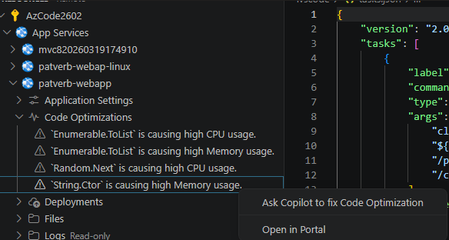
Today we shipped a feature in the Azure App Service extension for VS Code that answers both questions: Code Optimizations, powered by Application Insights profiler data and GitHub Copilot. The problem: production performance is a black box You've deployed your .NET app to Azure App Service. Monitoring shows CPU is elevated, and response times are creeping up. You know something is slow, but reproducing production load patterns locally is nearly impossible. Application Insights can detect these issues, but context-switching between the Azure Portal and your editor to actually fix them adds friction. What if the issues came to you, right where you write code? What's new The Azure App Service extension now adds a Code Optimizations node directly under your .NET web apps in the Azure Resources tree view. This node surfaces performance issues detected by the Application Insights profiler - things like excessive CPU or memory usage caused by specific functions in your code. Each optimization tells you: Which function is the bottleneck Which parent function is calling it What category of resource usage is affected (CPU, memory, etc.) The impact as a percentage, so you can prioritize what matters But we didn't stop at surfacing the data. Click Fix with Copilot on any optimization and the extension will: Locate the problematic code in your workspace by matching function signatures from the profiler stack trace against your local source using VS Code's workspace symbol provider Open the file and highlight the exact method containing the bottleneck Launch a Copilot Chat session pre-filled with a detailed prompt that includes the issue description, the recommendation from Application Insights, the full stack trace context, and the source code of the affected method By including the stack trace, recommendation, impact data, and the actual source code, the prompt gives Copilot enough signal to produce a meaningful, targeted fix rather than generic advice. For example, the profiler might surface a LINQ-heavy data transformation consuming 38% of CPU in OrderService.CalculateTotals, called from CheckoutController.Submit. It then prompts copilot with the problem and it them offers a fix. Prerequisites A .NET web app deployed to Azure App Service Application Insights connected to your app The Application Insights profiler enabled (the extension will prompt you if it's not) For Windows App Service plans When creating a new web app through the extension, you'll now see an option to enable the Application Insights profiler. For existing apps, the Code Optimizations node will guide you through enabling profiling if it's not already active. For Linux App Service plans Profiling on Linux requires a code-level integration rather than a platform toggle. If no issues are found, the extension provides a prompt to help you add profiler support to your application code. What's next This is the first step toward bringing production intelligence directly into the inner development loop. We're exploring how to expand this pattern beyond .NET and beyond performance — surfacing reliability issues, exceptions, and other operational insights where developers can act on them immediately. Install the latest Azure App Service extension and expand the Code Optimizations node under any .NET web app to try it out. We'd love your feedback - file issues on the GitHub repo. Happy Coding <3339Views0likes1CommentWhat AI Agents for Modernization Look Like in Practice
We’ve all been put onto an initiative to “modernize” our company’s applications. But talk about a haphazard and confusing project to be put on. Apps are older than anyone first thought, there are dependencies nobody can explain, and business critical services blocked behind another team's roadmap. Yet all of them are competing for the same developers. It’s overwhelming! What can you do? AI agents are helping teams unravel the modernization maze. Mandy Whaley wrote a recent post introducing some of the latest tech let’s take a bit of a deeper look. Most teams do not have a one-app problem GitHub Copilot modernization helps solve the problem of having to sort through several applications to modernize. You don’t have to be alone managing different complexities, dependencies, urgency, and ages of modernizing multiple applications! GitHub Copilot modernization helps create a repeatable way to understand each application before developers get their hands dirty. The GitHub Copilot modernization workflow GitHub Copilot modernization helps teams upgrade .NET projects and migrate them to Azure. It’s first going to assess your project and produce a markdown file that gives you an overview of what all needs to be done. Then it plans out the steps of the upgrade in more detail. Finally, it gets to it ,performing the code changes, fixes and validation. It works across Visual Studio, Visual Studio Code, the GitHub Copilot CLI, and GitHub.com. The Assessment Step The workflow starts with assessment: project, structure, dependencies, code patterns. GitHub Copilot modernization examines your project structure, dependencies, and code patterns to identify what needs to change. It generates an dotnet-upgrade-plan.md file in .github/upgrades so you have something concrete to review before the workflow moves forward. Plus, you can choose your .NET version (8, 9 or 10), supporting modernization standards and patterns in your organization, The Planning Step Once you approve the assessment that the GitHub Copilot modernization agent creates and you always get to approve before it proceeds to the next step,it moves on to planning. The planning step documents the approach in more detail. According to the documentation, the plan covers upgrade strategies, refactoring approaches, dependency upgrade paths, and risk mitigations. You can review and edit that Markdown before moving on to execution. The Execution Step Approve the planning document and the agent moves into execution mode. Here it breaks the plan down into discrete tasks with concrete validation criteria. And once everything looks good it begins to make changes to the code base. From there, we begin the upgrade work. If Copilot runs into a problem, it tries to identify the cause and apply a fix. Updating the task status and it creates Git commits for each portion of the process so you can review what changed or roll back if needed! The benefits of the steps By breaking each stage down into concrete steps teams get the chance to review the plan, understand what is changing, and decide where manual intervention is still needed. Architects and app owners have something concrete to look at, change if necessary, and push to version. Migrating to the cloud GitHub Copilot modernization is not limited to moving a project to a newer version of .NET. It also helps assess cloud readiness, recommend Azure resources, apply migration best practices, and support deployment to Azure. The Azure migration process of Copilot modernization helps answer questions like: Where should the application run? What services should I use with it? What parts of the application should stay in place for now, and what parts should be adapted for Azure? Teams can work through migration paths related to managed identity, Azure SQL, Azure Blob Storage, Azure File Storage, Microsoft Entra ID, Azure Key Vault, Azure Service Bus, Azure Cache for Redis, and OpenTelemetry on Azure. That is the kind of work that moves an application beyond a version update and into a more complete modernization effort. Humans still matter Agents can reduce manual work, can help teams move through assessment, planning, and repetitive tasks faster. Giving developers a better starting point and help keep progress visible in the repo. But the important decisions still belong to people! Architects still need to make tradeoffs. Application owners still need to think about business value, timing, and risk. Developers still need to review the code, check the plan, and decide where human judgment is required. The GitHub Copilot modernization speeds the process up by doing tedious work for you. You’re still in control of the decisions and responsible for the code it outputs, but it takes care of the work to perform the assessment, planning, and code changes. Give it a shot by picking just one project and running the assessment and reviewing the plan. See what it comes up with. Then when you’re ready, move on to the rest of your application portfolio. Modernization at scale still happens application by application, repo by repo, and decision by decision. Use the GitHub Copilot modernization agent, spin it up and try it, and let us know what you think in the comments.632Views0likes0CommentsFrom "Maybe Next Quarter" to "Running Before Lunch" on Container Apps - Modernizing Legacy .NET App
In early 2025, we wanted to modernize Jon Galloway's MVC Music Store — a classic ASP.NET MVC 5 app running on .NET Framework 4.8 with Entity Framework 6. The goal was straightforward: address vulnerabilities, enable managed identity, and deploy to Azure Container Apps and Azure SQL. No more plaintext connection strings. No more passwords in config files. We hit a wall immediately. Entity Framework on .NET Framework did not support Azure.Identity or DefaultAzureCredential. We just could not add a NuGet package and call it done — we’d need EF Core, which means modern .NET - and rewriting the data layer, the identity system, the startup pipeline, the views. The engineering team estimated one week of dedicated developer work. As a product manager without extensive .NET modernization experience, I wasn't able to complete it quickly on my own, so the project was placed in the backlog. This was before the GitHub Copilot "Agent" mode, the GitHub Copilot app modernization (a specialized agent with skills for modernization) existed but only offered assessment — it could tell you what needed to change, but couldn't make the end to end changes for you. Fast-forward one year. The full modernization agent is available. I sat down with the same app and the same goal. A few hours later, it was running on .NET 10 on Azure Container Apps with managed identity, Key Vault integration, and zero plaintext credentials. Thank you GitHub Copilot app modernization! And while we were on it – GitHub Copilot helped to modernize the experience as well, built more tests and generated more synthetic data for testing. Why Azure Container Apps? Azure Container Apps is an ideal deployment target for this modernized MVC Music Store application because it provides a serverless, fully managed container hosting environment. It abstracts away infrastructure management while natively supporting the key security and operational features this project required. It pairs naturally with infrastructure-as-code deployments, and its per-second billing on a consumption plan keeps costs minimal for a lightweight web app like this, eliminating the overhead of managing Kubernetes clusters while still giving you the container portability that modern .NET apps benefit from. That is why I asked Copilot to modernize to Azure Container Apps - here's how it went - Phase 1: Assessment GitHub Copilot App Modernization started by analyzing the codebase and producing a detailed assessment: Framework gap analysis — .NET Framework 4.0 → .NET 10, identifying every breaking change Dependency inventory — Entity Framework 6 (not EF Core), MVC 5 references, System.Web dependencies Security findings — plaintext SQL connection strings in Web.config, no managed identity support API surface changes — Global.asax → Program.cs minimal hosting, System.Web.Mvc → Microsoft.AspNetCore.Mvc The assessment is not a generic checklist. It reads your code — your controllers, your DbContext, your views — and maps a concrete modernization path. For this app, the key finding was clear: EF 6 on .NET Framework cannot support DefaultAzureCredential. The entire data layer needs to move to EF Core on modern .NET to unlock passwordless authentication. Phase 2: Code & Dependency Modernization This is where last year's experience ended and this year's began. The agent performed the actual modernization: Project structure: .csproj converted from legacy XML format to SDK-style targeting net10.0 Global.asax replaced with Program.cs using minimal hosting packages.config → NuGet PackageReference entries Data layer (the hard part): Entity Framework 6 → EF Core with Microsoft.EntityFrameworkCore.SqlServer DbContext rewritten with OnModelCreating fluent configuration System.Data.Entity → Microsoft.EntityFrameworkCore namespace throughout EF Core modernization generated from scratch Database seeding moved to a proper DbSeeder pattern with MigrateAsync() Identity: ASP.NET Membership → ASP.NET Core Identity with ApplicationUser, ApplicationDbContext Cookie authentication configured through ConfigureApplicationCookie Security (the whole trigger for this modernization): Azure.Identity + DefaultAzureCredential integrated in Program.cs Azure Key Vault configuration provider added via Azure.Extensions.AspNetCore.Configuration.Secrets Connection strings use Authentication=Active Directory Default — no passwords anywhere Application Insights wired through OpenTelemetry Views: Razor views updated from MVC 5 helpers to ASP.NET Core Tag Helpers and conventions _Layout.cshtml and all partials migrated The code changes touched every layer of the application. This is not a find-and-replace — it's a structural rewrite that maintains functional equivalence. Phase 3: Local Testing After modernization, the app builds, runs locally, and connects to a local SQL Server (or SQL in a container). EF Core modernizations apply cleanly, the seed data loads, and you can browse albums, add to cart, and check out. The identity system works. The Key Vault integration gracefully skips when KeyVaultName isn't configured — meaning local dev and Azure use the same Program.cs with zero code branches. Phase 4: AZD UP and Deployment to Azure The agent also generates the deployment infrastructure: azure.yaml — AZD service definition pointing to the Dockerfile, targeting Azure Container Apps Dockerfile — Multi-stage build using mcr.microsoft.com/dotnet/sdk:10.0 and aspnet:10.0 infra/main.bicep — Full IaaC including: Azure Container Apps with system + user-assigned managed identity Azure SQL Server with Azure AD-only authentication (no SQL auth) Azure Key Vault with RBAC, Secrets Officer role for the managed identity Container Registry with ACR Pull role assignment Application Insights + Log Analytics All connection strings injected as Container App secrets — using Active Directory Default, not passwords One command: AZD UP Provisions everything, builds the container, pushes to ACR, deploys to Container Apps. The app starts, runs MigrateAsync() on first boot, seeds the database, and serves traffic. Managed identity handles all auth to SQL and Key Vault. No credentials stored anywhere. What Changed in a Year Early 2025 Now Assessment Available Available Automated code modernization Semi-manual ✅ Full modernization agent Infrastructure generation Semi-manual ✅ Bicep + AZD generated Time to complete Weeks ✅ Hours The technology didn't just improve incrementally. The gap between "assessment" and "done" collapsed. A year ago, knowing what to do and being able to do it were very different things. Now they're the same step. Who This Is For If you have a .NET Framework app sitting on a backlog because "the modernization is too expensive" — revisit that assumption. The process changed. GitHub Copilot app modernization helps you rewrite your data layer, generates your infrastructure, and gets you to azd up. It can help you generate tests to increase your code coverage. If you have some feature requests – or – if you want to further optimize the code for scale – bring your requirements or logs or profile traces, you can take care of all of that during the modernization process. MVC Music Store went from .NET Framework 4.0 with Entity Framework 6 and plaintext SQL credentials to .NET 10 on Azure Container Apps with managed identity, Key Vault, and zero secrets in code. In an afternoon. That backlog item might be a lunch break now 😊. Really. Find your legacy apps and try it yourself. Next steps Modernize your .Net or Java apps with GitHub Copilot app modernization – https://aka.ms/ghcp-appmod Open your legacy application in Visual Studio or Visual Studio Code to start the process Deploy to Azure Container Apps https://aka.ms/aca/start389Views0likes1CommentFrom Single Apps to Scale Solutions: How AI Agents Scale Modernization
AI is rewriting the modernization playbook. Over the past few years, AI has changed software development faster than anything we’ve seen in decades. And it’s not just about writing code faster. AI is reducing the day-to-day friction that slows teams down: upgrades, migrations, test failures, brittle pipelines, incident response, and the ever-growing backlog of technical debt. That operational drag keeps teams stuck maintaining systems instead of building what’s next. Agentic DevOps makes this shift practical. Software agents can now help across every stage of the application lifecycle, from planning and refactoring to testing, deployment, and running production systems. The real question organizations face is no longer if they should modernize, but how to modernize safely, continuously, and at scale—without pausing the business. Modernization is a business decision, but it’s a technical job. And the challenges are real. 65% of organizations cite security and compliance as a top challenge 1 59% struggle with a lack of skilled talent and resources 1 58% are held back by the complexity of monolithic applications 1 That’s why 35% of modernization projects stall 1 . The result is growing backlogs of technical debt, rising operational costs, and fewer resources available for innovation. That’s why developers, architects, and application owners are turning to agents to reduce manual toil, manage complexity, and stay secure from start to finish. With GitHub Copilot modernization, your teams have end-to-end modernization guidance and execution, with agents across every phase of the lifecycle. For each application, developers can use agents to assess an application, plan the cloud migration, transform code and configuration based on the application’s needs, generate infrastructure-as-code, validate changes, and deploy and test directly on Azure. And today, it just got even better. The modernization agent. In Public Preview today, the modernization agent is empowering teams with scale solutions, not just single-app fixes. Application owners and architects who need visibility and control across multiple applications can use the modernization agent to: Assess readiness across many applications at once Plan application specific modernization journeys Surface deep code and dependency level insights and recommendations Automate upgrades for Java and .NET applications Recommend aligned Azure services with organizational needs Operated from the CLI, the modernization agent integrates directly with GitHub Copilot, creating issues, pull requests, and shareable assessment reports for each application. Architects and application owners retain visibility and governance, while developers receive clear, prioritized work they can execute from the modernization agent or finish directly in their preferred editors! The modernization agent also coordinates with GitHub Copilot’s coding agent to complete tasks asynchronously across repositories, so you have full monitoring and audit trail in GitHub’s Agent HQ. The result is a connected planning to execution flow that finally makes modernization at scale possible without sacrificing oversight or control. Let’s break it down. Plan your modernization journey at scale Portfolio managers and central planners are planning an organization’s modernization journey on Azure. Within that, a solution architect or application owner maybe be responsible for 5, 10, 20, or more applications in that portfolio. They need to quickly understand each application’s unique needs and business goals. Where is there complexity? How much effort will it take? What does success look like for each one? The modernization agent helps them build actionable plans across their application estate. Take a look. If the player doesn’t load, open the video in a new window: Open video Execute the plan With high-confidence plans built from the modernization agent, application owners and architects can pass off to developers to work directly in the IDE to execute where precision work may be needed. Importantly, no two organizations modernize the same way. Teams have their own standards, frameworks, and business logic—and agents need to respect that. GitHub Copilot modernization supports custom skills, allowing organizations to tailor modernization to their needs. With custom skills, teams can: Preserve critical business logic during transformation Standardize outcomes across large application portfolios Apply internal SDKs and software factory patterns Custom skills ensure modernization plans and execution reflect organizational requirements—giving customers the flexibility to move fast without losing consistency or control. Let’s see it in action. If the player doesn’t load, open the video in a new window: Open video The way forward We have much more coming from the modernization agent as we expand the experience beyond the CLI and integrate with Azure Migrate so portfolio managers and central planners can coordinate with application owners and architects at estate scale. With these new features, we’re excited to accelerate modernization at scale, while ensuring changes are aligned with your organization’s standards and application requirements. See what else we’ve announced on how agents are reinventing modernization on Azure. Get started today by joining the Public Preview of the modernization agent and get white-glove support for the Public Preview modernization agent. Stay tuned for more updates as we make app modernization at scale fast and easy! 1 Q1 2026 Cloud and AI Application Modernization Survey conducted by Forrester Consulting on behalf of Microsoft1.2KViews1like0Comments
Implementing the Backend-for-Frontend (BFF) / Curated API Pattern Using Azure API Management
Modern digital applications rarely serve a single type of client. Web portals, mobile apps, partner integrations, and internal tools often consume the same backend services—yet each has different performance, payload, and UX requirements. Exposing backend APIs directly to all clients frequently leads to over-fetching, chatty networks, and tight coupling between UI and backend domain models. This is where a Curated API or Backend for Frontend API design pattern becomes useful. What Is the Backend-for-Frontend (BFF) Pattern? The Backend-for-Frontend (BFF)—also known as the Curated API pattern—solves this problem by introducing a client-specific API layer that shapes, aggregates, and optimizes data specifically for the consuming experience. There is very good architectural guidance on this at Azure Architecture Center [Check out the 1st Link on Citation section] The BFF pattern introduces a dedicated backend layer for each frontend experience. Instead of exposing generic backend services directly, the BFF: Aggregates data from multiple backend services Filters and reshapes responses Optimizes payloads for a specific client Shields clients from backend complexity and change Each frontend (web, mobile, partner) can evolve independently, without forcing backend services to accommodate UI-specific concerns. Why Azure API Management Is a Natural Fit for BFF Azure API Management is commonly used as an API gateway, but its policy engine enables much more than routing and security. Using APIM policies, you can: Call multiple backend services (sequentially or in parallel) Transform request and response payloads to provide a unform experience Apply caching, rate limiting, authentication, and resiliency policies All of this can be achieved without modifying backend code, making APIM an excellent place to implement the BFF pattern. When Should You Use a Curated API in APIM? Using APIM as a BFF makes sense when: Frontend clients require optimized, experience-specific payloads Backend services must remain generic and reusable You want to reduce round trips from mobile or low-bandwidth clients You want to implement uniform polices for cross cutting concerns, authentication/authorization, caching, rate-limiting and logging, etc. You want to avoid building and operating a separate aggregation service You need strong governance, security, and observability at the API layer How the BFF Pattern Works in Azure API Management There is a Git Hub Repository [Check out the 2nd Link on Citation section] that provides a wealth of information and samples on how to create complex APIM policies. I recently contributed to this repository with a sample policy for Curated APIs [Check out the 3rd Link on Citation section] At a high level, the policy follows this flow: APIM receives a single client request APIM issues parallel calls to multiple backend services as shown below <wait for="all"> <send-request mode="copy" response-variable-name="operation1" timeout="{{bff-timeout}}" ignore-error="false"> <set-url>@("{{bff-baseurl}}/operation1?param1=" + context.Request.Url.Query.GetValueOrDefault("param1", "value1"))</set-url> </send-request> <send-request mode="copy" response-variable-name="operation2" timeout="{{bff-timeout}}" ignore-error="false"> <set-url>{{bff-baseurl}}/operation2</set-url> </send-request> <send-request mode="copy" response-variable-name="operation3" timeout="{{bff-timeout}}" ignore-error="false"> <set-url>{{bff-baseurl}}/operation3</set-url> </send-request> <send-request mode="copy" response-variable-name="operation4" timeout="{{bff-timeout}}" ignore-error="false"> <set-url>{{bff-baseurl}}/operation4</set-url> </send-request> </wait> Few things to consider The Wait policy allows us to make multiple requests using nested send-request policies. The for="all" attribute value implies that the policy execution will await all the nested send requests before moving to the next one. {{bff-baseurl}}: This example assumes a single base URL for all end points. It does not have to be. The calls can be made to any endpoint response-variable-name attribute sets a unique variable name to hold response object from each of the parallel calls. This will be used later in the policy to transform and produce the curated result. timeout attribute: This example assumes uniform timeouts for each endpoint, but it might vary as well. ignore-error: set this to true only when you are not concerned about the response from the backend (like a fire and forget request) otherwise keep it false so that the response variable captures the response with error code. Once responses from all the requests have been received (or timed out) the policy execution moves to the next policy Then the responses from all requests are collected and transformed into a single response data <!-- Collect the complete response in a variable. --> <set-variable name="finalResponseData" value="@{ JObject finalResponse = new JObject(); int finalStatus = 200; // This assumes the final success status (If all backend calls succeed) is 200 - OK, can be customized. string finalStatusReason = "OK"; void ParseBody(JObject element, string propertyName, IResponse response){ string body = ""; if(response!=null){ body = response.Body.As<string>(); try{ var jsonBody = JToken.Parse(body); element.Add(propertyName, jsonBody); } catch(Exception ex){ element.Add(propertyName, body); } } else{ element.Add(propertyName, body); //Add empty body if the response was not captured } } JObject PrepareResponse(string responseVariableName){ JObject responseElement = new JObject(); responseElement.Add("operation", responseVariableName); IResponse response = context.Variables.GetValueOrDefault<IResponse>(responseVariableName); if(response == null){ finalStatus = 207; // if any of the responses are null; the final status will be 207 finalStatusReason = "Multi Status"; ParseBody(responseElement, "error", response); return responseElement; } int status = response.StatusCode; responseElement.Add("status", status); if(status == 200){ // This assumes all the backend APIs return 200, if they return other success responses (e.g. 201) add them here ParseBody(responseElement, "body", response); } else{ // if any of the response codes are non success, the final status will be 207 finalStatus = 207; finalStatusReason = "Multi Status"; ParseBody(responseElement, "error", response); } return responseElement; } // Gather responses into JSON Array // Pass on the each of the response variable names here. JArray finalResponseBody = new JArray(); finalResponseBody.Add(PrepareResponse("operation1")); finalResponseBody.Add(PrepareResponse("operation2")); finalResponseBody.Add(PrepareResponse("operation3")); finalResponseBody.Add(PrepareResponse("operation4")); // Populate finalResponse with aggregated body and status information finalResponse.Add("body", finalResponseBody); finalResponse.Add("status", finalStatus); finalResponse.Add("reason", finalStatusReason); return finalResponse; }" /> What this code does is prepare the response into a single JSON Object. using the help of the PrepareResponse function. The JSON not only collects the response body from each response variable, but it also captures the response codes and determines the final response code based on the individual response codes. For the purpose of his example, I have assumed all operations are GET operations and if all operations return 200 then the overall response is 200-OK, otherwise it is 206 -Partial Content. This can be customized to the actual scenario as needed. Once the final response variable is ready, then construct and return a single response based on the above calculation <!-- This shows how to return the final response code and body. Other response elements (e.g. outbound headers) can be curated and added here the same way --> <return-response> <set-status code="@((int)((JObject)context.Variables["finalResponseData"]).SelectToken("status"))" reason="@(((JObject)context.Variables["finalResponseData"]).SelectToken("reason").ToString())" /> <set-body>@(((JObject)context.Variables["finalResponseData"]).SelectToken("body").ToString(Newtonsoft.Json.Formatting.None))</set-body> </return-response> This effectively turns APIM into an experience-specific backend tailored to frontend needs. When not to use APIM for BFF Implementation? While this approach works well when you want to curate a few responses together and apply a unified set of policies, there are some cases where you might want to rethink this approach When the need for transformation is complex. Maintaining a lot of code in APIM is not fun. If the response transformation requires a lot of code that needs to be unit tested and code that might change over time, it might be better to sand up a curation service. Azure Functions and Azure Container Apps are well suited for this. When each backend endpoint requires very complex request transformation, then that also increases the amount of code, then that would also indicate a need for an independent curation service. If you are not already using APIM then this does not warrant adding one to your architecture just to implement BFF. Conclusion Using APIM is one of the many approaches you can use to create a BFF layer on top of your existing endpoint. Let me know your thoughts con the comments on what you think of this approach. Citations Azure Architecture Center – Backend-for-Frontends Pattern Azure API Management Policy Snippets (GitHub) Curated APIs Policy Example (GitHub) Send-request Policy Reference