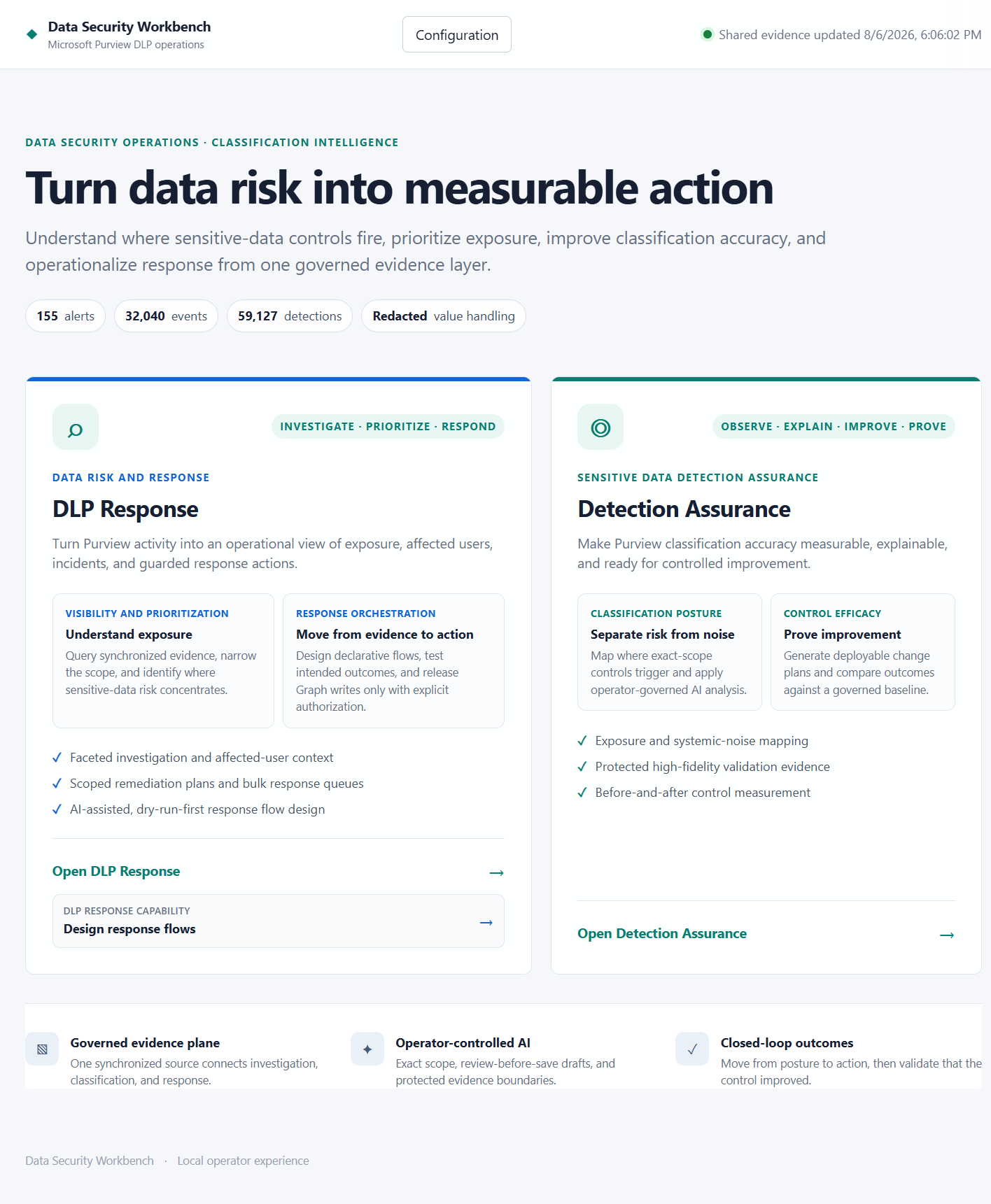
Built on the newly released Microsoft Purview DLP API, Data Security Workbench is a control-assurance and response layer that any customer can use as a starting point. It connects DLP incidents to their underlying evidence, uses governed AI to distinguish real exposure from systemic noise, creates reviewable Purview improvements, measures their effect against a baseline, and operationalizes response through incidents, email, and Teams.
Introducing Data Security Workbench
Built on the newly released Microsoft Purview DLP API, Data Security Workbench is an open-source starting point for any customer who wants to turn DLP alert volume into explainable detection assurance and controlled response.
Figure 1: The workbench separates operational response from classification assurance while keeping both connected through one governed evidence plane.The gap between alert volume and operational confidence
Microsoft Purview surfaces the activity that matters. But security teams still face the same operational challenge: connecting alerts to event evidence, understanding why a Sensitive Information Type fired, identifying the right business owner, deciding what should change, and responding without exposing the data they are trying to protect.
That work is typically split across scripts, exports, spreadsheets, portals, and one-off analyst knowledge. The result is familiar — alert volume grows faster than confidence, tuning decisions are hard to defend, and remediation becomes either too cautious to help or too broad to trust.
The goal is not to process more alerts. It is to make detection quality and response safety measurable operational controls.
Detection Assurance: a closed-loop control cycle
Detection Assurance determines whether your sensitive-data controls are behaving accurately. It explains why they fire, produces reviewable improvements, and proves whether those improvements worked — all as a repeatable, closed-loop process.
STEP 1: Observe Define the SIT boundary, tuning profile, and control language
STEP 2: Explain Analyze detections to separate signal from systemic noise
STEP 3: Improve Generate a reviewable Purview implementation plan
STEP 4: Prove Compare post-change outcomes against the original baseline
Figure 2: Classification posture reports retain the evidence period, model routing, detection totals, analysis chunks, and scoped-event count.Full transparency into detection behavior
Each assessment produces a verbose Classification Efficiency Report documenting every detection across the scoped estate. It shows the total matches processed, how much noise was identified, the contextual patterns, underlying taxonomies, and where false positives concentrate.
If you need to understand exactly what was flagged and why, the report gives full transparency — noise detection rate, primary workload, false-positive reduction opportunity, and pattern-level detail for every SIT rule in scope.
Figure 3: Baseline and later observations make noise reduction visible by pattern and SIT rule, with comparison cautions when periods are not equivalent.From report to reviewable Purview implementation plan
From this evidence, the system generates a Purview implementation plan. Each recommended step specifies the exact tuning change to make in your environment — the target SIT, the exact portal path, the current problem, and the precise configuration steps.
Critically, each step explains why the change is safe to implement, quantifies the expected reduction in false positives, and flags associated risks. For example, it may recommend refining a sensitive information type pattern to exclude authentication token structures generating false matches, and tells you the expected noise reduction from that single change.
Figure 4: The Purview implementation plan: prioritized actions (P0–P2), exact administrative steps, scoped workloads, deployment modes from simulation to operational control, and a copy-and-tune principle preserving rollback. This is a governed, reviewable, and quantifiable improvement to your DLP posture — not a one-time model opinion, but a repeatable control cycle with measurable outcomes.From assurance to operational response
Each tuning round also updates a DLP response store with the AI verdict for every analyzed incident. The system triages events — identifying which are genuine exposure and which are systemic noise — and records a privacy-safe rationale alongside each verdict.
These verdicts can then be written in bulk back to the Purview incidents (as comments and tags in Microsoft Defender), or used to reach out to affected end users with guided remediation steps via email or Teams.
Figure 5: AI-triaged incidents with verdicts, security comments, and deep links back to the specific Purview DLP incidents — ready for bulk action or individual review.Figure 6: The remediation plan binds a scoped set of incidents to explicit actions: tag incidents, update status, notify affected users. All live actions require deliberate confirmation before execution.After an explicitly approved incident update, the privacy-safe Detection Assurance rationale appears in the Microsoft Defender incident activity timeline — making outcomes easy to explain without requiring a separate incident queue.
Useful AI without an uncontrolled data boundary
Evidence is redacted by default. Classification boundaries fail closed. Microsoft Graph writes remain explicitly controlled.
The default assessment mode excludes detected values, identities, recipients, content names, senders, and subjects from the AI payload. Departments are resolved locally before identity redaction — the model receives the department, not the person used to resolve it. Sensitive-value analysis, when needed, requires separate configuration, a confirmation phrase, DPAPI protection, and an explicit per-run choice.
Live Graph actions (incident updates, email, Teams notifications) are disabled by default and require server enablement, an exact confirmation phrase, bounded targets, and an execution ledger. Dry-run is always the first gate.
Model routing
The workbench uses a luna model for high-volume event analysis and triage, and a Terra model for generating reports, implementation plans, and next-step recommendations. All AI is grounded in Purview data — no external training, no hosted data path, no opaque execution.
Get started
Turn your next DLP review into a measurable control cycle
Built on the newly released Microsoft Purview DLP API, this open-source workbench is a starting point any customer can build from. Local-first, transparent, and ready to adapt to your organization.

 Microsoft

