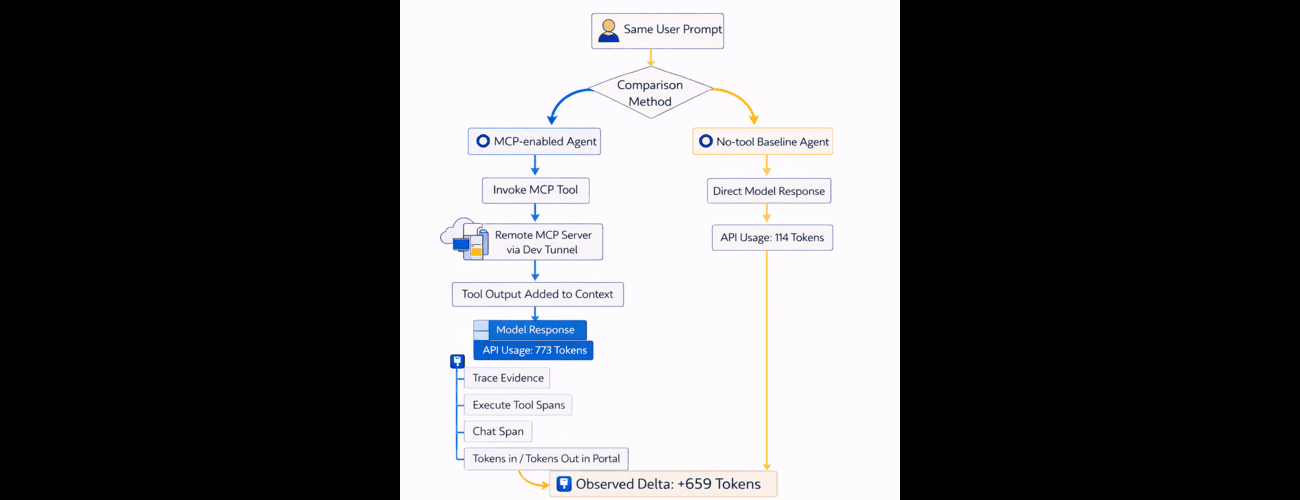
Your MCP-enabled agent just ran, and the token counts don't add up. The API says 773 tokens. The portal trace shows 581/141. The trajectory view displays something else entirely. Before you file a bug report, here's what's actually happening—and how to build an evidence pattern that makes enterprise token accounting defensible.
What you'll get: A reproducible A/B comparison method, visual evidence templates, and a reconciliation pattern that reduces FinOps review cycles.
Quick Reference
- MCP (Model Context Protocol): A standard for connecting AI models to external tools and data sources.
- Token: The basic unit of text processing and billing for AI models—roughly 4 characters or three-quarters of a word.
- Trajectory view: Microsoft Foundry's visualization of the step-by-step execution path of an agent.
- Token chips: The inline token count indicators shown in Microsoft Foundry's trace UI.
- devtunnel: A Microsoft tool for exposing local services to the internet for testing.
The Challenge
A common assumption is that Execute Tool spans should directly expose billed token deltas for the tool call itself. In practice, this is not how the telemetry is usually interpreted in Microsoft Foundry traces.
What typically goes wrong:
- Teams treat tool spans as billing boundaries.
- Teams compare numbers from different runs as if they were the same transaction.
- Teams mix thread token chips, trace table token columns, and API usage fields without reconciliation.
Example scenario:
- An MCP-enabled run shows tool activity and large total token count in API usage.
- A portal traces screenshot shows different Tokens In/Out values.
- Reviewers conclude the system is inconsistent, when the data is actually from different response IDs and run contexts.
Deep Dive
This validation used a prompt agent in Microsoft Foundry with an inline MCP tool that calls a weather MCP server.
Core components:
- Microsoft Foundry prompt agent: weather-mcp-token-test-agent
- MCP server: remote endpoint over devtunnel
- Evidence sources:
- API invocation usage object (input, output, total tokens)
- Microsoft Foundry Traces table (Tokens In, Tokens Out)
- Trajectory view (Execute Tool and Chat spans)
Observed architecture behavior:
- MCP invocation is visible through
mcp_list_toolsandexecute_toolspans. - Token accounting appears in the model's response metadata—specifically the usage object that reports input tokens (what you sent) and output tokens (what the model generated).
- Tool outputs can increase subsequent model context, which increases turn-level token usage.
Visual evidence from the run:
Image 1: Agent MCP tool configuration
Image 2: Traces table with token columns
Image 3: Traces trajectory dialog
Solution Approach
- Establish two comparison paths explicitly:
- Path A: strict API A/B comparison on the same prompt.
- Path B: portal trace evidence for invocation and trace-level token columns.
- Run MCP-enabled and baseline (no-tool) agents with the same prompt.
- Capture API usage values for both runs:
- MCP-enabled: input 581, output 192, total 773
- Baseline: input 57, output 57, total 114
- Delta: +659 total tokens
- Capture portal screenshots for trace-table and trajectory views, then record their row-level token values as separate run evidence:
- Example portal rows observed: 581/141, 581/141, 868/97
- Add a reconciliation statement in the report:
- API A/B totals and portal trace rows can represent different response IDs.
- They are complementary evidence and should not be forced into one exact row match.
Token variability note:
- Absolute token counts can vary across runs due to differences in system instructions, tool payload length, model behavior, and response formatting.
- Preserve the same prompt and baseline conditions when producing A/B comparisons.
Key decisions:
- Use API usage as primary delta proof.
- Use traces and trajectory as operational proof of tool invocation and run behavior.
- Keep evidence linked by response IDs when possible.
Key Learnings / Best Practices
- Always separate token evidence sources:
- API usage fields for strict per-response accounting
- Portal trace table for run observability
- Trajectory spans for invocation semantics
- Never compare token rows across different response IDs without labeling them as separate runs.
- Treat Execute Tool spans as invocation evidence, not standalone billing truth.
- Capture both baseline and MCP-enabled runs using the exact same prompt for defensible deltas.
- Preserve screenshots and IDs together in the same evidence package.
- Add one reconciliation paragraph whenever mixed evidence sources are presented.
- For enterprise reporting, prefer clear A/B tables over narrative-only claims.
Conclusion
MCP tool invocation in Microsoft Foundry can materially increase turn-level token usage, but the increase must be measured with disciplined evidence handling. In this validation, API A/B comparison showed a +659 total-token increase for the same prompt when MCP tools were enabled.
Going forward, enterprise teams should standardize an evidence pattern that combines API usage for accounting with trace/trajectory views for operational transparency.
Recommended next steps:
- Engineers: Create a prompt agent in Microsoft Foundry and run the A/B method on one of your production prompts. Record response IDs with token evidence.
- Platform/FinOps owners: Standardize one token evidence reporting template that separates API usage evidence from portal trace evidence, then connect the results to your existing Azure cost analysis workflow.
- Launch post authors: Reference this article's evidence pattern: include one trace screenshot, one A/B token table, and one reconciliation note to reduce review cycles.
- Questions? Join the discussion in the comments or connect with the Microsoft Foundry community on Microsoft Q&A.
References

 Microsoft