
Choosing the right AI system is rarely as simple as picking the newest or largest model — and agents add their own layer of variability on top. A model that wins on a public leaderboard can still underperform on the reasoning, math, or domain-knowledge questions that matter for your application, and an agent that solves one task well can regress on another after a prompt or tool change. The only way to know is to measure, on the same benchmark, under the same conditions, every time something changes.
Authors: Ilya Matiach, Morteza Ziyadi, Han Che, José Santos, Ali Mahmoudzadeh, Shuo Qiu, Salma Elshafey, April Kwong, Vivek Bhadauria
Introduction
Benchmarks in Microsoft Foundry (preview) make that kind of measurement a first-class part of the development workflow. You can run well-known open-source benchmarks against any model deployment or agent in your project, compare runs side by side in the evaluation group view, and drive the whole flow from the portal or the REST API.
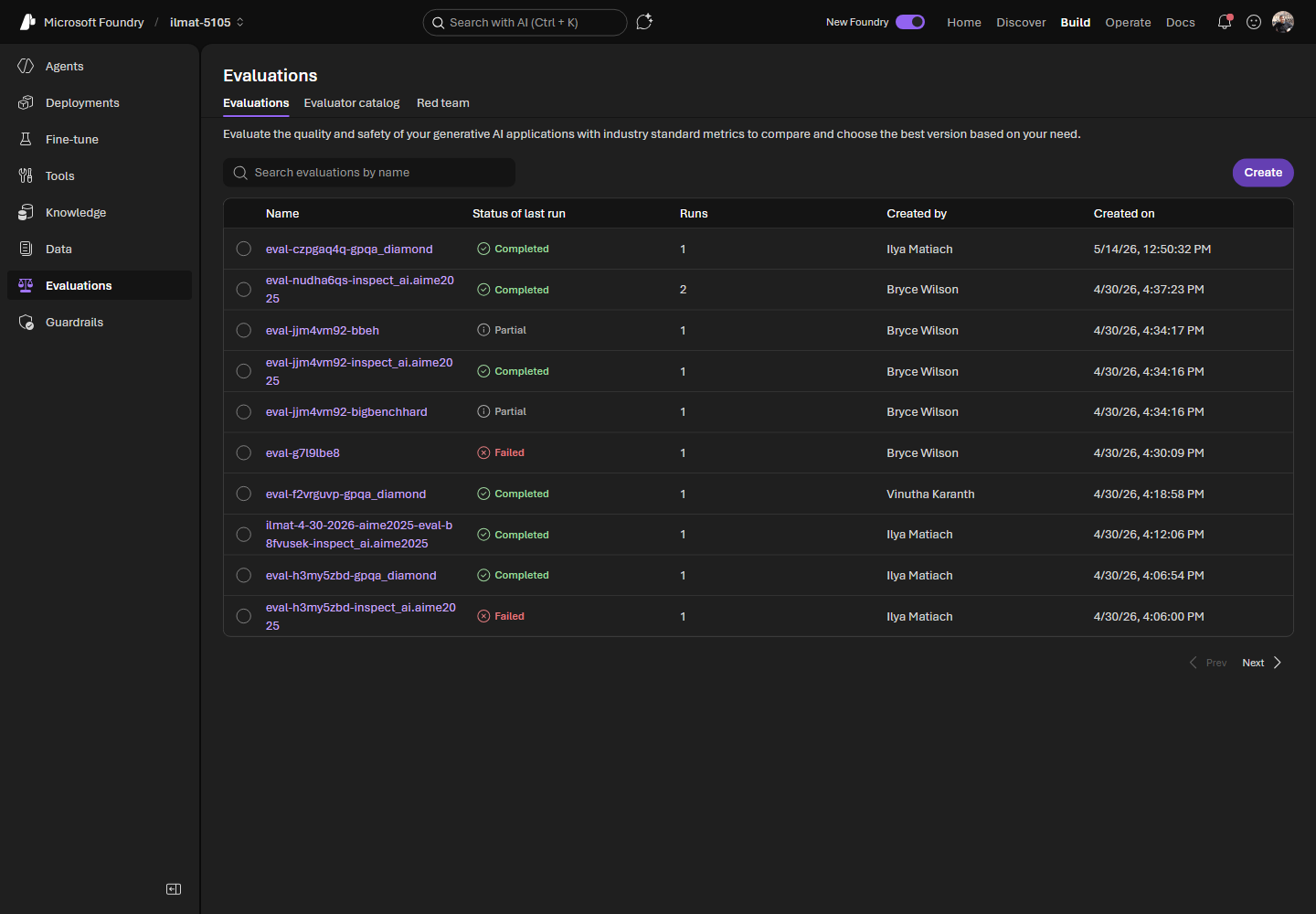
Figure 1. Benchmarks appear in the Microsoft Foundry Evaluations list alongside your evaluations.
How is this different from the model leaderboard?
Microsoft Foundry already includes a model leaderboard that surfaces precomputed benchmark scores across the model catalog. The leaderboard answers, “How do these models perform in general?”
Benchmarks answer a different question: “How does my deployment or my agent, with my judge model and my configuration, perform right now?” That distinction matters when you’re comparing two deployments of the same model, validating a fine-tune, checking whether an agent regressed after a tool change, or re-running a benchmark after a model version upgrade.
What a benchmark contains
A benchmark is a predefined evaluation package. Instead of asking you to upload evaluation data and define scoring criteria, the benchmark provides them for you:
- Benchmark dataset — a curated, fixed-size dataset of prompts and expected answers.
- Task category — the capability being measured (reasoning, math, science, truthfulness, …).
- Evaluation logic — a built-in evaluator such as builtin.regex_match, or a benchmark-specific scorer.
- Optional judge model — for benchmarks that use model-based judging (for example, FrontierScience), you also pick a deployment to act as the grader. Most regex- or scorer-based benchmarks (such as GPQA Diamond, BBH, MuSR, BBEH, and TruthfulQA) do not need a Judge model.
The result of each run is typically a score: a percentage plus a pass count, such as 82% with 645 / 790 examples passing the benchmark metric.
Target vs. judge model
The target is what you are evaluating — a model deployment or an agent. The judge model is a separate deployment that the evaluation service uses to score outputs when a benchmark requires model-based judging. The judge model’s score does not represent its own quality; it is part of the scoring pipeline. Keep the judge model consistent across runs you want to compare, the same way you would keep a measurement instrument fixed in a scientific experiment.
Benchmarks available in preview
The initial set of benchmarks covers reasoning, math, science, and truthfulness, with example counts ranging from small smoke-test benchmarks (AIME 2025, 30 examples) to larger suites (BBEH, 4,520 examples).
|
Benchmark |
Task |
Examples |
Evaluation logic |
|
AIME 2025 Benchmark |
reasoning, quality, math |
30 |
AIME 2025 |
|
BBEH Benchmark |
reasoning, quality |
4,520 |
builtin.bbeh |
|
BIG-Bench Hard Benchmark |
reasoning, quality |
934 |
builtin.regex_match |
|
ChemBench Benchmark |
reasoning, quality, sciences |
2,785 |
ChemBench |
|
FrontierScience Benchmark |
reasoning, quality |
160 |
FrontierScience |
|
GPQA Diamond Benchmark |
reasoning, quality |
198 |
builtin.regex_match |
|
MuSR Benchmark |
reasoning, quality |
756 |
builtin.regex_match |
|
TruthfulQA Benchmark |
truthfulness, quality, reasoning |
790 |
TruthfulQA |
Common benchmark scenarios
Comparing model deployments
Suppose you’re deciding between two model deployments — maybe two versions of the same model family, or a frontier model versus a smaller, cheaper one. With benchmarks you create a single evaluation group (for example, GPQA Diamond), then add one run per target. The group view shows each run’s score and token usage side by side, so you can weigh quality against cost in the same place.
This same pattern catches regressions after a model version upgrade or a fine-tune: re-run the established benchmark, look at the group view, and the delta tells you whether things moved in the right direction.
Benchmarking an agent
Agents introduce variability that pure model evaluations miss: prompts, tools, orchestration logic, and connected data all influence outputs. Pointing benchmarks at an agent gives you a model-agnostic, reproducible signal that complements the agent-specific evaluators you may already be using (intent resolution, task adherence, tool-call accuracy).
A practical pattern: pick a reasoning-heavy benchmark like GPQA Diamond or MuSR, target your agent (and, if relevant, one or two of its versions), and run it whenever you change the underlying model, the system prompt, or the tool set. The benchmark score becomes a stable yardstick across changes that would otherwise be hard to compare. From an agent’s detail page in Microsoft Foundry, the Evaluation tab opens the same wizard scoped to that agent.
Running a benchmark in the portal
From your Foundry project’s Build experience, open Evaluations and choose Create. The wizard walks through three short steps.
- Target — pick Model or Agent, then select one or more deployments or agent versions.
- Data — choose Benchmarks as the dataset source, pick the benchmarks you want, and select a Judge model if the benchmark requires one.
- Review — confirm targets, datasets, and evaluators, then submit.
Because the benchmark owns its dataset, prompts, and evaluator, the wizard skips the dataset upload, prompt setup, and most evaluator configuration that custom evaluations require.
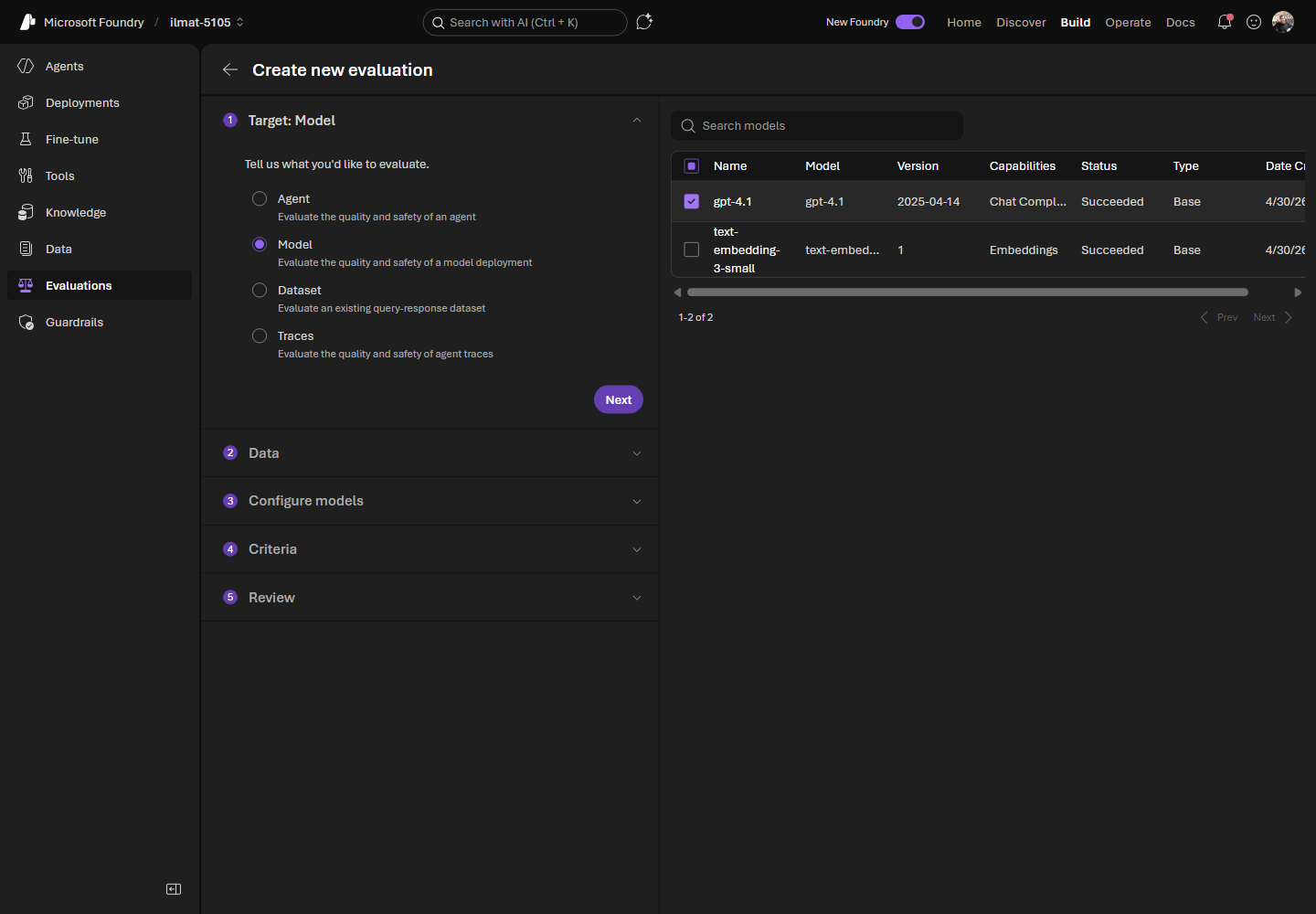
Figure 2. Start by selecting one or more model deployments (or an agent) as the evaluation target.
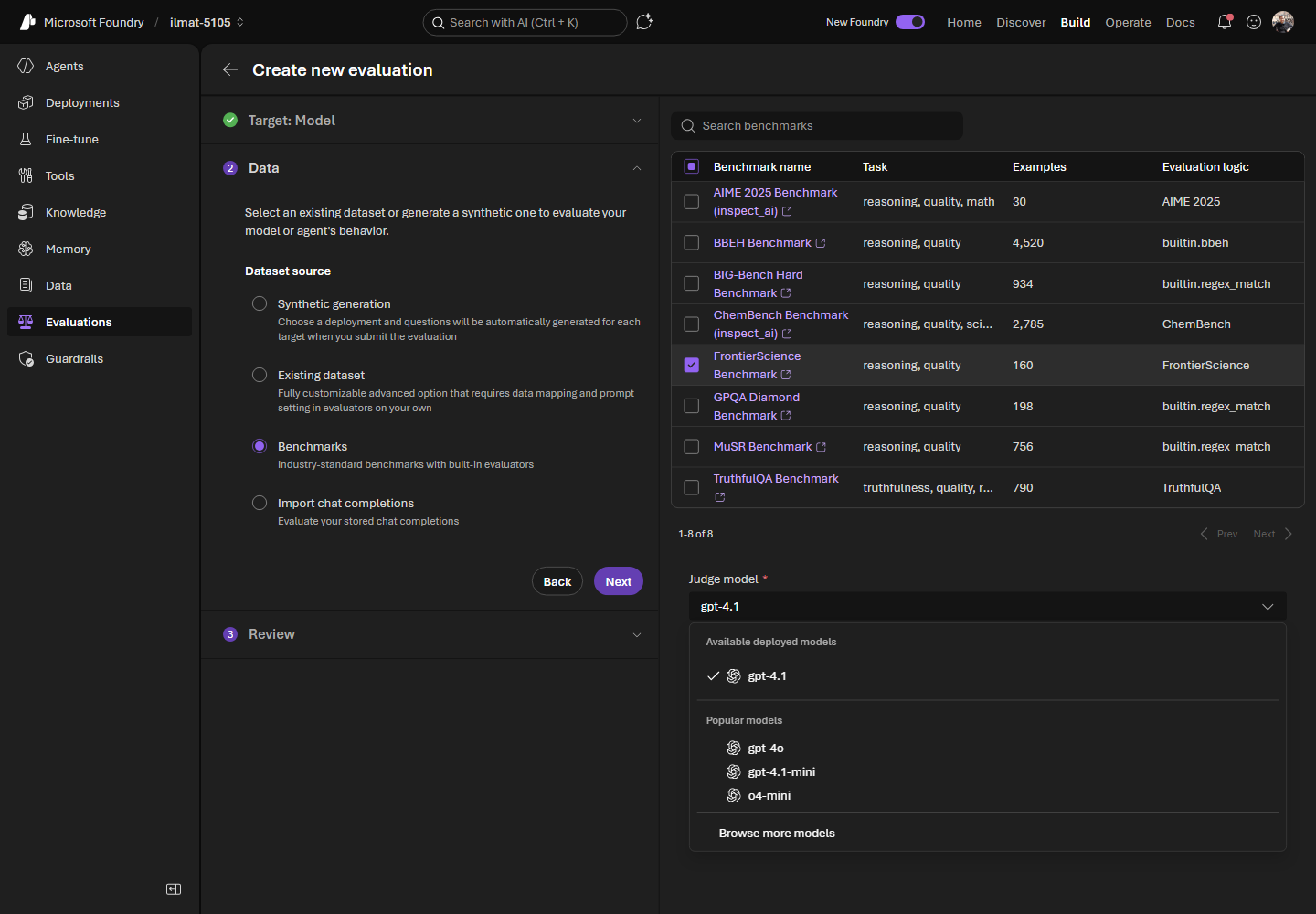
Figure 3. In the Data step, choose Benchmarks and pick one or more from the catalog. When you select a benchmark that uses model-based judging (here, FrontierScience), a Judge model dropdown appears for picking the deployment that will grade outputs.
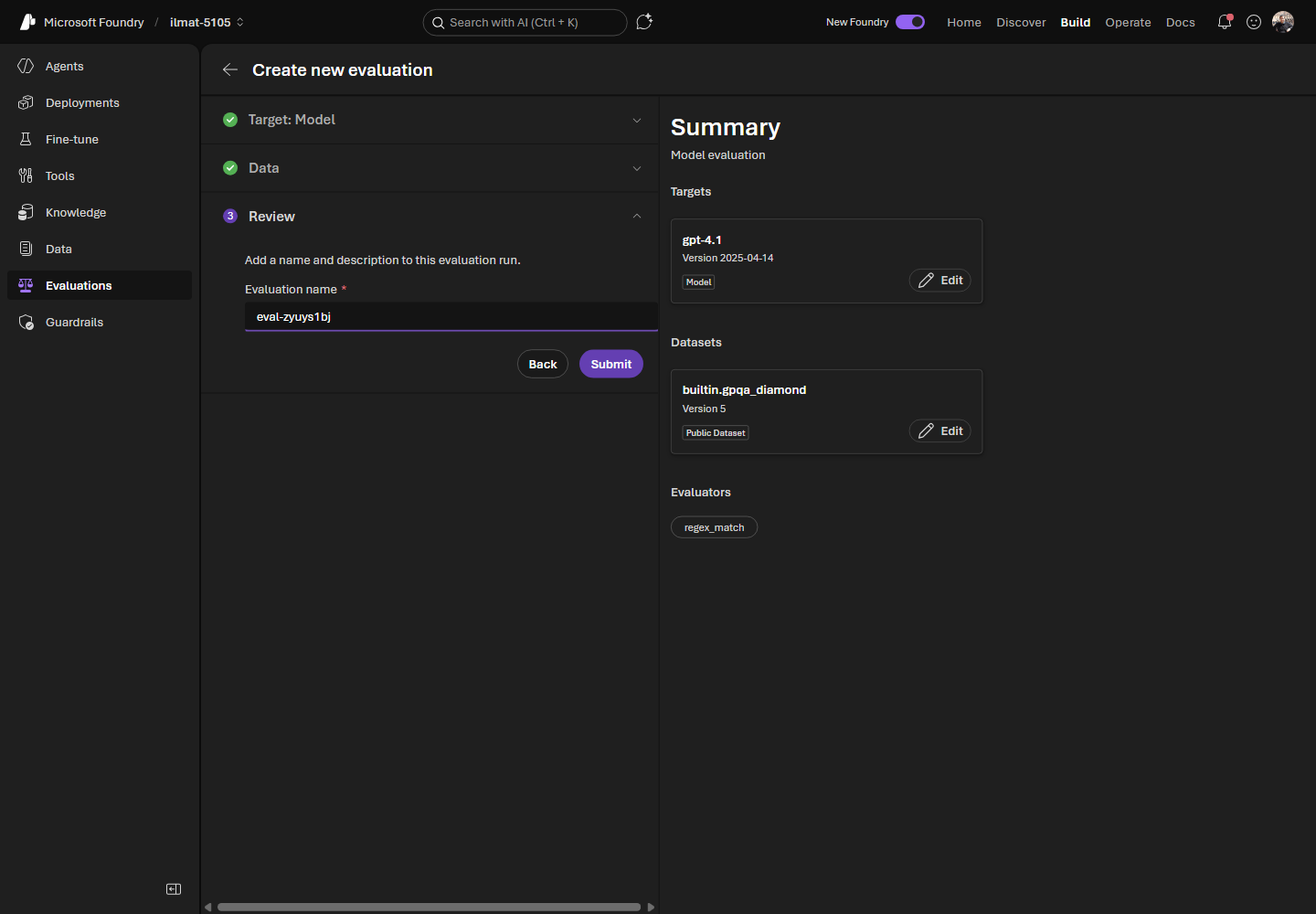
Figure 4. The Review step summarizes targets, benchmark datasets, and evaluators before submission.
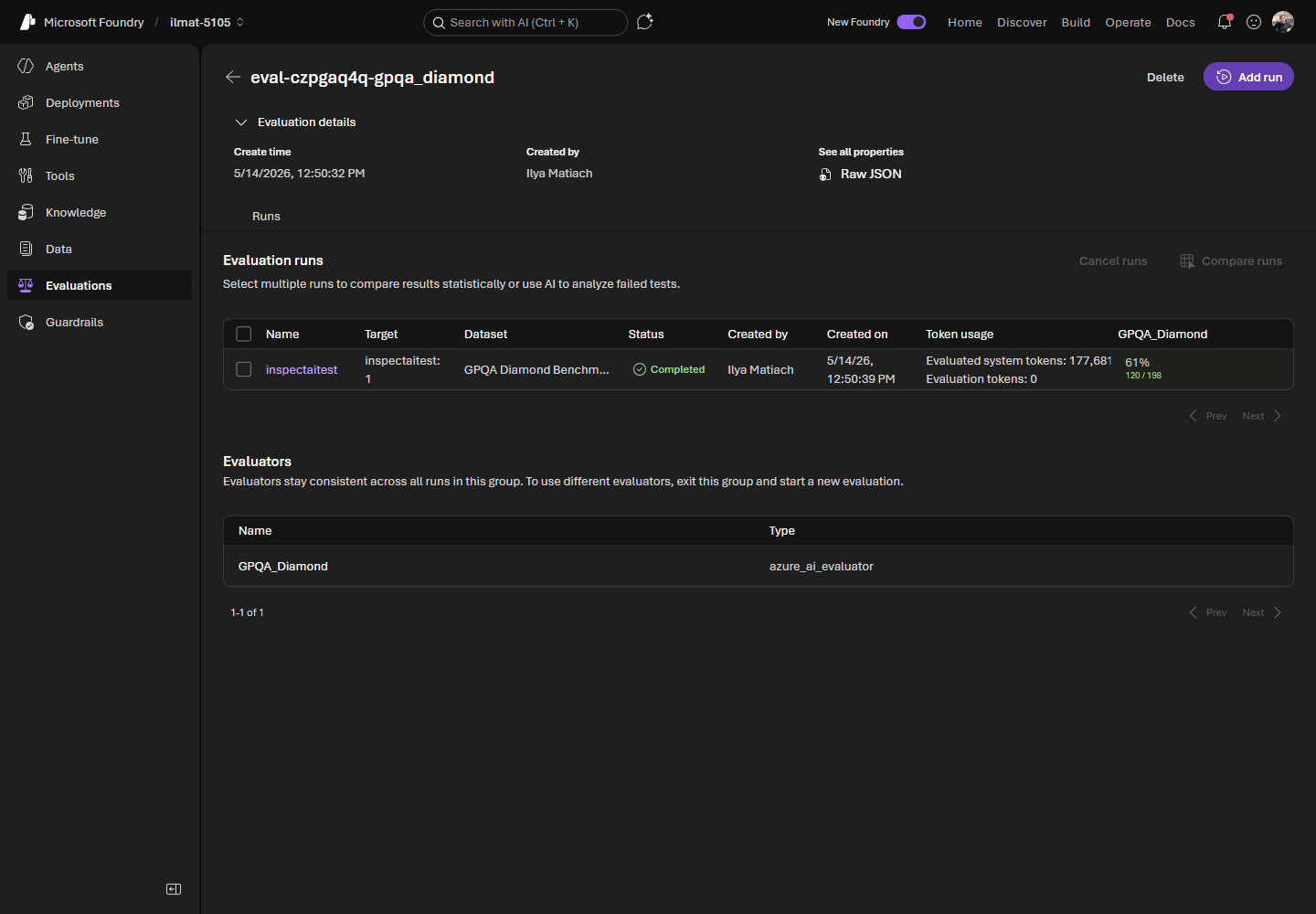
Figure 5. A completed evaluation group shows each run’s status, token usage, and benchmark score.
Reading benchmark results
Benchmark results show up at two levels. The evaluation group page lists every run in the group with its target, dataset, status, token usage, and benchmark score — convenient for side-by-side comparisons. Open an individual run for run status, Raw JSON, Download results, Download user logs, and the overall metric breakdown including token usage and the benchmark score.
A score can be expressed as a percentage (for example, 82%) and as a pass/total count (for example, 645 / 790). When detailed per-example metrics aren’t available, the overall metric result is still surfaced, and Download results gives you the row-level output for deeper analysis.
Token usage is reported as a first-class metric. Benchmarks can run hundreds or thousands of examples, and model-based judging multiplies the token cost, so it pays to keep an eye on this column when scaling up.
Driving benchmarks from the REST API (preview)
Everything in the portal is also available through the Foundry evaluations REST API. You create an evaluation group that pins the benchmark (and judge model, when one is required), then add one run per target you want to evaluate. The example below shows the shape of a group-create request; the full reference — authentication, the judge-model variant, adding runs, error responses, limitations, and troubleshooting — lives on Microsoft Learn.
POST {project-endpoint}/openai/evals?api-version=2025-11-15-preview
Authorization: Bearer {token}
Content-Type: application/json

{
  "name": "truthfulqa-benchmark-eval-group",
  "display_name": "TruthfulQA Benchmark",
  "data_source_config": {
    "type": "azure_ai_source",
    "scenario": "benchmark_preview",
    "benchmark_name": "builtin.truthful_qa",
    "benchmark_version": "3"
  }
}
Each evaluation group needs at least one run — the run is what actually evaluates a target model or agent against the group’s benchmark. Add one run per target you want to compare.
POST {project-endpoint}/openai/evals/{evaluation-id}/runs?api-version=2025-11-15-preview
Authorization: Bearer {token}
Content-Type: application/json

{
  "name": "truthfulqa-run-target-a",
  "display_name": "TruthfulQA - {target-deployment-a}",
  "data_source": {
    "type": "azure_ai_benchmark_preview",
    "target": {
      "type": "azure_ai_model",
      "model": "{connection-name}/{target-deployment-a}"
    }
  }
}
See the Microsoft Learn how-to for the full reference: https://learn.microsoft.com/en-us/azure/foundry/observability/how-to/benchmark-evaluations
Best practices
- Start with one or two benchmarks to validate your setup before scaling to larger suites.
- Pin a stable judge model and a stable benchmark_version when comparing runs over time.
- Watch token usage. Large benchmarks and model-based judges add up; preflight a single run before launching a batch.
- Download results for failure analysis when an aggregate score doesn’t tell the whole story.
- Treat preview features as preview. Pin api-version, validate benchmark identifiers, and review release notes before depending on the API in production.
Final thoughts
Reliable AI applications depend on reliable measurement. As models, prompts, fine-tuning datasets, and agents continue to evolve, the teams that move fastest will be the ones that can quickly and credibly answer: “did this change make things better?”
Benchmarks in Microsoft Foundry bring industry-standard measurement into the same place you build, deploy, and observe your AI systems — through a streamlined portal flow and a programmable REST API. To try it, open your Foundry project, go to Build > Evaluations, choose Create, and pick a small benchmark like AIME 2025 (30 examples) or GPQA Diamond (198) against a model deployment or agent. Once you have a baseline, add larger suites and additional targets, and let standardized benchmarks become part of how your team ships AI.
Get Started
Start building in Microsoft Foundry: ai.azure.com
Check out Observability BRK252 session: aka.ms/build26-BRK252
Read the docs: Foundry observability documentation
Join the community: aka.ms/ai/discord
Build blog: From observability to ROI for AI agents on any framework

 Microsoft