TL;DR: Azure Managed Redis has no capacity-reporting API. This PowerShell poller safely rotates real creation attempts across approved regions and SKUs until one succeeds.
Who this is for: Azure platform engineers, application owners, and site reliability engineers who need an Azure Managed Redis cluster in a capacity-constrained region without operating an unbounded retry loop.
Table of Contents
1. The problem and what the poller solves
Azure Managed Redis deployment validation does not confirm that capacity is available, and there is no API that reports capacity for a region and SKU. The only definitive check is a real creation attempt.
The Azure Managed Redis capacity poller makes bounded creation attempts across approved combinations and stops at the first success. It does not reserve or guarantee capacity.
What ships in the box
- Invoke-AmrAttempt.ps1, the poller
- amr-config.json, the configuration template
- tests/Invoke-Tests.ps1, 32 offline cases plus opt-in Azure tests
- Reference transcripts, measured from live runs
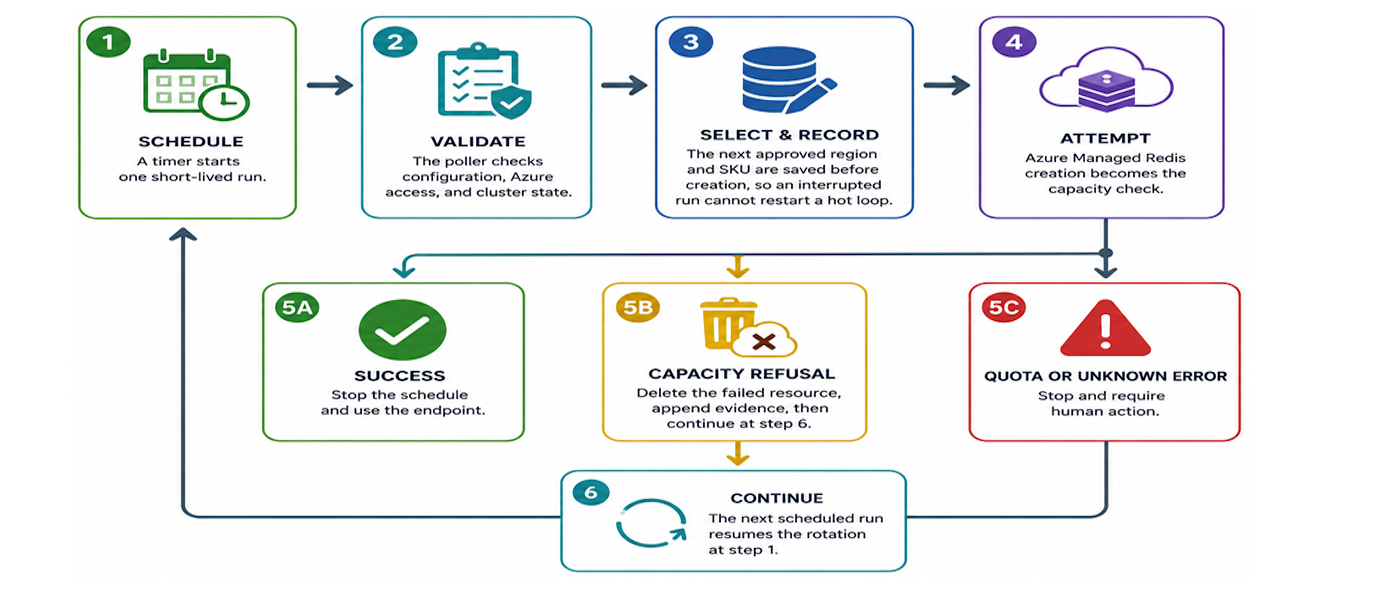
2. How the handoff works
| Step | What happens |
|---|---|
| 1. Schedule | A timer starts one short-lived run. |
| 2. Validate | The poller checks configuration, Azure access, and cluster state. |
| 3. Select and record | The next approved region and SKU are saved before creation, so an interrupted run cannot restart a hot loop. |
| 4. Attempt | Azure Managed Redis creation becomes the capacity check. |
| 5A. Success | Stop the schedule and use the endpoint. |
| 5B. Capacity refusal | Delete the failed resource, append evidence, then continue at step 6. |
| 5C. Quota or unknown error | Stop and require human action. |
| 6. Continue | The next scheduled run resumes the rotation at step 1. |
3. Configure and validate the poller
Prerequisites: PowerShell 7.2 or later, Contributor access to an existing resource group, and an authenticated Azure session.
Clone the repository and install the modules:
git clone https://github.com/jvargh/amr-capacity-poller.git
Set-Location ./amr-capacity-poller
Install-Module Az.Accounts, Az.Resources, Az.RedisEnterpriseCache -Scope CurrentUser
Connect-AzAccount
The poller requires an existing resource group. Create it if needed, then copy the configuration template:
New-AzResourceGroup -Name 'rg-redis-prod' -Location 'eastus2'
Copy-Item ./amr-config.json ./amr-config.local.json
Edit the Git-ignored local file with your subscription, resource group, cluster name, acceptable regions, and approved SKUs:
{
  "subscriptionId": "00000000-0000-0000-0000-000000000000",
  "resourceGroupName": "rg-redis-prod",
  "clusterName": "amr-redis-prod",
  "locations": [ "eastus2", "eastus", "centralus" ],
  "approvedSkus": [ "Balanced_B1", "Balanced_B3" ],
  "rotationOrder": "sku-first",
  "minimumIntervalMinutes": 30,
  "maxAttemptsPerRun": 1,
  "maxTotalAttempts": 200
}
List only regions where you are prepared to deploy the cluster. The first successful creation attempt determines the cluster's Azure region and connection endpoint, which may affect network latency from your application.
Run the readiness check:
./Invoke-AmrAttempt.ps1 -ConfigPath ./amr-config.local.json -DryRun
Success is DRY RUN PASSED with exit 0 and a preview of the next candidates. The check reads Azure state but creates, deletes, and writes nothing.
4. Run one controlled attempt
Before running: A success creates a billable cluster. The poller may delete a Failed resource with the configured name so that name can be reused. Use a dedicated name that you control.
Start one real run by removing -DryRun:
./Invoke-AmrAttempt.ps1 -ConfigPath ./amr-config.local.json
In a validated live run, one region refused capacity. The poller removed the failed resource, advanced to the next approved region, and successfully created the cluster using the same SKU.
[CAPACITY] No capacity for Balanced_B5 in eastus2 after 00:42.
[SUCCESS] CAPACITY SECURED: Balanced_B5 in westus2 after 08:14
[SUCCESS] Host: amr-redis-prod.westus2.redis.azure.net
These timings are observations, not a service-level promise. See the full transcript. Each attempt is also appended to amr-redis-prod.state.log.jsonl for troubleshooting or capacity escalation.
5. Schedule the capacity window
Keep the configuration and state files on persistent storage, run the task with Contributor access, and set its timeout above 20 minutes. This example starts every 30 minutes:
$action = New-ScheduledTaskAction -Execute 'pwsh.exe' `
  -Argument "-NoProfile -File `"$PWD\Invoke-AmrAttempt.ps1`" -ConfigPath `"$PWD\amr-config.local.json`""
$trigger = New-ScheduledTaskTrigger -Once -At (Get-Date) `
  -RepetitionInterval (New-TimeSpan -Minutes 30)
Register-ScheduledTask -TaskName 'AMR capacity attempt' -Action $action -Trigger $trigger
Keep the state file between runs. It stores the rotation position, rate limit, and lifetime attempt count.
6. Read the result without guessing
Every normal exit ends with RESULT and NEXT, and the exit code is designed for automation.
| Exit code | Meaning | Required action |
|---|---|---|
| 0 | The cluster was created or already exists in Succeeded state | Stop the schedule and use the endpoint |
| 5 | The minimum interval has not elapsed, or a create is still in flight | None; let the next scheduled run handle it |
| 10 | Every candidate attempted in this run was refused for capacity | None; keep scheduling |
| 1 | Configuration, permissions, quota, attempt cap, or an unknown error stopped the run | Investigate before retrying |
For a fast regression check that makes no Azure calls, run the 32 offline cases:
./tests/Invoke-Tests.ps1
Azure tests are opt-in because a successful create is billable. See the test matrix.
7. Clean up
Confirm the resource group and cluster name before deleting a test cluster:
Remove-AzRedisEnterpriseCache `
  -ResourceGroupName 'rg-redis-prod' `
  -ClusterName 'amr-redis-prod'
Remove the schedule and local state when the campaign is finished:
Unregister-ScheduledTask -TaskName 'AMR capacity attempt' -Confirm:$false
Remove-Item ./amr-redis-prod.state.json, ./amr-redis-prod.state.log.jsonl
8. Conclusion and next steps
Use the poller when Azure Managed Redis capacity is uncertain and your approved regions and SKUs are known.
Try it now
git clone https://github.com/jvargh/amr-capacity-poller.git
Set-Location ./amr-capacity-poller
./Invoke-AmrAttempt.ps1 -ConfigPath ./amr-config.local.json -DryRun
Learn more
- Read the configuration and scheduling guide
- Review the measured live-run transcripts
- Inspect the offline, read-only Azure, and real-create test tiers
Connect and contribute
Open an issue in the GitHub repository when you find an unclassified Azure response or a reproducible edge case.
Important: This script is not a supported Microsoft product and carries no service-level agreement. It can create billable resources and delete a failed cluster that matches the configured name. Review the code, use a dedicated name, and run -DryRun before scheduling it.

 Microsoft