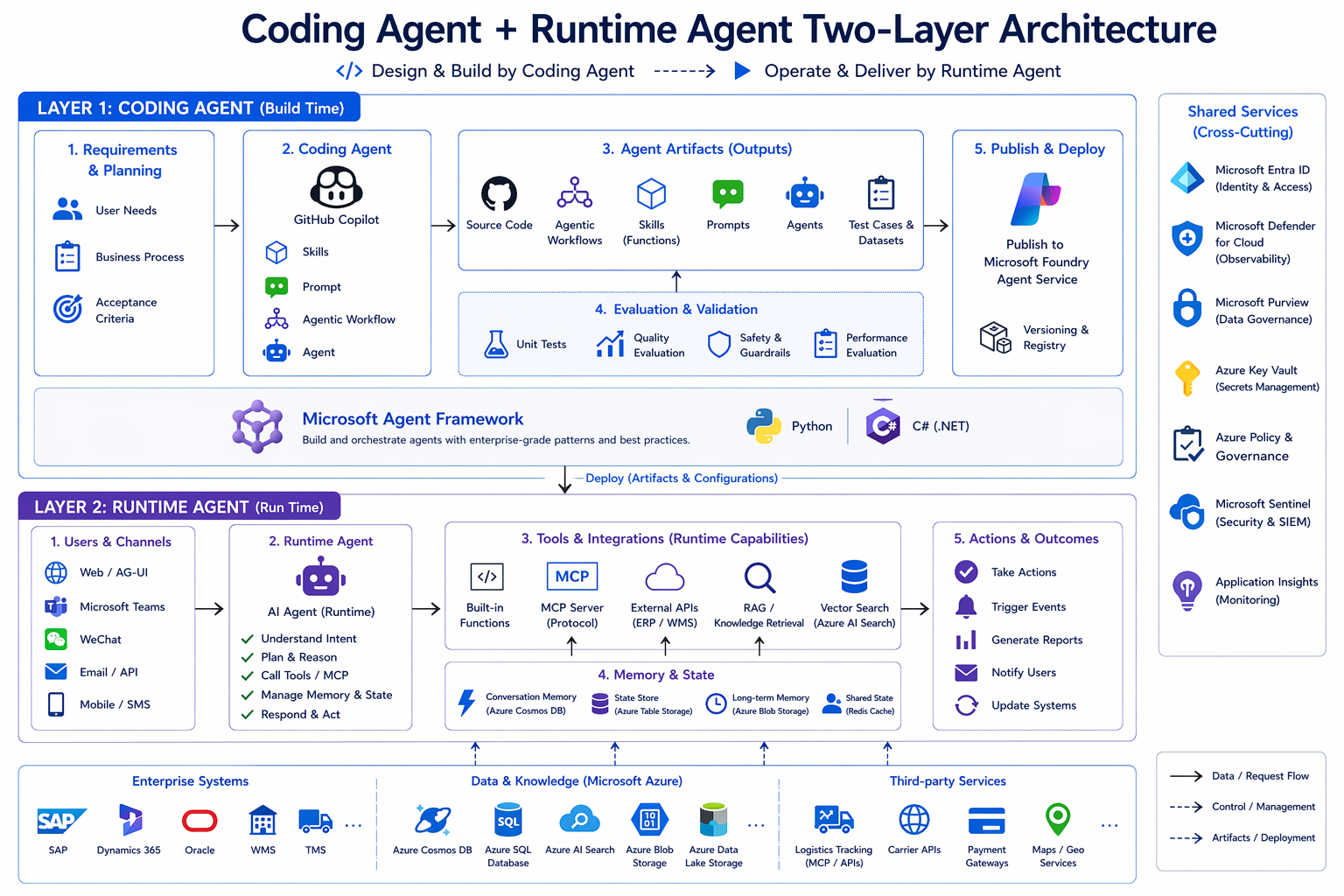
The single insight that changes everything
Most "build an AI agent" tutorials collapse two completely different jobs into one tangled mess:
- the job of building an agent (writing the code, defining its tools, evaluating it, packaging it), and
- the job of running an agent (planning, reasoning, calling tools, remembering users, delivering outcomes).
Once you separate them, modern agent development becomes a clean two-layer architecture:
A Coding Agent sits on top — that's how you produce an agent. A Runtime Agent sits below — that's the agent your business operates. Microsoft Agent Framework is the SDK that ties them together; Microsoft Foundry is the platform both layers publish to and run on.
But the secret ingredient — the thing that turns a generic Copilot into a domain-aware engineer — is the SKILL. SKILL is what the Coding Agent reads before writing a single line. It's how requirements become artifacts that actually match your framework, your conventions, and your fixtures.
This post walks the entire two-layer architecture, in the order you should learn it — with SKILL as the star of Layer 1. We ground every concept in ZavaShop, a fictional global e-commerce company with 5 fulfillment centers, dozens of suppliers, and a CEO who wants one live dashboard for all of it. Both Python and .NET (C#) are first-class — pick the language your team will run in production.
LAYER 1 — The Coding Agent (Build Time)
The Coding Agent is not the agent your customer talks to. It's the agent that constructs the agent your customer talks to. Its output is a bundle of artifacts — code, agent definitions, workflows, skills, connectors, evals, tests, configs, docs — that flow through validation and into Foundry.
Build time has five movements.
Movement 1 — Requirements & Planning
Before the Coding Agent writes a single line, you owe it three things:
- A real business pain. Not "let's build an agent." Rather: "Mei, the supervisor at Seattle DC, gets interrupted 60 times a day by stock-level questions."
- A list of acceptance criteria. What does "done" look like? "Agent answers stock questions for SKUs in our 10-SKU catalog. P95 latency under 4s. Wrong-tool rate under 5% on the eval set."
- The fixtures it'll run on. Real or realistic data — warehouses, SKUs, POs, customers — so the Coding Agent isn't reasoning about a vacuum.
ZavaShop context. The workshop ships workshop/data/ — 5 warehouses, 10 SKUs, 6 POs, 8 suppliers, 5 contracts, 4 customers (3 VIP), 6 orders, 5 carriers, 4 open exceptions. Every artifact the Coding Agent generates is anchored to this shared fixture set, so numbers stay consistent across the entire system.
Movement 2 — The Coding Agent + its SKILL (the star of build time)
This is the movement most teams skip — and it's the one that decides whether your build-time output is professional code or "ChatGPT-shaped" code.
What a Coding Agent actually is
The Coding Agent is GitHub Copilot Chat in Agent Mode, configured with a domain-aware agent definition. In the ZavaShop workshop, it lives at .github/agents/zavashop-coding-agent.agent.md and is activated from the VS Code Agent picker. You start each session with one plain sentence:
"I'm working on the inventory agent in Python — wire up stock and PO lookups against the fixtures, plus a HostedMCPTool for the warehouse handbook."
Notice what's not in that sentence: no library names, no class names, no file paths. The Coding Agent has to fill all of that in. The mechanism it uses is the SKILL.
What a SKILL is
A SKILL is a structured contract that teaches the Coding Agent how to write code in your framework, your conventions, and your domain. It is the most important file in the entire build-time layer — without it, GitHub Copilot is a fluent generalist; with it, it becomes a domain-aware specialist that writes code your tech leads would have written.
Conceptually, a SKILL contains:
| Section | Purpose |
|---|---|
| Scope & when to use | "Use this SKILL for building agents on Foundry / Azure AI — tools, MCP, Toolbox, Skills, Memory, Threads" |
| Framework idioms | The exact way to construct AzureAIAgentClient, register function tools, wire HostedMCPTool, create a Thread |
| Code patterns | Reference snippets the Coding Agent imitates — naming, import order, error handling, type hints |
| Fixture/data contract | How to load workshop/data/, which loaders exist (find_stock, find_po, etc.), where to add sys.path |
| Anti-patterns | What not to do — don't hardcode the model name, don't write inline mock dicts, don't bypass the data loader |
| Acceptance heuristics | How to map a LAB's acceptance criteria to runnable checks (eval rows, smoke tests) |
A SKILL is versioned with the codebase. When the framework releases a new idiom, you update the SKILL once; every agent built afterwards picks it up automatically. This is the single biggest reason convention drift disappears.
The six SKILLs in the ZavaShop workshop
The workshop ships six SKILLs — three for each language track — and they cover three orthogonal capability surfaces:
| Track | SKILL | Use it for |
|---|---|---|
| 🐍 Python | agent-framework-azure-ai-py | Single agent on Foundry: tools, MCP, Toolbox, Skills, Memory, Threads |
| 🐍 Python | agent-framework-workflows-py | Multi-agent workflows: WorkflowBuilder, executors, HITL, Checkpoint |
| 🐍 Python | agent-framework-agui-py | AG-UI server + client: SSE, frontend/backend tools, shared state, HITL |
| 🟦 .NET | agent-framework-azure-ai-csharp | Same as the Python azure-ai SKILL, for C# |
| 🟦 .NET | agent-framework-workflows-csharp | Same as the Python workflows SKILL, for C# |
| 🟦 .NET | agent-framework-agui-csharp | AG-UI in ASP.NET Core: MapAGUI, AGUIChatClient, HITL |
How the Coding Agent uses SKILL
The Coding Agent's loop is SKILL-first, code-second:
The discipline is captured in the workshop's one mantra:
"Read the SKILL first."
It is not optional. Skip it and you're back to generic Copilot output.
Movement 3 — A worked example: from a single sentence to a runnable agent
Let's trace what happens when you sit down in front of the Coding Agent and say:
"I'm working on the inventory agent in Python — wire up stock and PO lookups against the fixtures, plus a HostedMCPTool for the warehouse handbook."
Step 1 — The Coding Agent routes
The Coding Agent's definition (.github/agents/zavashop-coding-agent.agent.md) contains a routing table:
It loads both files into context before doing anything else.
Step 2 — The Coding Agent plans
Using the SKILL's patterns and the LAB's acceptance criteria, it generates a plan:
Every item in the plan traces back to either the SKILL (how) or the LAB README (what). No invention, no guessing.
Step 3 — The Coding Agent generates
Now — and only now — it writes code. Because the SKILL specified the patterns, what comes out is shaped like the rest of your codebase:
# scripts/inventory_agent.py
import os
import sys
from pathlib import Path

# Pattern from SKILL: add data folder to sys.path, import named loaders
sys.path.insert(0, str(Path(__file__).resolve().parents[1] / "data"))
from zava_data import find_stock, find_po   # noqa: E402

from agent_framework import HostedMCPTool
from agent_framework_azure_ai import AzureAIAgentClient
from azure.identity import DefaultAzureCredential


def stock_lookup(sku: str, warehouse: str) -> dict:
    """Return on-hand quantity for a SKU at a warehouse."""
    return find_stock(sku, warehouse)


def po_lookup(po_id: str) -> dict:
    """Return the status of a purchase order."""
    return find_po(po_id)


async def main() -> None:
    client = AzureAIAgentClient(
        project_endpoint=os.environ["FOUNDRY_PROJECT_ENDPOINT"],
        model_deployment_name=os.environ["FOUNDRY_MODEL"],   # gpt-5.5 from env
        async_credential=DefaultAzureCredential(),
    )

    agent = client.create_agent(
        name="Zara",
        instructions=(
            "You are Zara, the warehouse assistant for Seattle DC (SEA-01). "
            "Use the tools when asked about stock or POs. "
            "Answer briefly."
        ),
        tools=[
            stock_lookup,
            po_lookup,
            HostedMCPTool(
                name="warehouse-docs",
                url=os.environ["WAREHOUSE_DOCS_MCP_URL"],
            ),
        ],
    )

    thread = agent.get_new_thread()
    print(await agent.run("How many SKU-7421 are at SEA-01?", thread=thread))
Notice the things the SKILL enforced without you having to ask: env-var-driven config, named function tools with docstrings, sys.path data-loader pattern, HostedMCPTool placed alongside function tools, Thread for multi-turn.
Step 4 — The Coding Agent validates
The SKILL also told it how to validate. The Coding Agent runs:
- a smoke test against fixtures (SKU-7421 @ SEA-01 → 312),
- the eval set (eval_queries.jsonl) — was the right tool called? did the answer contain the expected fact?
- a red-team probe round.
It reports back: "3/3 acceptance criteria pass. Eval score 5/5. Red-team: no successful prompt injections."
Step 5 — Done
What landed in your repo is not just a script. It's an artifact bundle — code + agent definition + tools + eval rows + a one-page README — that matches the way your team writes agents. That bundle is what flows into the next three movements.
Movement 4 — Agent Artifacts (the outputs)
A well-instructed Coding Agent produces eight kinds of artifact. Together they make up "an agent" in the deployable sense:
| Artifact | What it is | Why it matters |
|---|---|---|
| Source code | The Agent / Workflow program | Versioned, reviewable, diffable |
| Agent definitions | Name, instructions, tool list | The "personality" — independently editable |
| Workflows | WorkflowBuilder graphs | Multi-agent orchestration as code |
| Skills | Named, packaged behaviors | Reusable capabilities — one Skill, many agents |
| Connectors | MCP servers, Toolbox registrations | Where the agent reaches into the world |
| Evals | eval_queries.jsonl and harness | Regression target for every prompt change |
| Tests & configs | Unit tests, .env schema, deployment manifests | Reproducibility |
| Documentation | READMEs, runbooks | The agent your future self can operate |
Don't confuse two senses of "skill" here. A SKILL file (uppercase, in .github/skills/) instructs the Coding Agent at build time. An Agent Skill (a Foundry concept) is a named runtime capability the Runtime Agent calls. Both names are deliberate — Layer 1's SKILL produces, among other artifacts, Layer 2's Skills.
Movement 5 — Validation
Before any artifact reaches Foundry, four gates run:
- Tests — unit + integration. Did find_stock("SKU-7421", "SEA-01") return 312, the value in the fixture?
- Lint & types — ruff/mypy on Python, dotnet build warnings on .NET. The model has to read these signatures; sloppy ones cause real bugs.
- Evaluation — run the eval set. Did the right tool get called? Did the answer contain the expected fact? You need a score, not a vibe.
- Red-Team probes — adversarial inputs that try to drift the agent off topic or extract another customer's data. The Foundry red-team SDK ships a battery of these.
Evangelist takeaway. "We built an agent" is not a deliverable. "We built an agent and here is its pass rate on a versioned eval set, plus a red-team report" is a deliverable. Validation belongs at build time, not "we'll add it later."
Movement 6 — Publish & Deploy
When validation is green, the Coding Agent's outputs flow into Foundry and Azure:
- Push to Microsoft Foundry — agent definitions, Skills, Toolbox tools, and custom evals register against your Foundry project. They are now governed, versioned, and observable.
- Deploy to Azure — the runtime host (AG-UI server, workflow worker, Teams app, API surface) ships to your Azure target (App Service, Container Apps, AKS, Functions). Same env vars drive local dev and cloud.
The same artifact set deploys to dev, staging, and production. There is no "production-only" code in your agent.
LAYER 2 — The Runtime Agent (Runtime)
Now the agent is live. Every conversation, every action against your data, every memory it writes — that's Layer 2. Five concerns define it.
Concern 1 — Users & Channels
A Runtime Agent reaches users through the channels they already use:
- Microsoft Teams — the agent shows up where work already happens.
- Outlook — triage, reply, summarize, schedule.
- Custom web / mobile / voice — built on AG-UI, which ships a React client covering streaming text, frontend tools, backend tools, shared state, generative UI, predictive updates, HITL prompts.
The channel is a deployment choice, not an architectural choice. The same agent definition can surface in Teams and on a React dashboard.
ZavaShop context. Mei's agent shows up in Teams. The CEO's control tower is a React app on top of AG-UI. The agent definition behind both is the same artifact set the Coding Agent produced.
Concern 2 — The Runtime Agent itself
The Runtime Agent is the loop you've heard about a thousand times — now it's a concrete piece of architecture:
AIAgent = model + instructions + tools + thread
Inside the loop:
- The model plans & reasons about the next step.
- It calls tools through MCP, Toolbox, or local functions.
- It reads & writes memory.
- It streams output back to the channel.
# Python — the runtime shape (exactly what the Coding Agent produced)
agent = client.create_agent(
    name="Zara",
    instructions="You are Zara, the warehouse assistant for Seattle DC.",
    tools=[stock_lookup, po_lookup, warehouse_docs_mcp],
)
Concern 3 — Tools & Integrations (the runtime capability surface)
At runtime, a Runtime Agent reaches the outside world through four kinds of capabilities — and which one to use is a real engineering decision:
| Capability | Lives in | Use when |
|---|---|---|
| Function tool | The agent's own process | Local code: a calculation, a DB query, a fixture lookup |
| MCP tool | An external MCP server | The capability is owned by another system, exposed via MCP |
| Toolbox tool | The Foundry project (server-side, tenant-wide) | Capability is shared by multiple agents, must be governed |
| Agent Skill | The Foundry project | A combination of tools + policy as one named capability |
Mental progression:
You don't have to start with Toolbox — but the moment a second agent touches the same domain, migrate.
ZavaShop context. Local fixtures → function tools. The warehouse handbook → MCP. Supplier-portal connectors shared by procurement, fulfillment, and finance → Toolbox tools. "Validate-PO-against-contract" → an Agent Skill.
Concern 4 — Memory & State
State at runtime comes in two flavors:
Thread = state inside one conversation
thread = agent.get_new_thread()
await agent.run("Look up PO-1043.",      thread=thread)
await agent.run("And its supplier?",      thread=thread)   # knows which PO
Memory = state across conversations
Foundry Memory is durable, retrievable knowledge about a user — VIP status, packaging preferences, delivery windows. Memory holds stable preferences and facts, not chat transcripts.
ZavaShop context. Customer service agent Aria remembers across sessions that C-204 is VIP, prefers no cardboard, and wants 6–8pm delivery.
Concern 5 — Actions & Outcomes
Real systems take actions that change state and produce outcomes other systems observe:
- Trigger events — kick off a workflow, page a human.
- Generate outputs — write a PO, draft an email, push to a record.
- Notify channels — send back to Teams, update a dashboard, hit a webhook.
- Observability — every action streams to Application Insights / Azure Monitor.
This is also where Workflows live. WorkflowBuilder is Agent Framework's orchestration primitive:
Three workflow features matter most:
- Reuse, don't rebuild — tools written at build time are workflow nodes at runtime.
- Human-in-the-Loop (HITL) — pauses, asks a human, resumes from the exact step.
- Checkpointing — workflows survive process restarts.
ZavaShop context. Fulfillment director Diego's team handles a $10K+ exception every day. Before: an email chain across 5 teams. After: a WorkflowBuilder graph with one HITL approval and full audit trail.
Cross-cutting: the shared services that make this safe
Both layers sit on top of platform services non-negotiable for enterprise deployment:
| Service | What it does for your agents |
|---|---|
| Microsoft Entra ID | Who is the user? Who is the agent? Managed identity for tool calls |
| Microsoft Defender for Cloud | Threat detection across the agent's compute + data plane |
| Microsoft Sentinel | SIEM — correlate agent actions with security signals |
| Azure Key Vault | Secrets, keys, connection strings — never in code, never in .env checked to git |
| Azure Monitor / App Insights | Every agent turn, every tool call, every workflow step — observable and queryable |
| Azure Policy & governance | Guardrails on what can be deployed where, by whom |
Skip this row and you have a demo that has not yet failed.
Mapping the ZavaShop workshop to the architecture
Layer 1 artifacts shipped in the repo:
- .github/agents/zavashop-coding-agent.agent.md — the Coding Agent definition
- .github/skills/agent-framework-{azure-ai,workflows,agui}-{py,csharp}/ — the six SKILLs
- workshop/data/ — shared fixtures every artifact grounds in
- Per-lab READMEs + eval_queries.jsonl — Layer 1 validation inputs
Layer 2 artifacts produced over the course of the workshop:
- A single agent (Zara) — function tools + HostedMCPTool + Thread
- A procurement agent (Pierre) — Toolbox + Agent Skills + approval policy
- A customer-service agent (Aria) — Foundry Memory + Evaluation + Red-Team
- A multi-agent fulfillment workflow (Diego) — WorkflowBuilder + HITL + Checkpoint
- An AG-UI control tower for the CEO — covering all 7 AG-UI features
Same model across the stack — gpt-5.5 on Foundry + text-embedding-3-small. Change one env var, run the same artifact in the other language.
Three habits that separate strong agent engineers
- Read the SKILL first. Make it ritual. The Coding Agent does it automatically; you should do it manually when reviewing the agent's output.
- Treat tools as a public API. Names, signatures, docstrings, return shapes — they are how the model sees your system at runtime. Refactor them like any other API.
- Measure before you tune. A prompt change without an eval delta is a vibe. With one, it's engineering.
Getting started in 60 seconds
git clone https://github.com/microsoft/Learn-Microsoft-Agent-Framework-with-Foundry-ZavaShop-Supply-Chain-Workshop
cd Learn-Microsoft-Agent-Framework-with-Foundry-ZavaShop-Supply-Chain-Workshop

# Foundry prereqs: gpt-5.5 + text-embedding-3-small deployed in your Foundry project
az login --use-device-code

# Python track
python -m venv .venv && source .venv/bin/activate
pip install agent-framework agent-framework-azure-ai agent-framework-ag-ui \
            azure-identity python-dotenv fastapi "uvicorn[standard]"

# .NET track
dotnet --version   # ≥ 10.0.100

# .env at repo root
cat > .env <<EOF
FOUNDRY_PROJECT_ENDPOINT=https://<your-project>.services.ai.azure.com/api/projects/<project-name>
FOUNDRY_MODEL=gpt-5.5
AZURE_OPENAI_EMBEDDING_MODEL=text-embedding-3-small
AGUI_SERVER_URL=http://127.0.0.1:5100/
AG_UI_API_KEY=zava-control-tower-demo-key
EOF

# In VS Code → Copilot Chat → Agent Mode → pick zavashop-coding-agent
# Then say: "I'm working on the inventory agent in Python — meet Mei."
The one mantra: "Read the SKILL first."
Closing thought
Modern agent development is not one job — it's two. The Coding Agent designs and builds; the Runtime Agent operates and delivers. Microsoft Agent Framework is the SDK that makes both layers feel like the same conceptual model. Microsoft Foundry is the platform both layers publish to and run on.
And the engine that turns a generic Copilot into a domain-aware engineer — that takes a sentence-long requirement and lands a runnable, validated, deployable artifact — is the SKILL. Write a good SKILL once, and every agent built afterwards inherits your team's taste, your fixtures, your patterns, your discipline.
The ZavaShop workshop is the smallest end-to-end example I can give you that actually exercises both layers, with six SKILLs ready to read. Walk it once, and the next time someone asks "how do we build agents in our org?", you won't be pointing at a tutorial — you'll be pointing at an architecture.

 Microsoft