Forum Discussion

Defender ATP integration
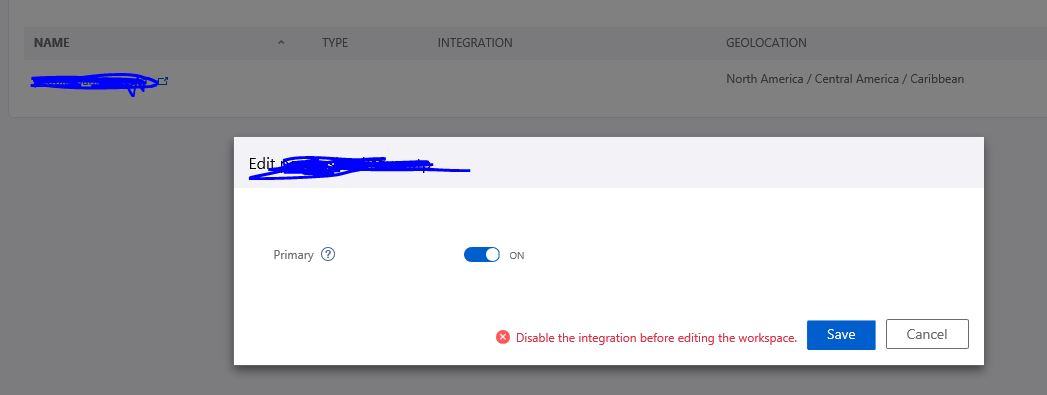
We have noticed that on the "Windows Defender ATP" blade the option to integrate with Defender ATP is grey but on. Also on the same blade page we see "Access Workspace Management UI in order to configure integrations". We also noticed that when we edit our workspace for Azure ATP and try to set it to Primary we get a message that says "Disable the integration before editing the workspace". We assume we are integrated with Defender ATP but how do we know for sure? Should I just blindly ignore this messages or is there some action I need to take to complete the Windows Defender ATP integration?
2 Replies
- Astrid McCleanFormer Employee
Hi Paul,
The Integration with Windows Defender ATP has just ben made available with their latest Preview features. To try this feature, will need to make sure “Preview features” are enabled in settings in the Windows Defender ATP portal and configure integration with the Azure ATP primary workspace.
The integration needs to be configured in both Azure ATP and Windows Defender ATP.
- Paul_BrockBrass Contributor
We verified that under the advanced settings in Windows Defender ATP we have "Azure ATP Integration" enabled. Our problem is when setting the workspace to primary and saving it we are told to "Disable the integration before editing the workspace." I'm not sure what this means exactly but I suspect it has something to do with being an early adopter. any ideas what this error message means against our running workspace?
I did a bit more troubleshooting and created a new workspace. Once this new workspace was created I was able to set it as primary and save it. I then clicked through to a new instance of Azure ATP with no sensors or anything connected to it. I tried once more to make the current production workspace primary but got the same message.