Forum Discussion

How is the software inventory created in MDATP?
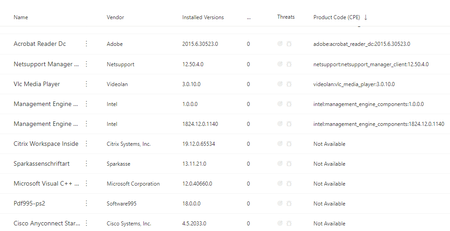

Please find below the answers to the questions asked :
- How often when does the software inventory list in MS 365 Defender get updated?
TVM Software Inventory data freshness is currently 3-4h (upper limit, can also be less).
Please refer the below screenshots for the information :
- Can we use a command line or powershell to trigger a software inventory scan?
There is no command line or powershell or anything else to trigger an inventory scan/update.
In addition to that if you have any further queries regarding the issue, please let me know.
Appreciate your time and patience.
Awaiting your reply.
With Best Regards,
Truptesh Fulpagare | Microsoft Security
mailto:v-tfulpagare@microsoft.com | +1-425-704-3638 Ext: 2261221 | Mon-Fri: 07:30 PM – 05:00 AM IST
Backup Engineer: Hrudyesh Bagde | mailto:v-hrbagd@microsoft.com | Mon-Fri: 07:30 PM – 05:00 AM IST
Manager: Anirudh Palit | mailto:v-anuver@microsoft.com | Mon-Fri: 05:00 AM – 02:30 PM EST
Team Callback Request email (monitored 24/7): mailto:secPro-EP@microsoft.com

byertjames Where is the link to this screen shot?
- byertjamesOct 05, 2022Copper Contributor
That screenshot was from the old version of the website now rolled into Microsoft 365 Defender
https://learn.microsoft.com/en-us/microsoft-365/security/defender-vulnerability-management/tvm-software-inventory?view=o365-worldwide
I believe this direct link can take you there
https://security.microsoft.com/vulnerability-management-inventories/applications
You now have to select the relevant row and in the side pane click on report inaccuracy as needed.