Forum Discussion

Content blocked by IT Admin
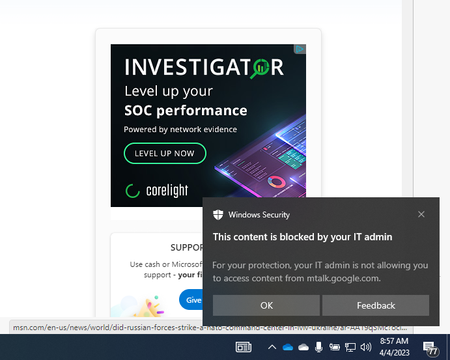
 Apr 21, 2023You should be able to see which process is trying to access this URL, if you look at the Defender Antivirus event logs.

I wish I could provide you answers but Google nor anyone else has been able to assist me with this issue...it literally drives me insane!

Not sure if it helps but I recently had issues with the 'content blocked by IT Admin' notifications and tracked it down to the Defender for Endpoint's web content filter. I found through the Reports > Web protection that the mtalk.google.com site is considered a 'chat' related site so if your content filter rule has the chat category blocked, this could be the cause. You can either add an exception for that site via the indicators section or allow the chat category to stop the notifications. If you're not using the content filter, I would also suggest checking the attack surface reduction rule called 'network protection.'
I'm still trying to determine what mtalk.google.com is exactly and finding mixed results on the web. Seems to be a now-defunct google service but as you observed, chrome is trying to reach it. I would assume any google related product or service could be for that matter.
- Eric_LawrenceNov 12, 2025
Microsoft
I hate to necro a thread two years later, but the issue is that ages ago, mtalk.google.com was a domain used for a Google instant messaging app. Nowadays, Chromium uses it internally for "Google Cloud Messaging" so just booting Chrome can hit that domain.
https://source.chromium.org/chromium/chromium/src/+/main:google_apis/gcm/engine/gservices_settings.cc;drc=0c1b535076e36622eec39515761eb72d81c04db0;l=33
To workaround this notification if you are blocking Instant Messaging category with Defender WCF you can create an explicit "Allow" indicator for the domain.  SPCIOSep 26, 2023Copper ContributorDear All, Thank you for responding to my queries. quite useful. Some more insight to this ask:
1. We "Unsactioned" these apps/website domains as part of MCAS implentation
2. While we block these, we would like to have a silent blocking, instead of popping up the alert everytime
Any settings that can be applied thru intune/GPOs, will be really helpful
Thanks
siva- beewolf16Sep 26, 2023Brass Contributor
SPCIOTo stop the pop-up, you would either need to exclude the particular offending web content filter category/ies from your web content filter policy (this would be determined by the web content filter reports) or if you want to just exclude individual URLs, you'll do this through security.microsoft.com > Settings > Endpoints > Indicators (under the Rules section.)
As noted above, if you're not using web content filter, then you should look at your attack surface reduction rule called Network protection. https://learn.microsoft.com/en-us/microsoft-365/security/defender-endpoint/enable-network-protection?view=o365-worldwide
Hope that helps!
- SPCIOSep 21, 2023Copper Contributorthank you. how do we stop this pop-up? any suggestions please.. am okay to block these web sites based on MCAS settings..
