Forum Discussion

"My Groups" list for SharePoint Homepage Web Part
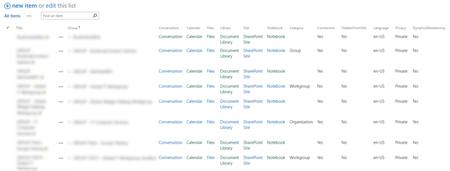

We've hit a road block woth this, I'm not sure why.
The groups are visible in the generated list for a member of that group, but the search remains empty for that user unless we manually/explicitely give the member rights (which he already has through the group).
When checking the privileges of a user on an item, it is given by the O365 group, but the item is only visible in the search until the privileges are given directly.
It looks like the search is unable to resolve the group members when crawling. It is strange that this is working in your tenant.

Hmm, I opted to use api and script editor web part to create our web part
Perhaps cfiessinger can flag someone down that knows how search indexing + Groups is working. We havent started using Groups for permissions elsewhere yet, but are definitely planning to and if this is the case, that is a big issue.
<SCRIPT LANGUAGE='JavaScript' type='text/javascript'>

$(document).ready(function () {

	$.ajax({
		url : "https://mytenant.sharepoint.com/sites/groups/_api/web/lists/getByTitle('my')/Items?$OrderBy=Title",
		contentType : "application/json;odata=verbose",
		headers : { "accept" : "application/json;odata=verbose" },
		success : function onSuccess(data, request){
			if(data.d.results.length == 0){
				$("#listOfGroups").html("No Groups");
			} else {
				for(i=0;i<data.d.results.length;i++){
					//console.log(data.d.results[i]);
					html = "<B>"+data.d.results[i].Title+"</B><BR>"
					if(data.d.results[i].Conversation){
						html += "<a style='font-size:16px;' title='Group Conversations' href='"+data.d.results[i].Conversation.Url+"' target='_blank'><i class='fa fa-comments-o' aria-hidden='true'></i></a> | ";
					}
					if(data.d.results[i].Calendar){
						html += "<a style='font-size:16px;' title='Group Calendar' href='"+data.d.results[i].Calendar.Url+"' target='_blank'><i class='fa fa-calendar' aria-hidden='true'></i></a> | ";
					}
					if(data.d.results[i].Files){
						html += "<a style='font-size:16px;' title='Group Files' href='"+data.d.results[i].Files.Url+"' target='_blank'><i class='fa fa-folder-open-o' aria-hidden='true'></i></a> | ";
					}
					if(data.d.results[i].Notebook){
						html += "<a style='font-size:16px;' title='Group Notebook' href='"+data.d.results[i].Notebook.Url+"' target='_blank'><i class='fa fa-book' aria-hidden='true'></i></a> | ";
					}
					if(data.d.results[i].Site){
						html += "<a style='font-size:16px;' title='Group SharePoint Site' href='"+data.d.results[i].Site.Url+"' target='_blank'><i class='fa fa-sitemap' aria-hidden='true'></i></a>";
					}

				}

				$("#listOfGroups").html(str);

			}

		},
		error: function (jqXHR, textStatus, errorThrown) { console.log(jqXHR); }
	});

});

</SCRIPT>

<div id="listOfGroups"></div>
Note, we've got font-awesome embedded for the icons.
 hgromekDec 03, 2018Copper Contributor
Hi Brent Ellis,
I am trying to recreate the end-user visual web part based on the script you provided. However, I am not getting anything populated (the API is set, I just can't get the records to display? The Str is not defined? Any insight on this? Any help is appreciated.
- Brent EllisDec 03, 2018Silver ContributorPerhaps my mistake in a poor copy paste, it looks like
$("#listOfGroups").html(str);
should be
$("#listOfGroups").html(html);
in the above example- hgromekDec 04, 2018Copper Contributor
My again! Any insight on how to pull in Team conversations or planner URLs?
- Alexander ZoutenbierNov 22, 2017Copper Contributor
Great code! Used it with the combination of Promoted Links.
Thanks!
- bart_vermeerschFeb 23, 2017Steel Contributor
You could easily test it by
1. creating a list
2. add an item, remove all permissions and add assign permissions to an O365 group
3. index the list
4. try to search for the item with a user account given permission through the O365 only on that item
We are unable to get the item back
- Brent EllisFeb 23, 2017Silver Contributor
Can confirm - that is pretty ridiculous and needs to be fixed asap
