Forum Discussion

five issues with one Office 365 Group
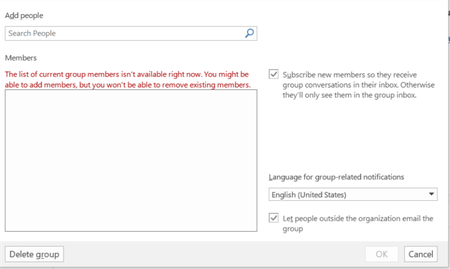

The fifth of five issues has been resolved, but I stumbled into a sixth one.
Here was the issue: I can't manage the group from Outlook 2016. See the screenshot below. A web search for part of that error in quotes has no results so I suspect this is an unusual problem.
The issue appears to be related to some users of the group not having email addresses. For some users, I created local accounts unattached to an email address. This caused the Outlook desktop client to choke (though I could manage the group from OWA). Once I removed those users, I could access the group members from the desktop client. I think Microsoft has to document that all Office 365 Group users need to have valid email addresses.
Regarding the new issue:
6. I can't add links to the navigation on SharePoint Team site. I've tried to add a link on any page (Home, Site Contents, other site page), the site accepts the new link, but then it doesn't appear.
Just an update for everyone following this thread... another month and no progress to report from Microsoft. I've had several emails back and forth with technical support, but that they haven't resolved the issues I laid out above with the exception of one (manging the group in Outlook 2016).
 Pete McCallaAug 21, 2018Copper Contributor
Hi Nick,
What was the resolution for managing the group in Outlook 2016? I created an Office 365 group with myself as the owner. Outlook 2016 isn't letting me add meetings to the calendar; however, I am able to add appointments to the calendar in OWA. Look forward to hearing from you. Regards,
Pete
- Nick NigroAug 22, 2018Brass Contributor
Hi Pete,
Nothing changed on my side. Managing that group within Outlook just started working a while back. Sorry I couldn't be of more assistance here.
Nick
- Nick NigroNov 26, 2018Brass Contributor
Re-upping this thread.
20 months later and things are mostly better with this group, issues 3-6 are fixed. Issue 2 might still exist.
Most importantly, issue (1) has reemerged. Inextricably some external guests are not receiving their welcome emails. For some of our users, we create a customer username/password using a domain different from our tenant. This allows us to setup a Microsoft account without the user having to do so. Thus, we are the ones who would receive the welcome email and can verify they're not being received.
Normally, we'd add the user to the Office 365 Group through OWA. I tried adding the user through Microsoft Teams instead, but am getting a cryptic error: "We ran into an issue. Please try again later"
The latest help from Microsoft support is to recreate the group. Since there are more than 500 users, we don't want to do that unless we absolutely have to do so and can be assured this issue won't resurface with a new group. I'm still waiting for some substantive support from Microsoft on this and will follow-up if I learn more.
 Thakhi ShaikSep 15, 2017Copper Contributor
Reset your password and try