intune
4390 Topics
WHFB - Intune - Only PIN works and it causes print issues
Hello, I have personally attempted to deploy this for my environment and so has a colleague. We deploy windows hello specifically to a single machine or user, the PIN ends up being the only option which can be used, the device will say every other option is not available. It will constantly pop up at the bottom right that the password needs to be put in again to authenticate the user and printing will not work at all. The devices are fully capable of using facial recognition. Has anyone encountered any of these issues in a similar fashion with an AD > Entra environment ? Thank you, Jamie.298Views0likes4Comments
Intune On-Demand Proactive Remediation API Reliability for Large-Scale Usage
Hi Team, We are testing the Intune On-Demand Proactive Remediation API: POST /deviceManagement/managedDevices/{managedDeviceId}/initiateOnDemandProactiveRemediation In our environment, the remediation package works correctly, and the API generally triggers the remediation as expected. However, during repeated testing, we noticed that a small percentage of requests do not seem to reach the endpoint. For example: 20 remediation requests sent 18-19 execute successfully 1-2 never trigger on the target device Devices are online and managed by Intune Added a 30-second delay between requests, but the behavior still occurs intermittently Before adopting this in production for a large client base, we'd like to understand: Has anyone observed similar behavior? Is this API reliable for triggering remediation across multiple devices in parallel? Are there any known limitations, queueing mechanisms, throttling considerations, or best practices? Is there a recommended way to verify that a remediation request was actually delivered to the device? Since this API is still in the beta/preview stage, is there any information on its roadmap or GA timeline? Note: For additional context, detailed test results, observations, and environment information, a PDF containing the complete analysis has been attached. Any guidance or real-world experience would be greatly appreciated. Thank you. https://learn-attachment.microsoft.com/api/attachments/1ad5bea4-9038-4b25-9a2a-a9e66a870f6a?platform=QnA https://learn.microsoft.com/en-us/graph/api/intune-devices-manageddevice-initiateondemandproactiveremediation?view=graph-rest-beta637Views0likes4Comments
Configure only "trusted" usb flash drives to be allowed to the workstations through Itnune?
We would like to impose a policy that allows only vendor specific encrypted usb flash drives to be installed to the workstations without affecting other usb device classes. Is there a way to accomplish it through Intune configuration?32Views0likes1CommentEntra Shared Mode - Force App Stop
Hi All I hope you are well. Anyway, I was asked this yesterday and think I already might know the answer, but here goes. We had an instance of Microsoft Excel stuck in "getting things ready" on an Android Entra Shared Mode Device. Technical Support wondered if there was a way to Force Stop Excel or clear the app data. We had a look in Exit Kiosk Mode, Android Settings, and the Force Stop of Excel said "Action not allowed" and the clear the app data said "Unable to delete data for app" So, my question(s) would be, is going into Exit Kiosk Mode and even trying to force stop / clear data on apps even a valid option, or is this by design? Would adding Excel to this setting help? Any help or confirmation would be greatly appreciated. Stuart704Views0likes4Comments
enrolling in Intune MacBook Pro with an M5 Pro
Hi everyone We have tested the Wi-Fi and ethernet profile without success with Apple businesses manager. The Wi-Fi and the ethernet connection itself works, but the enrollment process into Intune does not complete successfully. At this stage, we cannot sign in, and neither the Wi-Fi nor the Ethernet connection appears to be working. The device is a 14-inch MacBook Pro with an M5 Pro chip, running macOS 26.5.1 the device connects to the server, the settings begin to apply, but the process suddenly stops, and we are then unable to log in. These are steps followed : Synchronize the device from Apple Business Manager to Intune. Assign the enrollment profile to the device. Perform a device wipe/reset. Start Automated Device Enrollment (ADE). Complete the device setup and user sign-in. The device successfully enrolls into Intune. Intune begins deploying configuration profiles, compliance policies, security policies, and applications. During the policy application process, Wi-Fi connectivity stops responding. The device loses network connectivity and cannot continue synchronizing policies. We are unable to sign in because the enrolment process has not been finalized. As a result, we have to wipe the Mac and start the process again each time. We have disabled some policies, but we are still experiencing the same issue. Have anyone experienced any issues like that ? Regards,504Views1like3CommentsNew MD-102 : Weird departure from course traditional design
The first slide deck is tremendously long. It takes me 5 hours of lecture to get students into the first lab. The slide decks are very repetitive and could often be replaced with Instructor Demonstration slides. The topics are far-ranging: it mixes identity administration, Intune RBAC, Android enrollment, LAPS, Windows enrollment, and Autopilot before students have a stable mental model of the fundamentals of: Device enrollment > Policy/app creation > Targeting assignment. The first lab is disjointed, with many configurations, such as Creating Administrative units, Assigning Scope tags, and Custom Intune Roles, not implemented until later in the week in Exercise 5. The delegation model, administrative-unit work, and Android restrictions obscure the basics students should understand first. The course design seems to be a big departure from most, if not all, Microsoft courses I have ever taught. No Entra Connect Lab and no real Autopilot lab are a disappointment to some students as well44Views0likes0CommentsAndroid Enterprise System update expected behavior
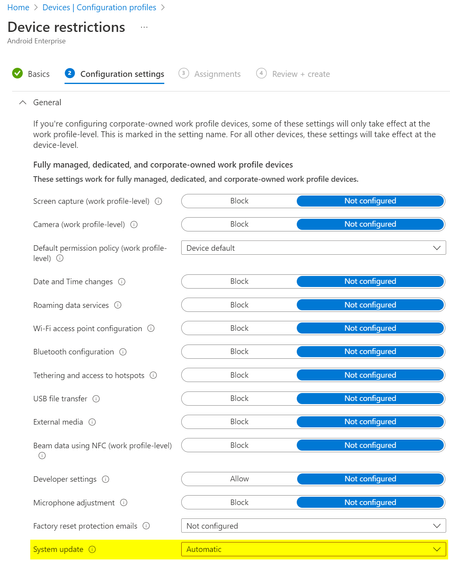
What would be the expected behaviour when we set the System update to Automatic in the Android Enterprise Device restriction profile? We have several devices rebooting "randomly" and without notification and when we check the dumpstate logs, these reboots were triggered by an update: Canonical boot reason: reboot,enterprise,mainline_updbug. According to the Android documentation this could be correct: https://source.android.com/devices/tech/admin/ota-updates Since we don't see the same behaviour on all devices, while they share the same Update policy, I'm not sure what to expect from this setting?4.5KViews0likes4Comments
Fully Managed Android Devices Constantly Restarting
Hi all, We have had users with our Fully Managed Android devices regularly rebooting without warning, sometimes multiple times a day. These devices are already fully updated when these restarts are happening. It's been hard to catch it as it's random and sometimes when it does, it will reboot multiple times. When the device turns back on, the phone says it is 'Optimising apps'. We also have the 'Auto Optimisation' function disabled in device care within settings. I know that's not much info to give but does anyone have any idea why this is happening or how to resolve it? As you can imagine it's causing a lot of issues within our business. This is occurring on both Samsung A32 devices and Samsung Tab Active 3 devices, both Fully Managed with the device firmware update setting in our configuration profile set to default.6.5KViews1like5CommentsMapping legacy server shares in Intune on Windows 10 MDM
In a Windows 10 full MDM (AzureAD+Intune) scenario, you’ll move your email, app and file workloads to Office 365 (or alternatives). In your pilot or hybrid phase, you may still need access to certain file shares on your servers, so here’s a simple PowerShell script you can deploy using Intune Device Configuration that maps your desired share. Deploy multiple times for multiple shares (or groups of users). It will create a shortcut in a location you define, so the mapping is always user-driven, it will automatically suggest your user’s AzureAD login as username. You can of course customize the script to your liking if you did not change your local AD upn yet. https://www.lieben.nu/liebensraum/2018/06/mapping-legacy-server-shares-in-your-windows-10-mdm-intune-pilot/ Solved49KViews3likes10CommentsKeyboard reverting on reboot
I'm having an issue with the keyboard reverting after OOBE. I'm using an English (UK) Windows 11 25H2 base image (deliberately — I want English display language, with Swedish keyboard/regional settings applied without needing to install a Swedish language pack). Deployment is native Windows Autopilot, no third-party tooling involved. Autopilot deployment profile: Language (Region) = Swedish (Sweden), Automatically configure keyboard = No. During OOBE, I manually select Swedish keyboard, and it's correctly applied — it's still Swedish through the first user logon. But after rebooting the keyboard silently reverts to English (UK). This is regardless of if I run pre-provisioning or user-driven. Is this a known/new behaviour, and how can I fix it?505Views0likes3Comments