Overview
Modern workloads increasingly rely on reacting to files as soon as they arrive in Azure Blob Storage. While Azure provides multiple ways to trigger computing from blob operations, choosing the right event-driven pattern is not always straightforward—especially in enterprise environments where latency, reliability, and operational transparency all matter.
Introduction
Hello everyone, Andrew Coughlin here, a Cloud Solution Architect specializing in Infrastructure as a Service on Azure.
In this post, I am going to walk through how to implement a direct Event Grid to Azure Function pattern. This is the simplest and lowest-latency option when you want real-time reactions to blob uploads.
Scenario
Suppose you have a workload where files are continuously uploaded into Azure Blob Storage and you need to trigger downstream processing.
Typical requirements include avoiding polling, achieving near real-time execution, and maintaining strong observability.
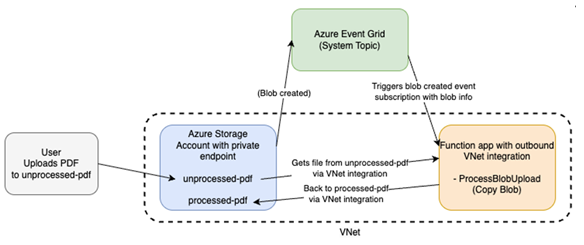
Architecture
Blob Storage → Event Grid → Azure Function
The Process
- Create and deploy the Azure Function
2. Validate the function
3. Create the Event Grid subscription
4. Upload a blob and validate the flow
Step 1 — Create and Deploy the Azure Function (Function First)
The Function must exist before creating the Event Grid subscription because Event Grid validates the endpoint during creation.
Steps:
1. Create a Function App (Consumption plan + storage account)
2. Open Function App → Functions → Create
3. Select Event Grid trigger
4. Provide function name
5. Create and save the function
Note: A storage account is required for all Function Apps and is created or selected during app creation.
Implement the Function
Below are examples of the HandleBlobCreatedEvent.cs, EventGridListenerFunction.csproj, Program.cs, and host.json
Example of HandleBlobCreatedEvents.cs:
namespace EventGridListenerFunction
{
    public class HandleBlobCreatedEvent
    {
        private readonly ILogger _logger;

        public HandleBlobCreatedEvent(ILoggerFactory loggerFactory)
        {
            _logger = loggerFactory.CreateLogger<HandleBlobCreatedEvent>();
        }

        [Function(nameof(HandleBlobCreatedEvent))]
        public void Run([EventGridTrigger] string data)
        {
            // Event Grid sends events as a JSON array
            using var doc = JsonDocument.Parse(data);

            if (doc.RootElement.ValueKind == JsonValueKind.Array)
            {
                foreach (var ev in doc.RootElement.EnumerateArray())
                {
                    HandleOneEvent(ev);
                }
            }
            else
            {
                HandleOneEvent(doc.RootElement);
            }
        }

        private void HandleOneEvent(JsonElement ev)
        {
            if (ev.TryGetProperty("eventType", out var eventType))
                _logger.LogInformation("EventType: {EventType}", eventType.GetString());

            if (ev.TryGetProperty("subject", out var subject))
                _logger.LogInformation("Subject: {Subject}", subject.GetString());

            if (ev.TryGetProperty("data", out var dataObj)
                && dataObj.ValueKind == JsonValueKind.Object
                && dataObj.TryGetProperty("url", out var urlProp))
            {
                _logger.LogInformation("Blob URL: {Url}", urlProp.GetString());
            }
            else
            {
                _logger.LogWarning("No data.url found in payload.");
            }
        }
    }
}
Example of Program.cs:
var builder = FunctionsApplication.CreateBuilder(args);

builder.ConfigureFunctionsWebApplication();

builder.Services
    .AddApplicationInsightsTelemetryWorkerService()
    .ConfigureFunctionsApplicationInsights();

builder.Build().Run();
Example of Host.json:
{
    "version": "2.0",
    "logging": {
        "applicationInsights": {
            "samplingSettings": {
                "isEnabled": true,
                "excludedTypes": "Request"
            },
            "enableLiveMetricsFilters": true
        }
    }
}
Example of EventGridListenerFunction.csproj:
<Project Sdk="Microsoft.NET.Sdk">

  <PropertyGroup>
    <TargetFramework>net8.0</TargetFramework>
    <AzureFunctionsVersion>v4</AzureFunctionsVersion>
    <OutputType>Exe</OutputType>
    <ImplicitUsings>enable</ImplicitUsings>
    <Nullable>enable</Nullable>
  </PropertyGroup>

  <ItemGroup>
    <FrameworkReference Include="Microsoft.AspNetCore.App" />
    <PackageReference Include="Microsoft.ApplicationInsights.WorkerService" Version="2.23.0" />
    <PackageReference Include="Microsoft.Azure.Functions.Worker" Version="2.51.0" />
    <PackageReference Include="Microsoft.Azure.Functions.Worker.ApplicationInsights" Version="2.50.0" />
    <PackageReference Include="Microsoft.Azure.Functions.Worker.Extensions.EventGrid" Version="3.5.0" />
    <PackageReference Include="Microsoft.Azure.Functions.Worker.Extensions.Http.AspNetCore" Version="2.1.0" />
    <PackageReference Include="Microsoft.Azure.Functions.Worker.Sdk" Version="2.0.7" />
  </ItemGroup>

</Project>
You will still need to publish this to the function app, which is outlined: Deployment technologies in Azure Functions | Microsoft Learn.
Step 2 — Create the Event Grid Subscription
Navigate to the Storage Account → Events → Create Event Subscription and select BlobCreated events targeting the Function.
Step 3 — Validate
Upload a blob and confirm the Function triggers and logs event data.
Common Pitfalls
- Creating the subscription before the function exists
• Storage account misconfiguration
• Networking restrictions preventing Function access to storage
Conclusion
The direct Event Grid to Azure Function pattern provides a simple and reliable approach for real-time blob processing without additional infrastructure.
Disclaimer
The sample scripts are not supported under any Microsoft standard support program or service. The sample scripts are provided AS IS without warranty of any kind. Microsoft further disclaims all implied warranties including, without limitation, any implied warranties of merchantability or of fitness for a particular purpose. The entire risk arising out of the use or performance of the sample scripts and documentation remains with you. In no event shall Microsoft, its authors, or anyone else involved in the creation, production, or delivery of the scripts be liable for any damages whatsoever (including, without limitation, damages for loss of business profits, business interruption, loss of business information, or other pecuniary loss) arising out of the use of or inability to use the sample scripts or documentation, even if Microsoft has been advised of the possibility of such damages.

 Microsoft