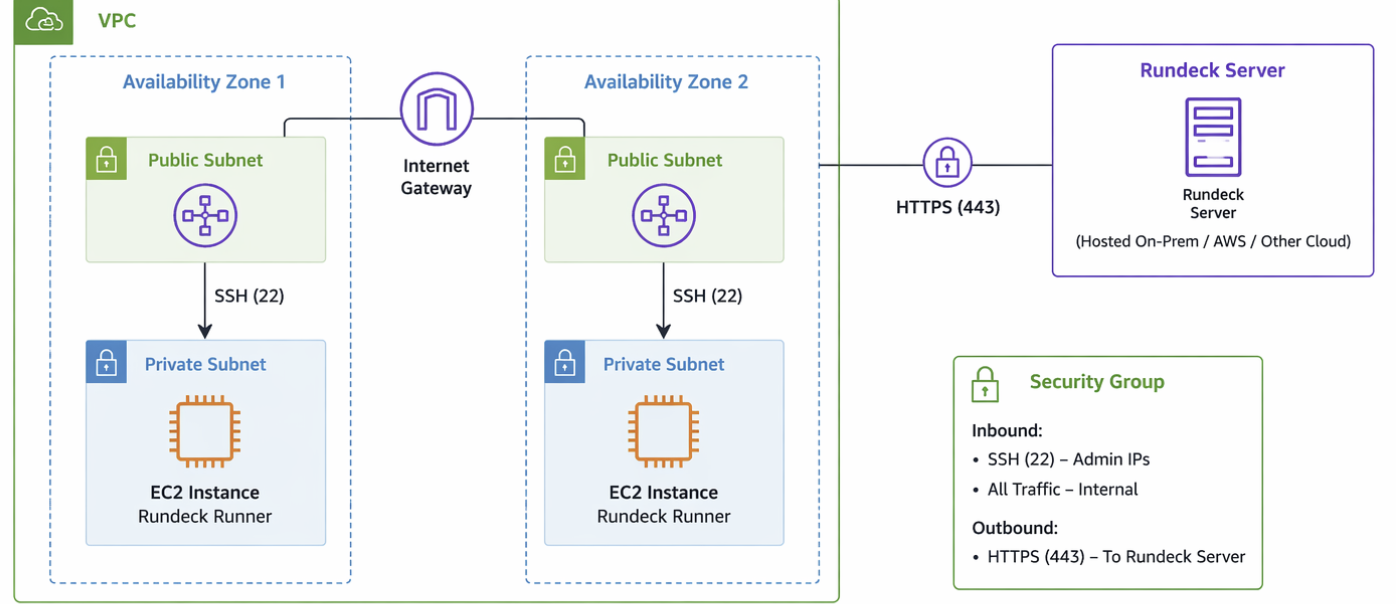
AWS Enterprise Rundeck integrated with Azure Runner enables seamless orchestration of over 2000+ jobs directly in the Azure environment, eliminating platform migration overhead. Overall, the solution delivers substantial efficiency gains, saving the customer team an estimated 6+ months of implementation and migration effort while ensuring faster time to value. This approach avoids the need to re-engineer or onboard workloads into Azure-native tools, significantly reducing operational complexity and effort.
Architecture Overview
- Rundeck Server (AWS) → https://dev.rundeck.xyz.com
- Rundeck Runner (Azure Linux VM)
- Secure Communication over HTTPS (Port 4432)
- Optional Proxy for enterprise networks
1.Ensure that network connectivity is established between the Rundeck endpoint (dev.rundeck.xyz.com) and the Azure subnet over port 443.
2.Request the customer to create a Runner within a new or existing project in the Rundeck portal by providing a suitable name and tags and then proceed to download the corresponding Runner JAR file.
3.Provision an Azure Linux Virtual Machine and deploy the downloaded Runner JAR using a VM extension or through a CI/CD pipeline integrated with BAMS/Artifactory. Below all prerequisite steps are mentioned which needs to be run on Azure VM to ensure Rundeck runner is ready.
4.Additionally, make sure all required prerequisites are installed on the Azure Linux VM that will host the Rundeck Runner.
5.After installation it will establish the connectivity between azure Rundeck runner and Aws Enterprise Rundeck.
6.We can trigger any Rundeck jobs on Azure virtual machines.
By deploying the Rundeck Runner on Azure, enterprises can seamlessly bridge AWS-hosted orchestration with Azure-based execution environments. This setup enables robust, scalable, and secure automation across hybrid cloud ecosystems.
All prerequiste needs to be run on the Azure vm.
Step 1: Network Connectivity Prerequisites:
Ensure proper network connectivity between Rundeck and Azure:
Allow outbound/inbound access: Source: Azure Subnet Destination: dev.rundeck.xyz.com Port: 443 Protocol: HTTP
Step 2: Create Rundeck Runner
Login to Rundeck Portal
Navigate to a project → Runner Management
Create a new runner:
Provide Name
Add Tags
Download the Runner JAR file
Step 3: Azure VM setup
Create a Linux VM (RHEL/CentOS) in Azure.
Deploy the runner jar via:
CI/CD pipeline (BAMS/Artifactory)
VM Extension for automation
Step 4: Install Prerequisites on Azure VM
Install Java 11
sudo bash
yum install java-11-openjdk.x86_64
rpm -qa | grep java-11
java --version
Step 5: Start the Runner -
useradd rundeck
Step 6: Create Rundeck User-
mkdir /opt/rundeck/
chown -R rundeck:rundeck /opt/rundeck/
cp runner-*.jar /opt/rundeck/
ll /opt/rundeck/
Step 7: Start the Runner -
without proxy
/bin/java -jar /opt/rundeck/runner-<id>.jar
With proxy:
/bin/java \
-Dmicronaut.http.client.proxy-type=http \
-Dmicronaut.http.client.proxy-address=webproxy.lo5.mgmt.services:80 \
-jar /opt/rundeck/runner-<id>.jar
Step 8: Configure Runner as a Service
vi /etc/systemd/system/runner.service
Add Configuration
[Unit]
Description=Process Automation Runner
[Service]
WorkingDirectory=/opt/rundeck/
Type=simple
User=rundeck
Group=rundeck
ExecStart=/bin/java -jar /opt/rundeck/runner-<id>.jar
Restart=on-failure
[Install]
WantedBy=multi-user.target
Enable and start service:
chmod 0640 /etc/systemd/system/runner.service
systemctl daemon-reload
systemctl enable runner.service
systemctl start runner.service
systemctl status runner.service
Step 9: Verify Runner Process
ps aux | grep rundeck
systemctl status runner.service
Step 10: Configure Log Rotation
create configuration:
vi /etc/logrotate.d/rundeck_runnerd
/opt/rundeck/runner/logs/operations.log
{
daily
missingok
rotate 8
compress
copytruncate
maxsize 150M
create 644 root root
}
Step 11: Runner Upgrade Process
Regenerate credentials:
curl -k -X POST https://dev.rundeck.xyz.com/api/42/runnerManagement/runner/<runner-id>/regenerateCreds \
--header "Content-Type: application/json" \
--header "X-Rundeck-Auth-Token: <token>"
Step 12: Download Updated runner
curl -k -X GET https://dev.rundeck.xyz.com/api/41/runnerManagement/download/<downloadTk> \
--header "X-Rundeck-Auth-Token: <token>" \
--output runner-${runner_id}.jar

 Microsoft