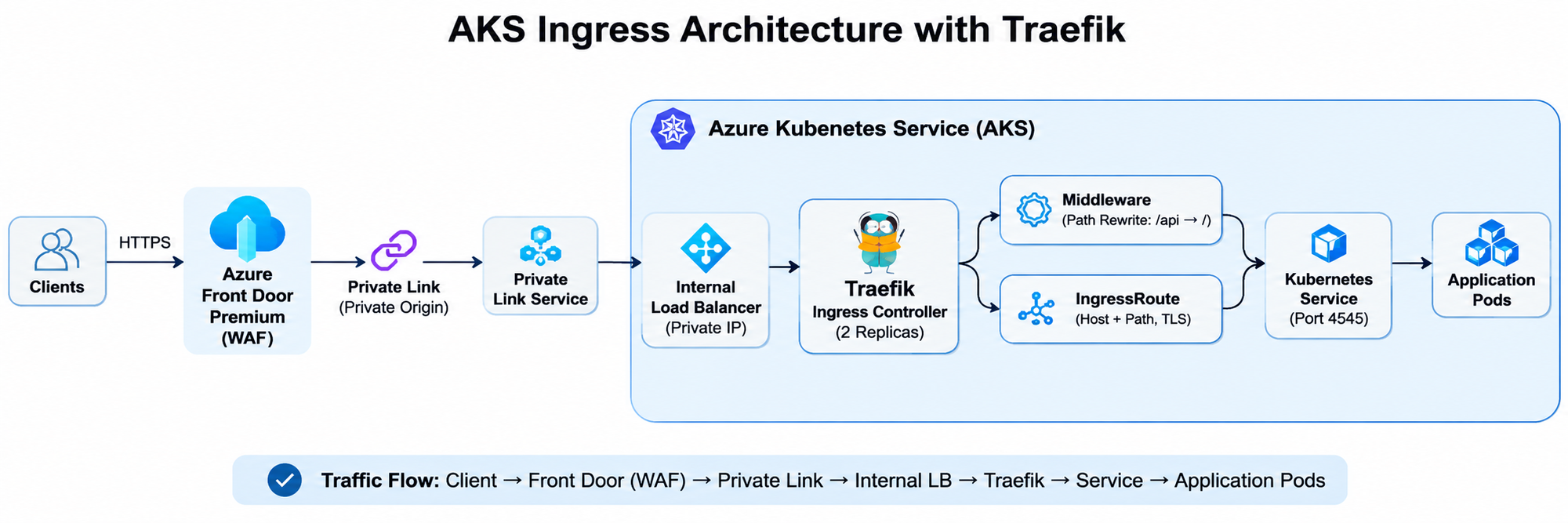
When hosting applications on Azure Kubernetes Service (AKS), managing secure and reliable external access to application workloads is an important part of the architecture. In this implementation, I deployed Traefik as an ingress controller on AKS and configured it to route incoming HTTPS traffic to application services running inside the cluster. The solution also integrates with Azure networking components, including an internal Azure Load Balancer, Azure Private Link Service, and Azure Front Door Premium. This blog walks through the implementation approach, key configurations, and practical considerations from the deployment. Note: Resource names, namespaces, hostnames, IP addresses, and other environment-specific details have been generalized.
Prerequisites
Before starting the implementation, ensure you have:
- An existing Azure Kubernetes Service (AKS) cluster with a user node pool available for ingress workloads.
- kubectl configured with access to the AKS cluster.
- Helm 3 installed and access to the Traefik Helm repository.
- Permissions to create Kubernetes resources, including Deployments, Services, Secrets, and Traefik CRDs.
- An application already deployed in AKS and exposed through a Kubernetes Service.
- An Azure virtual network and subnet configured for the AKS internal Load Balancer.
- Appropriate Azure permissions to create and configure an Internal Load Balancer and Azure Private Link Service.
- Azure Front Door Premium, if implementing the private origin integration described in this article.
- Required TLS certificates and Kubernetes TLS secrets for HTTPS routing.
Note: The Azure networking and Front Door components require appropriate permissions and configuration in the target Azure environment.
1. Architecture overview
The solution uses the following traffic flow:
Client → Azure Front Door Premium → Azure Private Link → AKS Internal Load Balancer → Traefik → Kubernetes Service → Application Pod
The main components are:
- Azure Front Door Premium: Provides the entry point for application traffic and supports private connectivity to the origin.
- Azure Private Link Service: Enables private connectivity to the AKS-hosted ingress endpoint.
- Internal Azure Load Balancer: Exposes Traefik through a private IP address within the virtual network.
- Traefik: Handles incoming HTTP/HTTPS traffic and routes requests based on hostnames and URL paths.
- Kubernetes Service: Provides internal connectivity to the application pods.
2. Deploying Traefik using Helm
I used the official Traefik Helm chart to deploy Traefik into a dedicated Kubernetes namespace.
First, add the Traefik Helm repository:
helm repo add traefik https://traefik.github.io/charts helm repo update
Create a dedicated namespace:
kubectl create namespace ingress-system
For a production deployment, I used a custom values.yaml file to configure the deployment, service, node selection, and Kubernetes providers.
Key Helm configuration
deployment: replicas: 2 nodeSelector: kubernetes.azure.com/agentpool: application ingressClass: enabled: true isDefaultClass: true providers: kubernetesCRD: enabled: true allowCrossNamespace: true kubernetesIngress: enabled: true service: enabled: true type: LoadBalancer annotations: service.beta.kubernetes.io/azure-load-balancer-internal: "true" service.beta.kubernetes.io/azure-load-balancer-health-probe-protocol: "tcp" service.beta.kubernetes.io/azure-pls-create: "true" service.beta.kubernetes.io/azure-pls-name: "aks-ingress-private-link" spec: externalTrafficPolicy: Local
The internal load balancer subnet annotation should be added according to the target AKS environment.
Important configuration considerations
- Two replicas provide availability across application workloads.
- The node selector ensures Traefik is scheduled on the intended user node pool.
- Kubernetes CRD and Ingress providers allow Traefik to discover routing configurations.
- The internal load balancer annotation ensures Traefik is exposed through a private IP.
- The Private Link Service annotation enables private connectivity to the ingress endpoint.
- externalTrafficPolicy: Local helps preserve the original client source IP at the Kubernetes service forwarding layer.
3. Deploy Traefik
Once the Helm values file is ready, deploy Traefik:
helm upgrade --install traefik traefik/traefik \ --version 41.6.0 \ --namespace ingress-system \ --values values.yaml \ --wait \ --timeout 10m
Validate the deployment:
kubectl get pods -n ingress-system kubectl get svc -n ingress-system kubectl get deployment -n ingress-system
The Traefik service should receive a private IP address from the configured subnet.
4. Configure application routing using IngressRoute
Traefik supports Kubernetes Custom Resource Definitions (CRDs), including IngressRoute, which provides more flexible routing capabilities.
For this implementation, I used an IngressRoute to route requests based on the hostname and URL path.
Example:
apiVersion: traefik.io/v1alpha1 kind: IngressRoute metadata: name: application-route namespace: application-namespace spec: entryPoints: - websecure routes: - match: Host(`internal.example.com`) && PathPrefix(`/api`) kind: Rule middlewares: - name: api-to-v1 services: - name: application-backend port: 4545 tls: secretName: application-tls
Update the hostname, namespace, backend service, port, and TLS secret to match the application environment.
The configuration ensures that HTTPS requests matching the specified hostname and /api path are forwarded to the corresponding Kubernetes Service.
5. Configure Traefik Middleware for URL rewriting
In this implementation, the application expected requests to reach its /v1 API endpoints, while incoming requests used the /api prefix.
I used Traefik's Middleware CRD with a regular expression to rewrite the request path.
Example:
apiVersion: traefik.io/v1alpha1 kind: Middleware metadata: name: api-to-v1 namespace: application-namespace spec: replacePathRegex: regex: '^/api(/(.*))?$' replacement: '/${2}'
This configuration removes the /api prefix before forwarding the request to the backend.
For example:
| Incoming request | Rewritten path |
|---|---|
| /api/health | /health |
| /api/orders | /orders |
| /api | / |
This allows the application to retain its existing API structure without requiring changes to the application code.
6. Integrating Azure Private Link Service
To enable private connectivity to the AKS ingress endpoint, I configured Azure Private Link Service on the internal load balancer.
The relevant Kubernetes Service annotations are:
service.beta.kubernetes.io/azure-load-balancer-internal: "true" service.beta.kubernetes.io/azure-pls-create: "true" service.beta.kubernetes.io/azure-pls-name: "aks-ingress-private-link"
The Azure Private Link Service is associated with the internal load balancer frontend.
This provides a private connectivity option for consumers that need to access the application without exposing the AKS ingress endpoint directly to the public internet.
The Private Link Service configuration and connection approval must also be validated on the Azure side.
7. Configuring TLS Termination in Traefik
TLS termination is an important part of the ingress architecture. It allows Traefik to handle HTTPS connections, manage certificates, and forward requests to backend Kubernetes services.
In this implementation, Azure Front Door Premium handles the client-facing TLS connection and establishes a separate HTTPS connection to the AKS origin. Traefik terminates this origin-side TLS connection using a Kubernetes TLS Secret.
How TLS works in this architecture
- The client sends an HTTPS request to Azure Front Door.
- Azure Front Door terminates the client-facing TLS connection.
- Front Door establishes a new HTTPS connection to the AKS origin through Private Link.
- Traefik receives the HTTPS request and terminates TLS using the configured certificate.
- Traefik applies the routing rules and forwards the request to the application Kubernetes Service.
Step 1: Create a Kubernetes TLS Secret
Traefik uses a Kubernetes TLS Secret containing the certificate and private key.
kubectl create secret tls application-tls \ --cert=tls.crt \ --key=tls.key \ --namespace application-namespace
The secret contains:
- tls.crt: TLS certificate.
- tls.key: Corresponding private key.
Ensure the certificate is valid for the hostname configured in the IngressRoute.
Step 2: Configure TLS in IngressRoute
Reference the TLS Secret in the IngressRoute configuration:
apiVersion: traefik.io/v1alpha1 kind: IngressRoute metadata: name: application-route namespace: application-namespace spec: entryPoints: - websecure routes: - match: Host(`internal.example.com`) && PathPrefix(`/api`) kind: Rule middlewares: - name: api-to-v1 services: - name: application-backend port: 4545 tls: secretName: application-tls
The websecure entry point handles HTTPS traffic, while secretName tells Traefik which Kubernetes TLS Secret to use for the certificate.
Step 3: Validate the TLS configuration
Check whether the TLS Secret exists:
kubectl get secret application-tls \ -n application-namespace
Inspect the IngressRoute:
kubectl describe ingressroute application-route \ -n application-namespace
Check Traefik logs for certificate or routing-related errors:
kubectl logs deployment/traefik \ -n ingress-system
Important considerations
- The certificate hostname must match the hostname used for the Front Door origin connection.
- The certificate must be trusted by Azure Front Door, with a valid certificate chain.
- The certificate and private key must be stored securely.
- The TLS Secret must exist in the same namespace as the IngressRoute referencing it.
- Configure certificate renewal and rotation before certificates expire.
- For production, avoid disabling certificate subject name validation at Azure Front Door.
With this configuration, Traefik handles HTTPS termination at the AKS ingress layer, while application routing remains managed through Kubernetes CRDs.
8. Integrating Azure Front Door Premium
Azure Front Door Premium was configured to use the private AKS ingress endpoint as an origin.
The important configuration areas include:
- Creating an origin group for the AKS-hosted application.
- Configuring the origin hostname and host header.
- Enabling Private Link for the origin.
- Selecting the appropriate Private Link Service.
- Configuring HTTPS on port 443.
- Setting up the health probe.
- Associating the origin group with the relevant Front Door route.
- Configuring the required WAF and security policies.
This provides a managed entry point for application traffic while keeping the AKS ingress endpoint private.
9. Validation and troubleshooting
After deployment, I validated the components at different layers rather than relying only on the Helm deployment status.
Kubernetes validation
Check Traefik pods:
kubectl get pods -n ingress-system
Check the Traefik service and its assigned IP:
kubectl get svc -n ingress-system
Check the application services:
kubectl get svc -n application-namespace
Check the application endpoints:
kubectl get endpoints -n application-namespace
Check the routing resources:
kubectl get ingressroute -A kubectl get middleware -A
Key areas to validate
- Pod scheduling: Confirm Traefik pods are scheduled on the intended node pool.
- Image availability: Ensure AKS nodes can access the container image registries required for deployment.
- Internal Load Balancer: Verify that the service receives the expected private IP.
- Private Link Service: Confirm the service is provisioned and the required private endpoint connection is approved.
- Backend service: Verify that the Kubernetes Service name and port match the actual application configuration.
- Service endpoints: Confirm that the backend Service has healthy pod endpoints.
- Routing and middleware: Validate the hostname match, path prefix, TLS secret, and rewrite behavior.
- End-to-end connectivity: Test the complete traffic flow through Azure Front Door and the AKS ingress endpoint.
10. Key learnings
A few practical takeaways from the implementation:
- Node pool selection matters: System node pools can have scheduling restrictions or taints. Plan the Traefik placement accordingly.
- Validate backend service details: The Service name and port configured in an IngressRoute must match the actual Kubernetes Service.
- Check service endpoints: A Kubernetes Service existing does not necessarily mean that it has healthy backend endpoints.
- Understand the networking path: Validate the internal load balancer, Private Link Service, and Front Door configuration independently.
- Use middleware for routing flexibility: Traefik path rewriting can help integrate applications without changing their existing API structure.
- Validate image registry connectivity: AKS nodes need outbound access to the registries hosting the required container images.
- Test end to end: Successful Helm deployment alone does not confirm that the complete application traffic flow is working.
Conclusion
Deploying Traefik on AKS provides a flexible way to manage application ingress, host-based routing, path rewriting, and TLS configuration.
By combining Traefik with an internal Azure Load Balancer, Azure Private Link Service, and Azure Front Door Premium, it is possible to build a private and scalable application ingress architecture on Azure.
The most important part of the implementation is validating each layer independently and then testing the complete traffic flow.
This implementation was a good hands-on exercise in bringing together Kubernetes ingress capabilities and Azure networking services to support secure application connectivity.

 Microsoft