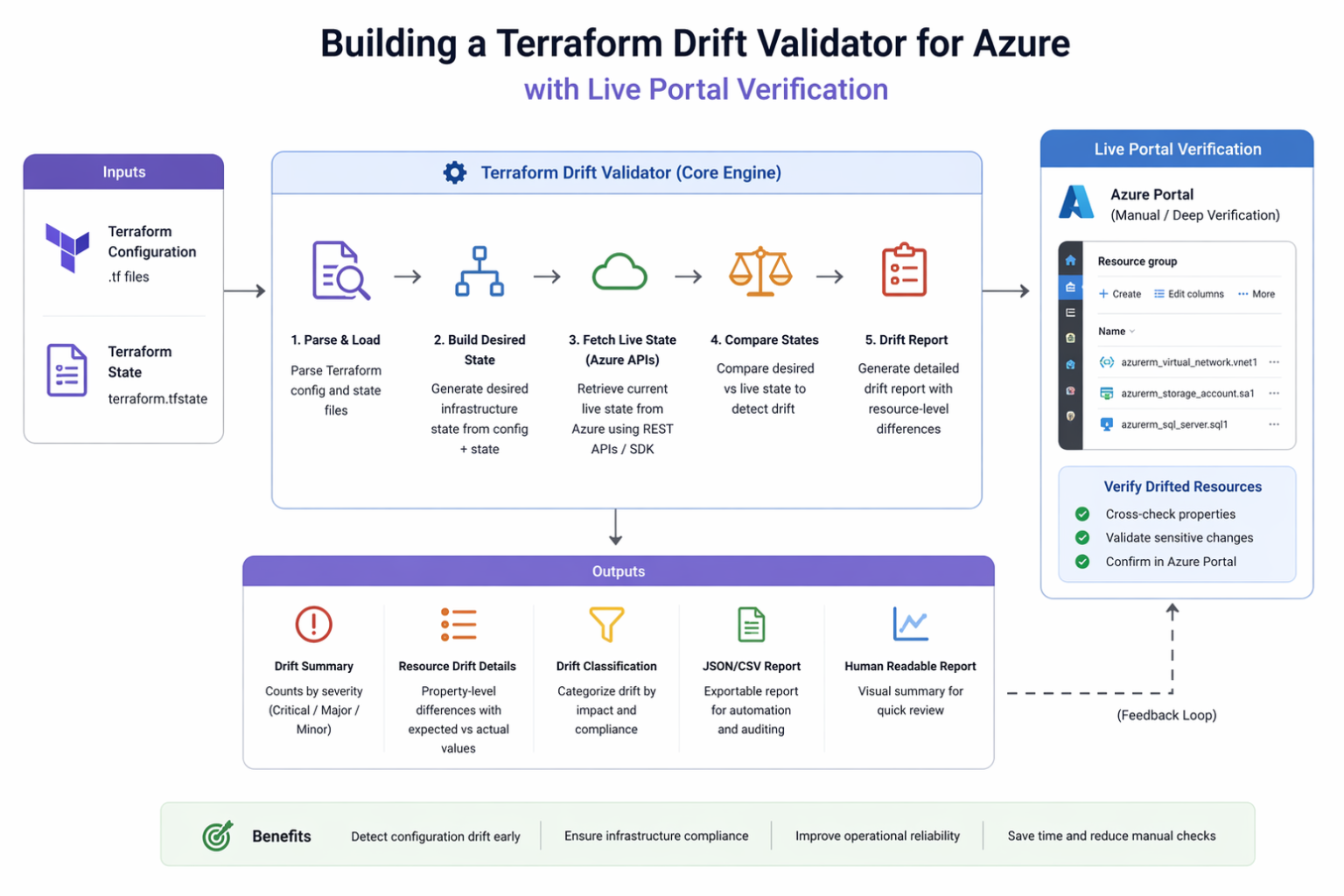
This technical blog post describes the Azure Infrastructure Validator Agent, a FastAPI-based validation service that compares expected infrastructure from Excel inventory against Terraform state and live Azure resources. The agent is designed to support enterprise governance by detecting drift, compliance gaps, and missing resources in real time.
Architecture:
This blog describes how to build a practical Terraform Drift Validator for Azure that compares three sources of truth:
- Excel sheet or design document containing expected Azure configuration
- Terraform state file representing IaC-managed deployed intent
- Live Azure configuration, verified both programmatically and through Azure Portal step-by-step checks
The solution can be exposed as a lightweight validation application. Below is the link of agent created for drift validator for infra.
https://ca-aiv-agent.livelyhill-f6d3be20.eastus.azurecontainerapps.io/
Key Takeaways
- Terraform drift detection is valuable but Terraform alone is not enough when enterprises also rely on design documents, migration inventories, and operational portal validations.
- Azure attributes such as SKU, tags, accelerated networking, managed disk type, and zone placement can all be validated using a mix of Terraform state parsing, Azure APIs/Resource Graph, and portal verification.
- Azure Resource Graph is especially useful for fast, large-scale live validation because it can query resource properties across subscriptions without calling every resource provider one by one.
- Managed Identity is the preferred enterprise authentication model for a read-only validator because it removes credential handling and supports token-based access to downstream Azure services.
- Manual Azure Portal verification with documented steps and screenshot placeholders makes the solution feel audit-ready, migration-ready, and operationally trustworthy.
1. Introduction
Terraform drift in Azure happens when what is actually deployed no longer matches what Terraform thinks exists or what the original design intended. In practice, drift appears after portal edits, partial manual changes, external scripts, policy remediation, or emergency operational actions that never get folded back into code. HashiCorp recommends automated drift detection because unmanaged divergence can create operational inconsistency, security exposure, and compliance risk.
Azure environments make this especially important because infrastructure is often governed by multiple teams: architects define the target design, DevOps teams deploy through Terraform, and operations teams may validate or troubleshoot through Azure Portal. Azure Resource Graph itself exists to support large-scale governance and current-state visibility across subscriptions, which makes it a strong foundation for live verification.
That is why an enterprise-grade drift validator should not compare only Terraform vs Azure. It should compare:
- Design intent from Excel or architecture documentation
- Terraform state as the IaC-managed representation
- Azure live configuration as the real runtime state
2. Problem Statement
Many organizations still maintain infrastructure specifications in Excel, migration trackers, or design documents. Those documents often contain the details that matter most to governance and operations: VM sizes, storage SKUs, disk performance expectations, tags, zones, and network settings. Terraform state, on the other hand, reflects what Terraform knows about deployed resources. Azure live state reflects what is actually running.
These three sources diverge for common reasons:
- A VM was resized manually in Azure Portal
- Accelerated networking was expected in design, defined in Terraform, but the actual NIC does not reflect it
- Tags were defined in a workbook but never applied consistently
- Storage or disk settings changed during production troubleshooting
- Zone placement differs from the architecture baseline
3. Solution Overview
The proposed solution is a Terraform Drift Validator for Azure with Live Portal Verification. At a high level, it works like this:
- The user uploads an Excel sheet or design document
- The solution extracts expected resource configuration
- It ingests the Terraform state file
- It queries Azure live resources
- It normalizes values across all three sources
- It compares attributes and generates a structured drift report
- It optionally presents portal validation steps for manual verification
This can run as a web application, API service, or agent-based validator, exposed through:
https://ca-aiv-agent.livelyhill-f6d3be20.eastus.azurecontainerapps.io/
4. Supported Validation Parameters
A useful validator should support the following checks:
- SKU
Validate expected SKU from design against Terraform and live Azure. This is critical for cost and performance. - IOPS
Validate disk performance expectations. Azure documents that some disk types—particularly Ultra Disk and Premium SSD v2—allow direct performance tuning, making IOPS a meaningful validation parameter. [ - Accelerated Networking
Azure states that accelerated networking improves VM network performance by reducing latency and CPU utilization via SR-IOV on supported VM sizes. This is exactly the kind of feature that is frequently missed or changed during deployments. - Tags
Azure tags are key-value metadata used for governance, organization, and cost management. Azure also warns that tags are stored as plain text and should not contain sensitive data. - Availability Zones
Validate whether resources are placed in the expected zone(s) or zone-resilient configuration. - Region
- VM Size
- Disk Type
- Resource Group
- NIC and network configuration
- Optional controls such as NSG expectations, public/private exposure, backup status, or monitoring configuration
a { text-decoration: none; color: #464feb; } tr th, tr td { border: 1px solid #e6e6e6; } tr th { background-color: #f5f5f5; }
7. Workflow
- User uploads an Excel sheet or design document
- System extracts expected fields such as resource type, name, SKU, IOPS, tags, zones, region, VM size, and network settings
- Terraform state file is parsed into resource objects
- Azure live resources are queried using Resource Graph and targeted API calls
- Attribute names and values are normalized
- Comparison engine calculates:
- Match
- Design vs Terraform drift
- Terraform vs Azure drift
- Design vs Azure drift
- Final report is generated with severity and remediation recommendations
8. Drift Report Output
A report should look like this:
| Resource | Attribute | Expected | Terraform | Azure Live | Status | Severity |
|---|---|---|---|---|---|---|
| vm-prod-01 | VM Size | Standard_D8s_v5 | Standard_D8s_v5 | Standard_D4s_v5 | Drift | High |
| nic-prod-01 | Accelerated Networking | Enabled | Enabled | Disabled | Drift | High |
| disk-prod-01 | Disk SKU | Premium SSD | Premium_LRS | StandardSSD_LRS | Drift | High |
| vm-prod-01 | Tags.Environment | Production | Production | Prod | Drift | Medium |
| vm-prod-01 | Zone | 1 | 1 |
9. Creating agents for same and uploading entire python code on the chrysalis
10. Future Enhancements
Next-step enhancements could include:
- Scheduled drift monitoring
- CI/CD integration after deployment
- ServiceNow or Teams notifications
- AI-generated remediation summaries
- Policy-aware scoring
- Compliance dashboards
- FinOps insights tied to SKU variance
- Historical trend tracking of drift across subscriptions

 Microsoft
