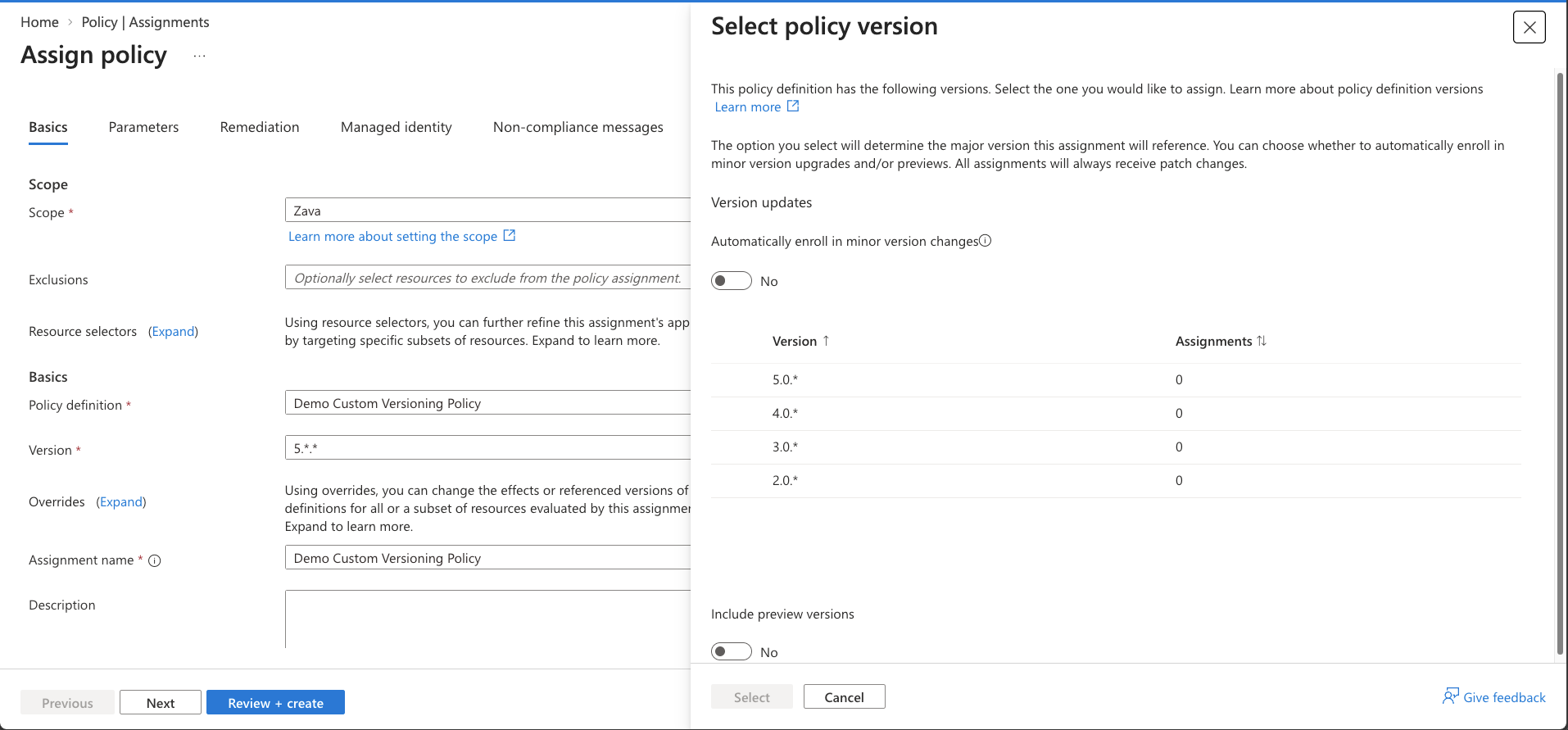
In 2024 we introduced versioning for built-in definitions and initiatives. Today we are extending that capability to your own policies! Custom policy versioning is now in public preview. Custom definitions and custom initiatives can store and reference multiple versions under a single definition ID, using the same model built-ins use.
What's new?
Every custom policy definition and initiative now has a top-level version property in {major}.{minor}.{patch} format. This gives you:
- Predictable updates. - Pin an assignment to a version so an edit never silently changes what is enforced.
- Safer rollouts. - Pilot a new version at one scope while production stays on the version it was tested against.
- Rollback. - Point the assignment back at the previous version. Nothing to redeploy.
- Visible history - Every version is preserved and viewable in the portal.
- Version-aware compliance - Compliance records show which version produced them.
Getting started
Your existing definitions are already on 1.0.0. Every custom definition and initiative that existed before this rollout has been backfilled to version 1.0.0. Evaluation has not changed. You now have a starting point to iterate from.
Create a new version by setting properties.version to a higher number and saving. The previous version is preserved. For example, a custom "Allowed locations" policy that started at 1.0.0 with only westus2, and was widened to add two more regions. The example below treats that as a major bump to 2.0.0, but any higher version number works, see "Suggestion for version bumps." for guidance:
{
  "properties": {
    "displayName": "Allowed locations (custom)",
    "mode": "Indexed",
    "version": "2.0.0",
    "parameters": {
      "allowedLocations": {
        "type": "Array",
        "defaultValue": [ "westus2", "eastus2", "centralus" ]
      }
    },
    "policyRule": {
      "if": { "not": { "field": "location", "in": "[parameters('allowedLocations')]" } },
      "then": { "effect": "deny" }
    }
  },
  "type": "Microsoft.Authorization/policyDefinitions",
  "name": "allowedLocationsCustom"
}
Assign a version with definitionVersion. Use 1.*.* to stay on major version 1 and pick up minor and patch changes automatically (recommended), or 1.1.* to pin to a minor version.
The patch position must always be *. Setting definitionVersion to a specific patch version such as 1.1.1 is not supported and the assignment will fail. Use 1.*.* or 1.1.* instead.
{
  "properties": {
    "policyDefinitionId": "/subscriptions/{subscriptionId}/providers/Microsoft.Authorization/policyDefinitions/allowedLocationsCustom",
    "definitionVersion": "1.*.*"
  },
  "type": "Microsoft.Authorization/policyAssignments",
  "name": "allowedLocationsProd"
}
To promote production to 2.0.0, change definitionVersion to 2.*.*. To roll back, change it again.
Check which version is in effect by adding $expand=latestDefinitionVersion,effectiveDefinitionVersion to a GET on the definition or assignment. See Policy Definition Versions REST API.
Portal
Custom definitions now behave like built-ins. The definition and assignment views show the version in Essentials with a Select version dropdown. Editing a definition shows a New version field next to the current one. The Create Assignment blade lets you choose which version to reference, and the compliance detail view includes a Version column.
CLI & PowerShell
Versioning is also supported in Azure CLI and Azure PowerShell. Create a new latest version with az policy definition create --version and manage older versions with the az policy definition version command group. See the Azure CLI reference and Azure Powershell reference for full examples.
Suggestions on Version Bumps
| Bump | Example | What Qualifies | Assignments pinned to 1.*.* |
| Major | 1.2.0 → 2.0.0 | Breaking changes: significant rule logic changes, removing a parameter, adding an enforcement effect by default, adding an enforcing definition to an initiative | Not picked up until you move them |
| Minor | 1.1.0 → 1.2.0 | Non-breaking changes: small rule logic refinements, new allowed values, new parameters with defaults, roleDefinitionIds changes | Picked up automatically |
| Patch | 1.2.0 → 1.2.1 | Text and metadata only: display name, description, category | Always picked up, cannot be pinned |
These are guidelines, not rules. Azure Policy doesn't check what changed between versions, so bump whichever number fits your process. Just remember that assignments on 1.*.* pick up minor and patch bumps automatically, but not major ones.
If you already track a version string in metadata.version, you can keep it, but Azure Policy does not act on it. Use properties.version going forward.
Important items to note
- Version Limit - Each custom definition or initiative can hold up to 4 versions during public preview. Delete unassigned versions to make room. A version cannot be deleted while an assignment references it.
- New versions must be higher - than the version you are editing from and cannot collide with an existing version.
- Supported modes - Custom versioning is supported for mode, All and Indexed. Resource Provider modes are not supported yet.
- Version overrides - on assignments (policyVersion override kind) are available for built-ins only. They are not supported for custom definitions or initiatives.
- Patch pinning - is not supported. Patch changes are always ingested, the same as built-ins.
What's next
We are working on Resource Provider mode support and a side-by-side version comparison in the portal.
Resources

 Microsoft