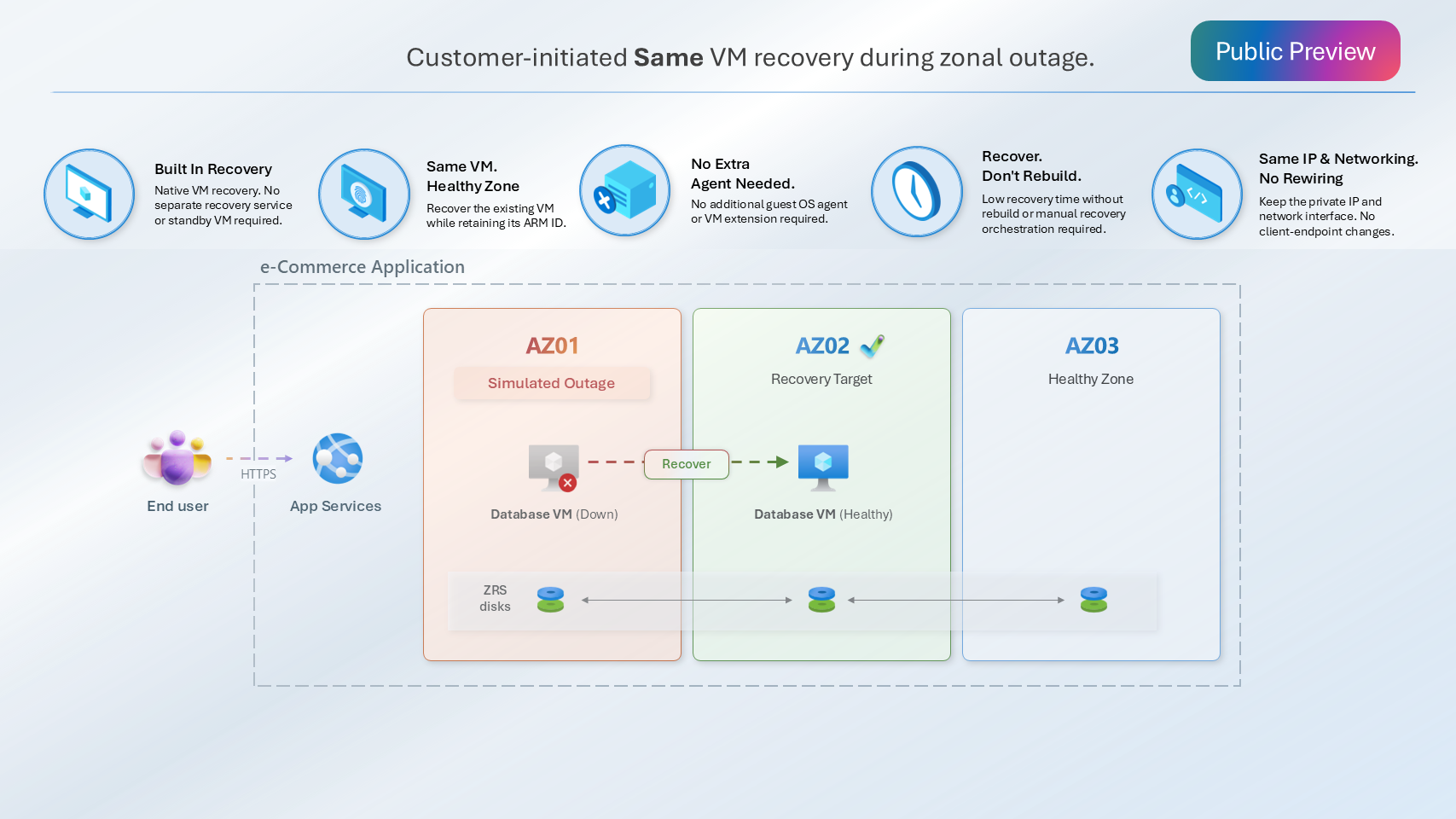
Recover an eligible Azure virtual machine (VM) in another availability zone within the same region.
We’re announcing the preview of zone resilience for Azure VMs. This capability lets you recover an eligible Azure virtual machine (VM) in another availability zone within the same region, while keeping the VM configuration intact. No re-create of VM required, you recover the existing VM rather than create a new replacement VM.
Zone resilience provides a customer-initiated recovery option for standalone zonal VMs. Enable zone movement before an outage, then initiate recovery when a zone failure affects your VM. Recovery involves downtime and depends on available capacity in the target zone; it isn’t automatic failover.
SAP RISE sees zone resilience for VM as an option for several workloads that do not natively provide cloud-based high availability capabilities, such as SAP Sybase IQ, helping simplify recovery from zonal infrastructure disruptions.
Over time, SAP intends to evaluate additional non-database workload scenarios where zone resilience for Azure VMs could provide operational simplicity and infrastructure resiliency benefits for customer landscapes— Lalit, Head of RISE Engineering and Operations, SAP
Recover the VM, not just its disks
Storage resilience and compute recovery solve different parts of an outage. ZRS managed disks synchronously replicate data across availability zones but replicated disks alone don’t restart an affected VM in a healthy zone.
Zone resilience connects those capabilities. It updates the zone placement of the existing VM and reuses its supported disks and configuration. You can prepare an eligible VM for recovery while its source zone is healthy, then use that recovery path if an outage occurs.
Key benefits
- Recover the existing VM: Change its zone placement without creating a replacement VM resource
-
Reuse data replicated across zones: Recover using the existing OS and data disks, rather than restoring copies of the disks to a new or existing VM
- Control when recovery starts: Confirm the impact on your workload and dependencies, select a target zone, and initiate recovery through supported management tools
Note: ZRS replication provides a near-zero recovery point objective (RPO) for data committed to disks. This doesn’t cover active requests, in-memory data, temporary disks, or application state that hasn’t been written to those disks. Application health and data consistency still need to be verified after recovery
How zone resilience works
Zone recovery workflow:
- Confirm VM impact and choose a healthy zone in the same region that supports your VM size.
- Force-deallocate the VM, stopping the workload; update the existing VM’s zone. The VM is unavailable during deallocation and restart,
- Start the VM in the target zone, subject to best-effort capacity.
- Verify the VM and workload before restoring traffic.
Prepare for an outage
Zone resilience must be enabled while the source availability zone is healthy. You can enable it when creating an eligible VM or on an eligible existing VM. Existing VMs must be deallocated before enablement, so plan for that interruption.
The configuration requires:
- A standalone VM deployed in a specific availability zone.
- All disks should be ZRS - Premium SSD ZRS or Standard SSD ZRS SKU supported for the OS disk and every attached data disk.
- Supported networking, including zone-redundant Standard SKU public IP addresses and load balancers where used, and supported zone-redundant gateways where applicable. Static and dynamic private IP addresses are supported.
The preview does not support On-demand capacity reservations, Azure Site Recovery, VM Scale Sets or data disks with write acceleration. Review the full requirements and limitations before enabling it.
Zone resilience addresses recovery within a region, not regional disaster recovery. Leverage Azure Site Recovery for regional disaster recovery.
For workloads that need high availability (HA), continue to deploy multiple instances across availability zones and distribute traffic between them. Single-VM recovery is not a substitute for highly available architecture.
Get started
Start by reviewing an existing VM’s zone placement, disk redundancy, and network dependencies against the preview requirements. Then enable zone movement through a supported Azure CLI, Azure PowerShell, or Bicep workflow while the source zone is healthy, and document the recovery and workload-validation steps in your runbook.
Read the public-preview documentation for availability, access requirements, supported tool versions, and step-by-step instructions.
For architecture guidance, see Reliability in Azure Virtual Machines

 Microsoft