Applications are rarely changed all at once anymore. Teams use feature flags, targeting rules, and progressive rollout patterns to introduce changes gradually and reduce risk.
This rollout model gives teams more than a safer way to control exposure. It also creates the context to understand what changed after a rollout.
But teams still need a practical way to answer:
Did this rollout move the needle in a measurable way?
Today, we’re introducing Scorecards in Azure App Configuration in public preview. Scorecards are a new capability in the Feature Management that helps teams quickly identify which metrics were impacted by a feature rollout and use those signals to decide what to do next.
Why Scorecards?
After a controlled rollout, the next step is often manual unless you run a full-fledged experiment.
Development Teams open dashboards, compare time ranges, scan logs, and look across standard and custom metrics to understand what changed. That work can take time, especially when an application emits many metrics across performance, reliability, engagement, business KPIs, or AI-related scenarios.
Scorecards help narrow that investigation.
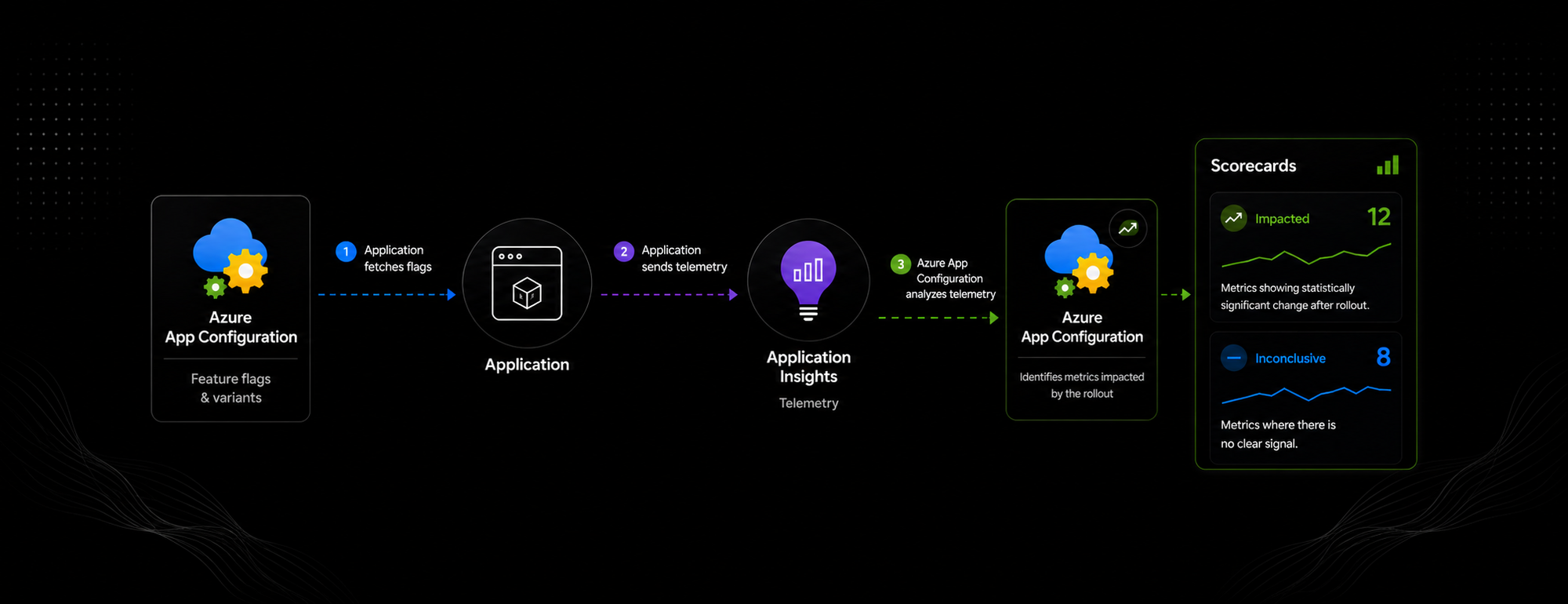
Using the telemetry your application already sends to Application Insights, Scorecards surface the metrics that moved after a rollout. This gives teams a faster starting point without requiring them to manually scan large sets of telemetry first for signals
How it works
Scorecards build on Feature Management in Azure App Configuration and telemetry from Application Insights.
A team starts by defining variants for a feature flag. One variant may represent the current behavior, while another represents a new feature, configuration path, service behavior, model version, or agent workflow.
As the application runs, it continues to emit telemetry to Application Insights. This can include standard metrics such as requests, failures, dependencies, and duration, along with custom metrics logged by the application.
Scorecards help teams view telemetry through the context of a rollout. In the telemetry experience for a feature flag, Scorecards surface the metrics associated with the rollout in two categories:
- Impacted
Metrics showing statistically significant change after rollout. - Inconclusive
Metrics where there is no clear signal.
When to use Scorecards
Scorecards are useful when teams want a quick signal after a controlled rollout.
Common examples include:
- application feature launches
- runtime configuration updates
- backend service changes
- performance improvements
- AI model or agent updates
Teams can use Scorecards to compare feature variants against key performance indicators, detect potential issues introduced by updated feature behavior, evaluate adoption and usage trends, and use telemetry insights to guide rollout, optimization, or deprecation decisions.
For deeper investigation, teams can continue using existing Application Insights dashboards, logs, alerts, and observability workflows.
Example: validating a new experience
Consider a team rolling out a redesigned onboarding flow in their application.
The team enables the new experience for a small percentage of users using a feature flag variant. The application already emits telemetry for page load duration, failed requests, sign-up completion, and custom engagement events.
After starting the rollout, Scorecards can help highlight which metrics show statistically significant change.
If completion-related metrics appear under Impacted, the team has a clear signal to investigate further. If most operational metrics appear as Inconclusive, the team can avoid spending time on areas where no clear signal was detected.
Architecture: From rollout to signal
Getting started
To use Scorecards:
- Use Azure App Configuration to implement feature flags in your application.
- Roll out changes using variant feature flags.
- Enable telemetry for the feature flag with Application Insights
- Use Scorecards in the Azure Portal to quickly identify impacted metrics.
Scorecards help teams focus on the metrics most relevant to a rollout and make faster decisions with more confidence.
We’d love to hear your feedback on what is working well and where we can improve as we continue to iterate on Scorecards and enhance the visual experience.

 Microsoft