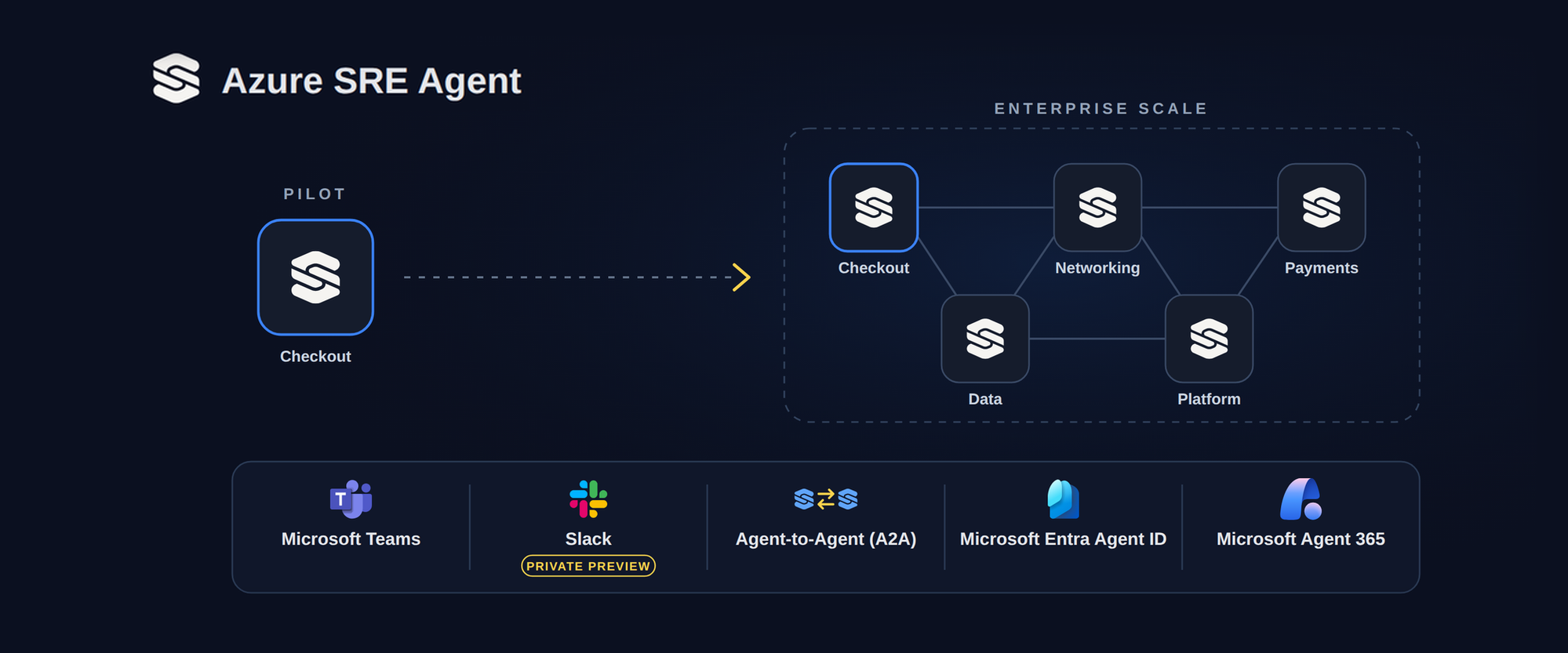
Bring Azure SRE Agent into your core workflows with new preview capabilities: chat with agents in Microsoft Teams and Slack, let agents work together across team boundaries with Agent-to-Agent (A2A), and govern them with Microsoft Entra Agent ID and Microsoft Agent 365.
For organizations modernizing with AI, deploying a successful first agent is only the beginning. The real test is moving from a pilot into the core workflows that keep the business running, such as incident response, change management, and on-call operations.
That shift brings new questions into focus. How should agents and teams work together? Where should humans stay in control? And how do you govern dozens of agents, not just one?
At Microsoft Ignite, we're expanding Azure SRE Agent in three areas, all now in preview:
- Work where your team works: Chat with Azure SRE Agent using the native Microsoft Teams integration, with approvals and access controls right in the conversation. Slack integration is in private preview.
- Agents that work across teams: With Agent-to-Agent (A2A) collaboration, your agents can call each other and communicate across team boundaries.
- Enterprise identity and governance: Give agents their own Microsoft Entra Agent ID, which enables integration with Microsoft Agent 365.
A 2 AM incident that crosses team boundaries
Here's an example of how these capabilities can work together during an incident.
At 2:07 AM, an alert fires for your store's checkout service. Your checkout team's Azure SRE Agent picks it up and starts investigating the affected resources before your on-call engineer has even opened their laptop.
Microsoft Teams integration: bringing SRE Agent into the incident chat
At the same time, the on-call engineer is notified and opens an incident chat in Microsoft Teams. With the native Teams integration, now in public preview, they add their Azure SRE Agent, "Checkout-Agent," to the chat, grant it access, and ask it to summarize the incident. The agent replies in the chat with the affected resources, when the errors started, and what looks normal so far.
From there, the agent works like any other teammate on the incident. The engineer asks, "@Checkout-Agent, are services other than checkout seeing the same latency? Where in the request path is it spiking?" and everyone in the chat sees the answer. Nobody has to switch to the SRE Agent portal or paste screenshots to keep others up to date.
Checkout-Agent summarizes the incident, traces the latency to a shared gateway, and waits for approval before changing anything, all in Teams.Joining the chat doesn't give the agent any new access. An agent administrator, in this case your on-call engineer, grants access one chat at a time and chooses who in it can talk to the agent. Admins also decide whether each action is allowed, needs approval, or is blocked, and what the agent can reach in Azure is governed separately by its own identity and permissions.
A few minutes in, the agent narrows down the issue: every service behind a shared network gateway is slowing down, and the latency spike sits at the gateway itself. That gateway belongs to your networking team. This is often where incidents stall. Someone has to notify networking and spend the next several minutes catching them up on everything that's already been checked.
A2A collaboration across team boundaries
Instead, the checkout SRE agent asks your networking team's SRE agent to investigate the gateway, using the open Agent-to-Agent (A2A) protocol, now in public preview. The request includes what it has already found, so the networking agent starts investigating right away, without waiting for anyone on the networking team to get online and up to speed.
The networking SRE agent looks into the gateway and finds a configuration change pushed a few minutes before the incident started. It shares that evidence with the checkout agent and flags rolling the change back as the likely fix.
The checkout agent adds the findings to its own and posts them to the Teams incident chat, so everyone is working from the same evidence. It has no access to the gateway, though, so the fix stays with the networking team.
Collaboration is limited to connections both teams have set up, and each agent accepts requests only from callers its team has approved, identified by their Microsoft Entra identity. The same A2A connections also work with agents built with Microsoft Foundry and other compatible A2A agents, so SRE Agent can join the agent workflows you already run.
Your team approves the fix
Your networking on-call comes online and joins the incident chat, where the evidence and recommended rollback are already waiting. They add the networking SRE agent to the chat and ask it to roll back the change. Because the rollback touches production, the agent pauses and posts an approval request in the chat. The engineer, who has approval rights on that agent, approves it, and the rollback runs with permissions the networking team controls.
By 2:21 AM, checkout latency is back to normal: 14 minutes from alert to mitigation, across two teams and two agents, in one conversation.
Microsoft Entra Agent ID and Microsoft Agent 365: governing agents at enterprise scale
The incident shows what coordinated response looks like when agents work inside your existing workflows and use A2A to reach other teams' agents. Scaling that across an enterprise means every agent needs an identity your security team recognizes, clear limits on what it can reach, and the same governance as everything else in your environment.
Every Azure SRE Agent has its own managed identity and operates within the Azure RBAC permissions assigned to it. Those permissions determine which resources it can reach and what it can do there. In the incident above, each agent stayed within its own permissions the whole time, even as the work moved between teams.
Organizations can also give an SRE agent a Microsoft Entra Agent ID, now in public preview. That's what lets it join Microsoft Teams as a known, governed identity in your tenant, so the agent in the incident chat is a recognized member of your organization, not an anonymous bot or a shared service account. Every Agent ID has an accountable sponsor, and it works alongside the agent's managed identity rather than replacing it, so its Azure permissions stay where they are.
With Entra Agent ID and Microsoft Agent 365, central security and IT teams can govern SRE agents alongside the rest of their agents: find them in the tenant's agent registry and monitor their activity with Microsoft Defender and Microsoft Purview.
Scaling across your enterprise
Moving from a successful pilot to broad enterprise adoption takes more than a capable agent. Agents need to work inside your existing workflows, collaborate across team boundaries, leave consequential actions to your engineers, stay within bounded identities and permissions, and fall under the same governance as everything else in your environment.
That's the foundation we're building into Azure SRE Agent, so it can grow from one team's pilot into how your whole organization runs operations.
Get started
- Explore everything new: Read What's new in Azure SRE Agent at Microsoft Ignite 2026 for the full set of announcements, Ignite sessions, resources, and updates.
- Try Azure SRE Agent: Get started in the Azure SRE Agent portal.
- Learn more: Read the Azure SRE Agent documentation, and learn more about the native Teams, Agent-to-Agent, and Microsoft Entra Agent ID integrations.
- Using Slack? Sign up for the native Slack integration, now in private preview.
- Plan your rollout: Read Part 2 of our enterprise adoption guide to decide when teams should share an agent and when each team should run its own.
Share your feedback
We'd love to hear from you as you try these capabilities! Leave a comment below or open an issue on Github:
- Beyond Teams, Slack, and our existing connectors, which tools does your team rely on during incidents that SRE Agent should work with?
- What would you need to run SRE Agent across teams? Tell us about your setup and which permissions, approvals, or handoffs we don't support well today.
- Any other feedback!

 Microsoft