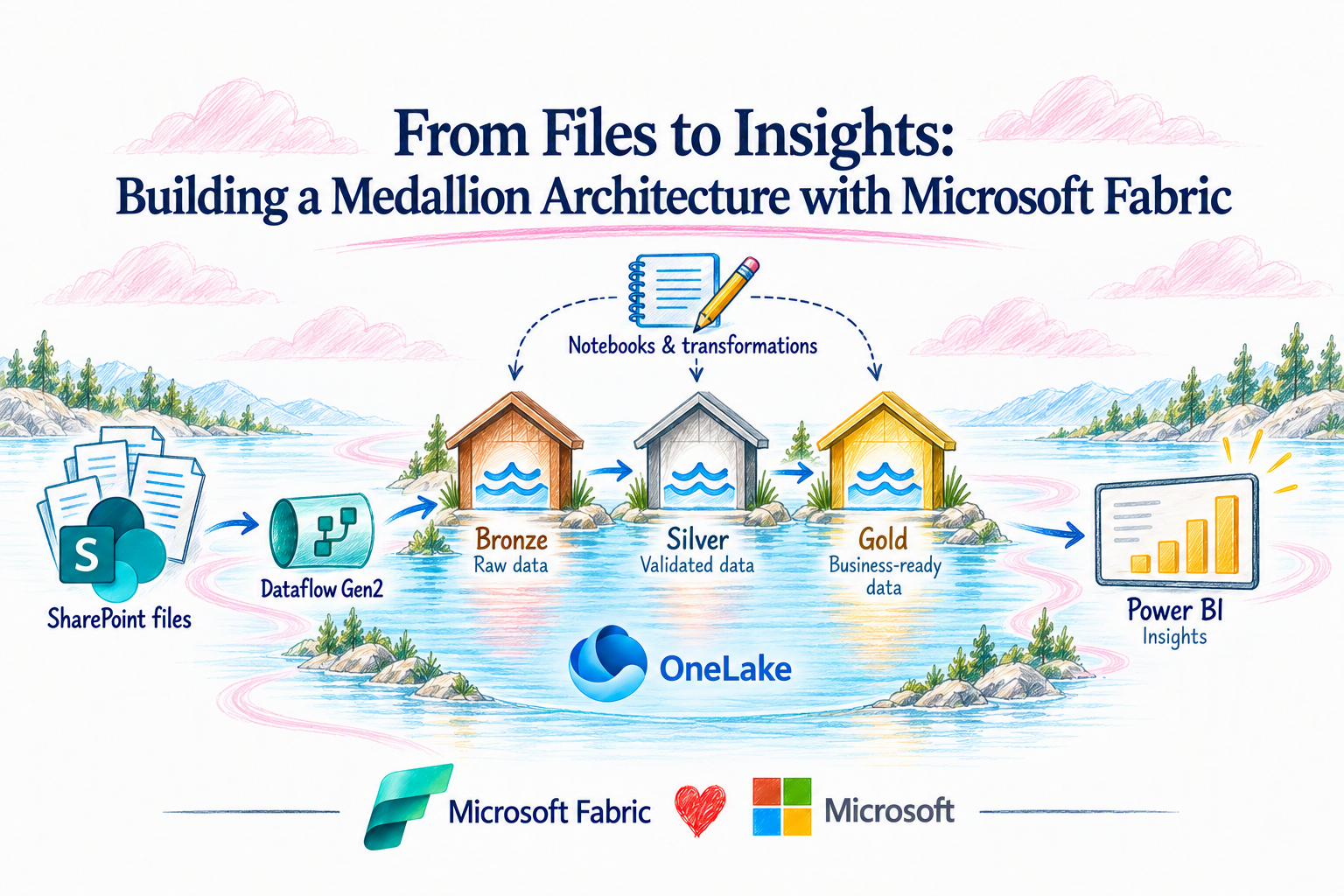
Organizations often receive critical business data through files, spreadsheets, and SharePoint, but turning that information into trusted, analytics-ready insights can quickly become complex. Microsoft Fabric simplifies this journey by bringing ingestion, transformation, governance, and analytics together in a unified data platform. In this article, we’ll explore how a Bronze, Silver, and Gold medallion architecture can transform raw files into clean, trusted, and business-ready data for reporting and insights.
Create a dedicated Fabric workspace
The SharePoint Documents/fabric-lab/customer-drop folder is created, and the initial baseline Excel workbook is uploaded. This simulates how vendor files can be dropped into a controlled landing area before Fabric processes them. For the initial run, the document specifically starts with: customers_2026-11-01_baseline.xlsx. Flow so far: Vendor Excel file → SharePoint landing folder → Fabric
Create the Fabric Lakehouse
A Lakehouse called lh_sharepoint_bronze_lab is created inside the workspace. The lab design states that the Dataflow creates the staging table while notebooks are intended to create the Bronze tables. What is happening: We now have a OneLake-backed location where the SharePoint data can land and later progress through the medallion architecture.
Connect Fabric Dataflow Gen2 to SharePoint
A Dataflow Gen2 is created and connected to the SharePoint folder source. The configuration uses the SharePoint site URL, rather than pointing directly at an individual Excel file. This is important because the design is intended to process files arriving in the folder, rather than building a one-off connection to a single workbook.
Apply ingestion logic in Power Query
The Dataflow's Advanced Editor contains Power Query logic that:
- Connects to SharePoint.
- Filters files to the designated folder.
- Selects .xlsx files.
- Ignores temporary Excel files beginning with ~$.
- Opens each workbook.
- Finds the tblCustomers table.
- Extracts its rows.
- Adds the originating filename as source_file.
- Adds the SharePoint modified timestamp as source_modified.
- Combines the rows from the accepted workbooks.
This source metadata is very useful later because Vendor Intelligence can retain where a record came from and when its source was modified.
Validate the first SharePoint file
The Dataflow successfully discovers the November 1 baseline workbook in SharePoint. The binary content shown represents the Excel file that Fabric can open and process. What this proves: Fabric can dynamically discover the staged Excel file from the SharePoint landing location.
Transform the Excel data into rows
The binary Excel workbook has now been interpreted as structured rows. The screenshot shows fields such as CustomerID, CustomerName, Email, Country, Region, SignupDate, Segment, AnnualRevenueUSD, and IsActive. For the actual Vendor Intelligence scenario, the same pattern can be applied to datasets such as:
- Vendor master records
- Contracts
- Spend
- Risk/compliance information
- Assessments and attestations
Map the data into the Lakehouse
The Dataflow destination configuration maps the incoming columns to the destination Lakehouse table and confirms their target data types.
What is happening: The ingestion process is transitioning from simply reading a file to writing structured data into Fabric.
Execute the ingestion
The Dataflow is saved and executed. The screenshot shows the run completed successfully, including the stg_customers_WriteToDataDestination activity. In simple terms: SharePoint → Dataflow Gen2 → Fabric Lakehouse is now functioning end to end.
Confirm the records in the Lakehouse
The resulting records are now visible in the Lakehouse staging table. The screenshot shows 10 rows from the first baseline file. This confirms that the data has moved successfully from an external SharePoint-hosted Excel file into Fabric.
Simulate the arrival of new vendor data
A second workbook, customers_2026-11-02_increment.xlsx, is added alongside the original baseline file. This is an important part of the Vendor Intelligence story because it demonstrates that new source data can continue arriving over time, rather than requiring the original file to be manually replaced.
Fabric discovers and processes the additional file
When the Dataflow runs again, the ingestion query reads the qualifying workbooks and combines their rows. The resulting view includes the original customer records plus the newly introduced records such as CUST-1011 through CUST-1015. This is where the architecture becomes important: staging can represent the current extraction from SharePoint, while Bronze should preserve the accepted source history rather than treating every incoming file as a completely independent business truth.
Move from ingestion into the Medallion architecture
The diagram below shows how the ingestion pattern evolves into the production Vendor Intelligence data architecture:
- Staging
- Temporary output from the SharePoint read. This layer can be replaced whenever the ingestion process executes.
- Bronze
- The raw historical layer. It preserves accepted source data and metadata. Vendor Intelligence examples identified in the design include bronze_vendors_raw, bronze_contracts_raw, bronze_spend_raw, and bronze_risk_raw.
- Silver
- The trusted/conformed layer. Here Fabric validates types and keys, resolves vendor aliases, standardizes information, removes duplicates, and retains exceptions. Example tables include silver_vendor, silver_vendor_alias, silver_contract, silver_invoice, and silver_risk.
- Gold
- The business-ready layer serving Vendor Intelligence applications and analytics, including the Vendor profile, spend summary, contract expiration information, and risk summary.
Creating the Staging-to-Bronze notebook
A Fabric notebook named 01_Staging_to_Bronze is created to begin the transformation process. The notebook approach allows Spark-based processing to be applied after Dataflow Gen2 has completed the SharePoint ingestion. The separation is intentional: Dataflow Gen2 handles source ingestion → Notebook handles engineering and medallion transformations.
Reading the staging data from the Lakehouse
The notebook reads the stg_customers table that was populated by Dataflow Gen2. The resulting dataset contains 15 records and 11 columns, including customer attributes such as CustomerID, CustomerName, Email, geography, segment, annual revenue, and activity status. Source metadata is also retained through source_file and source_modified. This is the handoff between ingestion and engineering: SharePoint → Dataflow Gen2 → stg_customers → Fabric Notebook. At this point, staging represents the current set of records discovered from the SharePoint landing location.
Preparing records for Bronze
Before writing records to Bronze, the notebook enriches each record with metadata required for historical tracking. A SHA-256 _record_hash is generated from the business attributes. Additional fields identify SharePoint as the source system and capture the Fabric ingestion timestamp. The resulting Bronze-ready record therefore contains:
- Original business attributes
- source_file
- source_modified
- _record_hash
- _source_system
- _ingested_at
The record hash becomes particularly useful when determining whether the same version of a source record has already been processed.
Creating the Bronze historical table
The transformed records are written into the Delta table bronze_customers_raw. The notebook confirms that the initial Bronze table was successfully created with 15 records. Bronze serves a fundamentally different purpose from staging.
- Staging answers: What does the current source extraction contain?
- Bronze answers: What source records has the platform historically accepted and observed?
For the eventual Vendor Intelligence implementation, equivalent patterns can support raw vendor, contract, spend, and risk entities such as bronze_vendors_raw, bronze_contracts_raw, bronze_spend_raw, and bronze_risk_raw.
Validating Bronze history and lineage
The Bronze table clearly demonstrates the additional lineage attributes captured during ingestion. Each business record is associated with the source file, source-modified timestamp, unique record hash, source system, and Fabric ingestion timestamp.
This metadata provides the foundation for traceability and future change detection. For example, if an existing entity arrives later with different business attributes, the newly calculated hash will differ from the historical hash. Fabric can recognize that observation as a new version rather than blindly duplicating records on every ingestion cycle.
Detecting new record versions
The next notebook logic compares the hashes calculated from incoming staging records against the hashes already stored in Bronze.
A left_anti join identifies only records whose hashes have not previously appeared in Bronze. In the screenshot, the notebook reports zero new record versions detected. This is the expected result because the current staging records were already loaded into Bronze. This is an important behavior:
Reprocessing the same SharePoint files does not automatically create duplicate historical observations. When source attributes eventually change, the changed business values generate a different hash and the new version can be appended to Bronze rather than replacing its previous history.
Separating Silver and Gold into dedicated Lakehouses
The architecture is then separated further by introducing dedicated Silver and Gold Lakehouses. The existing lh_sharepoint_bronze_lab continues to contain the staging and Bronze portions of the lab, while lh_vendor_silver and lh_vendor_gold provide isolated locations for trusted and business-ready data. The implementation now follows:
- SharePoint
- Staging and Bronze: lh_sharepoint_bronze_lab
- Silver: lh_vendor_silver
- Gold: lh_vendor_gold
- Analytics and downstream consumption
This physical separation also makes the medallion progression much easier to understand visually.
Reading Bronze for Silver processing
The Silver notebook begins by reading bronze_customers_raw from the Bronze Lakehouse. Before processing continues, the notebook validates that the required business, lineage, and hash columns exist. This validation provides an important quality gate between layers. Silver processing should not silently continue when required fields are missing from the upstream dataset.
Standardizing and selecting trusted customer records
Silver begins transforming raw historical observations into a cleaner representation of the business entity. The notebook normalizes values such as customer identifiers, customer names, email addresses, countries, regions, and segments. Records without valid customer identifiers are removed from the trusted output. A window operation then groups records by CustomerID and orders observations based on source and ingestion metadata. The notebook retains the latest applicable record for each customer. In this lab, the transformation results in 15 current Silver customers. The distinction is now clear:
- Bronze = historical observations
- Silver = standardized current business entities
Persisting the Silver customer table
The trusted output is persisted as silver_customer in the dedicated Silver Lakehouse. The screenshot shows the customer data stored alongside useful lineage attributes inherited from the Bronze layer. In the eventual Vendor Intelligence implementation, the Silver layer becomes particularly important because this is where vendor identities from different systems can be conformed. The target Vendor Intelligence architecture anticipates Silver entities such as silver_vendor, silver_vendor_alias, silver_contract, silver_invoice, and silver_risk. Silver is also the logical layer for standardization, duplicate resolution, alias handling, and exception management
Completing the Silver transformation
The completed Silver notebook demonstrates the transition from raw historical ingestion to a current, standardized dataset that downstream workloads can consume. Instead of requiring analytics workloads to understand every SharePoint file, ingestion timestamp, or historical source observation, downstream processing can work against a cleaner representation of the entity. This is an important architectural boundary:
- Bronze preserves what arrived.
- Silver establishes what can be trusted and consumed.
Moving from Silver to Gold
The next stage is Gold, the business-ready layer of the medallion architecture. The target Vendor Intelligence design identifies business-facing outputs such as vendor profiles, spend summaries, contract-expiration information, and risk summaries. For the current lab, which uses customer sample data, Gold should be described as a customer analytics demonstration rather than actual vendor-spend analytics. The Gold notebook reads the trusted Silver customer dataset and aggregates the records into analytics-ready measures such as:
- Customer count
- Active customer count
- Annual customer revenue
- Customer distribution by region
- Customer distribution by segment
The resulting Gold table can be stored as gold_customer_segment_summary in lh_vendor_gold. Gold therefore answers a different question from the previous layers:
- Bronze: What records arrived and when?
- Silver: What is the trusted current representation?
- Gold: What information should the business consume?
The complete lab architecture
At this point, the solution demonstrates the complete medallion journey:
- SharePoint landing
Files arrive in a controlled SharePoint folder. - Dataflow Gen2 ingestion
Fabric dynamically discovers qualifying Excel workbooks and transforms the file content into structured rows. - Staging
stg_customers represents the current SharePoint extraction. - Bronze
bronze_customers_raw preserves accepted source observations, lineage metadata, hashes, and ingestion timestamps. - Silver
silver_customer creates a standardized, current view of customer entities in a dedicated Silver Lakehouse. - Gold
The Gold layer transforms trusted entities into business-ready aggregations designed for analytics.
Create the pipeline
Save and Run your pipeline
Schedule the pipeline
Consuming the Gold Layer Through a Business Dashboard
The dashboard surfaces several key metrics:
- Total Customers provides a consolidated count of customers represented in the Gold layer.
- Active Customers highlights the portion of those customers currently identified as active.
- Annual Customer Revenue summarizes the annual revenue values associated with the current customer population.
- Annual Revenue by Region provides a geographic view of where customer revenue is concentrated.
- Customers by Segment shows the distribution of customers across the available customer segments.
- Region × Segment Detail provides a more granular view of customer count, active customers, and annual revenue across the two business dimensions.
The dashboard completes the end-to-end data flow demonstrated throughout the lab: SharePoint → Dataflow Gen2 → Staging → Bronze → Silver → Gold → Dashboard

 Microsoft