Forum Discussion

Responsive Embed Code not working properly

 Microsoft
Tiger Boshomane - I tried to reproduce this issue internally here at Microsoft but wasn't able to make it look like you have.
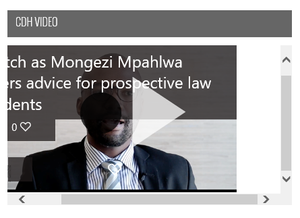
A few observations. It looks like the scroll bars up/down and left/right are not inside the iFrame. From yourscreenshot it makes me think they are in your HTML code around the Stream iFrame.
Also it looks like for some reason the Stream embed iframe didn't render quite right. There is a black circle centered with a triangle to the right of it. I believe that white triangle is supposed to be inside of the black circle for our play icon button. Do you have any idea if there is some other code / css on the page that is messing up the rendering of the Stream embed?
Can you check this issue on other OS/Browsers and see if has the same problem there?
What OS/Browser is your screenshot from?
The worst that I could get to happen in my testing was that there was just a vertical scroll bar at some very specific narrow widths for Stream when the title of the video was long (wraps to 2 or more lines). However the scroll bar went away again if I made the player even narrower. But I don't think the scroll bars you are seeing are not from the player, because of the white space between the player and the scroll bar in your picture.
