Forum Discussion

olha_serdiuk
Sep 12, 2024Copper Contributor
WebDav installation issue with IIS
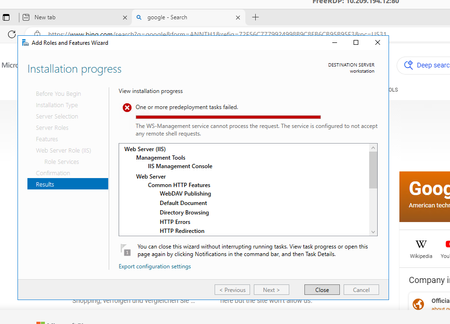
Hi! I have failed installation IIS for Web Server on virtual machine windows server 2016, that have connection via proxy and I connected to it via xfreerdp. What it can be?

kyazaferr
Nov 12, 2024MCT
- Check Windows Update: Ensure that your server is fully up to date with Windows Updates. Some IIS features may fail to install if updates or patches are missing.
4. Check for Errors in Logs
If the installation fails, reviewing the error logs can provide more detailed information on what went wrong.
Solutions:
- Event Viewer Logs: Open Event Viewer and check the Application and System logs for any errors related to IIS installation. Look for entries that might indicate why the WebDAV feature failed to install.
- IIS Installation Logs: Review the IIS-specific logs at:
- C:\Windows\Logs\CBS\
- C:\Windows\System32\inetsrv\logs\
5. Firewall and Network Issues
Since WebDAV involves file sharing and external connectivity, it’s important to ensure that your firewall settings allow for these connections.
Solutions:
- Check Firewall Settings: Make sure the server's firewall is not blocking required ports for IIS and WebDAV (typically, ports 80 and 443 for HTTP and HTTPS).
- Check for Conflicting Applications: Other software or services running on the VM could be conflicting with IIS installation, particularly if they use similar ports.
6. Incompatible RDP Session
There is a possibility that using xfreerdp to connect to the server may introduce issues, especially if it's not set up correctly for remote administration of Windows Server 2016.
Solutions:
- Use Remote Desktop (RDP) Client: If possible, use the official Remote Desktop Client (RDP) for Windows to connect and perform the IIS installation. Sometimes, third-party RDP clients can have compatibility issues with certain installation processes.
- Check RDP Session Settings: Ensure that your RDP session has the correct configuration for running administrative tasks, especially if you are executing commands in the terminal.
7. Verify WebDAV Prerequisites
Ensure that the prerequisites for WebDAV are met. The WebDAV feature requires some other components in IIS.
Solutions:
- Install Additional IIS Features: Make sure that the WebDAV Publishing feature is installed under IIS. You can install this feature from the Add Roles and Features wizard or through