Forum Discussion

sowjanyaravikrishna3
Jul 31, 2024Copper Contributor
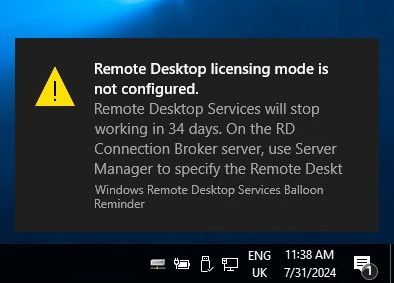
Remote desktop licensing mode is not configured
We have a Windows 2019 Server. It is workgroup server & not part of domain. Its been running fine since 3 to 4 years. We are seeing below message when trying to RDP to server since last 3 mo...

kyazaferr
Nov 13, 2024MCT
Disable the RDS Licensing Warning
Since you mentioned that you only need two concurrent RDP sessions and don't require CALs (Client Access Licenses), the following approach can help you disable any licensing warnings or issues:
- Modify Group Policy to Disable Licensing Warnings:
- Computer Configuration > Administrative Templates > Windows Components > Remote Desktop Services > Remote Desktop Session Host > Licensing