Forum Discussion

How to change Virtual Hard Disk Path when creating new VM in Windows Admin Center
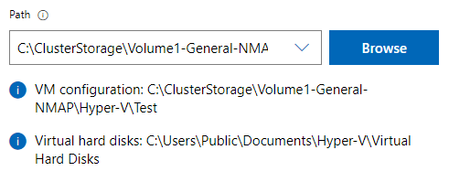

I see the same issue did you ever figure this out? As your screenshot shows you can change the default path but that only updates the location of the configuration file, not the virtual hard disk. The last place I want my VHD is the C: drive.
I confirmed the behavior accessing the Admin Center in both Chrome and Edge browsers to rule out a browser related issue.

 dietermJun 17, 2022Copper ContributorThe path can be changed via WAC Tools Settings -> Hyper-v Host Settings -> General. Seems cumbersome for choosing different volumes per vm, but at least there is a method for changing the path.
 Niklas HenningssonNov 29, 2022Copper Contributor
Why on earth would you want to store all your VHDX and Virtual Machines in the same folder?
Its nuts that Microsoft steers you in that direction.The logical layout is to have a folder for each VM in which contains all files connected to that VM.
Then there's also the situation where you'd might want to separate different VMs folders in a parent folder.
As an MSP you'd might have many different customers in the same Hyper-V enviornment and you want to have each customers VM files in that customers parent folder.
- thx1200Jun 18, 2022Bronze ContributorThat's extremely cumbersome, especially on a S2D cluster. WAC makes everything more complicated while being slower than MMC. It's truly an amazing feat of overengineering to the point of being useless to the end user.