Forum Discussion

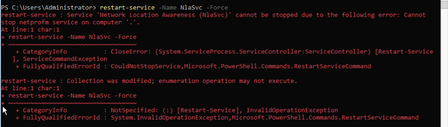
Windows Server 2022 Unable to restart 'Network Location Awareness' Service

Added the registry settings and had 3 consecutive successful reboots.

NickFranklin The problem isn't with the NLA service. The simple fix to the network type at boot is to make the NLA service dependent on the DNS service. The real problem is with the Network List Service. Has anyone found a fix yet? All 8 of my Server 2022 boxes have the exact same problem and Microsoft Support has become non-existent. I opened a ticket on this two months ago and still have not heard from Microsoft. Their support is way beyond bad.
 Rusty2345Dec 05, 2023Copper Contributor
I have not had to use this on member servers but it makes sense that it would apply as the fix is telling the server to wait until it sees a Domain. Best guess.
 Kyle_HansenDec 05, 2023Copper ContributorClarification; is the above registry entry (and found in other places on this thread) only for DC's? Or member servers also that have this issue? Thanks!
- JimBecherSep 08, 2023Copper ContributorOk. I fixed it by making the NLA service dependent on the DNS service. Six to one half dozen of the other. What people are missing is that the NLA service is not the real problem. It is the Network List Service. Try it. Disable the Network List Service and reboot. You can restart the NLA service any number of ways at that point. Applet. command line, whatever. The NLA service is not the issue. Of course you can't leave the Network List Service disabled but it points out where the real problem lies.
- Rusty2345Sep 08, 2023Copper ContributorI'm saying it eliminated the need to restart the list service.
- JimBecherSep 08, 2023Copper Contributor
Rusty2345 either that or making the NLA service dependent on the DNS service. Both work well but neither address the real underlying issue. The Network List Service can't be stopped or restarted.
or are you saying that the registry entry fixes the Network List Service?
- Rusty2345Sep 08, 2023Copper Contributor
Adding the DWORD "AlwaysExpectDomainController" in the registry shown further up in this thread has helped me so far .