Forum Discussion

bradcope
Sep 05, 2021Copper Contributor
Windows Server 2022 Unable to restart 'Network Location Awareness' Service
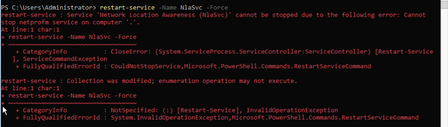
Testing server 2022 (core) GA on two machines; one physical, one virtual. When I attempt to restart the network location awareness service using the command: restart-service -Name NlaSvc -For...

NickFranklin
Aug 03, 2023Copper Contributor
This has been an issue since Server 2012 and Microsoft cannot fix a fundamental part of a network configuration on boot up. Adding the domain name to the DNS and a delayed start on the Network Location Awareness service didn't fix the issue. For christ sake MS fix this **bleep**. Rebooting a server after an update should not be doing this. You've had 10 years or more to sort this crap out.

TT_Vert
Aug 12, 2023Copper Contributor
NickFranklin Agree.. I have at least 6 servers that do this and there is no rhyme or reason as to why these servers do it and others don't. I've not found a permanent fix, it ALWAYS comes back at some point.
Dave
- NickFranklinAug 14, 2023Copper ContributorI've rolled out some registry tweaks on a Server 2022 install and fingers crossed it has survived 3 reboots.
https://learn.microsoft.com/en-us/answers/questions/400385/network-location-awareness-not-detecting-domain-ne- TT_VertAug 14, 2023Copper ContributorAre you referring to reg keys Sunny Qi mentioned?
- NickFranklinAug 14, 2023Copper Contributor
TT_Vert Yes, are you saying this doesn't work.