Forum Discussion

Running RemoteApp fails to run two instances with the same user
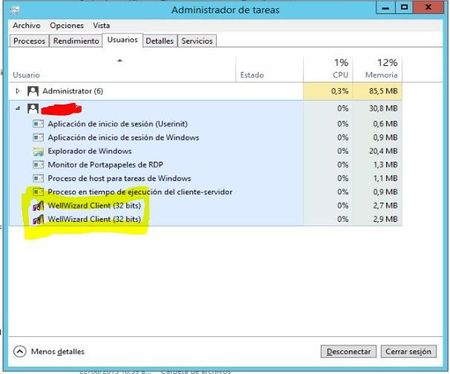
Hello, I have changed the language of my question.

Sounds like you just want to allow a user to run two simultaneous RDS sessions? You could;
Computer Configuration\ Administrative Templates\ Windows Components\ Remote Desktop Services\ Remote Desktop Session Host\ Connections\
Restrict Remote Desktop Services users to a single Remote Desktop Services session Disabled
- DeletedAug 13, 2018Not applicable
Thanks for the reply. That GPO is disabled, and that's what makes me stranger.
From my workspace I can execute two instances of the application, but I can not establish the connections that I mentioned in point 4. This only happens when executing the application by remoteapp.
Internal configuration of my application:
Running the application from the server's remote desktop, I connect to the two configurations of the previous image.
I run the application from RemoteApp, try to connect to the two configurations as in the previous image and that's where I present the error, it only allows me to connect to one of the settings of my application.
This error only occurs when I am occupying my user executing the remoteapp. If I am using the application directly from the server's desktop, there I can run the two instances.
- Dave PatrickAug 13, 2018MVP
I'd probably ask the scada systems developer how to accomplish this.
- DeletedAug 13, 2018Not applicable
Thanks. This means that probably the server to which the connection is made from the application, or the development of the application are those that may be causing the restriction?