Forum Discussion

RahamimL
Mar 01, 2023Iron Contributor
Remote Desktop Web Access HTML5 certificate error after replacing
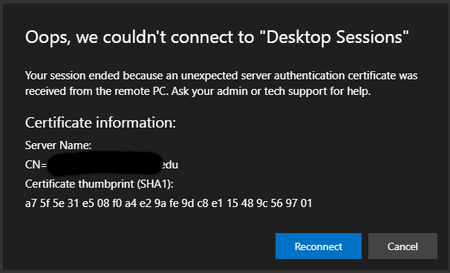
Hi everyone. We needed to update our certificate in our RDS servers. Unfortunately, now users receive this alert: I know this is old, but I was hoping maybe someone found a better solutio...

jafrie12s
Mar 19, 2023Copper Contributor
Thank you for your quick response.
Sadly this not a solution for us because users are 3rd party and we can't deploy settings to their devices.
Could you please tell me,
1. Did you have newest version of html5 webclient installed? And if not, did you update it?
2. Did you have to remove old certificate from MMC before it started to work?
3. Did you try CTRL+F5 refresh the website, did it work after that?
I'm just hoping that you didn't have newest version installed and if I install newest version before I might not have this problem.
Does anyone know any other solution, some settings in IIS perhaps?

RahamimL
Mar 19, 2023Iron Contributor
I didn't have the latest version installed before updating the certificate and I didn't remove the old certificate.
- jafrie12sMar 19, 2023Copper Contributor
Thank you again for your answer.
One more thing (at least :D).
What HTML5 webclient version did you have?
- RahamimLMar 21, 2023Iron ContributorBefore certificate import 1.0.27 and I upgraded to the latest when I replaced the certificate.
 Pat55Mar 21, 2023Copper Contributori have updated the webclient and the certifictes multiple times. Currently use the 1.0.28.0 Version, To import the Certificate on your Broker you need the .pfx Cert and to import in the Webclient by using the powershell command Import-RDWebClientBrokerCert the .cer cert.
You dont need to remove any old certificates. Sometimes the Cert is not successsfully imported to the RD gateway Server but you can check it in the RD gateway Manager on the gateway server.
cheers- RahamimLMar 21, 2023Iron ContributorI think there is one thing I forgot to mention... We are using Azure Application Proxy to allow connection. Could this be related?
Rahamim.