Forum Discussion

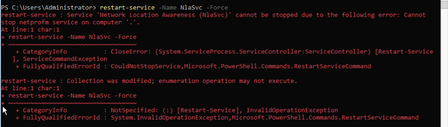
Windows Server 2022 Unable to restart 'Network Location Awareness' Service

TT_Vert Hi Dave, I managed to fix mine by adding the DNS suffix on my IPV4 adapter. Now my DC boots to Domain Network on every reboot.
IPV4 Properties > General > Advanced > DNS > Register Suffix for this connection (add your domain name e.g. "domain.local").
I also set the Network Location Awareness service to "Delayed Start"
Hope the above helps.

Thank you for that. I did add that to my biggest problem child 2022 server and it seems to have worked. Going to try that on a few more servers and see if it resolves it. I appreciate you taking the time to mention this. Shocking MS doesn't have any official solution to this like you do.
Dave
- TT_VertApr 04, 2023Copper Contributor
Wanted to update that the adding the domain suffix was only a temp fix as it started doing this again. So I now have a script to disable/enable IPv6 when I need to resolve this. Annoying to say the least.
Dave