Forum Discussion

JonEllisDeltaD
May 10, 2023Copper Contributor
Upgrade Windows Server 2019 Evaluation Issue
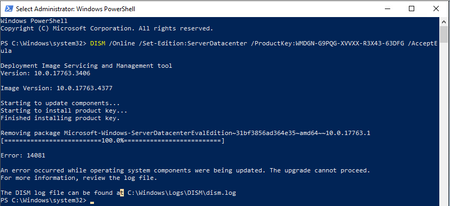
Every time I try to upgrade our evaluation datacenter I get this error. DISM.log 2023-05-10 13:32:23, Info DISM PID=1812 TID=2520 Scratch directory set to 'C:\Users\sajellis\AppData\Local\Tem...
 May 11, 2023Dave,
So this command:
Dism /online /Set-Edition:ServerDataCenter /ProductKey:WMDGN-G9PQG-XVVXX-R3X43-63DFG /AcceptEula
is the same thing as downloading the Windows Server 2019 iso and running it on the computer.
I downloaded that iso, ran it, installed the Windows Server 2019 Datacenter (Desktop Experience) and kept files and apps.
The server went through the upgrade process.
I then used the slmgr /ipk and slmgr /ato command and everything was fine.
Thank you again for assisting me in finding the resolution.

Dave Patrick
May 10, 2023MVP
Ok, well also note that Error: 14081 == The referenced assembly could not be found. So not a good start for this one. A repair install may sort it but time may be better spent standing up a new one, patch fully, activate and move on.
JonEllisDeltaD
May 10, 2023Copper Contributor
Dave… Mr. Patrick…
How did you ascertain
“The reference assembly could not be found”?
This is the first time I am seeing that, also, what does that mean exactly? Something important is missing? The DISM and CBS logs lead me down a path of trying to fix update components.
How did you ascertain
“The reference assembly could not be found”?
This is the first time I am seeing that, also, what does that mean exactly? Something important is missing? The DISM and CBS logs lead me down a path of trying to fix update components.