Forum Discussion

RahamimL
Mar 01, 2023Iron Contributor
Remote Desktop Web Access HTML5 certificate error after replacing
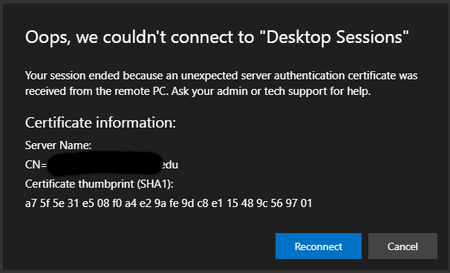
Hi everyone. We needed to update our certificate in our RDS servers. Unfortunately, now users receive this alert: I know this is old, but I was hoping maybe someone found a better solutio...

Pat55
Mar 21, 2023Copper Contributor
i have updated the webclient and the certifictes multiple times. Currently use the 1.0.28.0 Version, To import the Certificate on your Broker you need the .pfx Cert and to import in the Webclient by using the powershell command Import-RDWebClientBrokerCert the .cer cert.
You dont need to remove any old certificates. Sometimes the Cert is not successsfully imported to the RD gateway Server but you can check it in the RD gateway Manager on the gateway server.
cheers
You dont need to remove any old certificates. Sometimes the Cert is not successsfully imported to the RD gateway Server but you can check it in the RD gateway Manager on the gateway server.
cheers

RahamimL
Mar 21, 2023Iron Contributor
I think there is one thing I forgot to mention... We are using Azure Application Proxy to allow connection. Could this be related?
Rahamim.
Rahamim.
 Mark_DestreelAug 08, 2024Copper Contributor
This is probably related the Azure Application Proxy. I just solved the issue here.
When testing on-premise the AAP isn't used, so no certificate error is presented (all certificates are handled by the RDP server). Off-premise, AAP comes in play, it needs the updated certificate because it acts as a relay, and thus presents the certificate.Go to Azure Portal, Entra ID, Enterprise Applications, and select your RDP application. Then go to Manage, Application Proxy. In there you'll find the certificate, match the thumbprint for verification and upload the new one. It will take a few minutes to start working. I have the Dutch language in Azure so translations might be a bit off. Hope this helps anyone.