Forum Discussion

RDS 2019 issues related with to much services
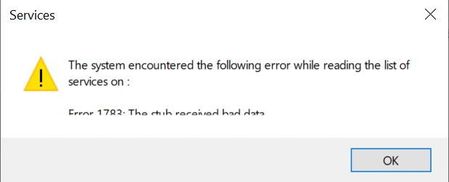

I have this problem too.
Solution is here:
https://docs.microsoft.com/en-us/troubleshoot/windows-server/system-management-components/error-1783-services-msc
That solution doesn't help. I think you are right about per-user services: it is still possible to monitor services by "sc query" or windows admin center and in my case it is over 300 services created when user logs in. Something like CDPUserSvc_*****.
Maybe this can help for a very temporary solution?
@echo off

goto main

:clsvc

FOR /F "tokens=1,2 delims= " %%A IN ('SC QUERY state^= all ^| find "%SN_STARTS_WITH%"') DO (@echo %%B && net stop %%B && SC delete %%B)
EXIT /B

:main
SET SN_STARTS_WITH=WpnUserService_
call :clsvc
SET SN_STARTS_WITH=DevicePickerUserSvc_
call :clsvc
SET SN_STARTS_WITH=DevicesFlowUserSvc_
call :clsvc
SET SN_STARTS_WITH=ConsentUxUserSvc_
call :clsvc
SET SN_STARTS_WITH=PimIndexMaintenanceSvc_
call :clsvc
SET SN_STARTS_WITH=CDPUserSvc_
call :clsvc

Unfortunately this is not a solution form me. My monitoring system is not working, because can't get status of services if some limit is reached described in article about per user services. I also found that "WMI Service provider" is getting a lot of CPU if Vmware Tools service is started:
And in my opinion it is also related with to much per user services created.
I also received some tip that I should clean boot server. I can answer that this is not a solution. Problem is related by system which is creating many many of per user services.
So Microsoft what is the solution? When you will repair this case?