Forum Discussion

Issues with Group Policy Update (gpupdate)
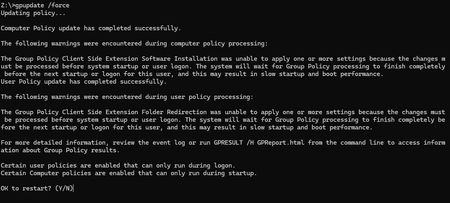

This is not a gpupdate failure. It is expected behaviour of synchronous Group Policy extensions.
Your output clearly shows:
- Software Installation CSE
- Folder Redirection CSE
Both of these extensions require processing at startup or logon, not during a background refresh. When you run:
gpupdate /force
Windows evaluates the policy and detects that certain settings can only be applied during boot or user logon. It then prompts for restart. If after reboot it still prompts again, one of these conditions exists:
- Always wait for the network at computer startup is enabled.
This forces synchronous processing and can delay completion. - Software Installation policy contains a package that is failing to install
Check Event Viewer:
- Applications and Services Logs
- Microsoft
- Windows
- GroupPolicy
- Operational
Also check Application log for MsiInstaller events.
- Folder Redirection target path is unreachable or misconfigured.
If the UNC path is unavailable at logon, the policy never completes and Windows retries on next cycle. - Slow link detection or DFS path issues.
Folder Redirection over a slow or failing link can cause repeated reprocessing.
Next steps:
Run:
gpresult /h c:\temp\gp.html
Open the report and confirm which GPO contains Software Installation or Folder Redirection.
Then temporarily unlink that GPO from the test workstation OU and reboot. If the loop stops, you have identified the offending extension.
This is not a DC health issue. It is a synchronous CSE waiting for successful completion and never reaching a success state.