Forum Discussion

Issue with Temporary Profile on Windows Server 2025 after renaming built-in Administrator account
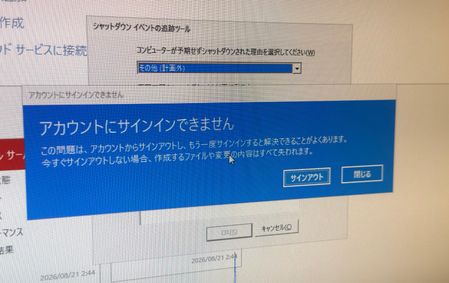

Hello Jamony, thank you for the detailed advice. And I’m sorry for the delay in replying. I checked the server as instructed and retrieved the event logs. Here are the results:
Here is the current profile and system state:
・There is a user folder in C:\Users, but I cannot tell whether it belongs to the domain administrator or the local administrator. I could not find the original "Administrator" folder.
・In sysdm.cpl (User Profiles), only the domain user and the default profile are displayed, and the local administrator profile is missing.
・In the registry (ProfileList), there is no SID key corresponding to the local administrator account at all.
・Additionally, the window corners have lost their rounded look and become sharp. It appears that the Themes service or visual styles are not loading properly.
Event Log Analysis:
I found that Event IDs 1500 and 1511 have occurred multiple times in the logs.
・Event ID 1500: "Windows cannot log you on because your profile cannot be loaded... Detail - The group or resource is not in the correct state to perform the requested operation."
・Event ID 1511: "Windows cannot find the local profile and is logging you on with a temporary profile."
・Target User SID: S-1-5-21-xxxxxxxxx-500 (The -500 ending confirms that this issue specifically affects the built-in Administrator account).
I believe that due to the interruption caused by the forced shutdown, the built-in Administrator (RID 500) fails to load its local profile every time, resulting in a temporary profile being created.
Given that the RID 500 profile configuration and registry key are completely missing from the system, do you think running DISM /Online /Cleanup-Image /RestoreHealth and sfc /scannow will actually repair this profile link? Or is a clean installation of Windows Server 2025 the most realistic solution at this point? Thank you for your advice.