Forum Discussion

Karl-WE
Nov 02, 2021MVP
HOW-TO: Import Out of Band Updates to WSUS using Microsoft Edge Chromium IE Mode and PowerShell
----- I recommend using https://www.powershellgallery.com/packages/Import-WSUSUpdate Full instructions to install the module are located here - https://www.ajtek.ca/blog/the-new-way-t...
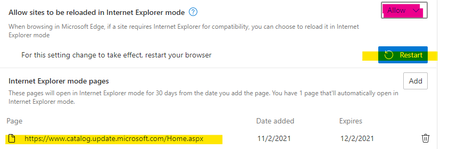


Karl-WE
Aug 30, 2022MVP
Good thought Eds1989. Could you be asked to check whether on your system the activeX for WU import is already installed, and try on a system where you never imported WSUS (e.g. Windows Server 2019 / 2022 with RSAT Windows Update Console and Edge).
Potentially the issue exists on machines which never imported any WU updates to WSUS.
Potentially the issue exists on machines which never imported any WU updates to WSUS.

Eds1989
Aug 31, 2022Brass Contributor
So on my laptop from which I was testing, the ActiveX control was already installed.
I have just gone onto our management server, running Windows Server 2022, which has RSAT installed but has not previously had the WSUS ActiveX installed.
When clicking import updates, it takes me to the site and prompts me to install the control. I did so, and imported an update successfully.
I did get a couple of UAC prompts along the way, but otherwise no issue.
I checked, and this machine has the same Edge version 104.
I have just gone onto our management server, running Windows Server 2022, which has RSAT installed but has not previously had the WSUS ActiveX installed.
When clicking import updates, it takes me to the site and prompts me to install the control. I did so, and imported an update successfully.
I did get a couple of UAC prompts along the way, but otherwise no issue.
I checked, and this machine has the same Edge version 104.