Forum Discussion

Karl-WE
Nov 02, 2021MVP
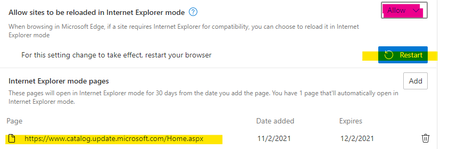
HOW-TO: Import Out of Band Updates to WSUS using Microsoft Edge Chromium IE Mode and PowerShell
----- I recommend using https://www.powershellgallery.com/packages/Import-WSUSUpdate Full instructions to install the module are located here - https://www.ajtek.ca/blog/the-new-way-t...


kwester-ebbinghaus-business
Aug 25, 2022Iron Contributor
My guide was helpful until it lasted valid. Anyone else seeing the issue that ActiveX can no longer be installed in IE Mode, thus the import of updates cannot be executed?

Eds1989
Aug 26, 2022Brass Contributor
kwester-ebbinghaus-business I've not had need to import anything for a while.
What update are you trying to import, and I'll use that as a test, as well as picking some other random update to try and import.
Cheers
James
 DeletedAug 29, 2022Hi James, this customer failed to import .net 4.8 for Windows Server. In addition, out of band update needs to be imported if a customer requires to fix a certain issue the OOB is going to fix.
Albeit obsolete you might want to try KB5016138 or these:
https://devblogs.microsoft.com/dotnet/net-framework-4-8-is-available-on-windows-update-wsus-and-mu-catalog/
We have tried to import the .net 4.8 for Windows Server 2016.- Eds1989Aug 30, 2022Brass ContributorJust as a test, I picked a Windows 7 update (KB4533005), which imported ok.
Also tried KB5016138 and KB4486153, and they also imported ok.
Perhaps you guys have Windows or Edge updates installed that I do not yet, which have introduced the issue?- Karl-WEAug 30, 2022MVPGood thought Eds1989. Could you be asked to check whether on your system the activeX for WU import is already installed, and try on a system where you never imported WSUS (e.g. Windows Server 2019 / 2022 with RSAT Windows Update Console and Edge).
Potentially the issue exists on machines which never imported any WU updates to WSUS.
