Forum Discussion

Extended tabs blank
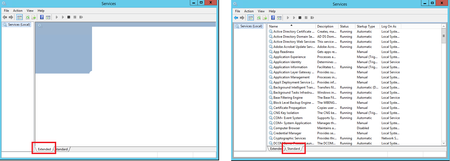

EFDake I had not tried that yet. I went ahead and delete the files, but it did not correct the issue. 😞

Someone mentioned possibly trying to Reset the settings in IE to the default and see if that works.
Internet Explorer | Settings Gear | Internet Options | Advanced Tab | Reset button
If that doesn't work, looks like some have solved it with a Repair install. Hope this helps.
Edward
- mmaus0891Sep 05, 2019Copper Contributor
EFDake Looks like we have a GPO that has this button locked out on this server. I will have to search and find where this GPO is and disable it to reset. Ill keep ya posted. Thanks for the advice.
- EFDakeSep 05, 2019MCT
mmaus0891 - Thanks for letting me know. I wonder if there is some other IE GPO setting that is affecting the snap-in? Interesting!
RSOP or GPRESULT are your friends. Assuming those aren't locked down by GPO as well.

- Leon LaudeSep 05, 2019Iron Contributor
Hi mmaus0891,
The Group Policy Objects (GPO) for the MMC console can be found over here:
User Configuration > Policies > Administrative Templates > Windows Components > Microsoft Management ConsoleThere is a GPO that restricts the Extended view, but according to your screenshot that you provided in your initial post it doesn't seem to be anything restricting your MMC console's extended view.
Anyhow the GPO for the extended view is called: Extended View (Web View).
However it's likely that an Internet Explorer GPO could be causing your issue, better check the GPOs applied to your server with: GPresult /H "C:\Temp\GPReport.html"
Best regards,
Leon
