Forum Discussion

DabearMDF58
Apr 03, 2024Copper Contributor
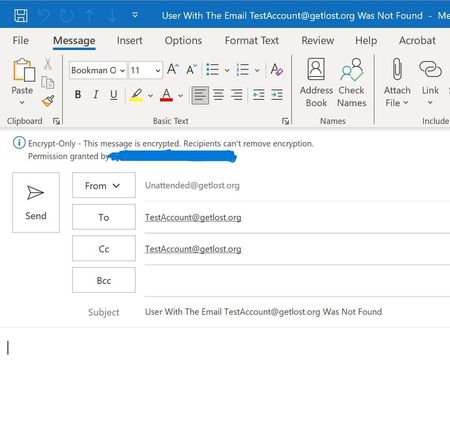
Trying to Send IRM Encrypted Email But Body Of Email Is Blank
0 I am writing a script that will open an encrypted Outlook Template File to send and encrypted email. However, the body of the email is not popluating. Code below. Any help would be appreciat...

LainRobertson
Apr 03, 2024Silver Contributor
Hi, Matthew.
I can't see enough of your screenshot to confirm which message composition mode is your default, however, if it happens to be HTML (it will display at the end of the window title as shown in the example below) then you need to populate the HTMLBody property, not the Body property - per your current example.
Cheers,
Lain

DabearMDF58
Apr 03, 2024Copper Contributor
Hey Lain,
I have tried both properties and then both come up blank.
I have tried both properties and then both come up blank.
- LainRobertsonApr 03, 2024Silver Contributor
Did you assign HTML content to that attribute?
$Mail.HTMLBody = "<html><body>Please Double Check The Vendors Email Address And Then Enter It Again</body></html>";Cheers,
Lain
- DabearMDF58Apr 03, 2024Copper Contributor
Yeah I tried that. I even used ConvertTo-Html and set that as the Body and piped it to a variable and then added the variable to the htmlbody property.
- LainRobertsonApr 03, 2024Silver Contributor
Two random quick mentions as afterthoughts:
- Your code sample features smart quotes around the HTMLBody string value, which may be a non-issue if they're only in this web content (but they would be an issue if they're somehow really in your PowerShell code);
- If your template is HTML-based and has already got a value for HTMLBody, then you'd want to be sure that the text you're adding either fully replaces the existing value or that you're inserting it correctly into the existing string block, as if things like tags don't match or free text exists outside of allowable boundaries, it won't render.
But again, these are just afterthoughts and may have no relevance to your test at all.
Cheers,
Lain